Getting started with PyGos and Pylife
-
@arikb We have now added some instructions on how to update manually from a computer here https://docs.pycom.io/pylife/fwupdate/
These should hopefully be able to work around the app issue you are experiencing. As you are already able to go into update mode you can skip step 2. -
@Stephen-Glavin . I'll report that as a bug, but in the mean time you can work around this by connecting from a computer.
If you just want to exit access point mode, re-pair and try again, connect to the access point
SSID: PyCom_AP_Firmware_Update
Password: pycom
and execute curl -v --request GET http://192.168.4.1/status -H "FW-Header-1: ota-reboot" from a terminal/command prompt.If you want to upgrade the firmware from a computer then follow the instructions here:
https://docs.pycom.io/pylife/fwupdate/ -
Thanks. I’ll give it a go later on. I must admit I was too eager to start using them so jumped straight in too fast! @Pete-Allen-0
-
UPDATE: Interestingly the charger pad paired with the power adapter i mentioned do charge my Samsung phone. So the charging pad must be OK. How come it just does not start charging my PyGos? What am i supposed to do??!!
-
@Peter-Bankuti Sorry you are having problems.
As the PyGos are quite small compared to your average charging pad it seems the charging pad doesn't recognise all locations. Can you try moving the PyGo around on the charging pad to see if it starts? Unfortunately it takes a little while to put the charging symbol on screen, so you have to leave it at a location for around 30 seconds or so to see if it starts. -
@Pete-Allen-0
Yes, this is getting really frustrating here...
I tried to follow the pictures found in the manual before. Now i also tried to follow the hint given in your reply, but neither of my PyGos begin recognized/charging. Already tried to move them slightly around&wait a bit.Meanwhile i also checked all the pins with my multimeter. No matter which 2 pins i test the meter shows 0V and 0mA on any pin pairs. So it seems the batteries are completely discharged. And it seems in that state they do not begin to charge. Is a QC2.0 adapter absolutely needed? Can you please share a pin mapping so that i could connect 5V 500mA directly to the proper pins to get things started?
-
@Peter-Bankuti it is normal for the pins to not show any voltage - they are all protected.
Here is an update of the image from the documentation with pin 1 (Gnd) and Pin 4 (+5V) marked.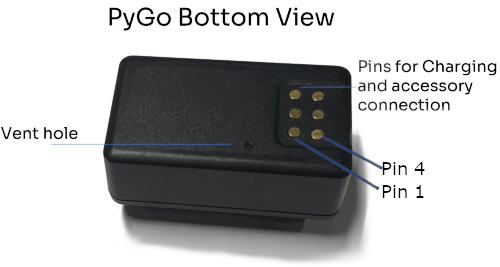
-
@Pete-Allen-0
Thanks for the pin map! What is the highest current i may apply to Pin 4 without damaging the device? -
@Peter-Bankuti it isn't connected directly to the battery so you can apply normal +5V without worrying about current. I will have to find out what the maximum current it can draw is, but it has always been well under 500ma when I've measured.
-
@Pete-Allen-0 Finally my PyGo2 began charging on the pad, so i hope i can get started with that device in some time. However the PyGo1 does not respond no matter how i place it, i really hope that unit is not a faulty one and can make somehow work also that unit. Thanks anyway.
-
@Peter-Bankuti
In the documentation i found this regarding charging time:
"Charging from 0% takes approximately 3-4 hours on USB, or 6-8 hours on a wireless charger."
Well in just about 15 minutes on the wireless charging pad it already overheated and the charger switched off. The PyGo2 become as hot as a potato taken out from boiling water... this is almost dangerous, so anyone trying to make these devices work for the first time should be aware of this. Unfortunately i could not get up&working and i spent the whole afternoon with that. This should not be the case!Also the android version of the PyLife app has issues. First: i can not find the version number anywhere. Second after playing around for hours just to get my PyGo2 finally start charging i could succesfully find that device within PyLife app, but when i was asked to enter a name i got NOT_VALID_DEVICE message back. Wow... i just simply can not not do anything useful with any of my 2 units. What does the app mean by the label "Type Device name" ?? Shall we type any name inside that input field or we need to enter thy device ID printed just under that box (which name does not get accepted either...)
Seriously how can pycom as team launch the documentation/app like that? You just can not make a documentation/user interface that confusing with dubious wording. I will try to continue tomorrow but for today i got tired of these, sorry.
-
Hi Pete, the password doesn’t seem to be correct, could you double check please? @Pete-Allen-0
-
@Stephen-Glavin Apologies, that is an error. The correct password is www.pycom.io
-
My frist pygo has been updated via the pylife application but the second one was blocked. I managed to update it manually. I didn't need to use the serial terminal: when the pylife app triggers an update, the access point PyCom_AP_Firmware_Update becomes available and I could follow the manual procedure starting with an additional ota-reboot.
Both of my pygos are now up to date but they are still overheating: they stop charging after about 5 minutes. I never managed to charge past 2%.
In addition, when I place a pygo on the charger, the pylife app rarely detects it. It seems like the bluetooth advertisement is randomly active. I can see it on a bluetooth scanner sometimes but it never stays on for very long and most of the time it is off, even though the pygo screen is on with the battery symbol. -
@Pete-Allen-0
Today i am going to try again. During the night i checked this page also on my mobile phone and could find relevant info in the troubleshooting part that did not display earlier on my laptop (with 4K display). This has been fixed for now so i think i have a better understanding than before. If i am right my PyGo1 might have been affected by the GPS lock issue and i should expect even that board to become reactive again after it self-discharges at some time. Is that right?Based on the info which was not rendering earlier, the manual firmware upgrade seems to be relatively easy and am willing to try as i program ARM Cortex chips in a very similar fashion each day. I got a MAX32625PICO board with a DAPLink firmware on it. If i get it right, ESP32's ESPLink is based on DAPLink, so maybe(?) i just should connect UART2 pins located on the JTAG/SWD header of the MAX32625PICO to P0 and P1 on the PyGo and also GND and +5V of the MAX32625 to P1 and P4. After which i just type upgrade() into the serial console to let PyGo start its WiFi. The process after that is described clearly, i just should come to that point without damaging the board. However during the night i also found a sentence in the PyGo datasheet at the top of page 7:
"The PYGO features an on–board voltage regulator that takes 3.5V – 5.5V from the VIN pin and
regulates it to 3.3V. It is important to only use the 3.3V as an output and not try to feed 3.3V into this pin as this could damage the regulator."So right now i am still confused if it was a good idea to apply any external power to P1 and P0 pins on the PyGo as the last thing i want is to damage my devices by doing so. Can you please clarify if that sentence contains valid info or that sentence does not apply any more?
-
@arikb said in Getting started with PyGos and Pylife:
Also, could you remove the 600 seconds between message limitation here?
I guess Pycom made that 600 seconds limitation to comply TTN's fair usage policy. However if i get it right, Pycom also offers its own LoRaWan network and i am not aware on similar limitations on that. However this is just i wild guess from my side, as i did not manage as far as you. My boards do not let me provisioning them.
-
@Pete-Allen-0 can you list the functions of the other pins? I assume 2 are tx/rx for the UART?
p1 - GND
p2 - ?
p3 - ?
p4 - +5V INPUT
p5 - ?
p6 -? -
@Peter-Bankuti I meant the 600 seconds delay in replying to forum messages...
-
@Brian-Wyld
This is a very good question as the datasheet contains a pin table but for sure one can not identify which pins do they mean. This should be fixed in the doc.In the webshop i found a picture about the mainboard of the USB cradle, this might help us to get an idea:

However there is a sentence on page 7 of the datasheet. If i get that sentence right, P4 is meant to be +5V OUTPUT only, in which case the only way the PyGo is meant to be powered is the wireless charger. If i get it right also the cradle charges wirelessly and does not apply +5V INPUT to P4... or may be the datasheet is outdated. Am actually waiting to an answer for this question, but that is something only a pycom engineer can answer.
-
Got my 2 Pygo1 devices yesterday.
- connection to pylife app eventually worked for device when on the charger
- after a couple of goes, managed to update the firmware to latest version on both using the app
- wireless charging makes the device VERY hot, and it never seems to actually charge - the battery animation seems to show it charging but the pylife app never shows more than 0% battery for either unit
- when not on charge, the device is dead (not visible on bluetooth, disconnected in pylife) very quickly
- no response to tapping the screen whether on charge or not (both devices are configured in 'performance' mode so should be always on)
- no wifi AP to connect telnet o get the REPL expect when doing firmware...
I'm not managing much progress here...

Hello! It looks like you're interested in this conversation, but you don't have an account yet.
Getting fed up of having to scroll through the same posts each visit? When you register for an account, you'll always come back to exactly where you were before, and choose to be notified of new replies (either via email, or push notification). You'll also be able to save bookmarks and upvote posts to show your appreciation to other community members.
With your input, this post could be even better 💗
Register Login