New firmware release, version 1.6.4.b1
-
Hello guys,
While we are working super hard to fix the garbage collector and the threading issues, and we are making progress with it, we still haven't cracked it, but we are close. However we still wanted to get this release out with a few interesting additions.
Here's the change log:
- esp32: machine.deepsleep() with no arguments sleeps forever.
- esp32: Enabled deepsleep() mode with timer wake up.
- esp32: Update to the latest IDF and re-implement WiFi/BT disabling.
- esp32: Enable all spreading factors and bandwidths supported by the SX1272.
- esp32: Add method to disconnect a BLE client from the GATT server.
Thanks to @jmarcelino for this contribution! - esp32: Use different version numbers for LoRaWAN and Sigfox.
The main highlight is that now disabling WiFi and Bluetooth actually turns off the radios and the current consumption drops to around 35mA.
Deepsleep with timer wake up: https://docs.pycom.io/pycom_esp32/library/machine.html?highlight=deepsleep#machine.deepsleep
At the moment there's an issue with current not really dropping to just a few uA and we are investigating it.
Apart from this we are also close to release the implementation for a LoRaWAN nano-gateway that you can connect to TTN. We were expecting to release it today as well, but we've had unexpected delays.
Cheers,
Daniel -
Thanks Daniel,
Is it possible to wake from deepsleep when a pin changes status?
Constantinos
-
@constantinos not on this release, but it will be on the next one.
-
@daniel great news!
Thanks again!
-
I just tried to update to this firmware and my (only) WiPy is now firmly bricked :-(
(It was probably the updater rather than the firmware itself, I don't think it got as far as actually running the new version)
Here's the output from the OSX GUI upgrade tool (screenshot since copy/paste isn't enabled):
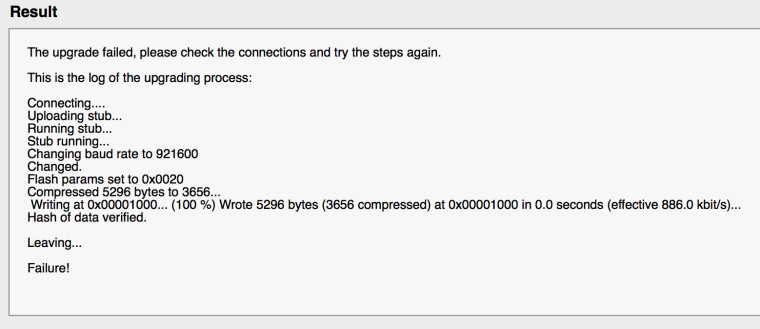
The board is now completely unresponsive. I tried following the "3.3v on pin 12" procedure to roll back to an earlier firmware, but that doesn't work. Since the failed firmware update the LED doesn't light up at all, regardless of what I do.
Is there any way to fix this? If not, I guess I'm giving up on Pycom and going with my Mediatek backup plan.
Pete
-
@Pete
To me it seems really difficult for the update process to brick your board.Have you tried updating it again (after power cycling with the GND to P2 (G23) in place)
Do you have anything else connected to the board other than serial, power and the GND->P2 (G23)? Some pins can affect its function.
Use this post for reference: https://forum.pycom.io/topic/763/firmware-upgrade-troubleshooting-checklist-procedure
-
@jmarcelino I did try updating it a second time, I remember reading that the "high speed" option often didn't work, so I wanted to try with that off. On that attempt it was unable to communicate with the board. Same when I tried again with "high speed" turned back on. I removed the P23 jumper and cycled the power just to get that reassuring blue flash before I went any further. But no flash, no LED activity of any kind, no wifi SSID and no response on the serial line. All dead.
I did have a GPS input on the second serial port, but that's been there for ages now.
I looked at the page you link to, but that's mostly about getting a firmware upgrade to work. My problem at this point is more basic, I just want the thing to boot. I've put it in a new breadboard with just a 5v power supply connected, but the LED stays off.
Pete
-
@Pete
Do you still have the GPS plugged in and have you tried to update again without it? -
This post is deleted! -
This post is deleted! -
@jmarcelino No, like I said it's just on a plain breadboard with nothing but power. I was trying to just see it boot before making a further attempt to upgrade it.
Based on your suggestion, maybe if the firmware is half-hosed then another upgrade attempt could work even if normal booting doesn't. So I've just tried it again with the following result:
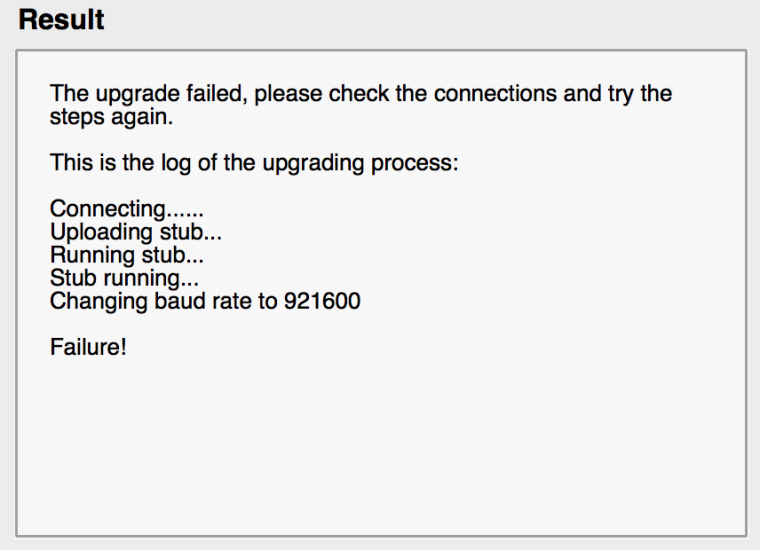
Does the "Stub running" part mean it did actually manage to talk to something on the board?
Pete
-
@Pete
Yes, think of Micropython as an application that runs on the board (which then runs your script). That's what makes it blink, show up as an AP etc. If the Micropython application is broken the board will appear to do nothing (though it might print some debug strings to the UART). However you can do an "upgrade" to reinstall the application again.When you connect G23-GND and reset you're telling the board to boot into a special download mode where it accepts a new application image (in this case a new Micropython build). This functionaliy is deeply hardcoded on the ESP32 processor so you'd struggle to break it, especially just by doing a regular upgrade.
What does break the process are devices connected to pins with special functionality known as 'strapping' which - much like G23 to GND - set different boot parameters. I think your GPS could have been interfering with these.
I think this new log does suggest the board is communicating.
Since the error was on setting the connection speed can you now try again disabling the high speed option again?
If it still fails can you close the upgrade tool, open a serial terminal application on the board's serial port (at the usual 115200bps) and let us know what messages show up after a reset?
-
@jmarcelino Brilliant - thanks for the explanation, and the advice - it's back to life :-)
Given how rapidly new firmware versions are coming out, I want to keep the ability to upgrade the module after building it into the rest of the project. Does this mean I'm going to need some kind of switch or jumper to disconnect the serial input from pin P4 during programming? Are there any other pins I need to be careful of?
Thanks,
Pete
-
OK, now that I have the new firmware, I've noticed a change (regression?) in the UART API.
I'm not sure if it's strictly correct, but with the earlier firmware I was doing:
def readUart():
    while True:
        if uart.any():
            line = str(uart.readline(), "utf-8")
            # do stuff with line
and reliably getting a newline-terminated chunk of input from the serial line each time.
With the new firmware, the same code (with the same serial input) often populates
linewith a fragment of the actual line, breaking at a random point where there certainly isn't a newline. The next read will continue with the rest of the line. They're breaking into random chunks of roughly 3 to 25 characters. I haven't noticed any instances of it failing to break on a genuine newline. I'm reproducing this with a minimal case where "do stuff" is just printinglinein the REPL.Does Pycom's test suite include any serial tests that would catch this?
EDIT: I've raised this as an issue on Github as more structured than dumping it into the forum pot.
Pete
-
This version is still unable to receive advertising packet via Bluetooth.
Packet that is sent (and captured by TI sniffer) that supposed to be 0x01 followed by all FFs:

is received as:(mac=b'\xb4\x99Ld\xba\xc9', addr_type=0, adv_type=3, rssi=-45, data=b'\x01\xff\x00\x00\x00\x00\x00\x00\x00\x00\x00\x00\x00\x00\x00\x00\x00\x00\x00\x00\x00\x00\x00\x00\x00\x00\x00\x00\x00\x00\x00')
b'\x01\xff\x00\x00\x00\x00\x00\x00\x00\x00\x00\x00\x00\x00\x00\x00\x00\x00\x00\x00\x00\x00\x00\x00\x00\x00\x00\x00\x00\x00\x00'
01ff0000000000000000000000000000000000000000000000000000000000Is it possible that no other user tried to look at advertising packets so far?
If I am doing something wrong, please chime in and show how to receive advertising packets properly...Daniel, please confirm this bug and give us estimate when will it be fixed. Our project is stuck, without this working properly, and there is pressure to look for alternative platforms...
Robert
-
I just updated my newly bought WiPy 2.0 to this firmware version with the Pycom updater. After reset I get a boot loop with the following messages via serial connection:[0_1488012601074_core_dump.txt](Uploading 100%)
Resetting the firmware via safe mode does not work. Also trying to reinstall the firmware update leads to the same result. Any help?
-
@lars
did you removed wire (G23-GND) after sucesfull upgrade? -
@zmrzli
Your BLE advertising data is invalid according to the Bluetooth spec. The first octet is 1 so you're specifying you are sending one byte for that unit. That's exactly what you're getting :-)
Let's move this discussion to your original post https://forum.pycom.io/topic/723/bluetooth-advertising-data -
@livius yes I removed the G23-GND wire. I tried serveral disconnects to power and only 3v3 and GND plus plus P0,P1 for UART were connected. Even without uart there is no wifi AP available any more, as was before the update.
For safe mode I tried 3v3-p12 for as long as the most rapid flashing of the orange led. -
@lars
could you post the serial connection messages again, either pasting here or somewhere like pastebin.com. It seems they didn't show on your other post
Hello! It looks like you're interested in this conversation, but you don't have an account yet.
Getting fed up of having to scroll through the same posts each visit? When you register for an account, you'll always come back to exactly where you were before, and choose to be notified of new replies (either via email, or push notification). You'll also be able to save bookmarks and upvote posts to show your appreciation to other community members.
With your input, this post could be even better 💗
Register Login