FiPy - SMS sending.
-
Hello guys,
I need to send SMS from my FiPy, but cannot attach with lte, does anyone know how to do that?
thats what im trying
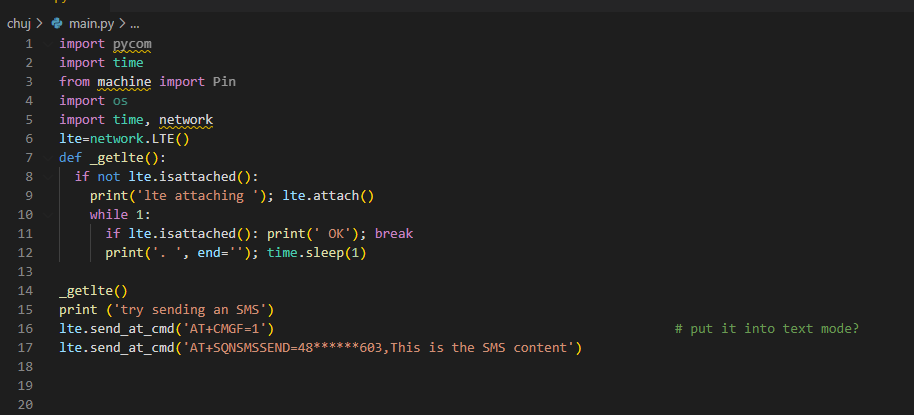
-
Hey, adding some code that should get you there and that includes a lot of useful debugging stuff. You'll need to change the apn / band .
import time
import socket
from network import LTE

# Connect to Mobile
def connect_mobile(settings):

    lte = LTE()

    connected = False

    display.set_mode("Trying: LTE")

    try:
        lte.init()
        print("LTE init success")
    except:
        print("LTE init failed")

    print(lte.ue_coverage()) # Check network coverage (True, is yes)

    print(lte.send_at_cmd('AT!="fsm"'))

    print(lte.send_at_cmd("AT"))

    print(lte.send_at_cmd("ATI1"))

    print(lte.send_at_cmd("AT+CSMINS?"))

    print(lte.send_at_cmd("AT+CFUN?"))

    print(lte.send_at_cmd('ATI+CIMI')) # Request IMSI

    print(lte.send_at_cmd('ATI+SQNCTM=?'))


    print("Add band, will be much faster")
    #lte.attach(band=None, apn="iot.1nce.net") #band : to scan for networks. If no band (or None) is specified, all bands will be scanned. The possible values for the band are: 3, 4, 5, 8, 12, 13, 20 and 28.
    lte.attach(band=20, apn="iot.1nce.net") # works
    print("attaching..",end='')
    while not lte.isattached():
        time.sleep(0.25)

        print('.',end='')
        print(lte.send_at_cmd('AT!="fsm"'))         # get the System FSM

    print("attached!")


    # once attached
    print(lte.send_at_cmd("AT+CSQ")) # Signal quality, returns <ssid> (), <ber>
    # SSID (received signal strength indication)
    ## 0: -113dBm or less
    ## 1: -111 dBm
    ## 2..30: -109..-53 dBm
    ## 31: -51 dBm or greater (best)
    ## 99: not known or not detectable

    # ber : channel bit error rate in percent
    ## 0..7: see table
    ## 9: not known or not detectable


    lte.connect()

    print("connecting [##",end='')
    while not lte.isconnected():
        time.sleep(0.25)
        print('#',end='')

        print(lte.send_at_cmd('AT!="fsm"'))
    print("] connected!")

    print(socket.getaddrinfo('pybytes.pycom.io', 80))

    lte.deinit() # Disables LTE modem completely

    return connected
Hello! It looks like you're interested in this conversation, but you don't have an account yet.
Getting fed up of having to scroll through the same posts each visit? When you register for an account, you'll always come back to exactly where you were before, and choose to be notified of new replies (either via email, or push notification). You'll also be able to save bookmarks and upvote posts to show your appreciation to other community members.
With your input, this post could be even better 💗
Register Login