Looking for general advices concerning usage
-
I am just not satisfied with my Sipy. At all.
Communicating with it hard, at best. After Pymakr stopped working/started corrupting files there are too many workarounds to be done.
I am using Filezilla which I can connect to via 192.168.4.1:21 almost every time. I have a very hard time transferring files. I succeed maybe every fifth try.
When the files are uploaded I can't get a serial output. I tried every serial monitor I can think of.
I get the messages when I hardreset the device or prompt it via the monitor.What do you guys do?
Has anyone found a way to make working with the boards worth the effort?Best, Mathias.
-
On my LoPys I'm using PuTTY as serial port monitor and Filezilla for file transfer without any problems.
Important note for Filezilla:
https://docs.pycom.io/pycom_esp32/pycom_esp32/general.html
FileZilla settings
Do not use the quick connect button, instead, open the site manager and create a new configuration. In the General tab make sure that encryption is set to: Only use plain FTP (insecure). In the Transfer Settings tab limit the max number of connections to one, otherwise FileZilla will try to open a second command connection when retrieving and saving files, and for simplicity and to reduce code size, only one command and one data connections are possible. Other FTP clients might behave in a similar way.
-
@maku
Hi maybe some specific Sipy problem (i have only Wipy2) but maybe not- did you configure filezilla to use only one connection?
https://docs.pycom.io/pycom_esp32/pycom_esp32/toolsandfeatures.html?highlight=filezilla - I use com port monitor from Arduino IDE with succesfull
- What is your firmware version?
os.uname()@rskoniec you are faster ;-)
- did you configure filezilla to use only one connection?
-
I use FileZilla with mentioned settings. As mentioned I can prompt the board, I can see hardreset. But I cannot ever see print from code.
This is what FileZilla looks like.
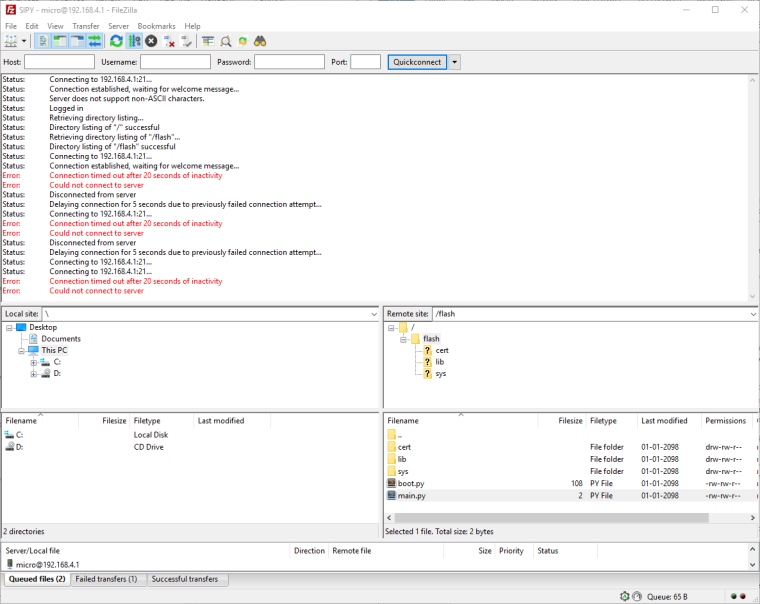
BTW: The "last modified" date doesn't look that good. Anynw else that has seen that?
-
@maku
is this with latest firmware? 1.6.5?
And do you have some code running on board withwhile true:loop in the same time when you are connected by ftp? -
Firmware is 1.6.3.b1 and code is:
import os print (os.uname().release) for i in range(100): print("Hello Again World") `` -
@maku said in Looking for general advices concerning usage:
Firmware is 1.6.3.b1
then try upgrade board to 1.6.5 - and back with results.
-
Done - changed nothing.
-
@maku
Do you use Expansion board or some TTL USB to UART converter? -
Expansion board.
Sry for late answers. Must wait 600s between different replies.
Hello! It looks like you're interested in this conversation, but you don't have an account yet.
Getting fed up of having to scroll through the same posts each visit? When you register for an account, you'll always come back to exactly where you were before, and choose to be notified of new replies (either via email, or push notification). You'll also be able to save bookmarks and upvote posts to show your appreciation to other community members.
With your input, this post could be even better 💗
Register Login