FTP access
-
Hello,
my problem is that I cannot access local file system on the WiPy via FTP. I'm using FileZilla and I configured it just like here http://micropython.org/resources/docs/en/latest/wipy/wipy/general.html#filezilla-settings and I receive a response from the WiPy: "MicroPython v1.6-89-g440d33a on 2016-02-27; WiPy with CC3200" and than I've got an error: Can't connect with the server. What can cause this problem? I'm using WiPy 1.0. -
You must set Filezilla to passive mode & single connection. You cannot set that in the quick connect mode. Instead you have to defien a connection in the connection manager and use that.
If you're on Linux or MAC, you can also try command line ftp, since that allows you to perform alls the steps individually. I personally prefer the FireFTP extension of FireFox, which seems a little bit easier to use. You can especially define the connection defaults. -
I configured it just like you said and it still doesn't work
-
Did you set the connection to not encrypted?
And do you have the option to try command line ftp?
Even on Windows, it should at least ask you for username & password. -
Yes, the connection is not encrypted. Host name is 192.168.1.1 and port number is 23. Is this proper?
-
ftp uses port 21 (and 20 for data)
Port 23 is for telnet -
I have these settings or my LoPy. No port, ftp, only use plain ftp, logon type normal.
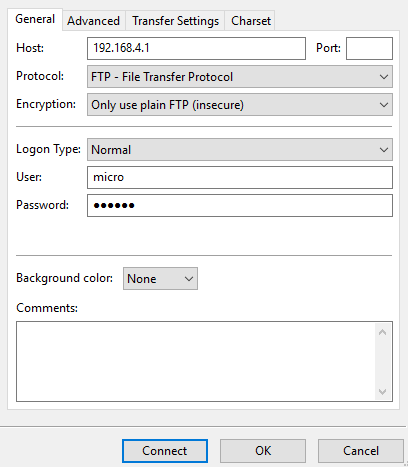
And set limit on connections.
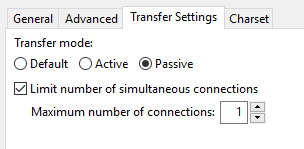
EDIT: Found also this (also for LoPy, but I think there shouldn't be any difference except maybe the ip).
-
Just to be sure you took the first step before the second:
- could you see the WiPy in your list of available Wifi devices?
- did you connect your computer to the WiPy as an WiFi access point?
-
Once the WiPy is connected to the router in STA mode, you will not see it any more in th elist of availlable WiFi devices, because it does not create it's own net any more. Then you connect yourself to the router and can then connect to the WiPy.
If you still need the WiPy ads access point, you can enable both modes. -
@robert-hh Yes, it's important what Robert writes! The kind of connection--and IP(!!)--is related to the network the WiPy is connected. In case the WiPy is started default it will start as access point. In this case the IP is 192.168.1.1 In case you have connected the WiPy to a home network and the WiPy is now a station and not an access point any more, the device gets the IP from the network. I had a look at my Fritz box dashboard and could so figure out the IP but I think you can also gather the IP via a serial connection?

Hello! It looks like you're interested in this conversation, but you don't have an account yet.
Getting fed up of having to scroll through the same posts each visit? When you register for an account, you'll always come back to exactly where you were before, and choose to be notified of new replies (either via email, or push notification). You'll also be able to save bookmarks and upvote posts to show your appreciation to other community members.
With your input, this post could be even better 💗
Register Login