• Device doesn't run code inside

    SiPy ftp filezilla machine
    2
    2
    0 Votes
    2 Posts
    222 Views
    robert-hhR
    @brossingo try listdir("/flash") and run "/flash/game.py" You may as well stick with main.py and simply use: import game
  • Upload timeout issue with ftp upload

    Discussion file filezilla ftp wifi
    4
    0 Votes
    4 Posts
    417 Views
    J
    @misterlisty I don't quite see how 35 KB is a "large file"... There must be something wrong in your setup, it is common to upload much larger files than that to perform OTA firmware upgrades for instance. Can you give more details about the setup, including whether the module is acting as a station or AP, what you have between the client and the device, any logs shown on either side, what type of file you are uploading... Tcpdump or wireshark captures could potentially be interesting as well.
  • 0 Votes
    6 Posts
    1k Views
    I
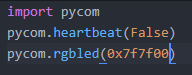
    @NickBoots , If you are connecting to an Access point from your pycom device (i.e Wifi in STA mode) disable the wifi on boot option via this command pycom.wifi_on_boot(False) reset board and try again.
  • LoPy4, WLAN and FileZilla connection

    LoPy lopy4 filezilla wifi
    6
    0 Votes
    6 Posts
    1k Views
    S
    Found the issue. It was actually caused by gc.collect() run time going from 6mS to 48mS. This was being run inside a timer tic ISR (I know, that's a no-no). The ISR was taking longer to run than the timer tic period. I assume the UART Int is a lower priority than the timer so it was never being processed. Is gc.collect() taking so long because of the extra memory or is this a bug?
  • Can't transfer files on home WiFi

    WiPy 2&3 wipy 2.0 filezilla file transfer wifi
    3
    0 Votes
    3 Posts
    1k Views
    S
    @robert-hh Number of concurrent transfers didn't make any difference. But the command line seem to work, and more importantly for me, it works from python with ftplib. I'll just stop using filezilla...
  • View contents of SD Card

    Discussion sd card filezilla
    6
    0 Votes
    6 Posts
    2k Views
    J
    Hello Robert, I used the example SD code where I see it call the mount statement. from machine import SD import os sd = SD() os.mount(sd, '/sd') os.listdir('/sd') f = open('/sd/test.txt', 'w') f.write('Testing SD card write operations') f.close() f = open('/sd/test.txt', 'r') f.readall() f.close()
  • FTP access

    WiPy 2&3 wipy 1 filezilla ftp
    10
    0 Votes
    10 Posts
    4k Views
    C
    @robert-hh Yes, it's important what Robert writes! The kind of connection--and IP(!!)--is related to the network the WiPy is connected. In case the WiPy is started default it will start as access point. In this case the IP is 192.168.1.1 In case you have connected the WiPy to a home network and the WiPy is now a station and not an access point any more, the device gets the IP from the network. I had a look at my Fritz box dashboard and could so figure out the IP but I think you can also gather the IP via a serial connection?
  • Ftp Filezilla could not connect to server

    WiPy 2&3 wipy filezilla ftp
    11
    0 Votes
    11 Posts
    7k Views
    R
    @livius Thanks
