Welcome to the Pycom forum Forum
    • \[\[global:header.categories\]\]
    • \[\[global:header.recent\]\]
    • \[\[global:header.tags\]\]
    • \[\[global:header.popular\]\]
    • Login

    Explore Pybytes | Official Documentation | Report a Firmware Bug/Issue | GitHub

    New firmware release 1.6.7.b1 (LoRaWAN Nano Gateway with TTN example!!)

    Scheduled Pinned Locked Moved Announcements & News
    firmware
    113 Posts 34 Posters 88.5k Views 32 Watching
    Loading More Posts
    • Oldest to Newest
    • Newest to Oldest
    • Most Votes
    Reply
    • Reply as topic
    Log in to reply
    This topic has been deleted. Only users with topic management privileges can see it.
    • RobTuDelftR Offline
      RobTuDelft @jmarcelino
      last edited by

      @jmarcelino Great, thanks. Machine unique ID/MAC (machine.unique_id()) can be used directly, without any changes or what is the convention here? Noticed the checkbox indeed.

      Now I have another quesiton pertaining LoRa transmission. When I send the payload ("hi") as lora_sock.send(bytes([0x68, 0x69])) or as lora_sock.send('hi') the payload ends up as cc26 for example on the other end; which if I translate to ascii again is not "hi". Any clue what is happening here?

      Without data you're just another person with an opinion.
      Hackster | About me

      J 1 Reply Last reply Reply Quote 0
      • J Offline
        jmarcelino @RobTuDelft
        last edited by

        @RobTuDelft
        Though the process doesn't actually guarantee unique numbers there is a convention to add FFFE in the middle to expand the 48-bit MAC to the EUI64 expected by the Things Network.
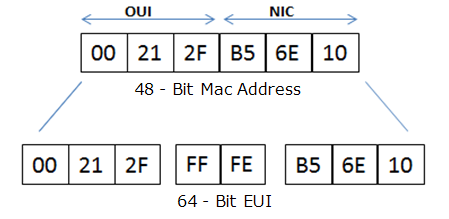
        0_1494697690137_89649-pic1.png

        I'm not sure what you mean in the LoRa problem. Is this with mode=LoRa.LORA or mode=LoRa.LORAWAN? And what is the "the other end": another LoPy, a LoRaWAN network server or something else?

        RobTuDelftR 1 Reply Last reply Reply Quote 2
        • RobTuDelftR Offline
          RobTuDelft @jmarcelino
          last edited by

          @jmarcelino Thanks for clarifying.
          As for the second issue, this is now resolved (had to do with encryption on the LoRaWAN).

          Without data you're just another person with an opinion.
          Hackster | About me

          1 Reply Last reply Reply Quote 0
          • J Offline
            jomifo Pybytes Beta
            last edited by

            I have successfully used the nanogateway example code to push some temperature sensor data (MCP9808) to TTN and am happy about that. Now I'm wondering are there ways using this example to configure LoRa to increase the range? I see the LORA_GW_DR = "SF7BW125" property in the config, but am unsure how or if this can be used to tweak Lora.
            Thanks.

            1 Reply Last reply Reply Quote 0
            • D Offline
              daniel
              last edited by

              @jomifo yes, if you change the spreading factor to 12 ("SF12BW125") the range will be much better. Do this both on the nano-gateway and in the node. You also need to tweak the Join command like this:

              lora.join(activation, auth, * ,timeout=None, dr=None)

              Specify the dr and make it 0 (which is the same as SF12BW125).

              Cheers,
              Daniel

              J 1 Reply Last reply Reply Quote 0
              • J Offline
                jomifo Pybytes Beta @daniel
                last edited by

                @daniel Excellent! Seems no need to directly alter the join command since the 'dr' parameter also uses a config parameter, 'LORA_NODE_DR'. I'm looking at the latest example on Github.

                1 Reply Last reply Reply Quote 0
                • F Offline
                  fredg
                  last edited by

                  I'm coming from this tutorial: https://docs.pycom.io/chapter/tutorials/lopy/lorawan-nano-gateway.html

                  You should update it probably to mention the "I'm using the legacy packet forwarder" for TTN network, and update the code to make it easy to extract the GATEWAY_ID.
                  Or maybe update the code to allow any GATEWAY_ID for TTN? I'm not sure how it really works...

                  J 2 Replies Last reply Reply Quote 1
                  • J Offline
                    jmarcelino @fredg
                    last edited by

                    @fredg
                    Thank you very much for your suggestion, TTN changed their language and gateway registration process recently - we'll update our documentation to reflect this.

                    1 Reply Last reply Reply Quote 0
                    • J Offline
                      jmarcelino @fredg
                      last edited by

                      @fredg
                      I've updated the Nano-gateway documentation to show how to generate a Gateway ID and also to reflect the changes in the TTN interface: https://docs.pycom.io/chapter/tutorials/lopy/lorawan-nano-gateway.html

                      Thanks again for your suggestion!

                      1 Reply Last reply Reply Quote 2
                      • D Offline
                        Devang Sharma
                        last edited by

                        @daniel, I live in India. While registering the gateway, which frequency plan I should choose? Can I choose Europe or do I have to choose Asia?

                        Thanks.

                        J 1 Reply Last reply Reply Quote 0
                        • J Offline
                          jmarcelino @Devang Sharma
                          last edited by jmarcelino

                          @devang-sharma
                          India has a unique Frequency plan:

                          https://kotahi.net/network/frequencies/

                          I recommend setting your config.py for the nano gateway and nodes to

                          LORA_FREQUENCY = 865062500

                          and make sure your nodes use this 865062500 frequency as well:

                          # set the 3 default channels to the same frequency
                          lora.add_channel(0, frequency=config.LORA_FREQUENCY, dr_min=0, dr_max=5)
                          lora.add_channel(1, frequency=config.LORA_FREQUENCY, dr_min=0, dr_max=5)
                          lora.add_channel(2, frequency=config.LORA_FREQUENCY, dr_min=0, dr_max=5)
                          
                          D 1 Reply Last reply Reply Quote 1
                          • D Offline
                            Devang Sharma @jmarcelino
                            last edited by

                            @jmarcelino, thanks. I've sent them an e-mail in order to get a free network connection. I hope they'll reply soon.

                            1 Reply Last reply Reply Quote 0
                            • D Offline
                              Devang Sharma
                              last edited by Devang Sharma

                              @jmarcelino, KotahiNet does not provide free connectivity in India. Also, they provide private LoRaWAN network only to the larger companies.

                              Is it possible to connect one LoPy(acting as a node) to connect with another LoPy(acting as a Gateway) without such LoRaWAN network?

                              If yes, can you guide me how to achieve it?
                              My question might not seem a good one, but I'm really new to LoRa.

                              Thanks.

                              L 1 Reply Last reply Reply Quote 0
                              • L Offline
                                livius @Devang Sharma
                                last edited by

                                @devang-sharma said in New firmware release 1.6.7.b1 (LoRaWAN Nano Gateway with TTN example!!):
                                look at examples
                                in doc
                                https://docs.pycom.io/chapter/tutorials/lopy/lopy-lopy.html
                                and sources on git
                                https://github.com/pycom/pycom-libraries/tree/master/examples

                                think about people first, then computers

                                D 1 Reply Last reply Reply Quote 0
                                • D Offline
                                  Devang Sharma @livius
                                  last edited by

                                  @livius Thanks. I was looking into docs and I found the examples. Though they needed modifications, it worked perfectly.

                                  1 Reply Last reply Reply Quote 0
                                  • R Offline
                                    rvandam
                                    last edited by

                                    I have a setup with a node and a nano gateway with the latest default script from Github. The data is received in the TTN backend, so that part is working.

                                    I want to update the date and time on the nodes over Lora (no wifi) I discovered that no rx data is received on the node. Could you give me a hint how to configure the gateway to send back the current time to the node?

                                    J 1 Reply Last reply Reply Quote 0
                                    • J Offline
                                      jmarcelino @rvandam
                                      last edited by jmarcelino

                                      @rvandam
                                      In LoRaWAN with TTN (Class A) you must send data from the node in order to receive any messages back.

                                      But if you queue a downlink with TTN you should receive it in your node - for example with data = s.recv(64) - once you've done an uplink (an s.send(...) ).

                                      R 1 Reply Last reply Reply Quote 0
                                      • R Offline
                                        rvandam @jmarcelino
                                        last edited by

                                        @jmarcelino thank you for your reply!

                                        When I add some data in the downlink field in the TTN backend, this data is received by the node. This is already one more step forward :-)

                                        Should I see the gateway as a "dumb" packet forwarder, and do the logic on the node and the TTN side?

                                        J 1 Reply Last reply Reply Quote 0
                                        • J Offline
                                          jmarcelino @rvandam
                                          last edited by

                                          @rvandam
                                          Glad you managed to receive data.

                                          Yes, that's exactly what LoRaWAN gateways are :) They don't send or receive anything on their own, that's the job for the network server.

                                          R 1 Reply Last reply Reply Quote 0
                                          • R Offline
                                            rvandam @jmarcelino
                                            last edited by

                                            @jmarcelino thank you again. This makes much sense. I was looking on the wrong end.

                                            1 Reply Last reply Reply Quote 0

                                            Hello! It looks like you're interested in this conversation, but you don't have an account yet.

                                            Getting fed up of having to scroll through the same posts each visit? When you register for an account, you'll always come back to exactly where you were before, and choose to be notified of new replies (either via email, or push notification). You'll also be able to save bookmarks and upvote posts to show your appreciation to other community members.

                                            With your input, this post could be even better 💗

                                            Register Login
                                            • 1
                                            • 2
                                            • 3
                                            • 4
                                            • 5
                                            • 6
                                            • 3 / 6
                                            • First post
                                              Last post

                                            Pycom on Twitter

                                            Pycom