Welcome to the Pycom forum Forum
    • \[\[global:header.categories\]\]
    • \[\[global:header.recent\]\]
    • \[\[global:header.tags\]\]
    • \[\[global:header.popular\]\]
    • Login

    Explore Pybytes | Official Documentation | Report a Firmware Bug/Issue | GitHub

    Firmware upgrade Serial port to use unavailable

    Scheduled Pinned Locked Moved Firmware
    15 Posts 5 Posters 4.3k Views 5 Watching
    Loading More Posts
    • Oldest to Newest
    • Newest to Oldest
    • Most Votes
    Reply
    • Reply as topic
    Log in to reply
    This topic has been deleted. Only users with topic management privileges can see it.
    • M Offline
      Migueloribe
      last edited by

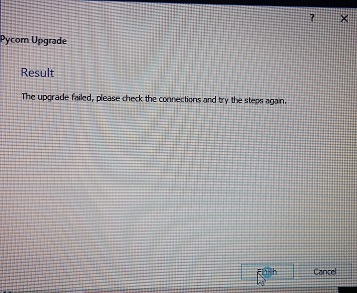
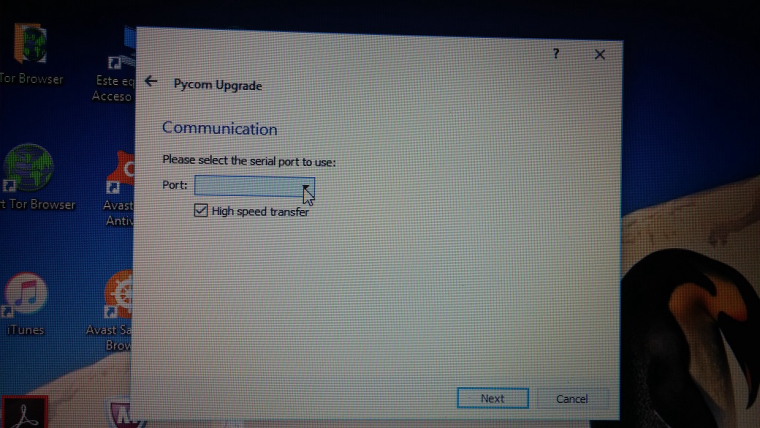
      I'm trying to update firmware of SiPy on a expansion board. I have connected 23 to Gnd (checked it is correctly done) and when I'm running the Pycom upgrade program when I get to communication part on the serial port option nothing appears neither I can write on the box. If I click on next it says the upgrade failed.

      M 1 Reply Last reply Reply Quote 0
      • M Offline
        michal.zykov @Migueloribe
        last edited by

        Hi @Migueloribe,

        Could you, please, add print-screen or at least text of the error message?

        Mike

        1 Reply Last reply Reply Quote 0
        • M Offline
          Migueloribe
          last edited by

          Sure. Here they are!0_1489586907721_20170315_144019.jpg 0_1489587093397_20170315_144003.jpg

          M 1 Reply Last reply Reply Quote 0
          • M Offline
            michal.zykov @Migueloribe
            last edited by

            Thx @Migueloribe !

            Have you selected the correct port? It's not so clear from that picture (blank field). Have you installed proper FTDI driver?

            Mike

            1 Reply Last reply Reply Quote 0
            • M Offline
              Migueloribe
              last edited by

              The problem is that there is no options to select in the "Port:" box. I have tried with "high speed transfer" ticked and unticked and nothing change.

              I saw in the forum that someone with same problem was told to install FTDI from http://www.ftdichip.com/Drivers/D2XX.htm . I did it but still remain the same.

              Thanks for the help

              1 Reply Last reply Reply Quote 0
              • robert-hhR Offline
                robert-hh
                last edited by

                You should install the VCP drivers.

                1 Reply Last reply Reply Quote 0
                • M Offline
                  Migueloribe
                  last edited by

                  I have installed from http://www.ftdichip.com/Drivers/VCP.htm as well, and nothing has happened. It is not recognized yet.

                  1 Reply Last reply Reply Quote 0
                  • robert-hhR Offline
                    robert-hh
                    last edited by robert-hh

                    From the picture I see I assume you use WIndows.

                    • Did you already succeed once to connect with the serial console using Pymakr, Putty, TeraTerm or the like
                    • If yes, which COM port was used?
                    • If no, are all jumpers on the interface board in place? You do not need all, but haven them all installed is safe; and
                    • Is the SiPy instaleld in the right orientation?
                    • Did you reset or power cycle after making a wire between G23 and GND? I assume Yes.
                    1 Reply Last reply Reply Quote 0
                    • M Offline
                      Migueloribe
                      last edited by

                      I have been only able to connect to Pymakr via wifi.

                      Rest of it should be ok unless I'm missing something:
                      All jumpers are in place.
                      SiPy is oriented in the right position
                      I have reseted after wiring G23 to GND

                      1 Reply Last reply Reply Quote 0
                      • robert-hhR Offline
                        robert-hh
                        last edited by

                        OK. Then you should check your basic connection, since the USB/Serial chip seems not to be recognized by Windows.
                        Is the USB cable good? Can you connect another device with that cable, like a smart phone or a different board?

                        1 Reply Last reply Reply Quote 0
                        • M Offline
                          Migueloribe
                          last edited by

                          Yes. I have try with 4 different cables in all usb ports of the laptop.
                          Cable woks with mobile :(

                          1 Reply Last reply Reply Quote 0
                          • robert-hhR Offline
                            robert-hh
                            last edited by

                            let's try again the expansion board.

                            If you take off the SiPy, pull the Tx and Rx jumpr and connect TX and RX on the inner side (the side to the SiPy).

                            Connect that to you PC. Do you in the device manager a COM port, like COM4 and up? If yes, then the device is detected.
                            If not, there is still a problem with either the driver or the expansion board.
                            If yes, start a program like Putty or TeraTerm or Arduino Serial Monitor with that COM port. Then you should see an echo of whatever you type on the keyboard.

                            1 Reply Last reply Reply Quote 0
                            • R Offline
                              rskoniec
                              last edited by rskoniec

                              @Migueloribe Did you look here? https://forum.pycom.io/topic/763/firmware-upgrade-troubleshooting-checklist-procedure
                              Do you see any change in a Device Manager when you're connecting/unconnecting USB cable with Expansion Board?
                              What version of Windows are you using?

                              The machine is working as good as it's code.

                              1 Reply Last reply Reply Quote 0
                              • M Offline
                                Migueloribe
                                last edited by

                                Fix¡¡ It seems It was the cable It worked with the 6th I´ve tried (one from the kindle ebook).
                                Thanks¡

                                1 Reply Last reply Reply Quote 0
                                • G Offline
                                  gigaflare
                                  last edited by

                                  Installing the Driver from "http://www.ftdichip.com/Drivers/VCP.htm" fixed my firmware update issue with my SiPy 1.0 (22)

                                  1 Reply Last reply Reply Quote 0

                                  Hello! It looks like you're interested in this conversation, but you don't have an account yet.

                                  Getting fed up of having to scroll through the same posts each visit? When you register for an account, you'll always come back to exactly where you were before, and choose to be notified of new replies (either via email, or push notification). You'll also be able to save bookmarks and upvote posts to show your appreciation to other community members.

                                  With your input, this post could be even better 💗

                                  Register Login
                                  • 1 / 1
                                  • First post
                                    Last post

                                  Pycom on Twitter

                                  Pycom