machine.idle usage
-
I have a rain gauge hanging off two gpio pins and transmitting via Lora every 15 minutes. Using the expansion board.
Because I need to count on the interrupt I can't put the device in deep sleep but I want to save as much power as possible. From the docs I understand that the maachine.idle() function is what I need to use.
Ignoring the interrupts for now I wrote the following test code to put the device to sleep using the machine.idle() function and putting it to sleep without the idle function.
I was using 36mA using idle and 38mA without. The difference would most likely be the led. This is way too much for my project to last on a battery for any reasonable amount of time.
What do you suggest?
Am I using the wrong technique?
Will there be more power savings in an upcoming firmware?
Is what I want not realistic?from network import WLAN
from network import Bluetooth
from machine import UART
import osuart = UART(0, 115200)
os.dupterm(uart)
wlan = WLAN()
wlan.init(mode=WLAN.STA)
wlan.deinit()
bt = Bluetooth()
bt.deinit()import time
import pycom
import machinepycom.heartbeat(False)
pycom.rgbled(0x000000)while True:
pycom.rgbled(0x330000)
time.sleep(10)
pycom.rgbled(0x000000)
machine.idle()
time.sleep(20)Any help is appreciated?
Justin
-
@jubbs
As i understand correctlyidleit only affect CPU cycles. this can be comparable to:while true: i+=1can eat 100% CPU - and much power
while true: i+=1 machine.idle()should use only a little CPU and little power
but if you already have inside loop commands which do wait - then you do not see much differenceBecause I need to count on the interrupt I can't put the device in deep sleep
Quesiton is what interrupt?
Because it will be possible to wake up by pin interrupt from deep sleep and i suppose this is your task? -
For the Rain Gauge to be accurate I need to maintain a counter variable. So if I put the unit into deep sleep I can't maintain a count.
Below is my class for the rain gauge. The main loop collects the drip count every 15mins and transmits to the server.
from machine import Pin import machine import time class Drips: def __init__(self, pin='P11', gnd='P12'): #G20 G22 gauge = Pin(pin, mode=Pin.IN, pull=Pin.PULL_UP) Pin(gnd, mode=Pin.IN, pull=Pin.PULL_DOWN) gauge.callback(trigger=Pin.IRQ_RISING, handler=self.drip) self.count = 0 self.debounce_timer = 0 def reset(self): self.count = 0 def drip(self,p): if(time.time() - self.debounce_timer > 1): self.count += 1 self.debounce_timer = time.time() machine.idle() def get_count(self): return self.count -
@jubbs
you can save that counter to file on flash or sd card -
Then I would need a clock to timestamp the drip / count to get accurate rainfall. My understanding is that deepsleep will stop the RTC as well. Any ideas how would I measure time?
-
if you look into table from esp32 documentation
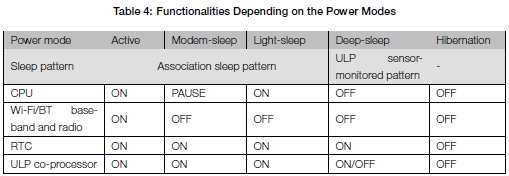
than you will see that it depend of exact sleep mode
but i do not suppose that all modes are now avaiable on current firmwarebut RTC is avaiable in almost all modes
Hello! It looks like you're interested in this conversation, but you don't have an account yet.
Getting fed up of having to scroll through the same posts each visit? When you register for an account, you'll always come back to exactly where you were before, and choose to be notified of new replies (either via email, or push notification). You'll also be able to save bookmarks and upvote posts to show your appreciation to other community members.
With your input, this post could be even better 💗
Register Login