Subcategories

  • This topic is deleted!

    1
    0 Votes
    1 Posts
    4 Views
    No one has replied
  • NB-IoT modem - reliability

    27
    0 Votes
    27 Posts
    144 Views
    P
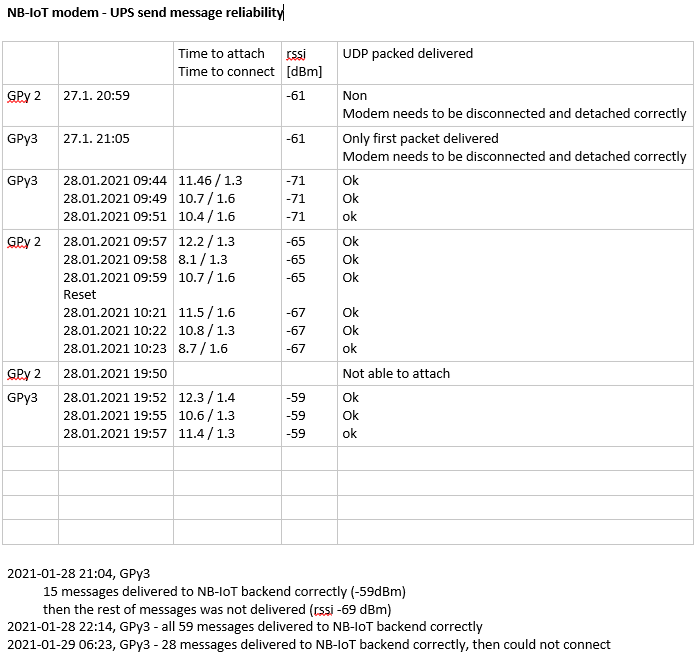
    @nadvorvo said in NB-IoT modem - reliability: Hi @peterp, Thank you for your reply. Here you can find log for a1). 1 of 2 messages delivered to backend server Thanks. So, this is good news. It means you should be able to wrap the detach/deinit into try/except and just keep going, right? I'll try to debug this further on our side. @nadvorvo said in NB-IoT modem - reliability: @peterp said in NB-IoT modem - reliability: b) after completing the test above, regardless of the outcome, please do also try the following: add the reset param to the detach command, like so: lte.detach(reset=True), then let it run again and let's see whether this behaves differently. 48 of 50 messages delivered to backend server About this test. I should have expressed my self better. The idea here is to let this run (long term hopefully) and see whether it ever reaches the OSError, ie similar to this: [AT-FAIL] +9504 Traceback (most recent call last): File "<stdin>", line 1, in <module> File "nb_test2.py", line 58, in nb_test2 OSError: the requested operation failed or some other "broken" state (exception, hang, etc). All my debugging here circles around this reliability aspect tbh. The fact that sometimes not 100% of messages go through, I would treat as a separate issue. Could it simply be that sometimes the network reception at that location is not ideal? What's the overall rate? Different device positioning? Different antenna positioning? Do you have any indication about reception using other devices or so? But, generally, I'd suggest at least as a step 1 let's focus on reliability, ie even if some packets are lost, the whole setup keeps going. Once that is established it's more meaningful to ask for overall failure rate over say, a few hours.

  • No wifi connection

    3
    0 Votes
    3 Posts
    31 Views
    R
    Yes, I have got multiple esp32 devices. Including some m5stack, witch I can program in their online ide.
  • sporadically OSError: [Errno 104] ECONNRESET and device exit..

    1
    0 Votes
    1 Posts
    18 Views
    No one has replied
  • Camera UART reading Pycom

    3
    2
    0 Votes
    3 Posts
    69 Views
    G
    Thanks for the advice. You are right, I could decrease the time of the code with some pointless sleeps. I got the camera working by increasing the buffer size (rx_buffer_size=40000) for a 640x480 pixel image and writing to flash. The image is 35KB so the buffer can hold the entire image. In retrospect, everytime I send when the buffer was filled, the GPy UART paused data collection at which point the camera may have injected more bytes into the jpg causing the image to be corrupted. [image: 1613190861162-s.jpg] from machine import UART from machine import SD import machine import os import time import gc import ubinascii uart = UART(1, baudrate=115200,rx_buffer_size=40000) #default baud of camera, this uses the UART_1 default pins for TXD and RXD (``P3`` and ``P4``) gc.collect() print(" ") print("Free Memory:") print(gc.mem_free()) print(" ") def reset(): uart.write(b'\x56\x00\x26\x00') #Send reset command time.sleep(4) recv=uart.read() # read up to 5 bytes print("Version:") print(recv) print(" ") def takephoto(): uart.write(b'\x56\x00\x36\x01\x00') #Send take photo command time.sleep(2) recv=uart.read() # read up to 5 bytes print("Take Photo:") print(recv) print(" ") def changesize(): #saved to camera flash #uart.write(b'\x56\x00\x31\x05\x04\x01\x00\x19\x22') #(160x120) Send take photo command #uart.write(b'\x56\x00\x31\x05\x04\x01\x00\x19\x11') #(320x240) Send take photo command uart.write(b'\x56\x00\x31\x05\x04\x01\x00\x19\x00') #(640x480) Send take photo command time.sleep(.1) recv=uart.read() # read up to 5 bytes print("Change Size:") print(recv) print(" ") def changeBaudrate(): uart.write(b'\x56\x00\x31\x06\x04\x02\x00\x08\x0D\xA6') #115200 Send take photo command time.sleep(3) recv=uart.read() # read up to 5 bytes print("Baudrate:") print(recv) print(" ") def compress(): uart.write(b'\x56\x00\x31\x05\x01\x01\x12\x04\x72') #Send take photo command time.sleep(4) recv=uart.read() # read up to 5 bytes print("Compression:") print(recv) print(" ") def stopCapture(): uart.write(b'\x56\x00\x36\x01\x03') #STOP CAPTURE reset() #changeBaudrate() changesize() #compress() takephoto() uart.write(b'\x56\x00\x34\x01\x00') #Send get image length command time.sleep(.1) print("READ IMAGE DATA LENGTH") recv=uart.read() # read up to 5 bytes print(recv) print("Image Size: "+str(int(ubinascii.hexlify(recv[5:9]),16)/1024)+" KB") print("READ IMAGE DATA") uart.write(b'\x56\x00\x32\x0C\x00\x0A\x00\x00\x00\x00') uart.write(recv[5:9]) uart.write(b'\x00\xFF') #Send get image length command time.sleep(3) #count=0 pic=uart.read() #time.sleep(.5) #while uart.any()>0: # pic=pic+uart.read(512) # time.sleep(.5) #time.sleep(10) #while uart.any()>0: # pic=pic+uart.read(512) # time.sleep(.5) #pic=ubinascii.hexlify(uart.read(500)) #time.sleep(.01) #while uart.any()>0: # pic=pic+ubinascii.hexlify(uart.read(500)) # time.sleep(.01) file='/flash/image'+str(machine.rng())+'.jpg' print(file) f = open(file, 'wb') # open for writing f.write(pic[5:-5]) time.sleep(2) f.close() #print(pic) #print(type(pic)) print(os.listdir('/flash')) #print(" ") stopCapture() gc.collect() print(" ") print("Free Memory:") print(gc.mem_free())
  • Unable to get manufacturer_data in the advertising packet

    1
    0 Votes
    1 Posts
    14 Views
    No one has replied
  • Bug with micropython "input" statement

    5
    0 Votes
    5 Posts
    27 Views
    C
    @robert-hh i'm using windows 10 with VSCode + pymakr for REPL via usb and i'm using putty via wifi for telnet REPL the bug happens whether i use both VSCode + pymakr and putty telnet or either one separately
  • i2c.scan() ... stucking

    7
    0 Votes
    7 Posts
    35 Views
    N
    @robert-hh @Gijs thank you for your feedback. I will test it. Vojtech
  • Lopy problem is in reboot loop

    7
    0 Votes
    7 Posts
    29 Views
    robert-hhR
    @kjm If pycom-fwtool-cli.exe is just the bundled version of the Python update tool, then using it with the option erase-all indeed just calls esptool.py with the option erase. Using esptool.py is the method I prefer. Just the raw tool, no layers in between hiding what's going on. I recommended using the updater because it looks more user friendly, and also restores the Sigfox credentials.
  • LTE modem firmware and LTE() classes can get into bricked state (to) easily

    79
    0 Votes
    79 Posts
    396 Views
    T
    my test system appeared to run successfully over night (8+ hrs). so the latest lte modem firmware appears to be stable for now.
  • This topic is deleted!

    1
    1
    0 Votes
    1 Posts
    1 Views
    No one has replied
  • stuck in Connecting to /dev/tty.usbmodemPy3390df1

    4
    0 Votes
    4 Posts
    33 Views
    G
    Between Windows Mac and Linux, there is no difference in stability, other than the dfu-util error. I have never tried it in virtualbox, might be worth it giving a go! The Pycom firmware updater tool should work fine for you in any case as far as Im aware (Im not sure what you mean with the screenshot, could you elaborate?)
  • BLE Advertising Channel Issue

    4
    0 Votes
    4 Posts
    20 Views
    J
    @joshcoombes the difference in frequencies should not alter signal strength in any significant way, probably much, much less than other factors affecting it. Even on a single channel you’ll most probably see signal strength varying quite a bit, you need to add a filter to smooth out those variations. And that’s not even taking into account movement of the device. Relying on a single channel would probably make your system more prone to interference from other devices.
  • Lopy4 Hardware problems deepsleep

    3
    1
    1 Votes
    3 Posts
    35 Views
    J
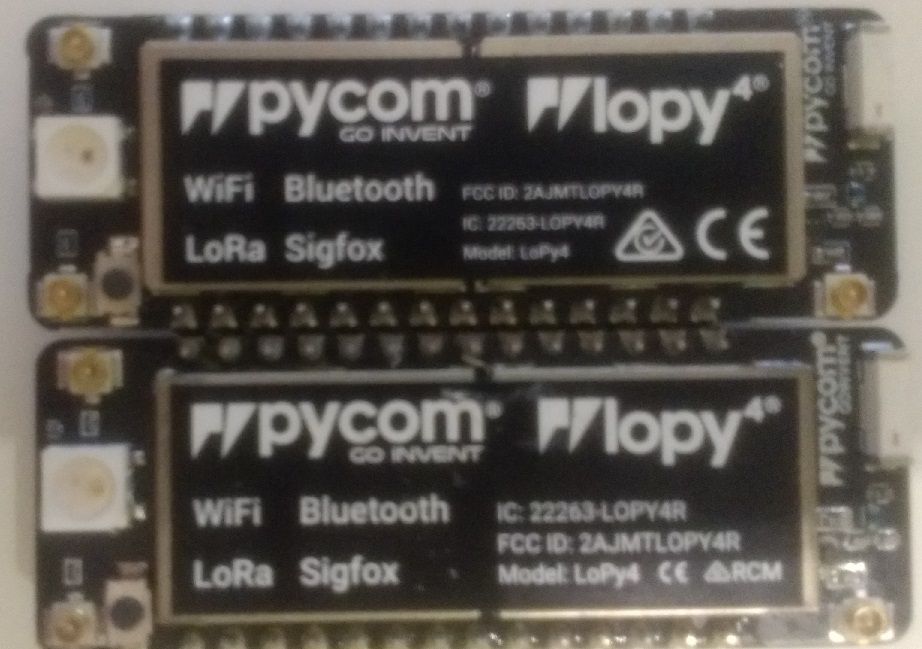
    @jcaron Hi, thank you for your reply here is some additional information: Both of the LoPys are using firmware version Pybytes 1.20.2.r3. The Lopy in the top of the image has a power consumption of 7mA during deep sleep and the other 0.02mA during deep sleep. They both have the exact same firmware and the exact same code which leads me to believe that this is a hardware related issue. Of course these are 2 different batches of Lopys if you notice one has big letters on the Label. with respect to the lopy which isn't going to deepsleep: I tried disabling Pybytes using this pycom.pybytes_on_boot(False) in my boot file but it still consumes 7mA in deepsleep. I also tried erasing all data and it still gives the same result 7mA. I do observe a drop yes in normal operating mode: time.sleep() it is using 40mA then after 15 seconds it drops to 7mA then after 15 seconds returns back to 40mA (because of the reboot after machine.deepsleep) This is a copy of the console: rst:0x7 (TG0WDT_SYS_RESET),boot:0x12 (SPI_FAST_FLASH_BOOT) configsip: 0, SPIWP:0xee clk_drv:0x00,q_drv:0x00,d_drv:0x00,cs0_drv:0x00,hd_drv:0x00,wp_drv:0x00 mode:DIO, clock div:1 load:0x3fff8020,len:8 load:0x3fff8028,len:2128 load:0x4009fa00,len:19760 entry 0x400a05bc As mentioned in my previous post the code is very very simple it simply uses machine.deepsleep() Thanks
  • NB1 (NB-IoT) connection issues

    13
    0 Votes
    13 Posts
    66 Views
    K
    @tuftec I've had occasional modem issues running from USB power alone (especially laptop USB). Maybe include a lithium battery just to convince yourself the problem is not power related.
  • 1 Votes
    4 Posts
    31 Views
    G
    With power cycles, I mean that it temporarily cuts the power and then turns it back on, its a more hard-reset than the reset button in that sense, as we also reset the LTE modem (if applicable) and the lora gateway radios I was thinking too far ahead, and the feature I described is not on the planning, mainly because there is limited use-cases for this as lora gateways are normally kept operational at all times. What you can do, is use machine.deepsleep() and use a sleep timer or interrupt pin to wake up again as described here: https://docs.pycom.io/firmwareapi/pycom/machine/#power-functions After gracefully exiting the pygate using machine.pygate_deinit(). This also puts the device in a low power state, disabling the gateway and sleeping the module. Gijs
  • Confusion over lora.nvram operations

    40
    0 Votes
    40 Posts
    170 Views
    T
    With a little help from @kjm it appears that I have vastly improved the stability of the system when the lte.deinit function fails. I still do not understand why the problem occurs. Apparently the lte entry within the globals dictionary just mysteriously disappears. If you make a lte.deinit() call the system crashes as it cannot find the definition for lte. Does anyone know why this issue occurs and why it has been around for so long? At least for now I have a work around. Some further testing of the method is needed to determine that it is stable enough for field deployment. Peter.
  • Pyscan only reading 4 bytes of a longer UID

    2
    0 Votes
    2 Posts
    19 Views
    G
    Hi, I believe this issue has been fixed in the latest version of the pyscan libraries: https://github.com/pycom/pycom-libraries/pull/123/commits/25adc91fd4c2b231bbecee6580d661cd3b31eab5 Let me know if you are using the correct version of the libraries Gijs
  • Fipy & PyTrack 1.1 - no connection to Microcontroller

    5
    0 Votes
    5 Posts
    364 Views
    W
    I have a fipy plugged into a pytrack v 1.1. If this site allows it I will update this post with combinations and permutations necessary to get connected and flash the bios.[image: 1608331908453-screen-shot-2020-12-18-at-5.47.46-pm.png] Whenever I try some software that might be too advanced I have to flash the BIOS to get the thing back into a programmable condition. For me it's holding the button right next to the LED. AND removing power then holding it while power is restored..and even sometimes another push or 2 for good luck! [image: 1608332060443-screen-shot-2020-12-18-at-5.54.15-pm.png] [image: 1608332089174-screen-shot-2020-12-18-at-5.54.43-pm.png]
  • 0 Votes
    4 Posts
    47 Views
    G
    When was that feature added and should the chip immediately back out of deepsleep when powered over USB while a battery is present? From my understanding, this has always been there. However, I would like to clarify my previous post a little bit: the numbers that get_wake_reason() output are not randomized on every call, but instead on every extended power off. For instance, when I plug in one of the devices after letting it sit for a few days, get_wake_reason() will return some value (0, 14, 38 are the ones I have seen so far) If I re-upload code, put it into deep sleep and remove power to it for another day or so, it will read some other arbitrary seeming value. I believe this is a bug and I'll talk to the firmware team about it. If the issue is crucial for your applications, there might be other workarounds (for example using the machine.deepsleep() and machine.wake_reason() Or, you can check the pytrack.get_sleep_remaining() to verify if we woke up from the accelerometer or from sleep time running out.

Pycom on Twitter