LoPy LoRa Range Testing... Inside a running refrigerator
-
I had to put this out there because it's just cool: LoPy in the Fridge.
Good job Pycom!
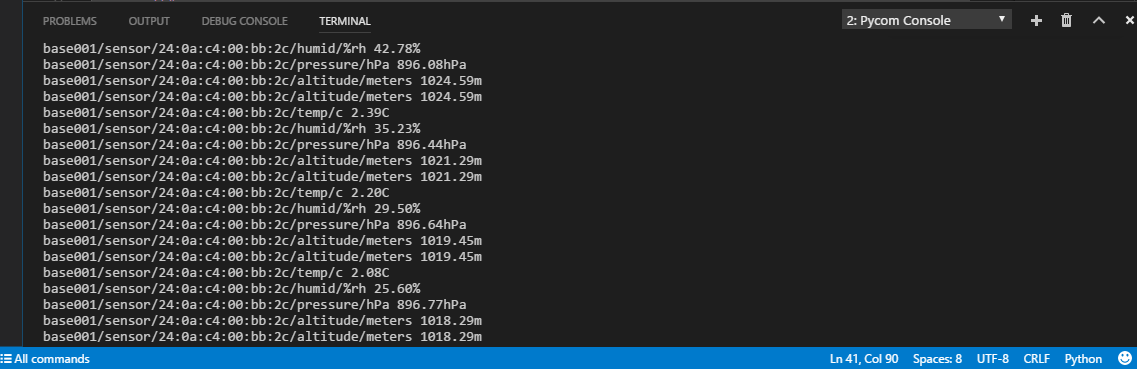
Being lazy and not wanting to run around outside with a battery powered LoPy, I wanted to see how much local interference (EMI from compressors, etc...) it could handle. Good test for LiPo batteries to see how they handle the cold. So I put it in the refrigerator. And to my surprise, it works with the door closed. Maybe it shouldn't be a surprise. Both the NanoGateway and the node are in the same office, not super far apart. The NanoGateway continues to publish node (sensor data) topics to the MQTT broker.
I would like a 'sleep_walk' mode that optimizes for LoRa only (WiFi off) for battery powered devices with BLE on.

LoRa node settings:
lora = LoRa(mode=LoRa.LORA, bandwidth=LoRa.BW_125KHZ, coding_rate=LoRa.CODING_4_8, sf=12, tx_iq=True)
lora_sock = socket.socket(socket.AF_LORA, socket.SOCK_RAW)
lora_sock.setblocking(False)
Data from serial connection on the NanoGateway (only 1 node connected)

Friends don't let friends run with scissors
-
Sometimes the transmission gets mangled.

-
@ledbelly2142 said in LoPy LoRa Range Testing... Inside a running refrigerator:
I would like a 'sleep_walk' mode that optimizes for LoRa only (WiFi off) for battery powered devices with BLE on.
Have you tried
pycom.wifi_on_boot(false)?Note that at the moment if you're battery powered and using the development modules, you probably need to use one of the Deep Sleep Shield, a Pysense or a Pytrack to turn off the ESP32. In that case BLE will be off as well during sleep, but you can use it when you wake up.
-
@jcaron
I need BLE on and everything else off. How much does the ESP32 consume (power) when in normal sleep? It's not easy to find the data. Does 'stand by' on the data sheet mean deep sleep? -
@ledbelly2142 Very nice. Was there any side effect on the coke, like it's magic now?
-
@robert-hh
LOL, I don't know. There's gotta be a Nuka-Cola reference in there somewhere -
@ledbelly2142
There are many types of sleep. The issue is that to keep BLE on, you need to keep the ESP32 powered, and due to a couple of issues on the dev board, that means at least 12 mA power drawn (not by the ESP32, but by the regulator and flash on the board), which translates to about a week with a (rather large) 2500 mAh battery, not even factoring in actual wake times, transmit power, etc.If you use deep sleep through the Deep Sleep Shield, Pysense or Pytrack rather than the "native" sleep modes of the ESP32, you can go down to about 10 µA, but that means the ESP32 is not powered at all, so no BLE during sleep.
Things are different if you use the OEM modules rather than the dev boards.
-
@jcaron
Thanks for the feedback, it helps a lot. Yup, I have to use the deep sleep shields...I will use the OEM for the next iteration, too many advantages. For my current project, I am scrambling for the deep sleep shields which Sea Slug Labs is helping me with. I didn't think I needed the deep sleep shields until it was too late to ship them from Pycom. Sea Slug Labs had the best for customer service ever! Totally bending over backwards to help. My vote for Pycom re-seller of the year award.
-
@ledbelly2142 Glad to Help :)
-
okmarts is happy to help you.


Hello! It looks like you're interested in this conversation, but you don't have an account yet.
Getting fed up of having to scroll through the same posts each visit? When you register for an account, you'll always come back to exactly where you were before, and choose to be notified of new replies (either via email, or push notification). You'll also be able to save bookmarks and upvote posts to show your appreciation to other community members.
With your input, this post could be even better 💗
Register Login