Welcome to the Pycom forum Forum
    • \[\[global:header.categories\]\]
    • \[\[global:header.recent\]\]
    • \[\[global:header.tags\]\]
    • \[\[global:header.popular\]\]
    • Login

    Explore Pybytes | Official Documentation | Report a Firmware Bug/Issue | GitHub

    Lopy with pytrack, how connect/use GPS?

    Scheduled Pinned Locked Moved LoPy
    gpslopypytrack
    76 Posts 5 Posters 33.6k Views 5 Watching
    Loading More Posts
    • Oldest to Newest
    • Newest to Oldest
    • Most Votes
    Reply
    • Reply as topic
    Log in to reply
    This topic has been deleted. Only users with topic management privileges can see it.
    • Z Offline
      zceld @livius
      last edited by

      @livius said in Lopy with pytrack, how connect/use GPS?:

      use simple fix for this

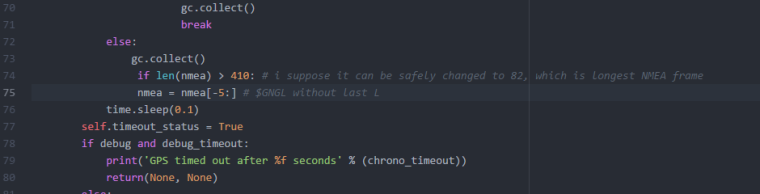
      This solution and you told me about it and the thing is that you have to replace lines 74 and 75 with the lines that are in green, right?
      0_1516291101532_4.PNG

      L 1 Reply Last reply Reply Quote 0
      • L Offline
        livius @zceld
        last edited by livius

        @zceld
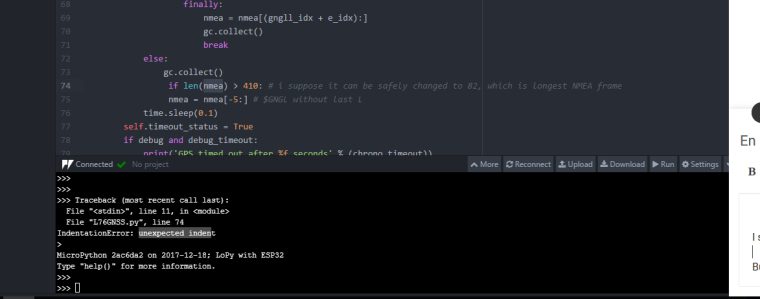
        Yes, but you have indentation problem
        remember that python work on proper indentation.
        nmea line must be indented

        think about people first, then computers

        Z 1 Reply Last reply Reply Quote 0
        • Z Offline
          zceld @livius
          last edited by

          @livius said in Lopy with pytrack, how connect/use GPS?:

          @zceld
          Yes, but you have indentation problem
          remember that python work on proper indentation.
          nmea line must be indented

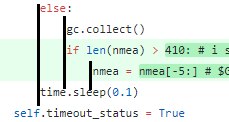
          I suppose you mean this:
          0_1516291578535_5.PNG
          But then how do I fix it?

          L 1 Reply Last reply Reply Quote 0
          • L Offline
            livius @zceld
            last edited by

            @zceld
            0_1516291674076_70f8f1fd-c46e-4ca8-87d2-e34858750cce-image.png

            think about people first, then computers

            Z 1 Reply Last reply Reply Quote 0
            • Z Offline
              zceld @livius
              last edited by

              @livius

              Perfect!. working correctly again. I do not understand how a tabulation can give an error. XDD it shows that I am new? Thank you very much again, although I'll probably come back with something else. But good Thanks to your patience as always.

              Z 1 Reply Last reply Reply Quote 0
              • C Offline
                crumble @zceld
                last edited by

                @zceld

                Is there anything I can do ?

                You can try to call the garbage collector before and after you read the coordinates.

                The better solution. Implement the GPS stuff by your own and share the code with us. You have to read the stream from the GPS chip into fix allocated buffers and parse them by your own. If you need only the coordinates, it is simple, you will need around 100 lines of code. I stuck with my version :-(. Had no time to work on it.

                L 1 Reply Last reply Reply Quote 0
                • Z Offline
                  zceld @zceld
                  last edited by

                  @livius
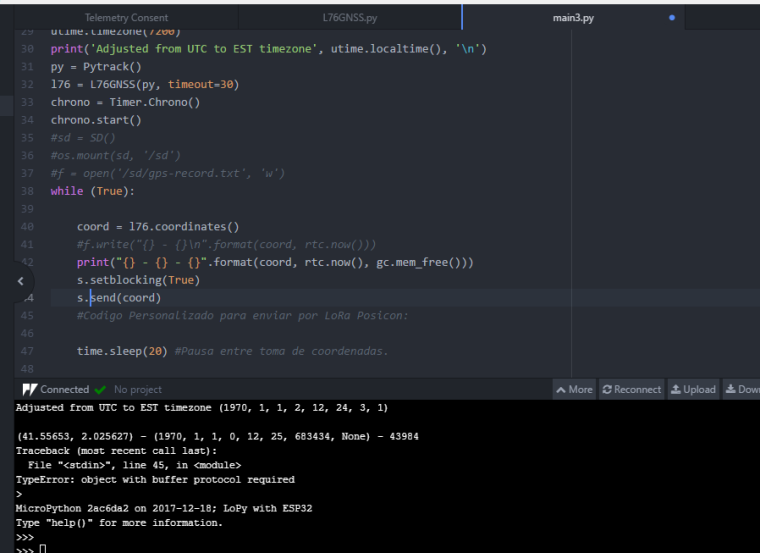
                  Well, I have another doubt. I am trying to send the coordinates by LoRa and it gives me the following problem that I do not know how to solve.
                  0_1516292916315_6.PNG

                  Other questions more:

                  print("{} - {} - {}".format(coord, rtc.now(), gc.mem_free()))
                  

                  This returns (latitude, longitude) - (Real time clock) - free ram
                  But and the altitude?
                  The time can be updated?

                  L C 2 Replies Last reply Reply Quote 0
                  • L Offline
                    livius @zceld
                    last edited by livius

                    @zceld said in Lopy with pytrack, how connect/use GPS?:
                    touple is not buffered
                    you need bytes you can try to cast this as bytes() but for lora better is using pack.
                    look at samples about lora in official docs https://docs.pycom.io/

                    Time you can update from wifi connection
                    by e.g.

                    rtc.ntp_sync("pool.ntp.org")
                    

                    or retrive it from GPS
                    or some external device for DCF or MSF

                    think about people first, then computers

                    1 Reply Last reply Reply Quote 0
                    • C Offline
                      crumble @zceld
                      last edited by

                      @zceld

                      But and the altitude?
                      The time can be updated?

                      If you look into the code of the library you will see, that only the coordinates are read from the GPS. No altitude and no dateTime.

                      The time information is read from WiFi. You will need access to an NTP server.

                      The sentence which is used to get the coordinates contains the time as well, but not the date. If you need only the time, you can simply add this to the library.

                      For date and time you have to add support for parsing additional NMEA sentences.

                      1 Reply Last reply Reply Quote 0
                      • L Offline
                        livius @crumble
                        last edited by

                        @crumble
                        better use existing one
                        https://github.com/livius2/micropyGPS
                        and exctend it if needed

                        think about people first, then computers

                        Z 1 Reply Last reply Reply Quote 0
                        • Z Offline
                          zceld @livius
                          last edited by

                          @livius
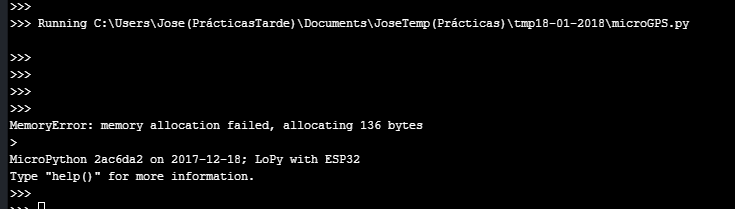
                          Thank you very much for the recommendation but using 'microGPS' gives me a lack of memory again.
                          0_1516633835702_7.PNG

                          On the other hand I do not know if to take advantage of this post or open another one. It is on the subject LoRa that I do not understand very well the programming examples. I am using this one.

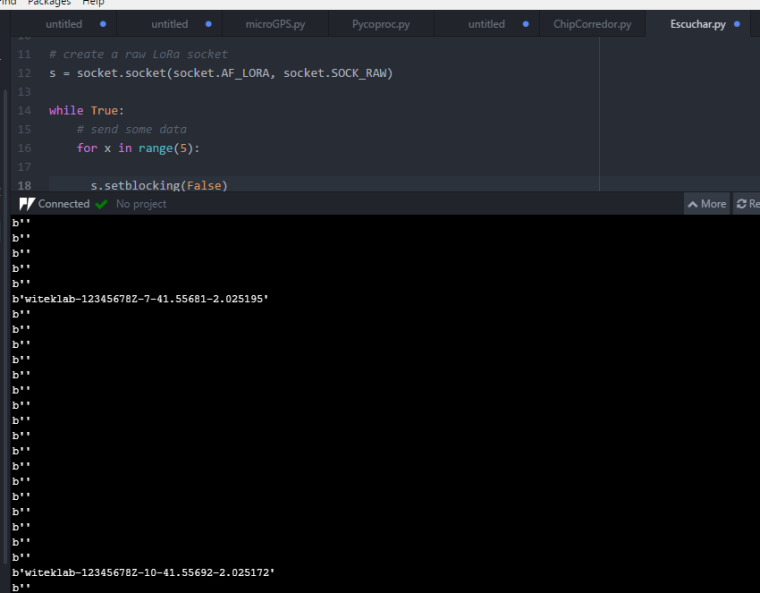
                          Using a board in sending mode, and another in receiver mode, I do not understand why there are messages sent by LoRa that are lost or not picked up by the receiver.
                          This captur reciver:
                          0_1516634446145_8.PNG

                          transmitter:0_1516634503753_9.PNG
                          print:
                          identifier-identifier-counter-longitude-latitude

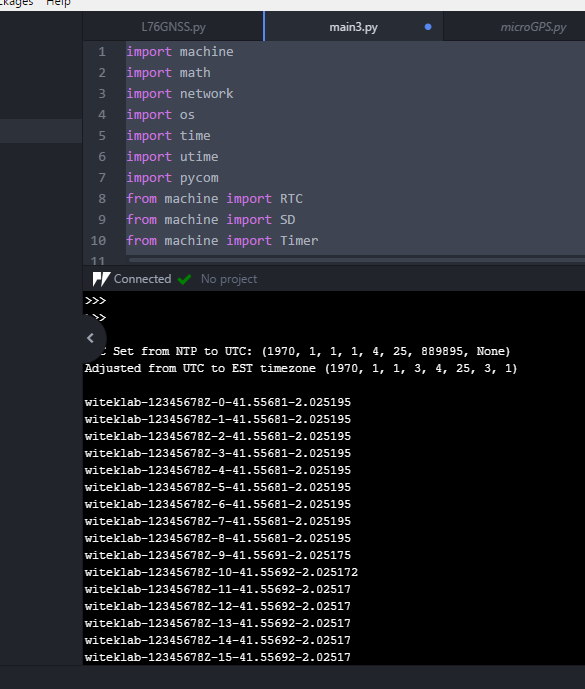
                          As you can see in the image of the receiver, it goes from counter 7 to 10 and has lost message 8 and 9

                          • issuer code:
                          import machine
                          import math
                          import network
                          import os
                          import time
                          import utime
                          import pycom
                          from machine import RTC
                          from machine import SD
                          from machine import Timer
                          from L76GNSS import L76GNSS
                          from pytrack import Pytrack
                          
                          from network import LoRa
                          import socket                                                                 
                          lora = LoRa(mode=LoRa.LORA)                                                  
                          s = socket.socket(socket.AF_LORA, socket.SOCK_RAW)                   
                          # setup as a station
                          
                          import gc
                          
                          time.sleep(2)
                          gc.enable()
                          
                          # setup rtc
                          rtc = machine.RTC()
                          rtc.ntp_sync("pool.ntp.org")
                          utime.sleep_ms(750)
                          print('\nRTC Set from NTP to UTC:', rtc.now())
                          utime.timezone(7200)
                          print('Adjusted from UTC to EST timezone', utime.localtime(), '\n')
                          py = Pytrack()
                          l76 = L76GNSS(py, timeout=30)
                          chrono = Timer.Chrono()
                          chrono.start()
                          j=0 #accountant
                          while (True):
                          
                              coord = l76.coordinates()
                          
                              #Codigo Personalizado para enviar por LoRa Posicon:
                              x = "witeklab-"+"12345678Z-"+str(j)+"-"+str(coord[0]) + "-"+str(coord[1])
                              s.setblocking(True)
                              s.send(x)
                              print(x)
                              time.sleep(2) #Pausa entre toma de coordenadas.
                              j=1+j
                          

                          receiver code:

                          from network import LoRa
                          import socket
                          import machine
                          import time
                          import pycom
                          
                          # initialize LoRa in LORA mode
                          # more params can also be given, like frequency, tx power and spreading factor
                          lora = LoRa(mode=LoRa.LORA)
                          
                          # create a raw LoRa socket
                          s = socket.socket(socket.AF_LORA, socket.SOCK_RAW)
                          
                          while True:
                              # send some data
                              for x in range(5):
                          
                                s.setblocking(False)
                                data = s.recv(64)
                                time.sleep(0.1)
                                print(data)
                          C L 2 Replies Last reply Reply Quote 0
                          • C Offline
                            crumble @zceld
                            last edited by

                            @zceld LoRa is like a radio in citizen band. Anyone can send messages around and all have to listen to them. So you may receive data from other devices as well.

                            Too solve your specific problem you shall set in your receiver blocking to true. This will wait until you reveived a message. If it is false it will not wait to receive a message in line `data = s.recv(64)
                            So it will continue with an empty string, because it has not received a message.

                            Setting blocking mode to false is useful, if you want to run your loop until you received a certain message. Setting it to true is useful if you want to start the loop after you received a message.

                            If you have only nonblocking calls and you want to wait for a message, you have to call it in a loop until something receives. This will need a lot of battery power.

                            If you want to run a loop until you receive a certain message and you have only blocking calls, you have to use multi threading to solve this problem. This will not consume much battery power, but it makes your code more complex.

                            Z 1 Reply Last reply Reply Quote 0
                            • L Offline
                              livius @zceld
                              last edited by

                              @zceld said in Lopy with pytrack, how connect/use GPS?:

                              Thank you very much for the recommendation but using 'microGPS' gives me a lack of memory again.

                              When and where do you create microGPS object instance?

                              think about people first, then computers

                              Z 1 Reply Last reply Reply Quote 0
                              • Z Offline
                                zceld @crumble
                                last edited by zceld

                                @crumble
                                I am very interested in what you say, because what really interests me is that the Lora system is in a listening mode until I receive a message, when we receive a message we can do something specific.

                                So a possible solution would be changing s.setblocking (True) like this?:

                                from network import LoRa
                                import socket
                                import machine
                                import time
                                import os
                                import pycom
                                
                                lora = LoRa(mode=LoRa.LORA)
                                
                                while True:
                                      s.setblocking(True)
                                      data = s.recv(64) 
                                      print(data)
                                
                                C 1 Reply Last reply Reply Quote 0
                                • Z Offline
                                  zceld @livius
                                  last edited by

                                  @livius

                                  Well no, I just ran microGPS as if it were the main. So you want to say that microGPS is a library and that to give me the coordinates I should develop a code like this one but with the library 'microGPS'?

                                  Example code:

                                  import machine
                                  import math
                                  import network
                                  import os
                                  import time
                                  import utime
                                  import pycom
                                  from machine import RTC
                                  from machine import SD
                                  from machine import Timer
                                  from L76GNSS import L76GNSS
                                  from pytrack import Pytrack
                                  #send with LoRa:
                                  from network import LoRa
                                  import socket                                                    
                                  lora = LoRa(mode=LoRa.LORA)                                                  
                                  s = socket.socket(socket.AF_LORA, socket.SOCK_RAW)                
                                  
                                  # setup as a station
                                  import gc
                                  gc.enable()
                                  
                                  # setup rtc
                                  rtc = machine.RTC()
                                  rtc.ntp_sync("pool.ntp.org")
                                  utime.sleep_ms(750)
                                  print('\nRTC Set from NTP to UTC:', rtc.now())
                                  utime.timezone(7200)
                                  print('Adjusted from UTC to EST timezone', utime.localtime(), '\n')
                                  py = Pytrack()
                                  l76 = L76GNSS(py, timeout=30)
                                  chrono = Timer.Chrono()
                                  chrono.start()
                                  
                                  while (True):
                                  
                                      coord = l76.coordinates()
                                  
                                  1 Reply Last reply Reply Quote 0
                                  • C Offline
                                    crumble @zceld
                                    last edited by

                                    @zceld said in Lopy with pytrack, how connect/use GPS?:

                                    So a possible solution would be changing s.setblocking (True) like this?:

                                    Yes. You need to set it only once outside the loop:

                                    s = socket.socket(socket.AF_LORA, socket.SOCK_RAW)
                                    s.setblocking(True)
                                    while True:
                                       data = s.recv(64) 
                                       print(data)
                                    
                                    Z 1 Reply Last reply Reply Quote 0
                                    • Z Offline
                                      zceld @crumble
                                      last edited by

                                      @crumble

                                      Great! thank you very much. Now I just need to be able to connect via Wi-Fi directly to Lopy, I do not know what the password is:
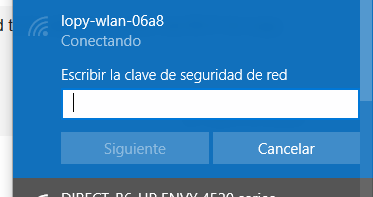
                                      0_1516721750191_10.PNG

                                      C 1 Reply Last reply Reply Quote 0
                                      • C Offline
                                        crumble @zceld
                                        last edited by

                                        @zceld

                                        here you will find the passowrd

                                        https://docs.pycom.io/chapter/toolsandfeatures/repl/telnet.html

                                        Z 1 Reply Last reply Reply Quote 0
                                        • Z Offline
                                          zceld
                                          last edited by zceld

                                          good morning everyone

                                          I already have a question in the ink, I've been looking and I have not seen anything clear about the plate. Therefore I take my post of doubts.

                                          Someone could explain to me what changes if you have write the function:

                                          s.setblocking (True)
                                          #or
                                          s.setblocking (False)
                                          
                                          ??
                                          

                                          Thanks, greetings in advance!

                                          By the way, I already managed to connect via wifi @crumble

                                          1 Reply Last reply Reply Quote 0
                                          • Z Offline
                                            zceld
                                            last edited by zceld

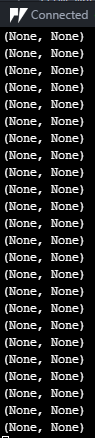
                                            On the other hand, I have the insecurity that I never know how long it will take to find GPS the pytrack ... sometimes they connect in 2 minutes, other times in 15 and then cases like today that I have been without signal for the whole afternoon...

                                            Code:

                                            import machine
                                            import math
                                            import network
                                            import os
                                            import time
                                            import utime
                                            import pycom
                                            from machine import RTC
                                            from machine import SD
                                            from machine import Timer
                                            from L76GNSS import L76GNSS
                                            from pytrack import Pytrack
                                            #send with LoRa:
                                            from network import LoRa
                                            import socket                                                    
                                            lora = LoRa(mode=LoRa.LORA)                                                  
                                            s = socket.socket(socket.AF_LORA, socket.SOCK_RAW)                
                                            
                                            # setup as a station
                                            import gc
                                            gc.enable()
                                            
                                            # setup rtc
                                            rtc = machine.RTC()
                                            rtc.ntp_sync("pool.ntp.org")
                                            utime.sleep_ms(750)
                                            print('\nRTC Set from NTP to UTC:', rtc.now())
                                            utime.timezone(7200)
                                            print('Adjusted from UTC to EST timezone', utime.localtime(), '\n')
                                            py = Pytrack()
                                            l76 = L76GNSS(py, timeout=30)
                                            chrono = Timer.Chrono()
                                            chrono.start()
                                            
                                            while (True):
                                            
                                                coord = l76.coordinates()                     
                                            

                                            Result:
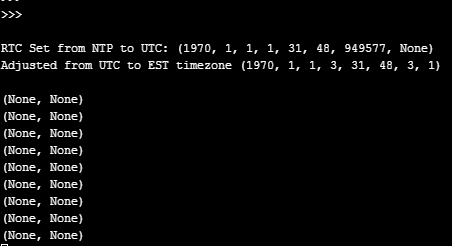
                                            0_1516899221556_123.PNG

                                            0_1516901169824_1.PNG

                                            C 1 Reply Last reply Reply Quote 0

                                            Hello! It looks like you're interested in this conversation, but you don't have an account yet.

                                            Getting fed up of having to scroll through the same posts each visit? When you register for an account, you'll always come back to exactly where you were before, and choose to be notified of new replies (either via email, or push notification). You'll also be able to save bookmarks and upvote posts to show your appreciation to other community members.

                                            With your input, this post could be even better 💗

                                            Register Login
                                            • 1
                                            • 2
                                            • 3
                                            • 4
                                            • 3 / 4
                                            • First post
                                              Last post

                                            Pycom on Twitter

                                            Pycom