Seek help about programming: How to send ultrasonic sensor data to gateway using LoRa OTAA ?
-
Hi everybody,
I have an Ultrasonic sensor and a LoPy and I connected the sensor to the LoPy via the expansion board. The ultrasonic module works well.
My issue is how to program the code to send the sensor data using LoRa OTAA method. This is my code. It can join the network but fail to transmit the data.The console always shows my error at the s.send() part. The whole structure was designed by my incomplete knowledge, I don't know if the logic is right, maybe some logic is a little stupid. I am a beginner of Python and not familiar with the language. Anybody can help me check the mistakes and modify it. Thanks in advance.import import binascii import pycom import socket import time from network import LoRa from machine import Pin, Timer echo = Pin(Pin.exp_board.G7, mode=Pin.IN) trigger = Pin(Pin.exp_board.G8, mode=Pin.OUT) # Colors off = 0x000000 red = 0xff0000 green = 0x00ff00 blue = 0x0000ff # Turn off hearbeat LED pycom.heartbeat(False) # Initialize LoRaWAN radio lora = LoRa(mode=LoRa.LORAWAN) # Set network keys app_key = binascii.unhexlify('11 22 33 44 55 66 77 88 99 00 11 22 33 44 55 65'.replace(' ','')) app_eui = binascii.unhexlify('00 00 00 00 00 00 00 00'.replace(' ','')) # Join the network lora.join(activation=LoRa.OTAA, auth=(app_eui, app_key), timeout=0) pycom.rgbled(red) # Loop until joined while not lora.has_joined(): print('Not joined yet...') pycom.rgbled(off) time.sleep(0.1) pycom.rgbled(red) time.sleep(2) print('Joined') pycom.rgbled(blue) s = socket.socket(socket.AF_LORA, socket.SOCK_RAW) s.setsockopt(socket.SOL_LORA, socket.SO_DR, 5) s.setblocking(True) trigger(0) chrono = Timer.Chrono() while True: chrono.reset() trigger(1) time.sleep_us(10) trigger(0) while echo() == 0: pass chrono.start() while echo() == 1: pass chrono.stop() distance = chrono.read_us() / 58.0 s.send(bytes([binascii.b2a(distance) % 256])) print('Sent %s bytes') pycom.rgbled(green) time.sleep(0.5) pycom.rgbled(blue) time.sleep(0.5) print("Distance {:.0f} cm".format(distance)) time.sleep(5)The error is:
Not joined yet...
Not joined yet...
Joined
Traceback (most recent call last):
File "<stdin>", line 64, in <module>
AttributeError: 'module' object has no attribute 'b2a' -
@rachelsimida said in Seek help about programming: How to send ultrasonic sensor data to gateway using LoRa OTAA ?:
s.send(bytes([binascii.b2a(distance) % 256]))
This line is flagged as wrong.
If you want to send it as a readable byte string, it would be something like:
s.send(str(distance).encode())
or base64-encoded
s.send(binascii.b2a_base64(str(distance)))Besides that, the last line should be indented, to be in the loop.
-
@robert-hh THANK YOU SO MUCH! It works when I use "s.send(str(distance).encode())".
While the "s.send(binascii.b2a_base64(str(distance)))" stills shows the invalid syntax.
Anyway, it helps me solve the problem.
The issue confused me couples of days. Now the gateway received the data like this:
I wonder know if the data can be changed another way that reads more simple and people can easily know the contents. Because u know the byte string looks so complex.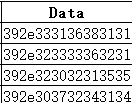
If the data must be showed like this, can you tell me the program to inverse these data to read the real distance from ultrasonic sensor. Because I need process these date in the Matlab later. -
@rachelsimida it's Ascii-characters, displayed as hex.
-
@rachelsimida The variant "s.send(binascii.b2a_base64(str(distance)))" did not work, because the first line of your code is wrong. it should be:
import binascii
Nevertheless, something like:
'392e32303131' ist just the hex representation of the text '9.2011'.
You could convert than with binascii.unhexlify('392e32303131') into b'9.2011'
or if you like a string instead a bytes object with
binascii.unhexlify('392e32303131').decode() into '9.2011' -
@rachelsimida You can also send that as json string, like:
import ujson  # put that into the import section

s.send(ujson.dumps({"dist" : distance}).encode())
That should give you readable data in the TTN log.
-
@robert-hh Very thanks.
The " binascii.unhexlify('392e32303131').decode() "works like
The" s.send(ujson.dumps({"dist" : distance}).encode()) "works like
-
@rachelsimida The intention of TTN is not to get the values from the TTN console, but set up your own server which finally receives teh messages. At that point, they are decoded.
If you look at the integrations tab, you can create there an message endpoint. For testing, you can define tes server whuch just collects your data. Click "get started creating one", then "HTTP Integration", ans there you can specify an server for receiving POST messages form TTN with your data.
"For testing, a website called RequestBin (https://requestb.in/) may be used to receive the data that TTN forwards (via POST Request). To set this up, navigate to RequestBin and click the Create a RequestBin." You'll get an URL, which you can paste into the HTTP Intergration form. -
@robert-hh Thank you so so so much for your patience.
-
@robert-hh Thank you robert-hh. I have solved the previous issues. It seems like you are an expert of this area. May I ask you a new question.
Next I want to design the deep sleep mode of my project for power save. Awake the device when we need it work. If the board can realize this function? Because I find it's different from pysense and pytrack, which has this function directly. Would you mind give me some direction? -
@rachelsimida sorry, I never tried deepsleep. But there is a lot of diskussion around.
-
@robert-hh Thank you.
-
The LoPy, SiPy and WiPy2 need to use either a Deep sleep shield, pysense or pytrack to get a low sleep current draw. On the newer modules, this is not required and they can directly use the ESP32 processor's deep sleep function with only 15uA current draw.
-
@seb Thanks for your guide. Such a pity my teacher only give me the original modules. It's a course project for me. So apart from deep sleep mode, if there exists other way to help the LoPy+ Expansion board+ ultrasonic sensor save power?
-
You can still use the ESP32's deep sleep to lower the modules current consumption down to 15mA, but with a deep sleep shield this will go down to 15uA or so. If your teacher ordered direct from pycom or not he should have received deep sleep shields with his order. If not he can request some for free by emailing salessupport@pycom.io
-
Hello @Rachelsimida ,
I am facing issues sending data from Hc-sr04 to Pysense. Could you please upload your working code? This would be really great!! -
import binascii
import pycom
import socket
import time
import ujson  # put that into the import section
from network import LoRa
from machine import Pin, Timer

echo = Pin(Pin.exp_board.G7, mode=Pin.IN)
trigger = Pin(Pin.exp_board.G8, mode=Pin.OUT)

# Colors
off = 0x000000
red = 0xff0000
green = 0x00ff00
blue = 0x0000ff

# Turn off hearbeat LED
pycom.heartbeat(False)

# Initialize LoRaWAN radio
lora = LoRa(mode=LoRa.LORAWAN)

# Set network keys
app_key = binascii.unhexlify('11 22 33 44 55 66 77 88 99 00 11 22 33 44 55 65'.replace(' ',''))
app_eui = binascii.unhexlify('00 00 00 00 00 00 00 00'.replace(' ',''))

# Join the network
lora.join(activation=LoRa.OTAA, auth=(app_eui, app_key), timeout=0)
pycom.rgbled(red)

# Loop until joined
while not lora.has_joined():
    print('Not joined yet...')
    pycom.rgbled(off)
    time.sleep(0.1)
    pycom.rgbled(red)
    time.sleep(2)

print('Joined')
pycom.rgbled(blue)

s = socket.socket(socket.AF_LORA, socket.SOCK_RAW)
s.setsockopt(socket.SOL_LORA, socket.SO_DR, 5)
s.setblocking(True)

trigger(0)
chrono = Timer.Chrono()

while True:
    chrono.reset()
    trigger(1)
    time.sleep_us(10)
    trigger(0)
    while echo() == 0:
        pass
    chrono.start()
    while echo() == 1:
        pass
    chrono.stop()
    distance = chrono.read_us() / 58.0
    s.send(str(distance).encode())
    pycom.rgbled(green)
    time.sleep(0.5)
    pycom.rgbled(blue)
    time.sleep(0.5)
    print("Distance {:.0f} cm".format(distance))
    time.sleep(5)


Hello! It looks like you're interested in this conversation, but you don't have an account yet.
Getting fed up of having to scroll through the same posts each visit? When you register for an account, you'll always come back to exactly where you were before, and choose to be notified of new replies (either via email, or push notification). You'll also be able to save bookmarks and upvote posts to show your appreciation to other community members.
With your input, this post could be even better 💗
Register Login