[Solved]Firmware upgrade tool for the Sequans Monarch SQN3330
-
Hi,
I was finally able to resolve the issue. The problem was with the SD card mount. The card would show successful mount , but for some reason would not show the *.dup file. I double checked my FAT32 format it looked right. Per suggestion from @jmarcelino, I formatted the card though the FiPy and then loaded the file and the issue was resolved:
The card directory was :>>> import time >>> import os >>> from machine import SD >>> sd=SD() >>> os.mount(sd,'/sd') >>> os.listdir('/sd') [] >>>So tried the format :
import os
from machine import SD
sd=SD()
os.mount(sd,'/sd')
os.mkfs(‘/sd')
After the format, and reload of the file the card directory showed as:
>>> import time
>>> import os
>>> from machine import SD
>>> sd=SD()
>>> os.mount(sd,'/sd')
>>> os.listdir('/sd')
['FIPY_GPY_CATM1_33988.dup']
>>>
Initial thread:
I followed the instruction per the link below and placed the codec.py, crc.py, sqnsupgrade.py, stp.py and README.md into VBS project space :
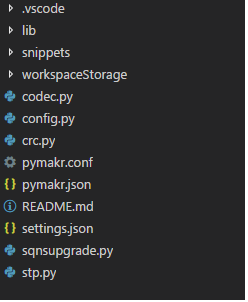
Per document : https://docs.pycom.io/chapter/tutorials/lte/firmware.html
Then I uploaded those files to my FiPy:Connecting on COM25... >>> Uploading project (main folder)... Reading file status [1/4] Writing file codec.py [2/4] Writing file crc.py [3/4] Writing file sqnsupgrade.py [4/4] Writing file stp.py Upload done, resetting board... ets Jun 8 2016 00:22:57 rst:0x7 (TG0WDT_SYS_RESET),boot:0x13 (SPI_FAST_FLASH_BOOT) configsip: 0, SPIWP:0xee clk_drv:0x00,q_drv:0x00,d_drv:0x00,cs0_drv:0x00,hd_drv:0x00,wp_drv:0x00 mode:DIO, clock div:1 load:0x3fff8028,len:8 load:0x3fff8030,len:1728 load:0x4009fa00,len:0 load:0x4009fa00,len:14584 entry 0x400a059c MicroPython v1.8.6-849-83e2f7f on 2018-03-19; FiPy with ESP32 Type "help()" for more information.And , I also copied the firmware files : FIPY_GPY_CATM1_33988 and FIPY_GPY_NB1_35351 dup files into a recently formated FAT32 micro SD.
On executingimport sqnsupgrade
I get :
>>> import sqnsupgrade
Traceback (most recent call last):
  File "<stdin>", line 1, in <module>
  File "sqnsupgrade.py", line 7
SyntaxError: invalid syntax
>>>
I must be doing something wrong or reading in between the lines per the instructions. Thanks in advance!!
-
@dda
I think the project files hasn’t synced correctly. Please do, os.mkfs(“/flash”) to restore the board to a clean install and try syncing the project again. -
@jmarcelino
Thank you for your response. I followed your instructions, ranConnecting on COM25 >>> import os >>> os.mkfs('/flash')Then restarted Visual Studio Code and re-powered Fipy and Uploaded files:
Connecting on COM25... >>> Uploading project (main folder)... Reading file status Failed to read project status, uploading all files Creating dir workspaceStorage Creating dir workspaceStorage/bc895fb1973b5d5624b4a2ed2625b38c [1/7] Writing file codec.py [2/7] Writing file crc.py [3/7] Writing file pymakr.json [4/7] Writing file settings.json [5/7] Writing file sqnsupgrade.py [6/7] Writing file stp.py [7/7] Writing file workspaceStorage/bc895fb1973b5d5624b4a2ed2625b38c/meta.json Upload done, resetting board... ets Jun 8 2016 00:22:57 rst:0x7 (TG0WDT_SYS_RESET),boot:0x13 (SPI_FAST_FLASH_BOOT) configsip: 0, SPIWP:0xee clk_drv:0x00,q_drv:0x00,d_drv:0x00,cs0_drv:0x00,hd_drv:0x00,wp_drv:0x00 mode:DIO, clock div:1 load:0x3fff8028,len:8 load:0x3fff8030,len:1728 load:0x4009fa00,len:0 load:0x4009fa00,len:14584 entry 0x400a059c MicroPython v1.8.6-849-83e2f7f on 2018-03-19; FiPy with ESP32 Type "help()" for more information. >>>Then tried:
>>> import sqnsupgrade Traceback (most recent call last): File "<stdin>", line 1, in <module> File "sqnsupgrade.py", line 7 SyntaxError: invalid syntax >>>Same as before, why is the import not working, the file is there and under the root directory itself. I also repeated the same by keeping the firmware files in a lib directory, same results.
Connecting on COM25 >>> import os >>> os.mkfs('/flash') Uploading project (main folder)... Reading file status Failed to read project status, uploading all files Creating dir lib Creating dir workspaceStorage Creating dir workspaceStorage/bc895fb1973b5d5624b4a2ed2625b38c [1/7] Writing file lib/codec.py [2/7] Writing file lib/crc.py [3/7] Writing file lib/sqnsupgrade.py [4/7] Writing file lib/stp.py [5/7] Writing file pymakr.json [6/7] Writing file settings.json [7/7] Writing file workspaceStorage/bc895fb1973b5d5624b4a2ed2625b38c/meta.json Upload done, resetting board... ets Jun 8 2016 00:22:57 rst:0x7 (TG0WDT_SYS_RESET),boot:0x13 (SPI_FAST_FLASH_BOOT) configsip: 0, SPIWP:0xee clk_drv:0x00,q_drv:0x00,d_drv:0x00,cs0_drv:0x00,hd_drv:0x00,wp_drv:0x00 mode:DIO, clock div:1 load:0x3fff8028,len:8 load:0x3fff8030,len:1728 load:0x4009fa00,len:0 load:0x4009fa00,len:14584 entry 0x400a059c MicroPython v1.8.6-849-83e2f7f on 2018-03-19; FiPy with ESP32 Type "help()" for more information. >>> import sqnsupgrade Traceback (most recent call last): File "<stdin>", line 1, in <module> File "/flash/lib/sqnsupgrade.py", line 7 SyntaxError: invalid syntax >>> -
@dda
Thank you.What is the content of sqnsupgrade.py as shown in Visual Studio?
-
@jmarcelino
The content is about 1238 lines of code.<!DOCTYPE html> <html lang="en"> <head> <meta charset="utf-8"> <link rel="dns-prefetch" href="https://assets-cdn.github.com"> <link rel="dns-prefetch" href="https://avatars0.githubusercontent.com"> <link rel="dns-prefetch" href="https://avatars1.githubusercontent.com"> <link rel="dns-prefetch" href="https://avatars2.githubusercontent.com"> <link rel="dns-prefetch" href="https://avatars3.githubusercontent.com"> <link rel="dns-prefetch" href="https://github-cloud.s3.amazonaws.com"> <link rel="dns-prefetch" href="https://user-images.githubusercontent.com/"> <link crossorigin="anonymous" media="all" integrity="sha512-ffMzRgUi/mtdt6xiC1jtSP1kZPeTBajWgak1AnijhQVTr6eCui3vcdxCvFCJjbjAXg730wT/i/rceI+PIwS6kQ==" rel="stylesheet" href="https://assets-cdn.github.com/assets/frameworks-c4bbb32afb602dcf8c75be0bc4c83014.css" /> <link crossorigin="anonymous" media="all" integrity="sha512-WZklPJpB37+ljTfVNn0494msEFLupIvcsVPpv1UCNJvCJAf0oFgpGlw4+OV4hQ3WMFTKbmuSVLk6uMmWuhnuqQ==" rel="stylesheet" href="https://assets-cdn.github.com/assets/github-0c21e211e4fd150ac107ccf0fcf751e5.css" /> <link crossorigin="anonymous" media="all" integrity="sha512-55jV1x0Cc2ZmUyGueT7DnpTSBe4rIx9uhX4ZBXAhhUhR6Yn67TCdY6xWkdvMVqpeAhzLWIKQU5PWG1RH0eTlSQ==" rel="stylesheet" href="https://assets-cdn.github.com/assets/site-37b627a1dacd99c337a986787006aa1c.css" /> <meta name="viewport" content="width=device-width"> <title>pycom-libraries/sqnsupgrade.py at master · pycom/pycom-libraries · GitHub</title> <meta name="description" content="GitHub is where people build software. More than 27 million people use GitHub to discover, fork, and contribute to over 80 million projects."> <link rel="search" type="application/opensearchdescription+xml" href="/opensearch.xml" title="GitHub"> <link rel="fluid-icon" href="https://github.com/fluidicon.png" title="GitHub"> <meta property="fb:app_id" content="1401488693436528"> ..... .... .... <div class="Popover js-hovercard-content position-absolute" style="display: none; outline: none;" tabindex="0"> <div class="Popover-message Popover-message--bottom-left Popover-message--large Box box-shadow-large" style="width:360px;"> </div> </div> <div id="hovercard-aria-description" class="sr-only"> Press h to open a hovercard with more details. </div> </body> </html> -
@dda
Umm that's definitely not right. Should be Python code.Can you try downloading it again? It's better to download the whole project as Zip from Github and it pick it from there. I think you chose to save the webpage instead.
-
@jmarcelino
That was really a critical error on my part, I apologize . I have downloaded all the files again looks the same as on Git.
I have the two *.dup files under /sd directory in my microSD card.>>>import sqnsupgrade >>> sqnsupgrade.run('/sd/FIPY_GPY_CATM1_33988.dup', 921600) <<< Welcome to the SQN3330 firmware updater >>> ♦Traceback (most recent call last): File "<stdin>", line 3, in <module> File "/flash/lib/sqnsupgrade.py", line 72, in run OSError: [Errno 2] ENOENT ♦> MicroPython v1.8.6-849-83e2f7f on 2018-03-19; FiPy with ESP32 Type "help()" for more information. -
@dda
Glad you got it going so far.Are you saying you placed the files into a folder called sd on the SD card? That's actually not necessary, the files should be directly on the root folder.
The /sd is just a mount point for MicroPython
-
@jmarcelino
Now I get AT+SMSWBOOT=3,0 failed.
I removed the sd folder from the SD card, formatted it again to FAT32 and SD card now contains just the two *.dup files for CAT-M and NBIoT only on the root.On executing the following from main.py or from REPL I get the error:
Connecting on COM25...

>>>
Uploading project (main folder)...

Reading file status
Failed to read project status, uploading all files
Creating dir lib
Creating dir workspaceStorage
Creating dir workspaceStorage/bc895fb1973b5d5624b4a2ed2625b38c
[1/8] Writing file lib/codec.py
[2/8] Writing file lib/crc.py
[3/8] Writing file lib/sqnsupgrade.py
[4/8] Writing file lib/stp.py
[5/8] Writing file main.py
[6/8] Writing file pymakr.json
[7/8] Writing file settings.json
[8/8] Writing file workspaceStorage/bc895fb1973b5d5624b4a2ed2625b38c/meta.json
Upload done, resetting board...
ets Jun  8 2016 00:22:57

rst:0x7 (TG0WDT_SYS_RESET),boot:0x13 (SPI_FAST_FLASH_BOOT)
configsip: 0, SPIWP:0xee
clk_drv:0x00,q_drv:0x00,d_drv:0x00,cs0_drv:0x00,hd_drv:0x00,wp_drv:0x00
mode:DIO, clock div:1
load:0x3fff8028,len:8
load:0x3fff8030,len:1728
load:0x4009fa00,len:0
load:0x4009fa00,len:14584
entry 0x400a059c
<<< Welcome to the SQN3330 firmware updater >>>
Entering recovery mode
Traceback (most recent call last):
  File "main.py", line 2, in <module>
  File "/flash/lib/sqnsupgrade.py", line 98, in run
OSError: AT+SMSWBOOT=3,0 failed!
MicroPython v1.8.6-849-83e2f7f on 2018-03-19; FiPy with ESP32
Type "help()" for more information.
>>>
>>> import sqnsupgrade >>> sqnsupgrade.run('/FIPY_GPY_CATM1_33988.dup', 921600) <<< Welcome to the SQN3330 firmware updater >>> Entering recovery mode Traceback (most recent call last): File "<stdin>", line 1, in <module> File "/flash/lib/sqnsupgrade.py", line 98, in run OSError: AT+SMSWBOOT=3,0 failed! >>> -
@dda
OK it's reading the files correctly. Can you try a couple more times? Make sure it's from a clean, freshly power up, start. -
@jmarcelino
Ok repeated the following steps in order:- Ran os.mkfs('/flash')
- Powered off Fipy/Expansion board 2.0
- Took out SD card, formatted the SD card and reloaded the CATM 's dup file into it.
- Powered Fipy on Expansion 3.0
5 Started VSC software & Uploaded files
Creating dir lib
Creating dir workspaceStorage
Creating dir workspaceStorage/bc895fb1973b5d5624b4a2ed2625b38c
[1/8] Writing file lib/codec.py
[2/8] Writing file lib/crc.py
[3/8] Writing file lib/sqnsupgrade.py
[4/8] Writing file lib/stp.py
[5/8] Writing file main.py
[6/8] Writing file pymakr.json
[7/8] Writing file settings.json
[8/8] Writing file workspaceStorage/bc895fb1973b5d5624b4a2ed2625b38c/meta.json
Upload done, resetting board...
ets Jun  8 2016 00:22:57

rst:0x7 (TG0WDT_SYS_RESET),boot:0x13 (SPI_FAST_FLASH_BOOT)
configsip: 0, SPIWP:0xee
clk_drv:0x00,q_drv:0x00,d_drv:0x00,cs0_drv:0x00,hd_drv:0x00,wp_drv:0x00
mode:DIO, clock div:1
load:0x3fff8028,len:8
load:0x3fff8030,len:1728
load:0x4009fa00,len:0
load:0x4009fa00,len:14584
entry 0x400a059c
<<< Welcome to the SQN3330 firmware updater >>>
Entering recovery mode
Traceback (most recent call last):
  File "main.py", line 2, in <module>
  File "/flash/lib/sqnsupgrade.py", line 98, in run
OSError: AT+SMSWBOOT=3,0 failed!
MicroPython v1.8.6-849-83e2f7f on 2018-03-19; FiPy with ESP32
Type "help()" for more information.
>>>
Tried about 4-5 times now and about 3-4 times earlier to you reply.
The FiPy is on a Expansion board 2.0 and powered via the USB connection to the PC.
-
@dda
Ok thanks, can you let me know the output offrom network import LTE lte = LTE() lte.send_at_cmd('ATI')Thanks
-
@dda
Sorry just saw you're using the Expansion Board, have you removed the CTS and RTS jumpers from the board?When using the expansion board with a FiPy, you will need to remove the CTS and RTS jumpers as these interfere with communication with the cellular modem.
https://docs.pycom.io/chapter/gettingstarted/connection/fipy.html
-
@jmarcelino
I took out the CTS and RTS jumper at the start itself, rest of the jumpers in place.
The unit is not responding tolte=LTE()its hangs up, first time it was stuck for over 3 minutes that's when I did Ctrl-C to get out of it. Tried again and its stuck again and won't respond to lte=LTE()
-
@dda
So lte = LTE() doesn't respond? Even from power up?If so please open a ticket with our service desk so we can best handle it.
https://pycomiot.atlassian.net/servicedesk/customer/portal/1
-
@jmarcelino
Finally responding now after a few power-ups.Connecting on COM25... >>> >>> from network import LTE >>> lte = LTE() >>> lte.send_at_cmd('ATI') '\r\nERROR\r\n' >>> lte.send_at_cmd('ATI') '\r\nERROR\r\n' >>> lte.send_at_cmd('ATI') '\r\nERROR\r\n' >>> -
@jmarcelino
And on retrying the firmware upgrade again, this time I am getting a different error once and back to the same AT+SMSWBOOT failed error<<< Welcome to the SQN3330 firmware updater >>> Entering recovery mode Resetting. Starting STP (DO NOT DISCONNECT POWER!!!) Traceback (most recent call last): File "main.py", line 2, in <module> File "/flash/lib/sqnsupgrade.py", line 114, in run NameError: local variable referenced before assignment MicroPython v1.8.6-849-83e2f7f on 2018-03-19; FiPy with ESP32 Type "help()" for more information. >>> <<< Welcome to the SQN3330 firmware updater >>> Entering recovery mode Traceback (most recent call last): File "main.py", line 2, in <module> File "/flash/lib/sqnsupgrade.py", line 98, in run OSError: AT+SMSWBOOT=3,0 failed! MicroPython v1.8.6-849-83e2f7f on 2018-03-19; FiPy with ESP32 Type "help()" for more information. >>>I have not done any changes to my code or file since the last error: OSError: AT+SMSWBOOT=3,0 failed!
Hello! It looks like you're interested in this conversation, but you don't have an account yet.
Getting fed up of having to scroll through the same posts each visit? When you register for an account, you'll always come back to exactly where you were before, and choose to be notified of new replies (either via email, or push notification). You'll also be able to save bookmarks and upvote posts to show your appreciation to other community members.
With your input, this post could be even better 💗
Register Login