• 0 Votes
    5 Posts
    981 Views
    D
    @lewis +1 Question to lewis, who are you buying your SIM through? I understand the two choices are Twilio and AlwaysConnect. I have one from AlwaysConnect. Nice guys, but so far unhelpful since they don't deal with IoT devices, just CradlePoint products and not any of the microcontrollers such as PyCom and/or Particle, etc. Question to PyCom, I see where T-Mobile US says the only certified device from Sequans is the US130Q. How will that affect us on the FiPy platform? Is there action you, the vendor, need to take to ensure your IoT platforms are certified?
  • problems updating sqns firmware

    Issues & Bugs fipy firmware lte nb iot
    4
    0 Votes
    4 Posts
    925 Views
    E
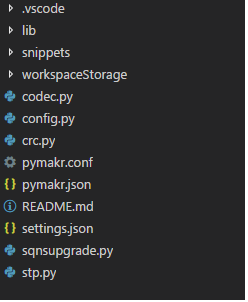
    getting further on this problem found list of OSErrors ENOENT means No such file or directory there was a typo in the file path at this point i'm getting other errors at line 121 >>> sqnsupgrade.run('/sd/FIPY_GPY_NB1_37781.dup',921600) <<< Welcome to the SQN3330 firmware updater >>> Entering recovery mode Traceback (most recent call last): File "<stdin>", line 1, in <module> File "/flash/lib/sqnsupgrade.py", line 121, in run TypeError: extra keyword arguments given >>> reading the sqnsupgrade.py says that the line does print('Resetting.', end='', flush=True) guessing it is not important that to print something i removed the line running the upgrade again gives me this >>> sqnsupgrade.run('/sd/FIPY_GPY_NB1_37781.dup',921600) <<< Welcome to the SQN3330 firmware updater >>> Entering recovery mode Traceback (most recent call last): File "<stdin>", line 1, in <module> File "/flash/lib/sqnsupgrade.py", line 123, in run File "/flash/lib/sqnsupgrade.py", line 74, in wait_for_modem TypeError: extra keyword arguments given reading the code at that line 74 gives print('.', end='', flush=True) this makes me think that there is something wrong with the call of the print() function so i removed the flush=True from both lines. after running the sqnsupgrade i now get the following >>> sqnsupgrade.run('/sd/FIPY_GPY_NB1_37781.dup',921600) <<< Welcome to the SQN3330 firmware updater >>> Entering recovery mode Resetting.. Starting STP (DO NOT DISCONNECT POWER!!!) STP started Session opened: version 1, max transfer 8192 bytes Code download failed, aborting! >>> this is how far i am at he moment still looking in to this any help is appreciated edit: after some more trying got some more info if i try the update again i get this error >>> sqnsupgrade.run('/sd/FIPY_GPY_NB1_37781.dup',921600) <<< Welcome to the SQN3330 firmware updater >>> Entering recovery mode AT+SMSWBOOT=3,0 response b'' Traceback (most recent call last): File "<stdin>", line 1, in <module> File "/flash/lib/sqnsupgrade.py", line 131, in run OSError: AT+SMSWBOOT=3,0 failed! the modem is not responsive to any AT commands if i send just AT+CGMI i get ERROR i tried to locate the cause of the error of the code download i eddited the sqnsupgrade.py to find out where this error is generated it is in line 155 except: blob.close() print('Code download failed 2, aborting!') abort = True i'm really out of ideas for the moment
  • 0 Votes
    4 Posts
    2k Views
    P
    @jazzyhawk Hey, try doing a safeboot. It should skip your boot.py and main.py code and allow you back in. https://docs.pycom.io/gettingstarted/programming/safeboot.html
  • 0 Votes
    17 Posts
    4k Views
    D
    @jmarcelino And on retrying the firmware upgrade again, this time I am getting a different error once and back to the same AT+SMSWBOOT failed error <<< Welcome to the SQN3330 firmware updater >>> Entering recovery mode Resetting. Starting STP (DO NOT DISCONNECT POWER!!!) Traceback (most recent call last): File "main.py", line 2, in <module> File "/flash/lib/sqnsupgrade.py", line 114, in run NameError: local variable referenced before assignment MicroPython v1.8.6-849-83e2f7f on 2018-03-19; FiPy with ESP32 Type "help()" for more information. >>> <<< Welcome to the SQN3330 firmware updater >>> Entering recovery mode Traceback (most recent call last): File "main.py", line 2, in <module> File "/flash/lib/sqnsupgrade.py", line 98, in run OSError: AT+SMSWBOOT=3,0 failed! MicroPython v1.8.6-849-83e2f7f on 2018-03-19; FiPy with ESP32 Type "help()" for more information. >>> I have not done any changes to my code or file since the last error: OSError: AT+SMSWBOOT=3,0 failed!
  • LTE-M on 800MHz?

    FiPy fipy firmware lte-m
    3
    0 Votes
    3 Posts
    887 Views
    M
    Hi @jmarcelino , I'm interested since you're specifically asking about supporting KPN. I'm trying to get LTE-M to work on a KPN network, but am unable to do so. Just after the attach() call I can execute AT+COPS=?, and after a long time (30s?) it'll show KPN. However, directly after it'll give a +CEREG: 4 (= unknown (e.g. out of E-UTRAN coverage)). After that it's unable to find any networks when using AT+COPS=?. If you managed to get KPN to work, I'd love to hear what AT commands you used.
  • LTE NB-IoT DNS

    FiPy nb-iot fipy firmware dns
    14
    1 Votes
    14 Posts
    3k Views
    L
    @combaindeft I finally found the time to test this and it works indeed! Just a heads up, Google DNS is 8.8.8.8 and 8.8.4.4, not 4.4.4.4 :)
  • 0 Votes
    18 Posts
    4k Views
    N
    @timh @IOAg I am not sure how you guys have been going with the LTE stuff but after 2 days of testing I am still finding it very flaky. I tried your earfcn settings and find that the unit finds a cell tower much quicker and consistently but still would not attach. I then updated to the latest FiPy firmware and then updated the Sequans firmware as per (https://forum.pycom.io/topic/2902/cellular-radio-firmware-release-sqn3330-for-both-cat-m1-and-nb-iot). I then found I started to be able to attach and connect. However, saying that, it is still inconsistent. I have had my device in the same spot for two days and I will get periods where it will connect almost every time, then hours where I get nothing. I also still have the modem crash when it is connected after a short period of time and then have times when it won't recover (lte.reset fails and machine.reset does not work either) with the only solution to perform a complete power cycle of the FiPy unit. Also it does not always attach/connect first go and I need to reset/attempt to attach in a cycle a few times. So while, when it does work, it connects more often there is no way I can consider my FiPy/The LTE modem as a reliable device. Pretty much at my wits end with this and looking at moving to a new platform. Would be interested to see if your results are similar or you feel you have a complete stable solution you would use as a commercial product?
  • Fipy Firmware Upgrade Error

    FiPy fipy firmware firmware fipy
    18
    3
    0 Votes
    18 Posts
    3k Views
    P
    @emmecilab I have only managed to see this when I've done something like put the module in the wrong way round or I'm using a usb cable that makes a bad physical connection. Im sure you already have but could you try removing/reseating the module in the expansion board and trying again. Same with the USB. If its still failing. drop a ticket to support@pycom.io or pm me on here and I'll help get this sorted.
  • ValueError: frequency 903900000 out of range

    FiPy fipy firmware
    7
    0 Votes
    7 Posts
    2k Views
    V
    it works after i change it to region=LoRa.AS923 thanks!
  • Error when importing pysense/pytrack

    FiPy fipy firmware pysense pytrack
    11
    0 Votes
    11 Posts
    4k Views
    R
    @Cormac Yeah the mkfs method has been renamed or just removed. Use os.fsformat('/flash') instead, as i also wrote in my previous post.