New firmware release v1.18.0
-
Hello everyone,
We have released a new stable firmware v1.18.0
This fixes the following issues:
-
esp32: Fix hang in AS923 due to incorrect timer behaviour.
-
esp32: Improve LTE stability. Forbid sending AT commands while in connected (data mode) state
-
lib/lora: Fix manual channel add for US915 and AU915 regions.
-
esp32: Add hidden SSID option. Enable websockets.
-
esp32: If state is already PPP, don't change it to ATTACHED.
-
esp32: Improve the robustness of lte.connect() when resuming a previous session.
-
mpy: Show Pycom version alongside Micropython core version
Update: As it was causing more confusion than anticipated, we have reverted the master branch of pycom-esp-idf back to the correct commit to build the stable version!
We will announce the new development version in the Beta Announcements & Development News sub-forum so if you're interested in trying out the latest new features I suggest you subscribe to get new topic notifications.
The new development firmware will contain a new Micropython core, new filesystem and has been updated to use the latest esp32 IDF.Please let us know if you encounter any issues
Christian Ehlers
-
-
@xykon when the PR to allow WLAN hostname change will be integrated?
https://github.com/pycom/pycom-micropython-sigfox/pull/165Having all DHCP pycom announcement set to ESPRESSIF as hostname is not really convenient when you have always 4/5 Lopy up
-
Hi @charly86 , I'll look in to adding your PR in the coming development releases
-
@iwahdan Nice, but that's not my PR so I don't want to get any credit for it ;-)
-
I used the Pycom Firmware Updater to update my FiPy from v1.17.3.b1. The Updater says the latest available is 1.15 but when I proceed to the update, it detects the 1.18 stable is available and uses that.
Issues I've encountered:
- It takes longer after a RESET to connect to the FiPy REPL shell.
- It appears the first call to lte.attach() always fails with an error. No error on retry but. . .
- Connecting to LTE does not succeed (fails to attach). So far, I have tried waiting up to 10 minutes. It previously would attach and connect within 10s.
-
@marike 1.15.0 is the latest firmware updater tool version, while 1.18.0 is the latest firmware version being flashed onto the device.
The firmware team will look at the issues raised and provide an update as soon as possible.
If you wish to downgrade please follow these instructions.
-
-
@xykon Recently loaded 1.18.0 onto WiPy2.0 OEM module and having some less than optimal i2c performance.
Issues:- Doest the new i2c firmware supports i2c clock stretching? I'm communicating with a bno055 imu (that uses clock stretching) and am getting I2C hangs.
Currently the i2c hangs after I enable the bno055 and do a scan (which returns the address at least once before hanging).
I have 4.7K pullups for SDA / SCL on my board that is interacting with the WiPy2.0 OEM.
Setup:
Talking to fuel gauge and IMU.
Scan hangs after second attempt....>> from machine import I2C, Pin >> >> bno055_rst = Pin('P23', mode=Pin.OPEN_DRAIN) # imu reset >> bno055_rst.value(1) #enable imu >> >> i2c = I2C(0, I2C.MASTER) >> >> i2c.scan() >> [40, 85] #success, i2c address for the bno055, bq27441 >> >>i2s.scan() ... hangs forever, need to hard reset the wipy2.0 OEM Note: No hang if I disable the imu by pulling p23 low.Thank you!
- Doest the new i2c firmware supports i2c clock stretching? I'm communicating with a bno055 imu (that uses clock stretching) and am getting I2C hangs.
-
I'm using Verizon (US) for LTE-M. The firmware for the modem was upgraded last week:
UE5.0.0.0c
LR5.1.1.0-33988
It looks like there is something broken with the AT commands. The response to
lte.send_at_cmd('X')where X is anything is the same, whether X is valid or not:>>> lte.send_at_cmd('AT+CEREG?') '' >>> lte.send_at_cmd('AT+COPS?') '' >>> lte.send_at_cmd('FAKE_COMMAND') '' -
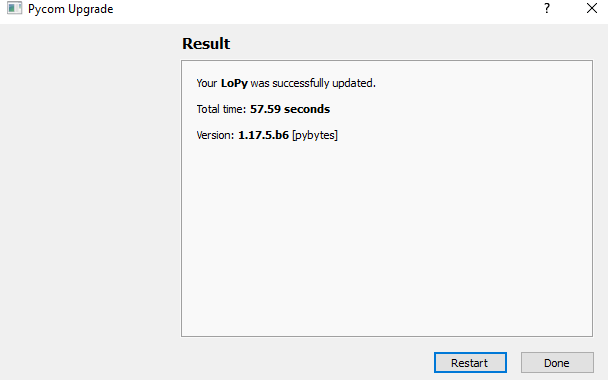
Updater updates my LoPy to 1.17.5.b6 but not 1.18.0
-
@bmarkus This is the stable firmware. We haven't released a new Pybytes version yet.
-
@xykon said in New firmware release v1.18.0:
@bmarkus This is the stable firmware. We haven't released a new Pybytes version yet.
I'm not using pybytes and do not want to have it, just want to update to an ordinary 1.18.0 In the updater all options, like beta versions, pybytes, forced region setting, etc. unselected. Why can't update to 1.18.0?
-
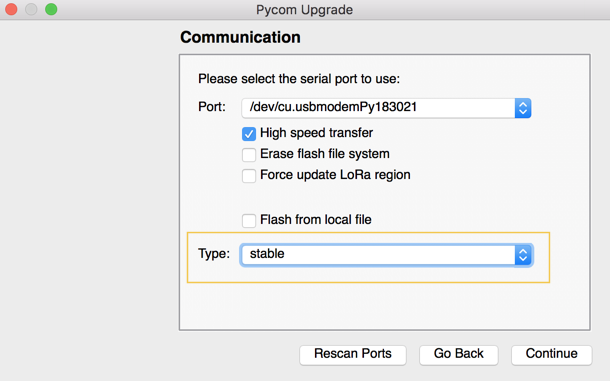
@bmarkus Are you using the latest stable firmware updater? Did you change the Type to stable in the Communications window?
-
@xykon Thanks, setting Type to stable solved the problem, update to 1.18.0 was successful. Would be god to change default from pybytes to stable :(
-
@bmarkus I can't change the default but the next firmware updater release will remember your choice.
-
Please note that as per the update above, we have reverted the master branch of pycom-esp-idf back to the correct commit needed to build the stable firmware.
We have also created a new branch idf-dev which contains all the updates previously pushed to master. The source code for the pycom-micropython-sigfox development release will be published some time next week.
-
Please take a look at this thread:
https://forum.pycom.io/topic/3377/fw-1-18-0-increased-boot-time-power-consumption -
What is LORAWAN MAC version of lopy4 after this firmware update?
-
@charly86 said in New firmware release v1.18.0:
@iwahdan Nice, but that's not my PR so I don't want to get any credit for it ;-)
Are you still facing this issue?
@charly86 said in New firmware release v1.18.0:
@iwahdan Nice, but that's not my PR so I don't want to get any credit for it ;-)
-
This post is deleted!


Hello! It looks like you're interested in this conversation, but you don't have an account yet.
Getting fed up of having to scroll through the same posts each visit? When you register for an account, you'll always come back to exactly where you were before, and choose to be notified of new replies (either via email, or push notification). You'll also be able to save bookmarks and upvote posts to show your appreciation to other community members.
With your input, this post could be even better 💗
Register Login