Welcome to the Pycom forum Forum
    • \[\[global:header.categories\]\]
    • \[\[global:header.recent\]\]
    • \[\[global:header.tags\]\]
    • \[\[global:header.popular\]\]
    • Login

    Explore Pybytes | Official Documentation | Report a Firmware Bug/Issue | GitHub

    New device: Cat-M1 and NB-IoT upgrade

    Scheduled Pinned Locked Moved GPy
    nb-iotnb-iot firmwarecat-m1firmware updatefirmware upgrad
    18 Posts 5 Posters 2.9k Views 7 Watching
    Loading More Posts
    • Oldest to Newest
    • Newest to Oldest
    • Most Votes
    Reply
    • Reply as topic
    Log in to reply
    This topic has been deleted. Only users with topic management privileges can see it.
    • mfalkviddM Offline
      mfalkvidd
      last edited by

      Hi.

      I've unpacked my first Pycom devices (a GPy and a FiPy, focusing on the GPy for now). I want to use the GPy with Hologram.

      https://forum.pycom.io/topic/2902/cellular-radio-firmware-release-sqn3330-for-both-cat-m1-and-nb-iot says

      Cellular radio firmware release (SQN3330) for both Cat-M1 and NB-IoT"

      But https://docs.pycom.io/chapter/tutorials/lte/firmware.html says

      If your module is running the factory LTE chip firmware, you MUST first perform an update to the latest CAT-M1 firmware before trying to upgrade to the NB-IoT firmware"

      Do I need to upgrade the CAT-M1 firmware before performing the instructions in https://forum.pycom.io/topic/2902/cellular-radio-firmware-release-sqn3330-for-both-cat-m1-and-nb-iot ?
      If so, can I follow the same instructions, but use the FIPY_GPY_CATM1_36417.dup file instead of FIPY_GPY_NB1_35351.dup? Or does the CAT-M1 firmware require a different upgrade method?

      I'm asking since upgrading the modem firmware seems to be delicate and doing the wrong thing could make it very hard to recover my GPy.

      X 1 Reply Last reply Reply Quote 0
      • X Offline
        Xykon administrators @mfalkvidd
        last edited by

        @mfalkvidd I just checked with the LTE team... it turns out this requirement can be ignored. I will update the instructions shortly.

        Christian Ehlers

        le_wildfoxL 1 Reply Last reply Reply Quote 1
        • le_wildfoxL Offline
          le_wildfox @Xykon
          last edited by

          @xykon

          Is there any update on support for nb-iot with huawei equipments?
          Any timeline maybe?

          Thanks!

          X 1 Reply Last reply Reply Quote 1
          • X Offline
            Xykon administrators @le_wildfox
            last edited by

            @le_wildfox It is now available for download: sequans.html or directly FIPY_GPY_NB1-37365.dup

            Christian Ehlers

            le_wildfoxL 1 Reply Last reply Reply Quote 1
            • le_wildfoxL Offline
              le_wildfox @Xykon
              last edited by

              @xykon Thanks!
              I'm currently trying to upgrade with the new firmware.

              So the upgrade sequence should be:
              step 1. upgrade to new CAT-M 36417.dup
              step 2. upgrade to new NB1 37365.dup

              Is that correct?

              X 1 Reply Last reply Reply Quote 0
              • X Offline
                Xykon administrators @le_wildfox
                last edited by

                @le_wildfox I was told by the LTE team that the upgrade order doesn't actually matter. I'm planning to do a few more tests today before updating the instructions.

                Christian Ehlers

                1 Reply Last reply Reply Quote 0
                • le_wildfoxL Offline
                  le_wildfox
                  last edited by

                  @xykon oh, okay. However I have this issue when upgrading:

                  https://forum.pycom.io/topic/3460/new-cat-m1-nb-iot-firmware-10-july-2018-upgrade-failure:

                  Any way to resolve it?
                  Thanks!

                  1 Reply Last reply Reply Quote 0
                  • le_wildfoxL Offline
                    le_wildfox
                    last edited by

                    @xykon Hello again, have you got any news about the failed upgrade using new firmware below?
                    Big thanks!

                    X 1 Reply Last reply Reply Quote 0
                    • X Offline
                      Xykon administrators @le_wildfox
                      last edited by

                      @le_wildfox We have a new firmware that I'm testing right now. We also received a new bootrom that will allow recovery if the flashing fails. I'm testing all this now and will provide more details as soon as possible.

                      At the moment I would suggest to refrain from trying to use the new NB-IoT firmware until the update is available. I'm trying as hard as I can to make this available but at the same time I don't want to risk more people loosing access to their devices.

                      Christian Ehlers

                      le_wildfoxL 1 Reply Last reply Reply Quote 1
                      • le_wildfoxL Offline
                        le_wildfox @Xykon
                        last edited by

                        @xykon Thanks for your response. As I'm currently working on prototype which should work with Huawei powered NB-IoT network, really hope to hear from you soon if the tests have been completed and the new firmware has been made available.
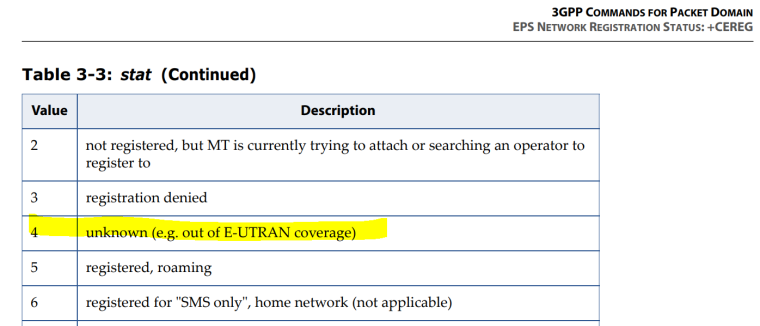
                        Last time I tried on their test lab, all I got was something like:

                        +CEREG : 2,4

                        0_1531732629055_297a20c1-9f5d-41f9-99b6-f981693f6c0d-image.png

                        Cheers!

                        X 1 Reply Last reply Reply Quote 0
                        • X Offline
                          Xykon administrators @le_wildfox
                          last edited by

                          @le_wildfox A new NB-IOT firmware 37781 is now available. I have also updated the upgrade scripts so please make sure you fetch the latest version.

                          Christian Ehlers

                          A 1 Reply Last reply Reply Quote 1
                          • A Offline
                            agotsis @Xykon
                            last edited by

                            @xykon I just tried to install the latest NB-IoT firmware to my FiPy connected to a PyTrack board. Prior to this I have successfully installed FiPy-1.18.0.r1.tar.gz. Unfortunately I am stuck in the following point:

                            >>> sqnsupgrade.run('/home/gotsis/FIPY_GPY_NB1_37781.dup', 921600, port='/dev/ttyACM0',resume=True)
                            <<< Welcome to the SQN3330 firmware updater >>>
                            Starting STP (DO NOT DISCONNECT POWER!!!)
                            Traceback (most recent call last):
                              File "<stdin>", line 1, in <module>
                              File "/home/gotsis/git/pycom-libraries/lib/sqnsupgrade/sqnsupgrade.py", line 144, in run
                                raise OSError("Invalid answer '%s' from the device" % response)
                            OSError: Invalid answer 'b''' from the device
                            

                            As seen from the code I am running this through the serial port, not an SD.
                            Any ideas, suggestions?

                            Many thanks!

                            X 1 Reply Last reply Reply Quote 0
                            • X Offline
                              Xykon administrators @agotsis
                              last edited by

                              @agotsis The resume=True option will only work if the modem is already in upgrade mode.

                              What do you get when you power-cycle the module and run the upgrade without the resume option?

                              Christian Ehlers

                              A 1 Reply Last reply Reply Quote 0
                              • A Offline
                                agotsis @Xykon
                                last edited by agotsis

                                @xykon I actually added the resume=True to address the "AT+SMSWBOOT=3,0 Failed!" error as mentioned in another post... If I leave resume out of the game I am stuck in that point.
                                I am now trying to repeat the procedure using an SD card.

                                UPDATE: And this is the error I get when using the SD card:

                                Entering recovery mode
                                AT+SMSWBOOT=3,0 response b''
                                Traceback (most recent call last):
                                  File "<stdin>", line 1, in <module>
                                  File "sqnsupgrade.py", line 130, in run
                                OSError: AT+SMSWBOOT=3,0 failed!
                                

                                Thanks!

                                X 1 Reply Last reply Reply Quote 0
                                • X Offline
                                  Xykon administrators @agotsis
                                  last edited by

                                  @agotsis Unfortunately it looks like you ran into one of two issues I identified with Sequans which cause the LTE modem to become unresponsive.

                                  We are still waiting for Sequans to produce a permanent solution that will allow us to fix both issues permanently to make sure the modem is always recoverable.

                                  I am working on making documentation available that will allow accessing the modem console logs through one of the test points on the bottom of the module. This will help us identify the exact issue (or issues) causing this.

                                  I will post more as soon as possible.

                                  Christian Ehlers

                                  A 1 Reply Last reply Reply Quote 1
                                  • A Offline
                                    agotsis @Xykon
                                    last edited by

                                    This post is deleted!
                                    1 Reply Last reply Reply Quote 0
                                    • A Offline
                                      agotsis
                                      last edited by

                                      @xykon Are there any updates for resolving the firmware upgrade error?

                                      danD 1 Reply Last reply Reply Quote 0
                                      • danD Offline
                                        dan @agotsis
                                        last edited by

                                        Hi @agotsis, Please check this post for more info about this issue. Hope this helps!

                                        1 Reply Last reply Reply Quote 0

                                        Hello! It looks like you're interested in this conversation, but you don't have an account yet.

                                        Getting fed up of having to scroll through the same posts each visit? When you register for an account, you'll always come back to exactly where you were before, and choose to be notified of new replies (either via email, or push notification). You'll also be able to save bookmarks and upvote posts to show your appreciation to other community members.

                                        With your input, this post could be even better 💗

                                        Register Login
                                        • 1 / 1
                                        • First post
                                          Last post

                                        Pycom on Twitter

                                        Pycom