LoPy connects to TheThingsNetwork but payload is empty
-
Sorry, beginner question…
I am connecting a LoPy to TheThingsNetwork via OTAA. I am sending a integer of the temperature in the payload (which is converted to bytes using the Pycom lora socket object’s send method). The sensor and node all appear to work correctly, however I don't actually know what is being sent by the LoRa radio module.The node’s application on the TTN console shows the device activating, then the uplink occurs a few seconds later.
The Payload in the uplink however shows nothing (actually is reads: 00000000000000000000000000).
Have I forgotten something really obvious? I have already posted this question on TheThingsNetwork forum but I am not sure if this problem may be a LoPy issue.
-
@philwilkinson Can you post the code that creates the payload. Pleas enclose code in lines of three backticks (```)
-
I didn't include the whole script as it would get too long...!
s = socket.socket(socket.AF_LORA, socket.SOCK_RAW) # set the LoRaWAN data rate s.setsockopt(socket.SOL_LORA, socket.SO_DR, 5) # make the socket blocking # (waits for the data to be sent and for the 2 receive windows to expire) s.setblocking(True) from pysense import Pysense from SI7006A20 import SI7006A20 py = Pysense() si = SI7006A20(py) data = int(si.temperature()) #converted float to integer s.send(bytes(data)) print('sent data to TTN') # make the socket non-blocking # (because if there's no data received it will block forever...) s.setblocking(False) -
results in
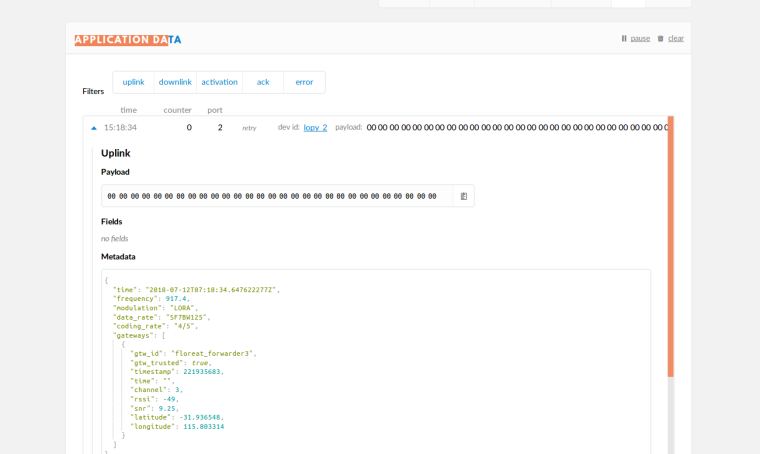
-
@philwilkinson Yes. That's why you get e straing ouf zeroes:
when you convert the float number to an int, you may receive a number like 8. bytes(8) however creates a bytearray of 8 bytes length, each with the value 0.
To convert a number into a bytearray containing this number you can either usrstr(number)or similar to convert it to an ascii string, or struct.pack(), like:
struct.pack("<i", number)
See https://docs.python.org/3/library/struct.html -
Brilliant! thanks @robert-hh for the guidance. I need to study my data types a lot more!
As I thought I should keep a float temperature reading for reasonable accuracy; my code now reads:s = socket.socket(socket.AF_LORA, socket.SOCK_RAW) s.setsockopt(socket.SOL_LORA, socket.SO_DR, 5) s.setblocking(True) raw_data = round((si.temperature()), 2) data = struct.pack('f', raw_data) s.send(data) print('sent ', raw_data, ' to TTN')I now have to work out how to get the payload back into a readable format using something like
struct.unpack('f', (bytes.fromhex('HEX value in payload'))) -
@philwilkinson Since you did no use tohex while sending, fromhex is not needed, unles the tohex is done somewhere else.
-
@philwilkinson For readable data you could also use:
data = "%.2f" % si.temperature()and use float(recv_data) for back-conversion.


Hello! It looks like you're interested in this conversation, but you don't have an account yet.
Getting fed up of having to scroll through the same posts each visit? When you register for an account, you'll always come back to exactly where you were before, and choose to be notified of new replies (either via email, or push notification). You'll also be able to save bookmarks and upvote posts to show your appreciation to other community members.
With your input, this post could be even better 💗
Register Login