Wipy 2.0 and save data on my pc, not in flash memory
-
@vflorio94 if the memory is short, then it is a different error. Is the error thrown during execution or when youe import the code?
-
@robert-hh yes, probably something occours
Uploading project (main folder)...
Not safe booting, disabled in settings

Reading file status
[1/2] Writing file lib_imu.py
Failed to write file, trying again...
Failed to write file, trying again...
Filecheck failed
[2/2] Writing file main.py
Upload done, resetting board…
but I don't understand what.
-
@vflorio94 Actually I have no clue what's happening and what was done.
-
@robert-hh but the message in the second line what means? when I upload file is necessary a safe booting? and here it isn't in safe booting
-
@vflorio94 I do not know what pymakr is doing. It can force a sfae boot via Ctrl-F, but that has to be configured somewhere in pymakr.
-
@robert-hh can be something in project settings? but I didn't modify it
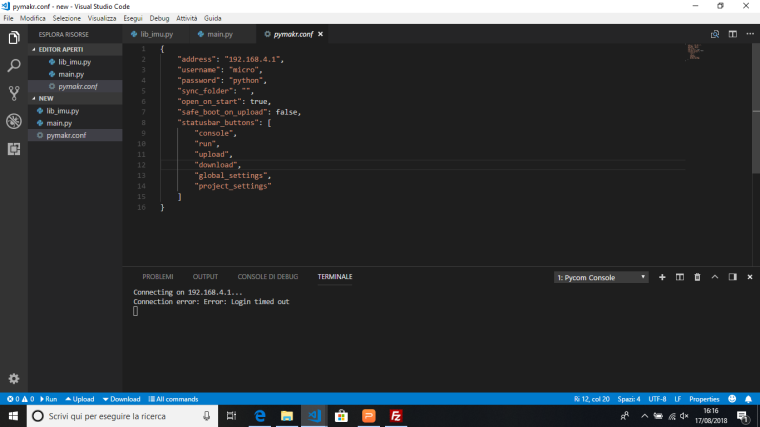
-
@vflorio94 Looks like the seeting of "safe_boot_on_upload": false
-
@robert-hh yes, i see it, but i don't know if I can modify it and if i have to upload also this pymakr.conf ?
-
@vflorio94 pymakr.conf is local file on your PC, configuring pymakr. Why should you not be able to modify it. You may have to restart Atom after that.
-
@robert-hh Hi, I need to ask you one more time. Do you know if there is a way to save on micro SD not only file.txt but also file.py?
thank you!! -
@vflorio94 A python script is a text file, just with the extension .py. You can start that from sd card with two methods:
a) change the active directory to the card before import
mount the card
os.chdir("/sd")
import file
b) change the system path.
If you
import sys
print(sys.path)
you get something like ['', '/flash', '/flash/lib'], which is the list of places where the python scripts are looked for. '' is the actual directory. You can add "/sd" to that path with:
sys.path.append("/sd")
you can also directly set sys.path to the list of places. -
@robert-hh I try to update my main.py and my lib.py on sd card but I can't understand where i have to put the command that you wrote.
-
@vflorio94 You have to put that in boot.py or main.py in flash, because that is executed in first place.
-
@robert-hh thank you, I do it.
another question, if I read data from a file.txt and I want to reuse this data, what is the way to import and/or assign them to a local variable?
thank you -
@vflorio94 To read the data from a file, you could read it all in once, assumign f is the opened file, with:
text = f.readlines()
then text is a list of strings. That however will use a lot for RAM. You can also read line by line with:
for line in f:
# line is one line to be processed -
@robert-hh YEs, but i have a file.txt with this content
[169.5, 169.5, 169.5, 169.5, 169.5, 169.5, 169.5, 169.5, 169.5, 169.5, 169.5, 169.5, 169.5, 169.5, 169.5, 169.5, 169.5, 169.5, 169.5, 169.5, 169.5, 169.5, 169.5, 169.5, 169.5, 169.5, 169.5, 169.5] [0.1875, 0.1875, 0.1875, 0.1875, 0.1875, 0.1875, 0.1875, 0.1875, 0.1875, 0.1875, 0.1875, 0.1875, 0.1875, 0.1875, 0.1875, 0.1875, 0.1875, 0.1875, 0.1875, 0.1875, 0.1875, 0.1875, 0.1875, 0.1875, 0.1875, 0.1875, 0.125, 0.1875] [-177.5625, -177.5625, -177.5625, -177.5625, -177.5625, -177.5625, -177.5625, -177.5625, -177.5625, -177.5625, -177.5625, -177.5625, -177.5625, -177.5625, -177.5625, -177.5625, -177.5625, -177.5625, -177.5625, -177.5625, -177.5625, -177.5625, -177.5625, -177.5625, -177.5625, -177.5625, -177.625, -177.5625]I want to iterate data by data in this file and compare them with other value trough control 'if'.
for example I want to use data in the first square brackets and step by step compare them with other numeric value, do you know a way to do this?
I am not able to convert them in numeric value and compare them one by one, I know that i have to use a 'for' to pass all the value but I am not succeded. -
@vflorio94 Can you create the file in a different format, like having one line for each set of data in brackets?
-
@vflorio94 You can do something like:
f = open("file.txt", "r") line = f.read() f.close() # now you have the full test in one string list = line.split("[") # now you have a list of three strings, and an empty one # remove the empty ones for index, item in enumerate(list): if len(item) == 0: del list[index] # convert to numeric value for index, item in enumerate(list): item = item.strip("] ").split(",") # now item is a list of numeric strings for i, el in enumerate(item): item[i] = float(el) list[index] = item # now list is a list of lists with numeric values # indexing by list[i][j] -
@robert-hh yes, i'll create a file in which I put one set of data in brackets in a line, then there is a way to extract a single data and do a control on it and then pass to the data in the next position?
-
@vflorio94 In my previous post I showed a code snippet, if all data is in one line. If each bracket is in a separate line, then the code snippet is much simpler.
f = open("file1.txt", "r")
list = f.readlines()
f.close()
# now you have a list of one string per line
for index, item in enumerate(list):
    item = item.strip("[]\n ").split(",")
    # now item is a list of numeric strings
    for i, el in enumerate(item):
        item[i] = float(el)
    list[index] = item
    # now list is a list of lists wirth numeric values

Hello! It looks like you're interested in this conversation, but you don't have an account yet.
Getting fed up of having to scroll through the same posts each visit? When you register for an account, you'll always come back to exactly where you were before, and choose to be notified of new replies (either via email, or push notification). You'll also be able to save bookmarks and upvote posts to show your appreciation to other community members.
With your input, this post could be even better 💗
Register Login