Welcome to the Pycom forum Forum
    • \[\[global:header.categories\]\]
    • \[\[global:header.recent\]\]
    • \[\[global:header.tags\]\]
    • \[\[global:header.popular\]\]
    • Login

    Explore Pybytes | Official Documentation | Report a Firmware Bug/Issue | GitHub

    New LTE Firmware releases v1.18.1.r4 (stable) & 1.19.0.b5 (development) & NB-IoT firmware 40343

    Scheduled Pinned Locked Moved Announcements & News
    firmwarelte
    51 Posts 12 Posters 10.8k Views 14 Watching
    Loading More Posts
    • Oldest to Newest
    • Newest to Oldest
    • Most Votes
    Reply
    • Reply as topic
    Log in to reply
    This topic has been deleted. Only users with topic management privileges can see it.
    • T Offline
      tlanier @serafimsaudade
      last edited by

      @serafimsaudade

      I get the same error even if I use an IP address. I don't think it's a DNS problem.

      1 Reply Last reply Reply Quote 0
      • R Offline
        reidfo @dan
        last edited by

        @dan Thanks, not sure how I missed that. I updated to 1.19.0.b5 using the updater and it broke LTE on my FiPy. The board would initially attach, then after several seconds the connection seemed to hang. AT commands took several seconds to complete. I downgraded back to my previous firmware (1.19.0.b4 built myself from the development branch) and it started working again.

        1 Reply Last reply Reply Quote 0
        • danD Offline
          dan @serafimsaudade
          last edited by

          @serafimsaudade @tlanier we are looking into the issue with sockets

          D T 2 Replies Last reply Reply Quote 0
          • D Offline
            danielm @dan
            last edited by

            @dan
            Is there any time estimation for fix of socket issue?

            1 Reply Last reply Reply Quote 0
            • T Offline
              tlanier @dan
              last edited by tlanier

              @dan
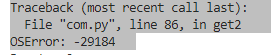
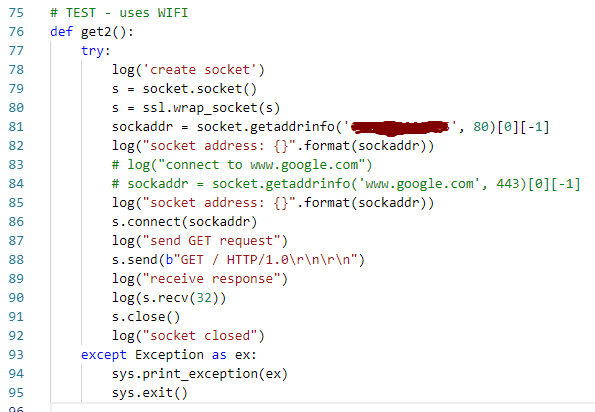
              If it helps, note that the socket error occurs even if I'm using WIFI and connecting to a static IP. I don't think the problem has anything to do with the LTE module.
              0_1542208352061_100317bf-8efa-4062-b195-642e6f6b9a6c-image.png

              0_1542209190430_2dbf7e91-a61d-4b8c-9c62-7bdf9a667b3f-image.png

              D S T 3 Replies Last reply Reply Quote 0
              • D Offline
                danielm @tlanier
                last edited by danielm

                @tlanier
                Is the behaviour identical on 1.19.0.b5 and 1.18.1.r4?

                1 Reply Last reply Reply Quote 0
                • S Offline
                  serafimsaudade @tlanier
                  last edited by

                  @tlanier
                  I'm using mqtt that use sockets over wifi connection with no problem.

                  1 Reply Last reply Reply Quote 0
                  • T Offline
                    tlanier @tlanier
                    last edited by

                    @tlanier

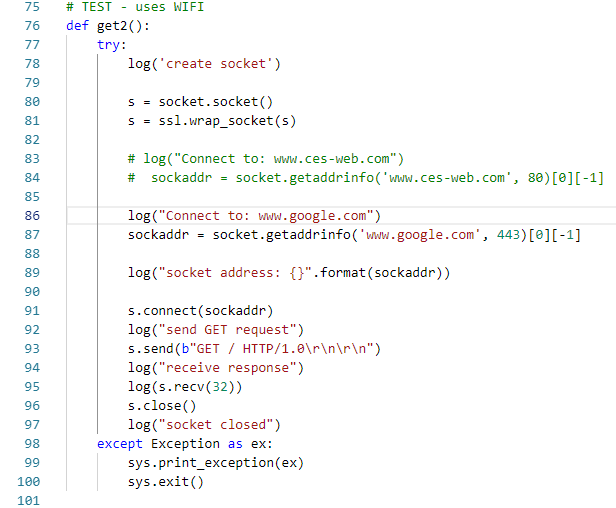
                    The problem with the previous code was my own fault. The "ssl.wrap_socket(s)" line should not be used when connecting to a non-secure site.

                    I now believe that the problem only occurs when connecting to a secure site. I can successfully connect using WIFI to a non-secure site. If I try to connect to a secure site (www.google.com), I get a stack overflow error.

                    0_1542216827652_4be6eab0-f53d-4f05-986b-2ebb61622bd1-image.png

                    0_1542216859717_1a9abf8d-8942-4acd-a348-4c9ee42eda8d-image.png

                    T I 2 Replies Last reply Reply Quote 0
                    • T Offline
                      tlanier @tlanier
                      last edited by

                      @tlanier
                      I'm now successfully connecting and downloading from a non-secure site using either LTE or WIFI. The errors occur if I try to connect to a secure site (www.google.com) using either LTE or WIFI.

                      # TEST - uses cell modem
                      def get1():
                          try:
                              log('creating LTE object - carrier verizon')
                              # lte = LTE()
                              lte = LTE(carrier="verizon")
                              # lte = LTE(carrier="at&t")         # instantiate the LTE object
                              log('resetting modem, may take up to 5 secs...')
                              lte.reset()
                              log('attaching...')
                              lte.attach(apn='apn.hologram.io')        # attach the cellular modem to a base station
                              # lte.attach(band=13)        # attach the cellular modem to a base station
                              
                              i = 0
                              while not lte.isattached():
                                  log('waiting for isattached...')
                                  utime.sleep_ms(1000)
                      
                              log('connecting...')
                              # lte.connect()       # start a data session and obtain an IP address
                              lte.connect(cid=3)    # cid=3 for verizon - start a data session and obtain an IP address
                              while not lte.isconnected():
                                  log('waiting for isconnected...')
                                  utime.sleep_ms(500)
                      
                              log('create socket')
                              s = socket.socket()
                      
                              log("Connect to: www.ces-web.com")
                              sockaddr = socket.getaddrinfo('www.ces-web.com', 80)[0][-1]
                      
                              #log("Connect to: www.google.com")
                              #s = ssl.wrap_socket(s)
                              #sockaddr = socket.getaddrinfo('www.google.com', 443)[0][-1]
                      
                              log("socket address: {}".format(sockaddr))
                      
                              s.connect(sockaddr)
                              log("send GET request")
                              s.send(b"GET / HTTP/1.0\r\n\r\n")
                              log("receive response")
                              log(s.recv(16))
                              s.close()
                              log("socket closed")
                              lte.disconnect()
                              log("disconnected")
                              lte.dettach()
                              log("dettached")
                              lte.deinit()
                              log("deinit")
                          except Exception as ex:
                              sys.print_exception(ex)
                              sys.exit()
                      
                      1 Reply Last reply Reply Quote 0
                      • P Offline
                        panda
                        last edited by panda

                        With this latest version on a GPy and latest CAT M1 modem firmware I can no longer connect with hologram SIM.

                        lte.connect() will dettach the modem and the REPL input hangs.

                        Previously I could successfully do:

                        lte = LTE('verizon')
                        lte.attach(apn='apn.hologram.io')
                        ...
                        lte.connect(cid=3)
                        

                        Going back to 1.18.1.r1 and 38638 modem fw works fine. Why would this change? How do I connect to Hologram with the latest updates?

                        The creg info is:

                        ['+CEREG: 2,5,"3D03","00F0F703",7', 'OK']

                        1 Reply Last reply Reply Quote 0
                        • X Offline
                          Xykon administrators
                          last edited by

                          Thanks everyone for the reports.

                          @iwahdan is looking into the SSL issue as this doesn't seem to be directly related to the LTE changes I made.

                          @panda Unfortunately we don't have hologram.io in The Netherlands so all I can do is emulate Verizon on our Amarisoft eNB.

                          Could you please try the following 3 commands between attach and connect?

                          print(lte.send_at_cmd('AT+CGATT?'))
                          print(lte.send_at_cmd('AT+CFUN?'))
                          print(lte.send_at_cmd('AT!="showphy"'))
                          

                          You mention that the REPL input hangs after connect()... if you do a hard reset does it keep hanging?

                          If you are able to reset the module and enter code, can you please run the 3 commands again without calling attach first?

                          Christian Ehlers

                          P 1 Reply Last reply Reply Quote 0
                          • P Offline
                            panda @Xykon
                            last edited by panda

                            @xykon said in New LTE Firmware releases v1.18.1.r4 (stable) & 1.19.0.b5 (development) & NB-IoT firmware 40343:

                            Could you please try the following 3 commands between attach and connect?

                            text
                            print(lte.send_at_cmd('AT+CGATT?'))
                            print(lte.send_at_cmd('AT+CFUN?'))
                            print(lte.send_at_cmd('AT!="showphy"'))

                            ['+CGATT: 1', 'OK']

                            ['+CFUN: 1', 'OK']

                            ['DL SYNCHRO STATISTICS', '=====================', ' Synchro state : DRX_SLEEP', ' PPU SIB1 ACQ watchdog : 0', ' Frequency Hypothesis RF (Hz) : 0', ' RSRP (dBm) : -94.06', ' RSRQ (dB) : -10.79', ' Channel estimation state (Cell-spec.) : HIGH CINR', ' Channel estimation state (UE-spec.) : LOW CINR', ' Channel estimation state (MBSFN) : LOW CINR', ' Channel estimation CINR : 10.10', ' Channel length : SHORT', ' AGC', ' AGC RX gain (dB) : 53.71', ' RX PSD BO (dBFs) : -20.63', ' RX PSD (dBm) : -99.33', ' Noise level RS (dBm) : -104.16', ' Digital gain (dB) : 9.03', ' CINR RS (dB) : 10.10', ' NARROWBANDS', ' Last DL NB : Central', ' Last UL NB : N/A', ' AFC', ' Frequency offset RF (Hz) : -316', ' Frequency offset BB (Hz) : 0', ' PBCH', ' MIB received quantity : 1239', ' MIB timeout quantity : 0', 'OK']

                            You mention that the REPL input hangs after connect()... if you do a hard reset does it keep hanging?

                            No, reset solves it.

                            If you are able to reset the module and enter code, can you please run the 3 commands again without calling attach first?

                            ['+CGATT: 0', 'OK']

                            ['+CFUN: 4', 'OK']

                            ['DL SYNCHRO STATISTICS', '=====================', ' Synchro state : OFF', ' PPU SIB1 ACQwatchdog : 0', ' Frequency Hypothesis RF (Hz) : 0', ' RSRP (dBm) : 0.00', ' RSRQ (dB) : 0.00', ' Channel estimation state (Cell-spec.) : LOW CINR',' Channel estimation state (UE-spec.) : LOW CINR', ' Channel estimation state (MBSFN) : LOW CINR', ' Channel estimation CINR : 0.00', ' Channel length : SHORT', ' AGC', ' AGC RX gain (dB) : 0.00', ' RX PSD BO (dBFs) : 0.00', ' RX PSD (dBm) : 0.00', ' Noise level RS (dBm) : 0.00', ' Digital gain (dB) : 0.00', ' CINR RS (dB) : 0.00', ' NARROWBANDS', ' Last DL NB :0', ' Last UL NB : 0', ' AFC', ' Frequency offset RF (Hz) : 0', ' Frequency offset BB (Hz) : 0', ' PBCH', ' MIB received quantity : 0', ' MIB timeout quantity : 0', 'OK']

                            1 Reply Last reply Reply Quote 0
                            • I Offline
                              iwahdan @tlanier
                              last edited by

                              Hi @tlanier ,I am not able to reproduce the stack overflow issue you got yet, however I've made some improvements to LTE and sockets in a pre-release v1.18.1.r5 :
                              https://github.com/pycom/pycom-micropython-sigfox/releases/tag/v1.18.1.r5
                              maybe you can see if that solves the problem.

                              Wahdan

                              D 1 Reply Last reply Reply Quote 0
                              • D Offline
                                danielm @iwahdan
                                last edited by danielm

                                @iwahdan
                                I am testing 1.18.1.r5 on FiPy with NB1-40343 running following code in main.py:

                                import network
                                import time
                                import urequests
                                
                                class httpPostTest():
                                	def __init__(self):	
                                		self.apn = None
                                		self.band = None
                                		self.LTEisAttached = False
                                		self.LTEisAttachedLast = False
                                		self.LTEisConnected = False
                                		self.LTEisConnectedLast = False
                                
                                		self.start = True
                                
                                	def initLTE(self, band, apn):
                                		self.apn = apn
                                		self.band = band
                                		print("INFO", "Starting initialization of LTE")
                                		
                                		try:
                                			self.lte = network.LTE()
                                			print("INFO", "LTE initialized")
                                		except:
                                			print("WARNING", "LTE init command failed")	
                                
                                		print("LTE is attached after init:", self.lte.isattached())
                                		print("LTE is connected after init:", self.lte.isconnected())
                                
                                	def run(self, url):	
                                		n = 0
                                		while True:
                                
                                			self.LTEisAttached = self.lte.isattached()
                                
                                			if not self.LTEisAttached and (self.LTEisAttachedLast or self.start):
                                				if not self.start:
                                					print("WARNING", "Dettached from LTE network")
                                				try:
                                					self.lte.attach(band = self.band, apn = self.apn)
                                					print("INFO", "LTE attach command sent")
                                					self.start = False
                                				except:
                                					print("WARNING", "LTE attach command failed")
                                
                                			if self.LTEisAttached and not self.LTEisAttachedLast:
                                				print("INFO", "Attached to LTE network")
                                				try:
                                					self.lte.connect()
                                					print("INFO", "LTE connect command sent")
                                				except:
                                					print("WARNING", "LTE connect command failed")
                                
                                			self.LTEisAttachedLast = self.LTEisAttached
                                
                                			self.LTEisConnected = self.lte.isconnected()
                                
                                			if self.LTEisConnected and not self.LTEisConnectedLast:
                                				print("INFO", "Connected to LTE network")
                                
                                			elif not self.LTEisConnected and self.LTEisConnectedLast:
                                				print("WARNING", "Disconnected from LTE network")
                                
                                			self.LTEisConnectedLast = self.LTEisConnected
                                
                                			if self.LTEisConnected:
                                				n+=1
                                				try:
                                					response = urequests.post(url, headers={"Content-Type": "application/json", "Accept": "application/json"}, data='{"time": "%s"}' % (time.time()))
                                					print("INFO", "%s. HTTP POST successful: %s" % (n, response.text))
                                				except Exception as e:
                                					print("WARNING", "%s. HTTP POST failed: %s" % (n, e))
                                
                                			time.sleep(0.25)
                                
                                test = httpPostTest()
                                test.initLTE(20, "nbiot.telekom.sk")
                                test.run(url = "https://54.167.116.227/post")
                                

                                It is also available here for download including slightly modified urequests library:
                                https://drive.google.com/open?id=19hA2KGq4iwkkv36d2cuW1M4j0Tab9_YP

                                Issues:

                                1. The code often hangs during LTE initialization (self.lte = network.LTE())
                                2. If it makes it through init only first request is sent successfully and then the modem seems to dettach from the network:
                                INFO Starting initialization of LTE
                                INFO LTE initialized
                                LTE is attached after init: False
                                LTE is connected after init: False
                                INFO LTE attached command sent
                                INFO Attached to LTE network
                                INFO LTE connect command sent
                                INFO Connected to LTE network
                                INFO 1. HTTP POST successful: {"args":{},"data":{"time":"13"},"files":{},"form":{},"headers":{"x-forwarded-proto":"https","host":"54.167.116.227","content-length":"14","accept":"application/json","content-type":"application/json","x-forwarded-port":"443"},"json":{"time":"13"},"url":"https://54.167.116.227/post"}
                                WARNING 2. HTTP POST failed: Avialable Interfaces are down
                                WARNING Dettached from LTE network
                                

                                Application code written for our product behaves in a similar way since 1.18.1.r3.

                                I 1 Reply Last reply Reply Quote 0
                                • D Offline
                                  danielm
                                  last edited by danielm

                                  In the meantime I left the test code running on 1.18.1.r2 with NB1-40343 modem firmware.
                                  It was necessary to replace line

                                  self.lte.attach(band = self.band, apn = self.apn)
                                  

                                  with:

                                  self.lte.send_at_cmd('AT+CGDCONT=1,"IP","%s"' % (self.apn))
                                  self.lte.attach(band = self.band)
                                  

                                  because lte.attach() does not support "apn" parameter in 1.18.1.r2.

                                  After almost 5000 requests the test failed with error codes as follows:

                                  INFO 4866. HTTP POST successful: {"args":{},"data":{"time":"41384"},"files":{},"form":{},"headers":{"x-forwarded-proto":"https","host":"54.167.116.227","content-length":"17","accept":"application/json","content-type":"application/json","x-forwarded-port":"443"},"json":{"time":"41384"},"url":"https://54.167.116.227/post"}
                                  INFO 4867. HTTP POST successful: {"args":{},"data":{"time":"41392"},"files":{},"form":{},"headers":{"x-forwarded-proto":"https","host":"54.167.116.227","content-length":"17","accept":"application/json","content-type":"application/json","x-forwarded-port":"443"},"json":{"time":"41392"},"url":"https://54.167.116.227/post"}
                                  INFO 4868. HTTP POST successful: {"args":{},"data":{"time":"41399"},"files":{},"form":{},"headers":{"x-forwarded-proto":"https","host":"54.167.116.227","content-length":"17","accept":"application/json","content-type":"application/json","x-forwarded-port":"443"},"json":{"time":"41399"},"url":"https://54.167.116.227/post"}
                                  WARNING 4869. HTTP POST failed: -76
                                  WARNING 4870. HTTP POST failed: -1
                                  WARNING 4871. HTTP POST failed: -1
                                  WARNING 4872. HTTP POST failed: -1
                                  WARNING 4873. HTTP POST failed: -1
                                  WARNING 4874. HTTP POST failed: -1
                                  WARNING 4875. HTTP POST failed: -1
                                  WARNING 4876. HTTP POST failed: -1
                                  WARNING 4877. HTTP POST failed: -1
                                  WARNING 4878. HTTP POST failed: -1
                                  WARNING 4879. HTTP POST failed: 23
                                  WARNING 4880. HTTP POST failed: 23
                                  WARNING 4881. HTTP POST failed: 23
                                  WARNING 4882. HTTP POST failed: 23
                                  WARNING 4883. HTTP POST failed: 23
                                  WARNING 4884. HTTP POST failed: 23
                                  
                                  WARNING 10843. HTTP POST failed: 23
                                  WARNING 10844. HTTP POST failed: 23
                                  WARNING 10845. HTTP POST failed: 23
                                  WARNING 10846. HTTP POST failed: [Errno 105] ENOBUFS
                                  WARNING 10847. HTTP POST failed: [Errno 105] ENOBUFS
                                  WARNING 10848. HTTP POST failed: [Errno 105] ENOBUFS
                                  

                                  Methods lte.isattached() and lte.isconnected() returned True during entire test period.

                                  After Ctrl-F reset (without power supply disconnection) it was not possible to init LTE (from REPL). I upgraded Pycom FW to 1.18.1.r5 via FTP OTA an LTE init failed as well.

                                  1 Reply Last reply Reply Quote 1
                                  • D Offline
                                    danielm
                                    last edited by

                                    @Xykon @iwahdan
                                    I would appreciate feedback on my previous two posts.
                                    LTE implementation in 1.18.1.r3 to 1.18.1.r5 works worse than in 1.18.1.r2. Testing code is provided, you may check yourself.

                                    1 Reply Last reply Reply Quote 0
                                    • P Offline
                                      Paul Thornton
                                      last edited by

                                      Hi All,

                                      Due to moving office's and limited internet access the development team are unable to investigate the LTE issues at the moment. Thanks for being patient whilst we work on this.

                                      @danielm Ill make sure they see your response and take a look just as soon as they can.

                                      Paul T,

                                      robert-hhR 1 Reply Last reply Reply Quote 1
                                      • robert-hhR Offline
                                        robert-hh @Paul Thornton
                                        last edited by

                                        @paul-thornton Hello Paul. Welcome to the community.

                                        P 1 Reply Last reply Reply Quote 0
                                        • P Offline
                                          Paul Thornton @robert-hh
                                          last edited by

                                          @robert-hh

                                          Thanks :D Ill make a proper introduction post soon. I just snuck on to post this and get you all updated. Look forward to getting stuck in the forums some cool projects being worked on in here. :)

                                          D 1 Reply Last reply Reply Quote 0
                                          • D Offline
                                            danielm @Paul Thornton
                                            last edited by

                                            @paul-thornton
                                            Hi Paul, thanks for the information regarding moving of the office.

                                            1 Reply Last reply Reply Quote 0

                                            Hello! It looks like you're interested in this conversation, but you don't have an account yet.

                                            Getting fed up of having to scroll through the same posts each visit? When you register for an account, you'll always come back to exactly where you were before, and choose to be notified of new replies (either via email, or push notification). You'll also be able to save bookmarks and upvote posts to show your appreciation to other community members.

                                            With your input, this post could be even better 💗

                                            Register Login
                                            • 1
                                            • 2
                                            • 3
                                            • 1 / 3
                                            • First post
                                              Last post

                                            Pycom on Twitter

                                            Pycom
