FiPy LTE not connecting after Upgrade Firmware
-
@steve-williams it happened after upgrading to Sequans 39529.
My only thought was to downgrade as well. -
@jordan-reyes OK, sounds similar then. I have added a VBatt monitor to my code and I note that when the LTE is trying to attach, that voltage reading drops from 4.2V (nominally 'normal') to 3.9 ~ 4.05 V like the modem is drawing a lot of power power? Still investigating that. I am in Australia so I was also wondering if some change has been made by Telstra on the network. I have tried several SIM's with the same result from the GPY.
-
@steve-williams my initial thoughts are it is not a network issue more along the lines of a power brown out, we did have a disconnection on the older firmware version, which we were testing on a power source that would have dropped below the recommended amps, although we did not have a monitor on it, that is what we thought.
-
@jordan-reyes That is my thinking too, but why start failing now, after working fine for months? No change to power supply etc.
-
I was having issues when trying to run the v18.1 code while attaching to Vodafone Aus. I upgraded to the latest dev version and a number of little issues just disappeared. I am now getting reliable connections every 10mins or so but every 2 - 4 hours my system crashes unexpectedly. No o/s errors reported. Just fall s back to the repl. No idea why yet.
-
@steve-williams a change in how the firmware handles things could cause more power usage. That said I'm not aware of anything specific that would have caused this.
I'd suggest giving the latest rc firmware for the fipy a test. We've had a bunch of lte/stability improvements in the last few rc builds that could help.
-
@paul-thornton Thanks for that advice, I will try that. However I am trying to deliver a finished prototype for team review, so I would prefer to use release version software really. Downgrade is perhaps an option at this stage - previous version worked fine for a long time!
-
I am wondering if I have a similar problem.
Setup is FiPy on Pyscan module.
FW version 1.18.2 and 39529 on the modem.
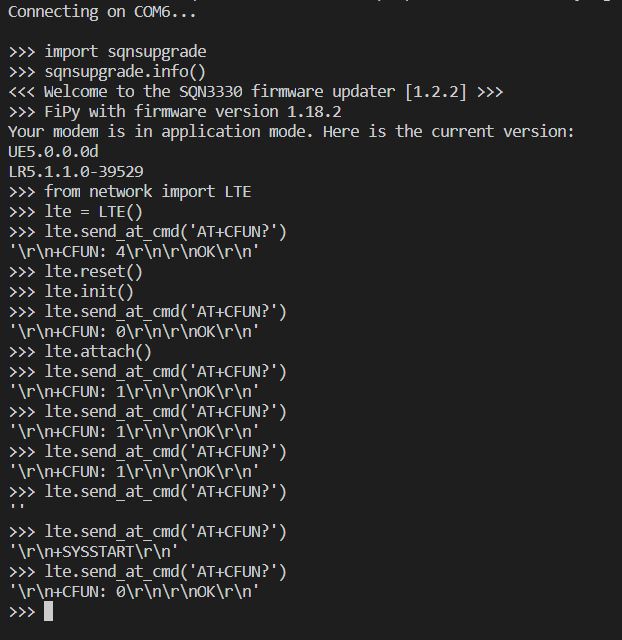
When lte.attach() is called, and then quickly repeating AT+CFUN?, the modem first reports
CFUN: 1. Shortly after it reports +SYSSTART and then CFUN: 0.
As per Sequans AT manual, +SYSSTART is associated with modem reset/startup.
Could this suggest that the modem reboots due to lte.attach() call?Below snap from terminal:
-
My thought is that the Fipy Firmware is not the issue. but the Sequans firmware 39529 modem update was the issue. No problem running any Fipy Firmware old or new. Issues arise when using modem firmware 39529
-
@steve-williams I have been trying a number of different options and combinations of GPY and Sequans firmware and I have not found a solution to the problems I am experiencing. While I strongly suspected the Sequans firmware, downgrading to 33080, then up to 38638 and 39529 showed no real difference to the problem I am having getting LTE to attach properly.
With each Sequans version I tried Pycom GPY Release F/W GPy-1.18.1.r3, r4, r7 and also GPy-1.18.2. I also tried release candidates GPy-1.20.0.rc2, rc3, rc4 and rc7 - no joy with any of them or any combination.
I had no difficulty with any of the firmware installs and my code doesn't seem to mind which version/s are running. But I still can't get LTE to attach. But I least I have gone through previous versions which did work OK previously.
From here I can only try and prove that either the Sequans module itself (processor or radios) or perhaps the Expansion Bd. 3.0 is the cause. More testing to do now I have eliminated some possibles.
Anyone else having trouble or lucked onto a solution?
-
@akimmels I realized I should probably clarify this a bit.
What this suggest to me is that when lte.attach()is called, the modem seems to reset itself, without lte.attach() returning or giving an error.
So you think the modem is still trying to attach, but in fact it is reset....This can be seen from the CFUN returning 0 indicating that both RX adn TX of the modem are disabled. It can also be seen from the current the module is draining, which is much lower in the reset state than when the RX and TX are active.
I flashed NB-IoT firmware (instead of LTE-M) into the modem, and was then able to attach and connect to a network and test connectivity. So this proves that the hardware is OK....
-
I have discussed this with Sequans but before we can do any type of troubleshooting we need more details.
-
The network operator being used
-
The API commands used to setup the connection
-
The LTE firmware version currently installed (
print(lte.send_at_command('ATI1'))) -
The MicroPython firmware currently used (
os.uname()) -
The output of
print(lte.send_at_command('AT+CEREG?'))after trying to attach. -
The output of
print(lte.send_at_command('AT+SQNMONI=9'))after trying to attach (might return ERROR)
@akimmels This is normal behaviour under certain circumstances. The
lte.isattached()command should automatically re-enable the radio in this case. It is not advised to enable/disable the radio manually as this will cause the MicroPython task monitoring the LTE modem to fail. -
-
I have also uploaded a new firmware package for CAT-M1: https://software.pycom.io/downloads/sequans/CATM1-41065.zip
The password is the same as for other Sequans firmware downloads.
This is a pre-release that has not been fully tested yet. It should be used only for users who have issues with the latest official release.
-
@xykon said in FiPy LTE not connecting after Upgrade Firmware:
It is not advised to enable/disable the radio manually as this will cause the MicroPython task monitoring the LTE modem to fail.
When you say don't manually enable/disable the radio, what commands that would be used to do this? I do use init/deinit in my code (to reduce power use between LTE use), is that OK?
I will try the new firmware you advised of, and also get the information you request, this is a vexing problem and I am keen to resolve it. As I posted earlier, I have tried a number of different Sequans and GPY firmwares to try and identify the problem but had no success yet.
-
@xykon Just installed the 41065 firmware on my GPY, running 1.20.0.rc7. Sadly, my let.attach problem is NOT fixed..
-
@xykon I am in Australi and use the Telstra service. The lte configuration I use is:



I have followed you instructions and taken snapshots of the command/result for each, Please note that the correct command to send AT commands is lte.send_at_cmd(instruction). as follows:
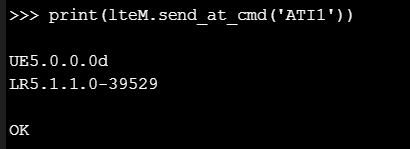

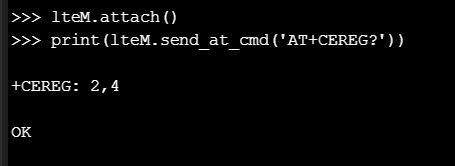

After that I uploaded the new seqans firmware OK, but it hasn't fixed the issue..
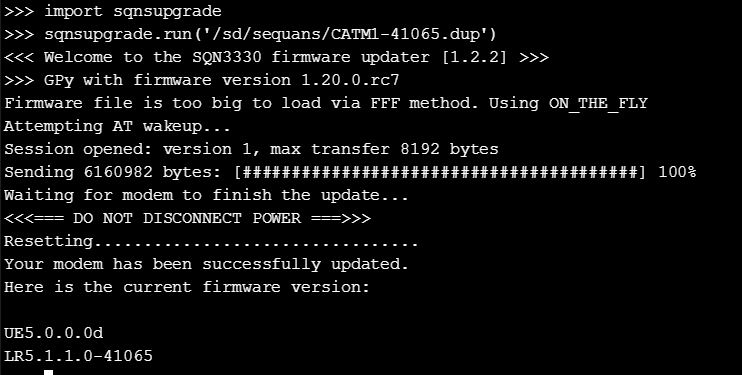
Hope the above helps to resolve the problems being encountered..
-
@steve-williams Can you please try with:
from network import LTE
lte = LTE(carrier="telstra")
lte.attach()
Please do not send any commands starting with "AT!" to the modem unless expressly advised by Pycom. The command you are using has been discontinued in recent firmwares.
-
@xykon OK, I wasn't aware of that.. the code I am using has that instruction included and has done for months, and worked fine until recently? Where was the information on this provided -( so I can look for any other useful information)?
-
@xykon I tried that set of instructions - still doesn't attach.. :-(
-
@xykon do any of these updates location specific? Wouldn't think so but wanted to double check I am in the USA usually verizon. Tried the upgrade here and it still did not work.
Hello! It looks like you're interested in this conversation, but you don't have an account yet.
Getting fed up of having to scroll through the same posts each visit? When you register for an account, you'll always come back to exactly where you were before, and choose to be notified of new replies (either via email, or push notification). You'll also be able to save bookmarks and upvote posts to show your appreciation to other community members.
With your input, this post could be even better 💗
Register Login