Welcome to the Pycom forum Forum
    • \[\[global:header.categories\]\]
    • \[\[global:header.recent\]\]
    • \[\[global:header.tags\]\]
    • \[\[global:header.popular\]\]
    • Login

    Explore Pybytes | Official Documentation | Report a Firmware Bug/Issue | GitHub

    Firmware Release v1.20.1

    Scheduled Pinned Locked Moved Announcements & News
    firmware
    68 Posts 18 Posters 11.4k Views 19 Watching
    Loading More Posts
    • Oldest to Newest
    • Newest to Oldest
    • Most Votes
    Reply
    • Reply as topic
    Log in to reply
    This topic has been deleted. Only users with topic management privileges can see it.
    • C Offline
      Clemens
      last edited by Clemens

      I have some devices with firmware 1.20.0.rc13 before and now 1.20.1. Unfortunately the old software is not running with the new firmware and I got e.g.

      File "main.py", line 11, in <module>
      File "webserver.py", line 124, in <module>
      File "/flash/lib/microDNSSrv.py", line 19, in Create
      File "/flash/lib/microDNSSrv.py", line 161, in Start
      OSError: Network card not available
      

      or

      File "/flash/lib/terkin/network/core.py", line 110, in start_services
      File "/flash/lib/terkin/network/core.py", line 131, in start_httpserver
      File "/flash/lib/terkin/api/http.py", line 70, in start
      File "/flash/dist-packages/microWebSrv.py", line 219, in Start
      OSError: Network card not available
      

      and my former working OTA-Code is stopping also

        File "main.py", line 44, in <module>
        File "/flash/lib/OTA.py", line 176, in connect
      NameError: name 'SSID' isn't defined
      
      robert-hhR 1 Reply Last reply Reply Quote 0
      • robert-hhR Offline
        robert-hh @Clemens
        last edited by robert-hh

        @Clemens I had a similar problem too on one Lopy4 device - Wifi was not available. Erasing the flash and reloading the firmware solved it.

        C 1 Reply Last reply Reply Quote 1
        • C Offline
          Clemens @robert-hh
          last edited by

          @robert-hh said in Firmware Release v1.20.1:

          pycom.wifi_on_boot(True, True)

          >>> pycom.wifi_on_boot()
          False
          >>> pycom.wifi_on_boot(True, True)
          Traceback (most recent call last):
            File "<stdin>", line 1, in <module>
          OSError: the requested operation failed
          
          robert-hhR 1 Reply Last reply Reply Quote 0
          • robert-hhR Offline
            robert-hh @Clemens
            last edited by robert-hh

            @Clemens That wifi_on_boot() issue is a different topic and has been fixed with today's build for the Dev branch. AFIK it is not yet in the 'official' version.
            Edit: It looks like there is a lag in the Pycom update. The updater does not show V1.20.1, and the download page for firmware packages is also not updated.

            1 Reply Last reply Reply Quote 0
            • rcolisteteR Offline
              rcolistete
              last edited by

              Please update the links for all Pycom devices in :
              https://docs.pycom.io/advance/downgrade/
              to include the version 1.20.1 for manual firmware download.

              My "MicroPython Samples". My "MicroPython Firmwares" with many options (double precision, ulab, etc).

              rcolisteteR 1 Reply Last reply Reply Quote 0
              • C Offline
                Clemens @robert-hh
                last edited by

                One software is after the repeated firmware update with the checked option erase filesystem now running. The second one outputs still the same error.

                1 Reply Last reply Reply Quote 0
                • B Offline
                  berni
                  last edited by

                  After upgrading to 1.20.1, I started having crashes when setting up the frequencies for the Nano-Gateway code:

                  Guru Meditation Error: Core  1 panic'ed (Cache disabled but cached memory region accessed)
                  Guru Meditation Error: Core  1 panic'ed (IllegalInstruction). Exception was unhandled.
                  Memory dump at 0x40201f50: bad00bad bad00bad bad00bad
                  Guru Meditation Error: Core  1 panic'ed (IllegalInstruction). Exception was unhandled.
                  Memory dump at 0x40201f50: bad00bad bad00bad bad00bad
                  Guru Meditation Error: Core  1 panic'ed (IllegalInstruction). Exception was unhandled.


                  This happens somehow randomly, after a few cycles of deep sleep/transmission, but even the Watchdog timer becomes useless.

                  Then I downgraded to 1.20.rc13. Now, the code doesn't work and stops in this line:

                  >>> from network import LoRa
                  >>> lora = LoRa(mode=LoRa.LORAWAN)
                  >>> lora.nvram_erase()
                  Traceback (most recent call last):
                    File "<stdin>", line 1, in <module>
                  OSError: the requested operation failed
                  >>> lora.nvram_save()
                  Traceback (most recent call last):
                    File "<stdin>", line 1, in <module>
                  OSError: the requested operation failed
                  

                  Is there any way to go back to 1.20.rc13 and have these function working again? I suspect there must be some low level changes on the LoRa radio.

                  I robert-hhR O 3 Replies Last reply Reply Quote 0
                  • I Offline
                    iwahdan @berni
                    last edited by

                    Hello @berni , Thanks for reporting that issue, we will work on reproducing it, meanwhile regarding the exception you get when downgrading to rc13 , this should be due to the new formatting mechanism of NVS introduced in IDF_v3.2 (1.20.1) , so when you downgrade the FW to previous version of IDF, NVS might not be initialise successfully, to solve this issue you can erase the device and flash the Firmware again.

                    Thanks

                    Wahdan

                    1 Reply Last reply Reply Quote 1
                    • robert-hhR Offline
                      robert-hh @berni
                      last edited by

                      @berni @iwahdan Setting the frequency and/or removing channels is a topic which anyhow does not seem to work. I have to look at it. Even when I set in the abp_node.py sample code the device to use a single frequency only, it transmits at the three default frequencies. That was different once.

                      O 1 Reply Last reply Reply Quote 0
                      • O Offline
                        oligauc @berni
                        last edited by

                        @berni Using a terminal / command prompt, please can you go to the pycom firmware updater folder (e.g "C:\Program Files (x86)\Pycom\Pycom Firmware Update" in windows) and type the following command:

                        pycom-fwtool-cli.exe -p "your com port" erase_all

                        After erasing please re-flash your device.

                        Please let us know how it goes, Thanks

                        B 1 Reply Last reply Reply Quote 0
                        • O Offline
                          oligauc @robert-hh
                          last edited by

                          @robert-hh We carried out some tests with the abp node / RAK gateway in the EU region. If you add 3 channels with the same frequency and remove the others, it will send at 1 frequency.

                          If you do not add / remove channels manually, then the node uses frequency hopping.

                          robert-hhR 3 Replies Last reply Reply Quote 0
                          • robert-hhR Offline
                            robert-hh @oligauc
                            last edited by

                            @oligauc I think i did that in my code, which is the abp_node example. I'll repeat it.

                            1 Reply Last reply Reply Quote 0
                            • robert-hhR Offline
                              robert-hh @oligauc
                              last edited by

                              @oligauc I just verified that, after a clean erase & upload. Then only one frequency is used. There may have been a modified set-up. I purchased a SDR recently, which allows to see the frequencies used. It's interesting to see all the different activities in the 868 band.

                              1 Reply Last reply Reply Quote 0
                              • robert-hhR Offline
                                robert-hh @oligauc
                                last edited by

                                @oligauc I tried another device, a LoPy now, and that one was completely messy. After setting a Lora parameter wrong, I could not change that any more. Only erasing flash and re-installing the firmware made it working again. Besides that, below is a nice picture showing how a message with DR=0 looks in the waterfall diagram.
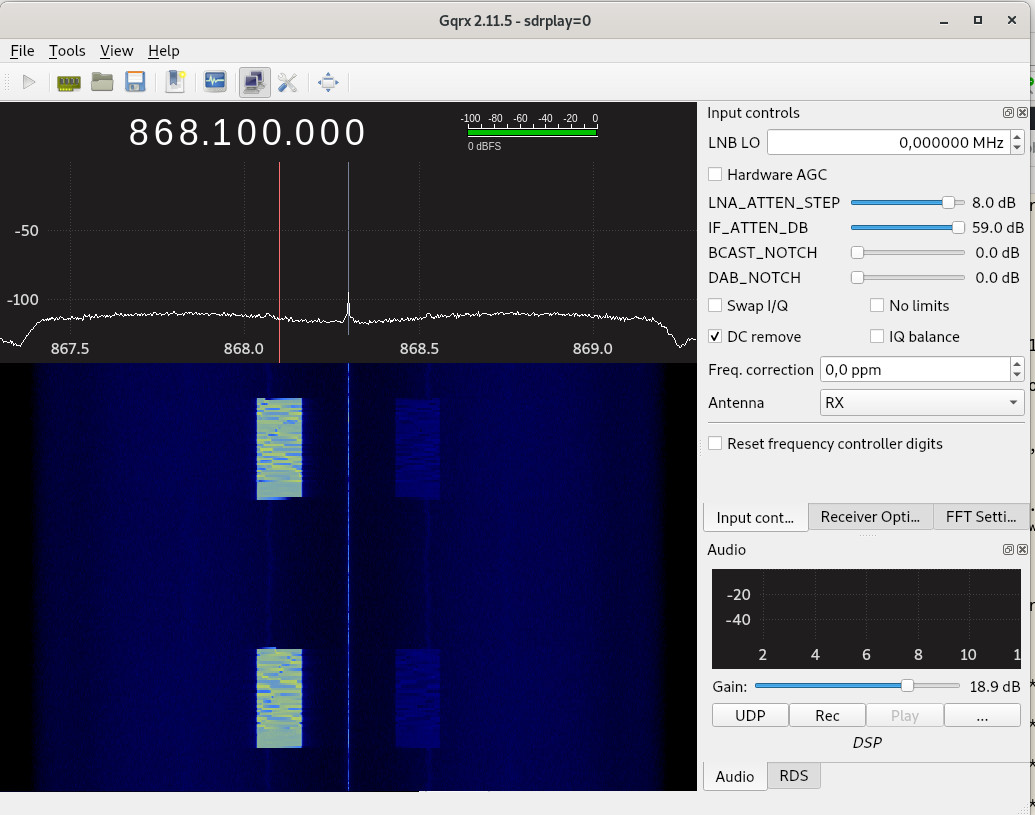
                                lora_waterfall_DR0.jpg

                                1 Reply Last reply Reply Quote 0
                                • B Offline
                                  berni @oligauc
                                  last edited by

                                  Thank you @oligauc!

                                  This fixed the issue with lora.nvram_erase(). Also, I was having troubles deleting the flash from the pycom firmware upgrade software (it will time out if I select that option, working fine if I just upgrade the FW).

                                  I have observed that having pybytes active and doing my own LoRa OTTA (saving on nvram after joining the network) caused that the join flag was deleted and never connected again. I have disabled the pybytes in the pybytes_config.jsonfile adding {"pybytes_autostart": false} and that fixed the issue.

                                  I have been running the program on v1.20.1.r1 without pybytes and haven't had any Guru Meditation errors for a while. I'll keep trying...

                                  A 1 Reply Last reply Reply Quote 1
                                  • C Offline
                                    cmisztur @robert-hh
                                    last edited by

                                    @robert-hh said in Firmware Release v1.20.1:

                                    I build the image myself

                                    Right.

                                    pyexec_frozen_module("_main.py");

                                    robert-hhR 1 Reply Last reply Reply Quote 0
                                    • robert-hhR Offline
                                      robert-hh @cmisztur
                                      last edited by

                                      @cmisztur It's not that _main.py or _boot.py are executed, it's what is frozen into the image as _boot.py or _main.py.

                                      1 Reply Last reply Reply Quote 0
                                      • S Offline
                                        serafimsaudade
                                        last edited by serafimsaudade

                                        pycom_.png

                                        I'm getting this error when compiling.
                                        I clone the repo and try to compile.

                                        robert-hhR 1 Reply Last reply Reply Quote 0
                                        • robert-hhR Offline
                                          robert-hh @serafimsaudade
                                          last edited by

                                          @serafimsaudade IOt may be a problem with the pycom esp-idf.
                                          in the folder pycom-esp-idf, execute the command:

                                          git checkout idf_v3.2
                                          git submodule sync
                                          git submodule update --init
                                          

                                          Also, in you pycom esp32 source directory, issue the commands:

                                          git checkout Dev
                                          git submodule sync
                                          git submodule update --init
                                          

                                          Then, a

                                          make BOARD=WIPY clean
                                          make BOARD=WIPY
                                          
                                          S 1 Reply Last reply Reply Quote 0
                                          • S Offline
                                            serafimsaudade @robert-hh
                                            last edited by

                                            @robert-hh Tks for the tip.

                                            That was the idf submodules.
                                            problem solve. :)

                                            D 1 Reply Last reply Reply Quote 0

                                            Hello! It looks like you're interested in this conversation, but you don't have an account yet.

                                            Getting fed up of having to scroll through the same posts each visit? When you register for an account, you'll always come back to exactly where you were before, and choose to be notified of new replies (either via email, or push notification). You'll also be able to save bookmarks and upvote posts to show your appreciation to other community members.

                                            With your input, this post could be even better 💗

                                            Register Login
                                            • 1
                                            • 2
                                            • 3
                                            • 4
                                            • 2 / 4
                                            • First post
                                              Last post

                                            Pycom on Twitter

                                            Pycom

