OSError: Couldn't connect to Modem!
-
@Edward-Dimmack Hello and thanks for the response. Could you please give me the last part of the firmware? As my units did have firmware version 1.18.2.r7 (so still 1.18.2).
If anyone still have problems we have figured out a way of reliably turning on the modem:
When communicating set lte_modem_en_on_boot() to True.
Do a reset.
communicate.This does however introduce the need to keep state between resets, but that can be done by ether checking if lte_modem_en_on_boot is set to True or by checking reset cause if you don't want to start using the eeprom.
-
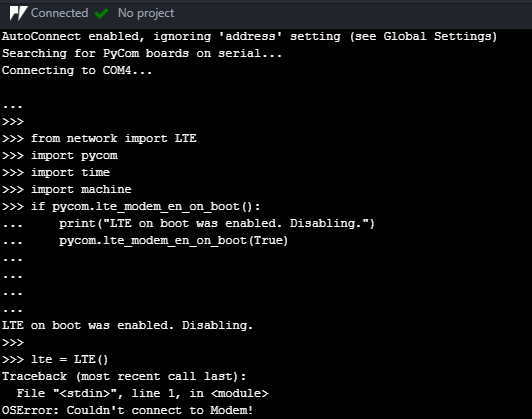
@tveito Hi, I got the same problem here. My device has firmware version 1.18.2.v7. I did a reset but there is still stuck after entering the code "lte = LTE()". Please help me. Thank you!!
-
@diepducle From the logic of your code/commands you want to disable
pycom.lte_modem_en_on_bootif it's enabled so you shold usepycom.lte_modem_en_on_boot(False)orpycom.lte_modem_en_on_boot(0) -
@rskoniec Thank you for your reply. I tried to use pycom.lte_modem_en_on_boot(False) but the result was still the same.
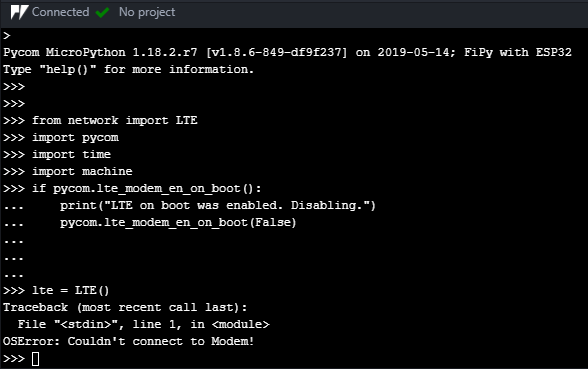
I am a newbie in this area and trying to send data to pybytes after this. But now I am struggling with LTE M1 connection. Could you please tell me the way to fix this problem? Many thanks!
-
@rskoniec By the way, before the firmware version 1.18.2.r7 being used, I used to upgraded the firmware to version 1.18.2.r6 [pybytes], and I got a different problem when entering the code "lte = LTE()" (as same as the following topic: https://forum.pycom.io/topic/3129/lte-lte-getting-stuck-after-reset-fw-1-17-3-b1-on-fipy). I wonder that which firmware version should I use and am I doing the right track.
-
@diepducle Try with downgrade to https://software.pycom.io/downloads/FiPy-1.18.2.tar.gz or upgrade to https://software.pycom.io/downloads/FiPy-1.18.3.tar.gz Here is the full list of FiPy f/w https://software.pycom.io/downloads/FiPy.html
-
@rskoniec Thank you for your reply.
I tried to downgrade to some versions like: FiPy-1.18.2.r6, FiPy-1.18.2.r5, FiPy-1.18.2, FiPy-1.18.1.r7 but all show the same problem is that the triple arrows are disappeared.
When I upgrade to version FiPy-1.18.3 from the version FiPy-1.18.2.r7 (using), they show the problem of OSError: Couldn't connect to modem.
-
@diepducle Maybe clues from this thread would be helpful https://forum.pycom.io/topic/4022/unable-to-update-gpy-modem-firmware
-
@rskoniec Thank you for your support. I've already fixed this problem by upgrading the modem firmware.
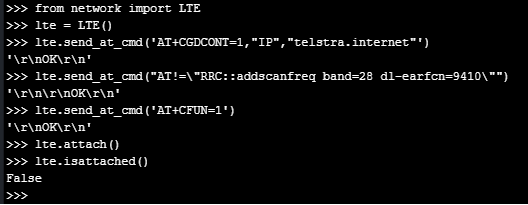
Now I am trying to connect to Telstra network in Australia but I got stuck when lte is not attached, as shown in the picture below. Could you please help me to figure out this problem?
-
@tveito Sorry for the late reply. I meant 1.18.2 with no revision update. So I had 1.18.2.r7 and it didn't work so I downgraded to 1.18.2 and it worked.
Hello! It looks like you're interested in this conversation, but you don't have an account yet.
Getting fed up of having to scroll through the same posts each visit? When you register for an account, you'll always come back to exactly where you were before, and choose to be notified of new replies (either via email, or push notification). You'll also be able to save bookmarks and upvote posts to show your appreciation to other community members.
With your input, this post could be even better 💗
Register Login