Welcome to the Pycom forum Forum
    • \[\[global:header.categories\]\]
    • \[\[global:header.recent\]\]
    • \[\[global:header.tags\]\]
    • \[\[global:header.popular\]\]
    • Login

    Explore Pybytes | Official Documentation | Report a Firmware Bug/Issue | GitHub

    SigFox Error

    Scheduled Pinned Locked Moved SiPy
    sipysigfox
    16 Posts 4 Posters 4.7k Views 4 Watching
    Loading More Posts
    • Oldest to Newest
    • Newest to Oldest
    • Most Votes
    Reply
    • Reply as topic
    Log in to reply
    This topic has been deleted. Only users with topic management privileges can see it.
    • M Offline
      michal.zykov @saprize
      last edited by

      Hi @saprize,

      As I mentioned, this seems to be firmware issue. Check this out:

      • https://forum.pycom.io/topic/624/new-firmware-release-version-1-5-1-b1-supporting-the-sipy

      So, you should upgrade firmware to the most recent one to get your SiPy to the fully functional state.

      Mike

      1 Reply Last reply Reply Quote 0
      • J Offline
        jmarcelino @saprize
        last edited by

        @saprize
        You're running very old firmware when Sigfox wasn't even activated. Update your board first by following the "Firmware Update" links at https://www.pycom.io/resources/

        1 Reply Last reply Reply Quote 0
        • S Offline
          saprize
          last edited by

          This makes no sence. Ich can connect via Serialport. But when ich do the 23 to G thing an run the Updater it always fails. This cant be an Connection issue. pymkr works fine user my CP21xx serial device. ??

          M J 2 Replies Last reply Reply Quote 0
          • M Offline
            michal.zykov @saprize
            last edited by

            Hi @saprize,

            Based on your information there are two issues.

            Issue No .1
            Sigfox library does not work properly because of your obsolete firmware.

            Solution: Upgrade firmware to the most recent one.

            Issue No. 2
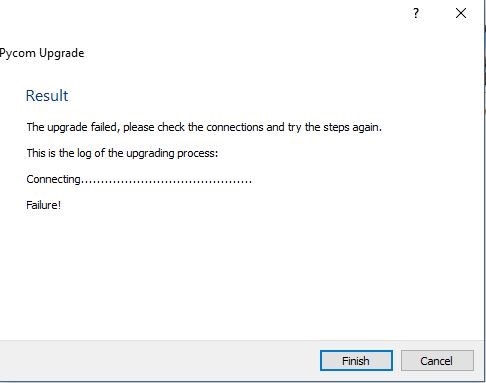
            You are not able to upgrade your firmware. OK - can we get any details? What is the error message? Can you take a print-screen?

            Mike

            1 Reply Last reply Reply Quote 0
            • S Offline
              saprize
              last edited by

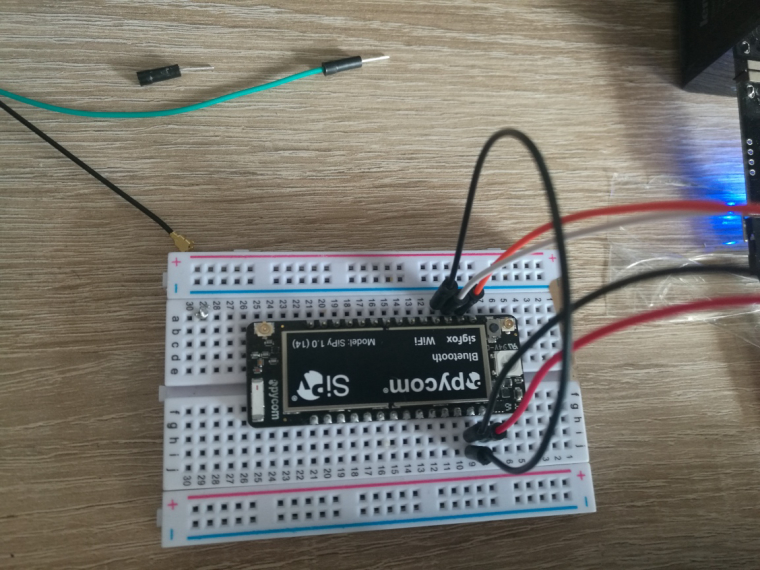
              There ist no Log or no futher info anywhere its just states ![0_1489673278628_Unbenannt.PNG](Uploading 100%) this.

              0_1489673587497_IMG_20170316_150612.jpg

              ![0_1489673676801_Unbenannt.jpg](Uploading 100%)

              M 1 Reply Last reply Reply Quote 0
              • M Offline
                michal.zykov @saprize
                last edited by

                Hi @saprize,

                Thank yoU! How do you know that the firmware upgrade fails?

                Mike

                S 1 Reply Last reply Reply Quote 0
                • J Offline
                  jmarcelino @saprize
                  last edited by

                  @saprize
                  Did you reset/power cycle the board after connecting GND-23?

                  Have you closed other apps accessing the port, e.g Pymakr?

                  S 1 Reply Last reply Reply Quote 0
                  • S Offline
                    saprize
                    last edited by

                    0_1489673946142_Unbenannt3.jpg

                    1 Reply Last reply Reply Quote 0
                    • S Offline
                      saprize @michal.zykov
                      last edited by

                      @michal.zykov got to wait 600 sec. till ich can post again....

                      1 Reply Last reply Reply Quote 0
                      • R Offline
                        rskoniec
                        last edited by

                        @saprize Check this:

                        @rskoniec said in Firmware upgrade Serial port to use unavailable:

                        @Migueloribe Did you look here? https://forum.pycom.io/topic/763/firmware-upgrade-troubleshooting-checklist-procedure
                        Do you see any change in a Device Manager when you're connecting/unconnecting USB cable with Expansion Board?
                        What version of Windows are you using?

                        The machine is working as good as it's code.

                        1 Reply Last reply Reply Quote 0
                        • S Offline
                          saprize @jmarcelino
                          last edited by

                          @jmarcelino There u go the WIFI Autoconnect was still on !!!!! Now it works. Thank you guys !!!!!!!

                          1 Reply Last reply Reply Quote 0

                          Hello! It looks like you're interested in this conversation, but you don't have an account yet.

                          Getting fed up of having to scroll through the same posts each visit? When you register for an account, you'll always come back to exactly where you were before, and choose to be notified of new replies (either via email, or push notification). You'll also be able to save bookmarks and upvote posts to show your appreciation to other community members.

                          With your input, this post could be even better 💗

                          Register Login
                          • 1 / 1
                          • First post
                            Last post

                          Pycom on Twitter

                          Pycom