Welcome to the Pycom forum Forum
    • \[\[global:header.categories\]\]
    • \[\[global:header.recent\]\]
    • \[\[global:header.tags\]\]
    • \[\[global:header.popular\]\]
    • Login

    Explore Pybytes | Official Documentation | Report a Firmware Bug/Issue | GitHub

    Pure Python library for reading DHT sensor on Pycom boards

    Scheduled Pinned Locked Moved Discussion
    dht dht11 dth22
    57 Posts 8 Posters 29.5k Views 9 Watching
    Loading More Posts
    • Oldest to Newest
    • Newest to Oldest
    • Most Votes
    Reply
    • Reply as topic
    Log in to reply
    This topic has been deleted. Only users with topic management privileges can see it.
    • R Offline
      robmarkcole @robmarkcole
      last edited by

      Annoyingly I am unable to upload the code, as it is 'marked as spam' when I try. Nevertheless I am just using the examples in your Github repo

      Jurassic PorkJ 1 Reply Last reply Reply Quote 0
      • Jurassic PorkJ Offline
        Jurassic Pork @robmarkcole
        last edited by Jurassic Pork

        hello,
        @robmarkcole
        to see what is wrong, you can uncomment some lines in the file dht.py. The lines 49, 53, 54, 63 with the print function.
        you must see something like that for the dht11 :
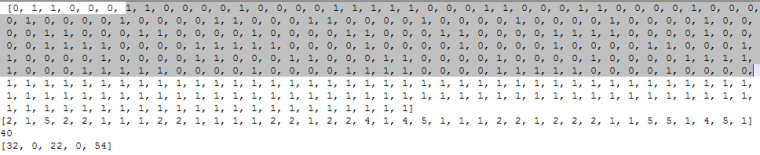
        0_1496716130654_print_dht11_data.png

        the last line in the photo (line 63 print(the_bytes)) has the values for the humidity (32) and for the temperature (22).
        May be something is wrong with the WiPy module :
        i use a SiPy module and the other people who have used the library seems to use a LoPy module. If someone can try to use the library with a WiPy module to see if it is OK.

        Friendly, J.P

        R 1 Reply Last reply Reply Quote 0
        • R Offline
          robmarkcole @Jurassic Pork
          last edited by

          Hi @Jurassic-Pork thanks for the tips. Here is what I get. The temp and humidity values change each time I reset the board, but look incorrect. E.g. humidity went from 18 to 37 on a restart.
          Cheers

          entry 0x4009fd9c                                                                                                        
          ('192.168.0.23', '255.255.255.0', '192.168.0.1', '192.168.0.1')                                                         
          [1, 0, 1, 1, 0, 0, 1, 1, 0, 0, 0, 1, 1, 1, 0, 0, 0, 1, 1, 0, 0, 0, 1, 0, 0, 0, 1, 1, 1, 1, 0, 0, 0, 1, 0, 0, 0, 1, 1, 1,
           1, 0, 0, 0, 1, 0, 0, 0, 1, 0, 0, 0, 1, 0, 0, 0, 1, 0, 0, 0, 1, 1, 0, 0, 0, 1, 0, 0, 0, 1, 0, 0, 0, 1, 0, 0, 0, 1, 0, 0,
           0, 1, 1, 0, 0, 0, 1, 0, 0, 0, 1, 1, 1, 1, 0, 0, 0, 1, 0, 0, 0, 1, 0, 0, 0, 1, 1, 1, 1, 0, 0, 0, 1, 0, 0, 0, 1, 0, 0, 0,
           1, 0, 0, 0, 0, 1, 0, 0, 0, 1, 0, 0, 0, 1, 0, 0, 0, 1, 0, 0, 0, 1, 0, 0, 0, 1, 1, 0, 0, 0, 1, 0, 0, 0, 1, 0, 0, 0, 1, 1,
           1, 1, 0, 0, 0, 1, 1, 1, 1, 0, 0, 0, 1, 0, 0, 0, 1, 1, 1, 1, 0, 0, 1, 1, 1, 1, 0, 0, 0, 1, 1, 1, 1, 0, 0, 0, 1, 1, 1, 1,
           1, 1, 1, 1, 1, 1, 1, 1, 1, 1, 1, 1, 1, 1, 1, 1, 1, 1, 1, 1, 1, 1, 1, 1, 1, 1, 1, 1, 1, 1, 1, 1, 1, 1, 1, 1, 1, 1, 1, 1,
           1, 1, 1, 1, 1, 1, 1, 1, 1, 1, 1, 1, 1, 1, 1, 1, 1, 1, 1, 1, 1, 1, 1, 1, 1, 1, 1, 1, 1, 1, 1, 1, 1, 1, 1, 1, 1, 1, 1, 1,
           1, 1, 1, 1, 1, 1, 1, 1, 1, 1, 1, 1, 1, 1, 1, 1, 1, 1]                                                                  
          [2, 2, 3, 2, 1, 4, 1, 4, 1, 1, 1, 1, 2, 1, 1, 1, 1, 2, 1, 4, 1, 1, 4, 1, 1, 1, 1, 1, 1, 1, 1, 2, 1, 1, 4, 4, 1, 4, 4, 4]
          40                                                                                                                      
          [37, 0, 18, 0, 55]                                                                                                      
          8                                                                                                                       
          Temperature: 18 C                                                                                                       
          Humidity: 37 %

          Jurassic PorkJ 1 Reply Last reply Reply Quote 0
          • Jurassic PorkJ Offline
            Jurassic Pork @robmarkcole
            last edited by Jurassic Pork

            hello,
            @robmarkcole
            look at this this timing for the AM2302 data acquisition :
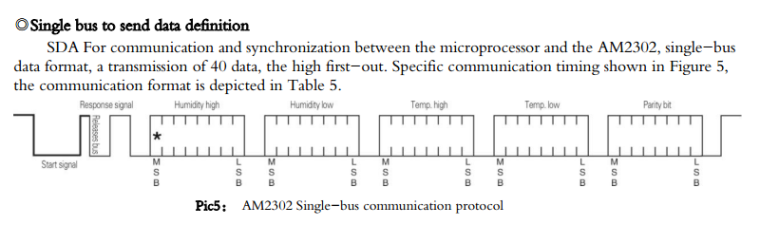
            0_1496762177466_AM2302-Timing.png
            the acquisition begins when the start signal after 19 ms is put to level 1 :

            def read(self):
                    #time.sleep(1)
                    # send initial high
                    #self.__send_and_sleep(1, 0.025)
                    # pull down to low
                    self.__send_and_sleep(0, 0.019)
                    # collect data into an array
                    data = self.__collect_input()
            
                def __collect_input(self):
                    # collect the data while unchanged found
                    unchanged_count = 0
                    # this is used to determine where is the end of the data
                    max_unchanged_count = 100
                    last = -1
                    data = []
                    m = bytearray(800)        # needs long sample size to grab all the bits from the DHT
                    irqf = disable_irq()
                    self.__pin(1)
            

            then we store the level values :

                   for i in range(len(m)):
                        m[i] = self.__pin()      ## sample input and store value
            

            your samples data begin with a 1 and me with a zero (begining of the response signal)
            try to see if you have always a 1 for the first data.

            R 1 Reply Last reply Reply Quote 0
            • R Offline
              robmarkcole @Jurassic Pork
              last edited by

              @Jurassic-Pork Appears to always start with 1..

              Jurassic PorkJ 1 Reply Last reply Reply Quote 0
              • Jurassic PorkJ Offline
                Jurassic Pork @robmarkcole
                last edited by Jurassic Pork

                hello,
                @robmarkcole
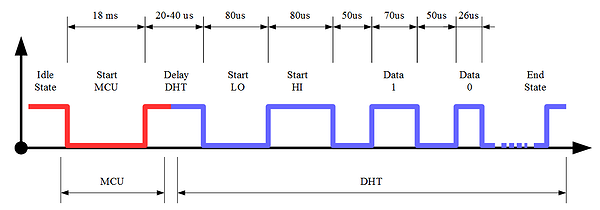
                0_1496785483210_dht11_timing_diagram_cs600x210fx.png

                May be you have the Delay DHT in your first data and not me.

                In the parse data function :

                    def __parse_data_pull_up_lengths(self, data):
                        STATE_INIT_PULL_DOWN = 1
                        STATE_INIT_PULL_UP = 2
                        STATE_DATA_FIRST_PULL_DOWN = 3
                        STATE_DATA_PULL_UP = 4
                        STATE_DATA_PULL_DOWN = 5
                
                        state = STATE_INIT_PULL_UP
                
                        lengths = [] # will contain the lengths of data pull up periods
                        current_length = 0 # will contain the length of the previous period
                
                        for i in range(len(data)):
                
                            current = data[i]
                            current_length += 1
                
                            if state == STATE_INIT_PULL_DOWN:
                                if current == 0:
                                    # ok, we got the initial pull down
                                    state = STATE_INIT_PULL_UP
                                    continue
                                else:
                                    continue
                            if state == STATE_INIT_PULL_UP:
                                if current == 1:
                                    # ok, we got the initial pull up
                                    state = STATE_DATA_FIRST_PULL_DOWN
                                    continue
                                else:
                                    continue
                            if state == STATE_DATA_FIRST_PULL_DOWN:
                                if current == 0:
                                    # we have the initial pull down, the next will be the data pull up
                                    state = STATE_DATA_PULL_UP
                                    continue
                                else:
                                    continue
                            if state == STATE_DATA_PULL_UP:
                                if current == 1:
                                    # data pulled up, the length of this pull up will determine whether it is 0 or 1
                                    current_length = 0
                                    state = STATE_DATA_PULL_DOWN
                                    continue
                                else:
                                    continue
                            if state == STATE_DATA_PULL_DOWN:
                                if current == 0:
                                    # pulled down, we store the length of the previous pull up period
                                    lengths.append(current_length)
                                    state = STATE_DATA_PULL_UP
                                    continue
                                else:
                                    continue
                        return lengths
                

                try to put the state variable to STATE_INIT_PULL_DOWN at the begining of the function :

                 state = STATE_INIT_PULL_DOWN
                

                Friendly, J.P

                R 1 Reply Last reply Reply Quote 0
                • R Offline
                  robmarkcole @Jurassic Pork
                  last edited by

                  @Jurassic-Pork said in Pure Python library for reading DHT sensor on Pycom boards:

                  state = STATE_INIT_PULL_DOWN

                  Thanks JP. Making this change I get:

                  entry 0x4009fd9c                                                                                                        
                  ('192.168.0.23', '255.255.255.0', '192.168.0.1', '192.168.0.1')                                                         
                  [1, 0, 1, 0, 0, 0, 1, 0, 0, 1, 0, 0, 0, 1, 1, 1, 0, 0, 1, 1, 0, 0, 1, 1, 1, 0, 0, 0, 1, 1, 1, 0, 0, 1, 0, 0, 0, 1, 0, 0,
                   1, 0, 0, 0, 1, 0, 0, 1, 0, 0, 0, 1, 0, 0, 1, 0, 0, 0, 1, 0, 0, 0, 1, 0, 0, 1, 0, 0, 0, 1, 0, 0, 1, 0, 0, 0, 1, 1, 1, 0,
                   0, 1, 1, 0, 0, 1, 0, 0, 1, 1, 0, 0, 1, 1, 1, 0, 0, 0, 1, 0, 0, 1, 0, 0, 0, 1, 0, 0, 1, 1, 0, 0, 1, 0, 0, 1, 1, 0, 0, 1,
                   0, 0, 1, 1, 0, 0, 1, 0, 0, 0, 1, 0, 0, 1, 1, 1, 0, 0, 0, 1, 0, 0, 1, 0, 0, 0, 1, 1, 1, 0, 0, 1, 1, 1, 1, 0, 0, 1, 1, 1,
                   0, 0, 0, 1, 1, 1, 1, 1, 1, 1, 1, 1, 1, 1, 1, 1, 1, 1, 1, 1, 1, 1, 1, 1, 1, 1, 1, 1, 1, 1, 1, 1, 1, 1, 1, 1, 1, 1, 1, 1,
                   1, 1, 1, 1, 1, 1, 1, 1, 1, 1, 1, 1, 1, 1, 1, 1, 1, 1, 1, 1, 1, 1, 1, 1, 1, 1, 1, 1, 1, 1, 1, 1, 1, 1, 1, 1, 1, 1, 1, 1,
                   1, 1, 1, 1, 1, 1, 1, 1, 1, 1, 1, 1, 1, 1, 1, 1, 1, 1, 1, 1, 1, 1, 1, 1, 1]                                             
                  [1, 1, 3, 2, 3, 3, 1, 1, 1, 1, 1, 1, 1, 1, 1, 1, 1, 1, 3, 2, 1, 2, 3, 1, 1, 1, 2, 1, 2, 1, 2, 1, 1, 3, 1, 1, 3, 4, 3]   
                  39  
                  

                  And nothing more

                  Jurassic PorkJ 1 Reply Last reply Reply Quote 0
                  • Jurassic PorkJ Offline
                    Jurassic Pork @robmarkcole
                    last edited by

                    hello,
                    @robmarkcole
                    Ok it's not good because you have only 39 values (last line)
                    it's seems that your module is slower than mine because the max value for length of 1 level is 4 and for me 5 (or it is the dht ) . What is exactly your Pycom Module ? frequency ? firmware ?

                    R 1 Reply Last reply Reply Quote 0
                    • R Offline
                      robmarkcole @Jurassic Pork
                      last edited by

                      Hi @Jurassic-Pork

                      • it's a Wipy 2.0,
                      • will check firmware tonight but only updated 2 days ago so presumably the latest,
                      • how to check the frequency?
                      Jurassic PorkJ 1 Reply Last reply Reply Quote 0
                      • Jurassic PorkJ Offline
                        Jurassic Pork @robmarkcole
                        last edited by Jurassic Pork

                        @robmarkcole
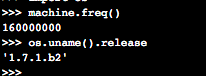
                        try this :

                        import machine
                        import os
                        machine.freq() # get the CPU frequency
                        os.uname().release 
                        

                        for me :

                         import machine                                                                                                      
                         import os                                                                                                           
                         machine.freq() # get the CPU frequency                                                                              
                        160000000                                                                                                               
                         os.uname().release                                                                                                  
                        '1.6.12.b1'

                        R 1 Reply Last reply Reply Quote 0
                        • R Offline
                          robmarkcole @Jurassic Pork
                          last edited by

                          @Jurassic-Pork s

                          0_1496904069365_upload-4c762e17-60b1-4129-82b3-268d0666a29a

                          Jurassic PorkJ 1 Reply Last reply Reply Quote 0
                          • Jurassic PorkJ Offline
                            Jurassic Pork @robmarkcole
                            last edited by

                            hello,
                            @robmarkcole have you still your problem ? the new firmware release v1.7.7.b1 have a new function pulses_get that can improve my DHT library.

                            R 1 Reply Last reply Reply Quote 0
                            • R Offline
                              robmarkcole @Jurassic Pork
                              last edited by

                              @Jurassic-Pork I just updated my firmware today :-) How to use the new function?

                              Jurassic PorkJ 1 Reply Last reply Reply Quote 0
                              • Jurassic PorkJ Offline
                                Jurassic Pork @robmarkcole
                                last edited by Jurassic Pork

                                @robmarkcole
                                put this code in the dht.py file and try a read2 in place of a read function. Show me the result (tuples and length) .

                                    def read2(self):
                                        #time.sleep(1)
                                        # send initial high
                                        #self.__send_and_sleep(1, 0.025)
                                
                                        # pull down to low
                                        self.__send_and_sleep(0, 0.019)
                                        data = pycom.pulses_get(self.__pin,100)
                                        self.__pin.init(Pin.OPEN_DRAIN)
                                        self.__pin(1)
                                        print(data)
                                        #enable_irq(irqf)
                                        bits = []
                                        for a,b in data:
                                        	if a ==1 and 18 <= b <= 28:
                                        		bits.append(0)
                                        	if a ==1 and 65 <= b <= 75:
                                        		bits.append(1)
                                        print("longueur bits : %d " % len(bits))
                                        if len(bits) != 40:
                                            return DTHResult(DTHResult.ERR_MISSING_DATA, 0, 0)
                                        print(bits)
                                        # we have the bits, calculate bytes
                                        the_bytes = self.__bits_to_bytes(bits)
                                        # calculate checksum and check
                                        checksum = self.__calculate_checksum(the_bytes)
                                        if the_bytes[4] != checksum:
                                            return DTHResult(DTHResult.ERR_CRC, 0, 0)
                                        # ok, we have valid data, return it
                                        [int_rh, dec_rh, int_t, dec_t, csum] = the_bytes
                                        if self.__dhttype==0:		#dht11
                                            rh = int_rh 		#dht11 20% ~ 90%
                                            t = int_t 	#dht11 0..50°C
                                        else:			#dht21,dht22
                                            rh = ((int_rh * 256) + dec_rh)/10
                                            t = (((int_t & 0x7F) * 256) + dec_t)/10
                                            if (int_t & 0x80) > 0:
                                                t *= -1
                                        return DTHResult(DTHResult.ERR_NO_ERROR, t, rh)
                                

                                PS : i have created a new branch in my DHT_pycom github repository (see at the end of my first message in this thread)

                                R 1 Reply Last reply Reply Quote 0
                                • R Offline
                                  robmarkcole @Jurassic Pork
                                  last edited by

                                  @Jurassic-Pork The good news is my DHT11 works fine with read(). However I think I bust my DHT22 at some point as reading no data from it. Will have to order another to test..!

                                  1 Reply Last reply Reply Quote 0
                                  • techykermitT Offline
                                    techykermit
                                    last edited by

                                    @Jurassic-Pork I have an AMT2301/DHT21 sensor. Google says that it is similar to the DHT22 and should work with the same code. However, your library with DHT22 as the set sensor does not work.
                                    Do you know anything about if the sensor is supported or are you planning to add it in the future?

                                    1 Reply Last reply Reply Quote 0

                                    Hello! It looks like you're interested in this conversation, but you don't have an account yet.

                                    Getting fed up of having to scroll through the same posts each visit? When you register for an account, you'll always come back to exactly where you were before, and choose to be notified of new replies (either via email, or push notification). You'll also be able to save bookmarks and upvote posts to show your appreciation to other community members.

                                    With your input, this post could be even better 💗

                                    Register Login
                                    • 1
                                    • 2
                                    • 3
                                    • 3 / 3
                                    • First post
                                      Last post

                                    Pycom on Twitter

                                    Pycom