Welcome to the Pycom forum Forum
    • \[\[global:header.categories\]\]
    • \[\[global:header.recent\]\]
    • \[\[global:header.tags\]\]
    • \[\[global:header.popular\]\]
    • Login

    Explore Pybytes | Official Documentation | Report a Firmware Bug/Issue | GitHub

    Update LoPy Firmware - Instructions if Pymakr is not working

    Scheduled Pinned Locked Moved Issues & Bugs
    firmware update
    18 Posts 3 Posters 4.6k Views 3 Watching
    Loading More Posts
    • Oldest to Newest
    • Newest to Oldest
    • Most Votes
    Reply
    • Reply as topic
    Log in to reply
    This topic has been deleted. Only users with topic management privileges can see it.
    • S Offline
      ssmith @olddognewtricks
      last edited by

      @olddognewtricks 0_1492441419021_upload-f670acc7-88bd-443d-89ee-a8f3349fe771

      1 Reply Last reply Reply Quote 0
      • O Offline
        olddognewtricks @ssmith
        last edited by

        @ssmith Found the desktop App by looking thru the recently added apps. Jumper cable installed between Grd and G23. USB cable plugged into PC and PyCom and PC finds only Com3 in the selection field, opened Update Firmware and tried several times and get Upgrade Failed each time. The PC is only giving me Com 3. I have an HP and it has 2 USB connections on the front of the PC. Plugging it into one of the ports the Blue LED does not come on. If I plug it into the other the Blue LED is on constantly? No spare USB ports on the back of the PC. Jumper also installed on TX terminal. Was missing 1 jumper, all are installed except CHG.

        robert-hhR S 2 Replies Last reply Reply Quote 0
        • robert-hhR Offline
          robert-hh @olddognewtricks
          last edited by

          @olddognewtricks Maybe the right com port is not installed yet. You may check in the windows device manager, com ports. There should be an virtual com port listed.

          O 1 Reply Last reply Reply Quote 0
          • O Offline
            olddognewtricks @robert-hh
            last edited by

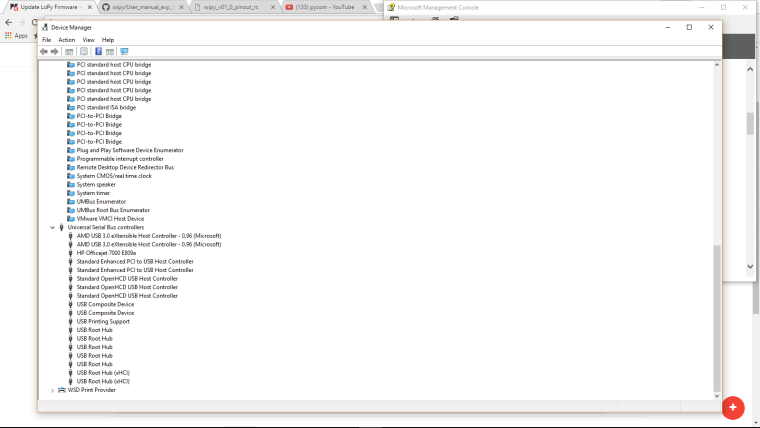
            @robert-hh ! Help out a old school device Manager when it was simple.
            Got any clues how to get one of the front S9 USB pointed to the LoPy.
            0_1492454394205_upload-a1443b2f-03e6-4e9d-a3d6-492b6ef60e0f

            robert-hhR 1 Reply Last reply Reply Quote 0
            • robert-hhR Offline
              robert-hh @olddognewtricks
              last edited by robert-hh

              @olddognewtricks It should be listed in the COM port section, not the USB device section. if it is not listed in the COM section, then most likely the driver is missing.

              O 1 Reply Last reply Reply Quote 0
              • S Offline
                ssmith @olddognewtricks
                last edited by

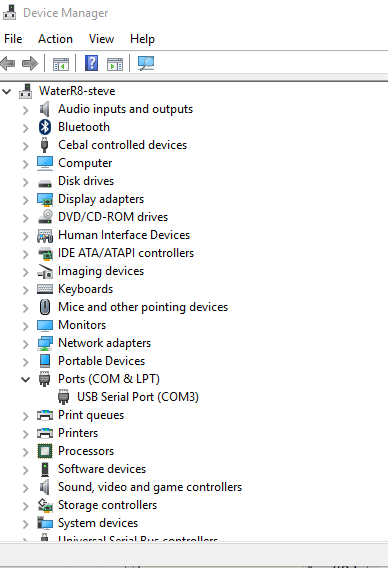
                @olddognewtricks Open up device manager and look at com ports. You should see one pop up when you plug in the device. Also after plugging in the board, hit the reset button before trying the updater.
                0_1492454968015_upload-f9ec502a-b57f-4e23-96a8-c007c7b9bb3f .
                Might need to update the FTDI drivers.

                O 1 Reply Last reply Reply Quote 0
                • O Offline
                  olddognewtricks @robert-hh
                  last edited by

                  @robert-hh Duh, sorry!

                  1 Reply Last reply Reply Quote 0
                  • O Offline
                    olddognewtricks @ssmith
                    last edited by

                    @ssmith Device Manager open. Plugged, un Plugged and Plugged in PyCom, no changes and also had it scan for new devices, no results.
                    I really appropriate you 2 trying to help. I'm trying to figure things out before I come to the forum.

                    robert-hhR 1 Reply Last reply Reply Quote 0
                    • robert-hhR Offline
                      robert-hh @olddognewtricks
                      last edited by robert-hh

                      @olddognewtricks Try installing one of the windows drivers (32 or 64 bit, whatever you OS is) from this site: http://www.ftdichip.com/Drivers/VCP.htm.
                      And yes, just to ask the obvious: Are you sure that the USB cable works. Can you use it to transfer data to your phone or another device?

                      1 Reply Last reply Reply Quote 0
                      • O Offline
                        olddognewtricks
                        last edited by

                        It's definitely a com port issue. I tried to see if I could figure out how the 2 front USB ports were label in the device manager with a wild hair idea of inserting a Micro SD card in the expansion board to see if it would pop up but no luck, probably because the SD card isn't formatted. My only Com port listing is a NETGEAR application interface NMEA (Com 3)

                        S robert-hhR 2 Replies Last reply Reply Quote 0
                        • S Offline
                          ssmith @olddognewtricks
                          last edited by

                          @olddognewtricks Most likely an FTDI driver issue.

                          1 Reply Last reply Reply Quote 0
                          • robert-hhR Offline
                            robert-hh @olddognewtricks
                            last edited by

                            @olddognewtricks The SD card will never show up as a device, since the interface to the PC is a simple UART routed through an UART/USB bridge made by FTDI. Like said before, please

                            • check the cable
                            • check the driver
                            • check, is all jumpers are. But the device should be visible as COM port even if jumpers are missing.
                            O 1 Reply Last reply Reply Quote 0
                            • O Offline
                              olddognewtricks @robert-hh
                              last edited by

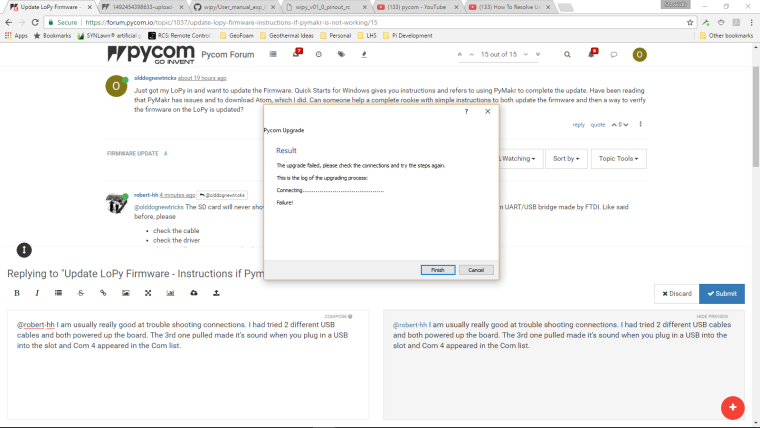
                              @robert-hh I am usually really good at trouble shooting connections. I had tried 2 different USB cables and both powered up the board. The 3rd one pulled made it's sound when you plug in a USB into the slot and Com 4 appeared in the Com list.
                              0_1492458664581_upload-4ade9118-3791-49bc-9d7d-d7824ae6a315

                              robert-hhR 1 Reply Last reply Reply Quote 0
                              • robert-hhR Offline
                                robert-hh @olddognewtricks
                                last edited by

                                @olddognewtricks Good. If the update still fails -

                                • did you have the jumper installed and did you push reset at Lopy after that?
                                • you could try to uncheck the 'high speed' option
                                • an Internet connection is required during update for fetching the firmware image.
                                1 Reply Last reply Reply Quote 0
                                • O Offline
                                  olddognewtricks
                                  last edited by

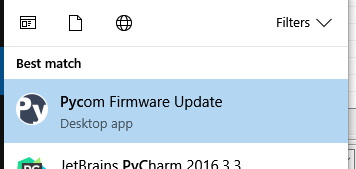
                                  Unplugged it one more time. Plugged it back in and hit the reset button. Then selected Com 4 and it worked. Thank you so much for your help. If I still had hair I would have pulled a few more strands out!

                                  1 Reply Last reply Reply Quote 0

                                  Hello! It looks like you're interested in this conversation, but you don't have an account yet.

                                  Getting fed up of having to scroll through the same posts each visit? When you register for an account, you'll always come back to exactly where you were before, and choose to be notified of new replies (either via email, or push notification). You'll also be able to save bookmarks and upvote posts to show your appreciation to other community members.

                                  With your input, this post could be even better 💗

                                  Register Login
                                  • 1 / 1
                                  • First post
                                    Last post

                                  Pycom on Twitter

                                  Pycom