Welcome to the Pycom forum Forum
    • \[\[global:header.categories\]\]
    • \[\[global:header.recent\]\]
    • \[\[global:header.tags\]\]
    • \[\[global:header.popular\]\]
    • Login

    Explore Pybytes | Official Documentation | Report a Firmware Bug/Issue | GitHub

    Using MLX90614 temperature sensor
    Scheduled Pinned Locked Moved MicroPython
    i2ctemperaturepin
    20 Posts 4 Posters 6.0k Views 4 Watching
    Loading More Posts
    • Oldest to Newest
    • Newest to Oldest
    • Most Votes
    Reply
    • Reply as topic
    Log in to reply
    This topic has been deleted. Only users with topic management privileges can see it.
    • T Offline
      timeb @jmarcelino
      last edited by

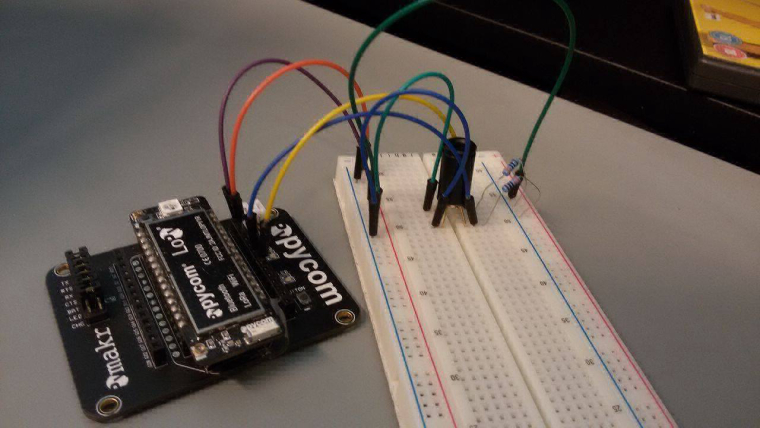
      @jmarcelino 0_1493293096727_18195721_1330006060440300_560227766_o.jpg

      J T 2 Replies Last reply Reply Quote 0
      • J Offline
        jmarcelino @timeb
        last edited by

        @timeb
        I'm afraid that photo isn't very helpful, can you list which pins go where?

        1 Reply Last reply Reply Quote 0
        • T Offline
          timeb @timeb
          last edited by

          @timeb I connected the two pull-up resistors to the SDA and SCL of the MLX90614. Then SDA and SCL from MLX90614 go to G7 and G6 pin of the LoPy respectively. I connect Ground of MlX90614 to Ground on LoPy and power to 3.3v on LoPy.

          J L 2 Replies Last reply Reply Quote 0
          • J Offline
            jmarcelino @timeb
            last edited by

            @timeb
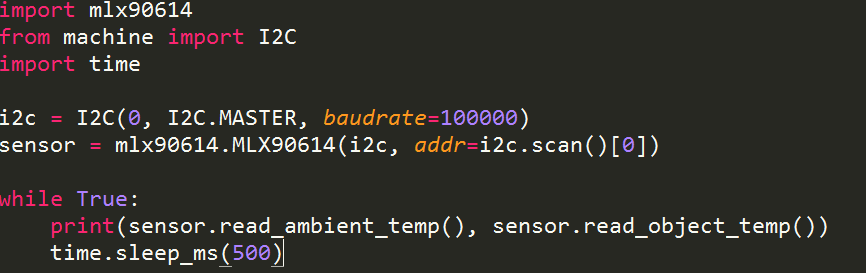
            Thanks, so if your SDA is G7 and your SCL is G6 you should setup I2C as:

            i2c = I2C(0, I2C.MASTER, baudrate=100000, pins=('G7', 'G6'))
            or
            i2c = I2C(0, I2C.MASTER, baudrate=100000, pins=('P20', 'P19'))

            if like me you prefer the Px syntax

            You shouldn't need the pull-up resistors, I2C on the LoPy turns on the internal pull-ups which should work for most situations.

            T 1 Reply Last reply Reply Quote 0
            • L Offline
              livius @timeb
              last edited by livius

              @timeb

              I connected the two pull-up resistors to the SDA and SCL

              Do you mean pull down? I see it on picture (if i see ok)
              But as @jmarcelino say you shouldn't need the pull-up resistors

              think about people first, then computers

              1 Reply Last reply Reply Quote 0
              • T Offline
                timeb @jmarcelino
                last edited by

                @jmarcelino So then I get this when I used i2c.scan(). Does it mean it is working?
                [8, 9, 10, 11, 12, 13, 14, 15, 16, 17, 18, 19, 20, 21, 22, 23, 24, 25, 26, 27, 28, 29, 30, 31, 32, 33, 34, 35, 36, 37, 38, 39, 40, 41, 42, 43, 44, 45, 46, 47, 48, 49, 50, 51, 52, 53, 54, 55, 56, 57, 58, 59, 60, 61, 62, 63, 64, 65, 66, 67, 68, 69, 70, 71, 72, 73, 74, 75, 76, 77, 78, 79, 80, 81, 82, 83, 84, 85, 86, 87, 88, 89, 90, 91, 92, 93, 94, 95, 96, 97, 98, 99, 100, 101, 102, 103, 104, 105, 106, 107, 108, 109, 110, 111, 112, 113, 114, 115, 116, 117, 118, 119]

                L 1 Reply Last reply Reply Quote 0
                • L Offline
                  livius @timeb
                  last edited by livius

                  @timeb
                  For me it looks strange you should see only 5A(90)

                  did you removed this resistors?

                  think about people first, then computers

                  T 1 Reply Last reply Reply Quote 0
                  • T Offline
                    timeb @livius
                    last edited by

                    @livius I removed the resistors. I don't get what seems to be the problem?

                    J 1 Reply Last reply Reply Quote 0
                    • J Offline
                      jmarcelino @timeb
                      last edited by

                      @timeb
                      I may be misunderstanding your photo but aren't the signal pins swapped? SDA going to G6 and SCL to G7?

                      If so change the I2C(pins=.(..)) init accordingly.

                      T 1 Reply Last reply Reply Quote 0
                      • T Offline
                        timeb @jmarcelino
                        last edited by

                        @jmarcelino I changed that but I still get [8, 9, 10, 11, 12, 13, 14, 15, 16, 17, 18, 19, 20, 21, 22, 23, 24, 25, 26, 27, 28, 29, 30, 31, 32, 33, 34, 35, 36, 37, 38, 39, 40, 41, 42, 43, 44, 45, 46, 47, 48, 49, 50, 51, 52, 53, 54, 55, 56, 57, 58, 59, 60, 61, 62, 63, 64, 65, 66, 67, 68, 69, 70, 71, 72, 73, 74, 75, 76, 77, 78, 79, 80, 81, 82, 83, 84, 85, 86, 87, 88, 89, 90, 91, 92, 93, 94, 95, 96, 97, 98, 99, 100, 101, 102, 103, 104, 105, 106, 107, 108, 109, 110, 111, 112, 113, 114, 115, 116, 117, 118, 119]

                        J 1 Reply Last reply Reply Quote 0
                        • J Offline
                          jmarcelino @timeb
                          last edited by

                          @timeb
                          Do you have a logic analyser or oscilloscope?

                          I wonder if the MLX device is in PWM mode.

                          I'm not exactly sure how to change it but the datasheet suggests holding the SCL line low for longer than 1.44ms before initiating I2C.

                          T 1 Reply Last reply Reply Quote 1
                          • T Offline
                            timeb @jmarcelino
                            last edited by

                            @jmarcelino I will look into it. Thanks.

                            1 Reply Last reply Reply Quote 0
                            • T Offline
                              timeb @jmarcelino
                              last edited by

                              @jmarcelino Is there a library for MLX90614 sensors that I can use?

                              L 1 Reply Last reply Reply Quote 0
                              • L Offline
                                livius @timeb
                                last edited by

                                @timeb said in Using MLX90614 temperature sensor:

                                MLX90614

                                https://github.com/mcauser/micropython-mlx90614/blob/master/mlx90614.py

                                think about people first, then computers

                                1 Reply Last reply Reply Quote 0
                                • S Offline
                                  swohl
                                  last edited by

                                  I have been working on the mlx90614 for the last day and can communicate successfully with 6 on an I2C bus, but am am receiving an overwhelming number of errors. Right now it hovers around 25% of attempts to read the sensor. I believe it could be related to a timing issue of the I2C communication in micropython.

                                  Some errors are the result of a bad read of the I2C data, which can be verified if you read the PEC byte after the data. The third byte should come back with a crc-8 value, but sometimes it comes back as 0xFF, as if the mlx90614 is one byte ahead of the lopy.

                                  The other error is related to readfrom_mem function in i2c. This error produces an OSError exception about every one in four attempts. In other mlx90614 libraries the flow for reading bytes is slightly more complicated, for example

                                  // send the slave address then the command and set any
                                  // error status bits returned by the write
                                  Wire.beginTransmission(_addr);
                                  Wire.write(cmd);
                                  _rwError |= (1 << Wire.endTransmission(false)) >> 1;
                                  
                                  // experimentally determined delay to prevent read errors
                                  // (manufacturer's data sheet has left something out)
                                  delayMicroseconds(30);
                                  
                                  // resend slave address then get the 3 returned bytes
                                  Wire.requestFrom(_addr, (uint8_t)3);
                                  
                                  // data is returned as 2 bytes little endian
                                  val = Wire.read();
                                  val |= Wire.read() << 8;
                                  
                                  // read the PEC (CRC-8 of all bytes)
                                  _pec = Wire.read();
                                  
                                  return val;
                                  

                                  Is there anyway to imitate this flow control? Using the above style code on an Arduino I receive no errors and do not have to do coding gymnastics to control errors.
                                  1 Reply Last reply Reply Quote 0

                                  Hello! It looks like you're interested in this conversation, but you don't have an account yet.

                                  Getting fed up of having to scroll through the same posts each visit? When you register for an account, you'll always come back to exactly where you were before, and choose to be notified of new replies (either via email, or push notification). You'll also be able to save bookmarks and upvote posts to show your appreciation to other community members.

                                  With your input, this post could be even better 💗

                                  Register Login
                                  • 1 / 1
                                  • First post
                                    Last post

                                  Pycom on Twitter

                                  Pycom