Worst experience ever...
-
Hey guys, new comer here.
PyCom Products are absolute fun to have but I cannot express my frustration I have trying to code for it.
Here is my experience:
I've had to wait around 3 weeks to get my hands on a WiPy 2.0 board, therefore I've had read all about it before hands. I knew how to update the firmware and whatnot, so, No problem there (Almost)I have made a blink example for myself (a great one too) in less than 10 mins, you know why? Because there was a very small mention of
rgbledsomewhere in the pile of spaghetti pages you call Docs!after that, oh my GOD! Guys! you are doing the best with the hardware and features, but why the documentation is so horrible?! Is it really that hard to keep the docs up to speed? If so, I think you are understaffed! I mean, I document my test projects much better than what you are doing!
Unlike most of the guys around here, I'm a Software Developer with Electronics education and I can say, without proper documentation the SDK and IDE and everything else worthNULL. I beg of you, please provide better documentation, we need to know classes, constants,... I'm not talking about Examples, just provide the API guide, we will figure the rest out. And pleaaaase keep it up with the firmware releases. I mean, in every type of project management, tasks have a DONE definition, yours should include: Documented? If not, don't release it. I don't know how I can express my frustration more clearly, but I'm betting a lot of odds on being able to work out your boards and future looks so dark at the moment with this kind of experience.As a final note, the odd thing here is that, I can't believe how such a good product (Hardware part) has been developed when such basic process (such as documentation) has been omitted! Absolutely stunning!
-
@mohpor I'm sorry to hear your horrible experience and I would like to thank you for your feedback. We made an important refactoring to the docs a few weeks ago, and we thought that we added all the missing parts in order to keep it up to date with the releases, but apparently this is far from true.
I would very much appreciate if you can give us examples in the docs showing where are the areas that need attention and which ones are the spaghetti sections. In any case, I'll make sure that we go back to square 1 regarding the docs and review every section again.Cheers,
Daniel -
Hi Daniel, Thanks for the reply.
Well, have you tried the
help()command? For examplehelp(WLAN)provides much more info than the (non existing WLAN class) docs!
You have provided a wonderful SDK called MicroPython, why there is no structure to its documentation?
I'm not that familiar with Python myself, but I guess you could more easily structure your API guide Module by Module. What we have now is a good start, but you should be more specific and more detailed about classes and constants. I wish I could just open the API docs, find thenetworkmodule and navigate toWLANsection and find out all aboutdisconnect()function's arguments for example.
Don't get me wrong, I know you are doing your best, I'm just saying you should try harder. I know you are very knowledgable about the topic at your hand, but I kindda feel the documentation is written from the Creators perspective rather than the poor guy who'd use it as a reference. -
I agree. And reality is that without good documentation no matter how amazing potentially the hardware is, it will not evolve!
You need to help us with proper tutorials and documentation, please! For me is by far the worst IoT experience I had. This is suppose to be the Linux of IoT easy to play with ... at least this is what we were sold. This is not true!
-
Dear All,
Point noted... give us a few weeks to sort things out. We are recruiting more headcount so documentation is a key area of improvement. All good input and frustration is totally understandable. We will sort it out short term.
Best wishes Fred
-
My experience using the Wipy 2 for the first time has been somewhat similar to @geobike's so I want to add a few points that might help making the process a bit smoother.
First of all, the quickstart guide at https://docs.pycom.io/pycom_esp32/pycom_esp32/getstarted.html needs some love. Having a mix of Lopy, Wipy and Pymakr setup in one document is not helpful. Also the pictures look oh so slightly different from the actual boards which is definitely confusing.
The second remark, and the one that other users have stumbled upon greatly concerns Pymakr. After the installation Pymakr was unable to contact my Wipy 2 over USB. It shows several exceptions and errors:
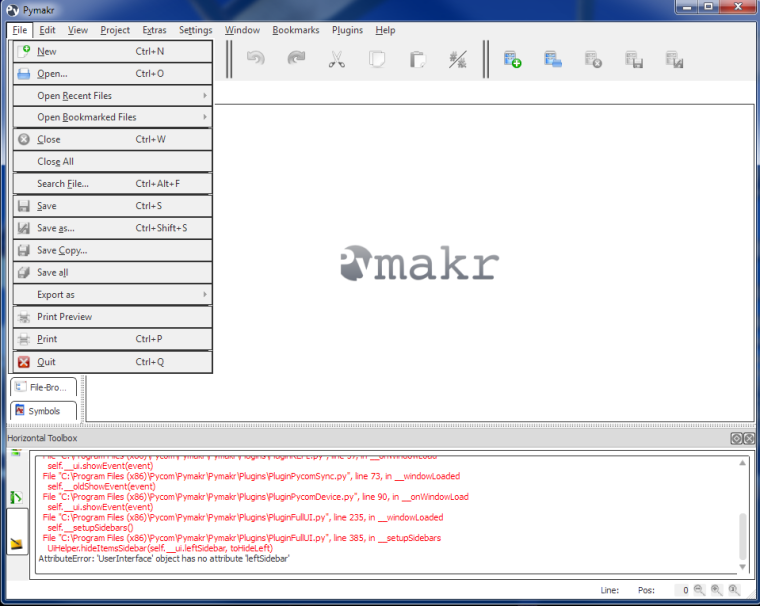
and it simply looks really bad (only used the Windows version though). So using this IDE guarantees a rough ride already. Others have suggested dropping Pymakr completely and so far I can only agree that extending another open source IDE (Pycharm, Eclipse, Spyder, Eric Python, IDLE ...) might provide a better experience than fixing all the issues with Pymakr (it additionally confuses users that it uses Python 2.7 while micropython is Python 3.x).
As a comparison I do not want to use the Arduino example because Arduino has a long history but using Micropython on the ESP8266 (NodeMCU board). Despite getting the board only with Lua and the documentation on the micropython website being a bit vague because they try to give explanations for different boards with the same chip I got micropython running and first experiments with a REPL prompt within an hour.
The Wipy 2 on the other hand took two hours to get to a similar state, despite the fact that micropython is already installed and the hardware is known. This is mostly due to the bad state of Pymakr, the lack of documentation (which serial driver do I need, where to download?) and the odd default settings: Why is the serial UART interface disabled in the default setting? It is not explained in the docs how to write to boot.py, this alone is a stumbling block for users without micropython experience. Other users have complained about the blinking LED, I agree that it does not serve any purpose. Instead it would be much more helpful to show activity on the LED when a WiFi, Serial or other connection is made to show that something works.
As for the firmware update, the windows update tool is totally opaque. You have no idea what is going on. Compared to that the epstool to update the ESP8266 firmware is much more informative. And I still do not know why I need to connect a pin to GND to get the firmware update going. Is this really necessary? The expansion board has a large number of jumpers, still none of them is helpful for the firmware update.
So overall I do not agree that this is 'the worst experience ever' because many other development boards throw much larger issues your way. So I hope you create a feedback process going so that the users can give the Pycom team a bit more input of all the areas that definitely need fixing. The combination of the ESP32 and micropython has so much potential, it would be a pity if these issues hinder its widespread usage.
-
Hi Alexander.
Firstly thank you for the very detailed and extremely constructive comments. It is very useful to get this level of input to help us better understand areas of improvement.
I will leave it for Daniel to come back and comment on some of the other technical issues you raise however I wanted to give you an update ref documentation. We have a new developer joining whose main role will be to get the documentation completely overhauled. Downside is he will not be able to start before 6th feb so expect to see major improvements from then on.
We follow the forum carefully and pick up everybody's comments as it is the key source of input for product/user experience improvement.
Best wishes Fred
-
@alexander Thanks a lot for your feedback. It definitely looks like your Pymakr installation went really wrong and that's why is showing all those errors and nothing works. Could you let me know which version of Windows and which version of Pymakr are you using? I will then take this to the Pymakr development team so they can analyze it.
Regarding connecting pin P2 to GND in order to enter programming mode, there's going to be a new version of the expansion board around Q2 which will have a jumper for this purpose.
The LED is mostly meant to be controlled by the user (using the methods inside the
pycommodule), but the suggestions about using it to show status are good. We will add them to the features wish list: https://forum.pycom.io/topic/433/features-wish-listCheers,
Daniel -
Thank you for the instantaneous reply.
In my setup I am using Windows 7 (64 bit) and downloaded and installed Pymakr 1.0.0.b8 (pymakr_setup_1.0.0.b8.exe). I can also attach log files if that helps.
The two error messages that I get are
--------------------------------------------------------------------------------
2017-01-04, 15:49:51
--------------------------------------------------------------------------------
<type 'exceptions.AttributeError'>:
'UserInterface' object has no attribute 'leftSidebar'
--------------------------------------------------------------------------------
  File "C:\Program Files (x86)\Pycom\Pymakr\Pymakr\Plugins\PluginUpdate.py", line 133, in __onWindowLoad
    self.__ui.showEvent(event)
  File "C:\Program Files (x86)\Pycom\Pymakr\Pymakr\Plugins\PluginREPL.py", line 57, in __onWindowLoad
    self.__ui.showEvent(event)
  File "C:\Program Files (x86)\Pycom\Pymakr\Pymakr\Plugins\PluginPycomSync.py", line 73, in __windowLoaded
    self.__oldShowEvent(event)
  File "C:\Program Files (x86)\Pycom\Pymakr\Pymakr\Plugins\PluginPycomDevice.py", line 90, in __onWindowLoad
    self.__ui.showEvent(event)
  File "C:\Program Files (x86)\Pycom\Pymakr\Pymakr\Plugins\PluginFullUI.py", line 235, in __windowLoaded
    self.__setupSidebars()
  File "C:\Program Files (x86)\Pycom\Pymakr\Pymakr\Plugins\PluginFullUI.py", line 385, in __setupSidebars
    UiHelper.hideItemsSidebar(self.__ui.leftSidebar, toHideLeft)
and
Error information:
--------------------------------------------------------------------------------
2017-01-04, 15:46:39
--------------------------------------------------------------------------------
<type 'exceptions.AttributeError'>:
'PluginPycomDevice' object has no attribute '_PluginPycomDevice__pds'
--------------------------------------------------------------------------------
File "C:\Program Files (x86)\Pycom\Pymakr\Pymakr\Plugins\PluginPycomDevice.py", line 98, in __onWindowUnload
self.__pds.disconnect()
The only thing I did after the installation was changing the color theme from dark to light but I am not sure if that is connected with any of the error messages.
-
Thank you for the instantaneous reply.
You are welcome :-)
We will check on your issue ASAP.
Cheers,
Daniel
Hello! It looks like you're interested in this conversation, but you don't have an account yet.
Getting fed up of having to scroll through the same posts each visit? When you register for an account, you'll always come back to exactly where you were before, and choose to be notified of new replies (either via email, or push notification). You'll also be able to save bookmarks and upvote posts to show your appreciation to other community members.
With your input, this post could be even better 💗
Register Login