Nodes unable to join TTN via LoPy nano gateway
-
Hi all,
I am trying to set up the LoPy as a nano gateway. I followed the tutorial, but still run into some connectivity issues.
The nano gateway is registered, I ticked the box 'I'm using a packet forwarder' and I can see in the console that it is connected to TTN.
In order to test the gateway, I am using an MTDOT-BOX-G-915 that I used previously to test another gateway (but not based on a LoPy).
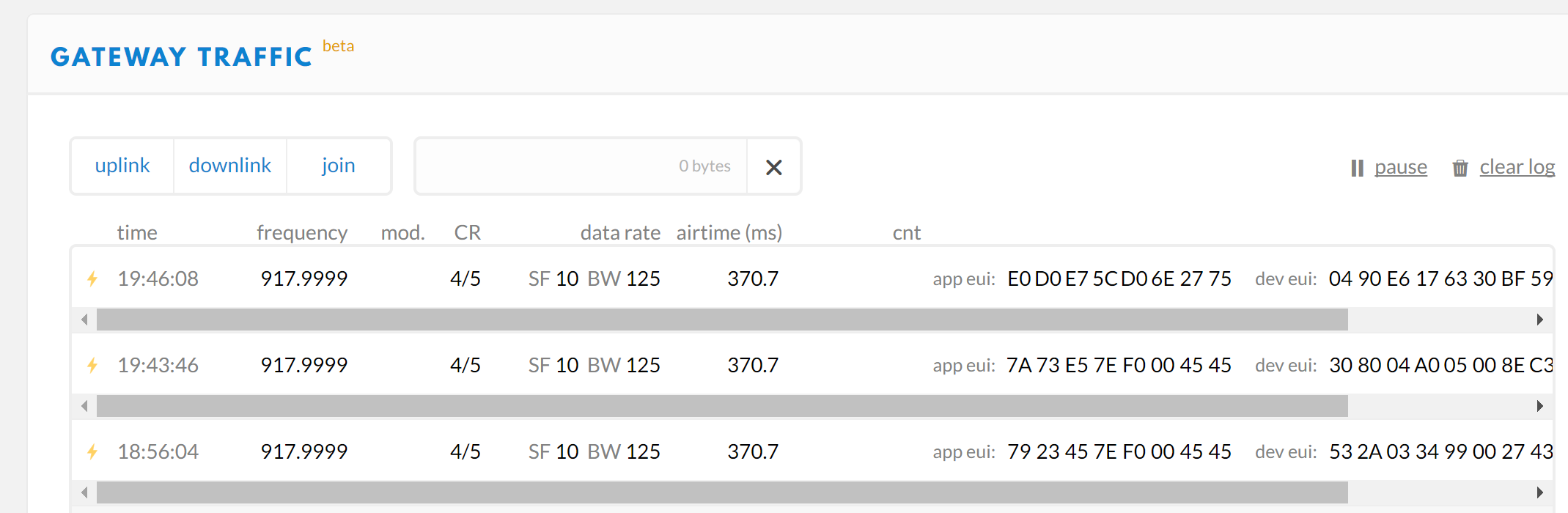
The nano gateway can forward the Join Requests of the node to TTN (I can see those messages in the console, see the screenshot below). But then it seems no packet goes back to the node as it is not able to join the network.
The interesting thing bit is that all the Join Requests are made by the same node, but the app eui and dev eui change all the time.
Here are a the detail couple of requests made by the same node:
{
"gw_id": "eui-XXXX",
  "payload": "ACYhbpBc59DgWb8gIzfm0DQIcXrQTus=",
  "dev_eui": "34D0E6372320BF59",
  "lora": {
 "spreading_factor": 10,
    "bandwidth": 125,
    "air_time": 370688000
  },
  "coding_rate": "4/5",
  "timestamp": "2017-05-22T14:50:20.747Z",
  "rssi": -54,
  "snr": -9,
  "app_eui": "E0D0E75C906E2126",
  "frequency": 917999900
}

{
"gw_id": "eui-XXXX",
  "payload": "AEVFAPB+1bNwy76QCQoZEQAX/JeBwlI=",
  "dev_eui": "0011190A0990BECB",
  "lora": {
 "spreading_factor": 10,
    "bandwidth": 125,
    "air_time": 370688000
  },
  "coding_rate": "4/5",
  "timestamp": "2017-05-22T14:52:18.184Z",
  "rssi": -97,
  "snr": -65,
  "app_eui": "70B3D57EF0004545",
  "frequency": 917999900
}
Here is the
configuration.py(I am in Australia, so I had to change the frequency and some other details) :GATEWAY_ID = 'XXXX' SERVER = 'router.eu.thethings.network' PORT = 1700 NTP = "pool.ntp.org" NTP_PERIOD_S = 3600 WIFI_SSID = 'XXXX' WIFI_PASS = 'XXXX' LORA_FREQUENCY = 91800000 LORA_DR = "SF10BW125"In the file
nanogatewy.piI changed the following:RX_PK = {"rxpk": [{"time": "", "tmst": 0, "chan": 6, "rfch": 0, "freq": 918.0, "stat": 1, "modu": "LORA", "datr": "SF10BW125", "codr": "4/5", "rssi": 0, "lsnr": 0, "size": 0, "data": ""}]}I also made sure that the port 1700 is open on my router and that UDP packets coming through that port are routed to the LoPy.
I did try other TTN routers (asia-se, au,...) as well, but with always the same results.
Also, I tried to connect the LoPy as a node to TTN via an other gateway, and it did work properly. So the Lora radio module works.
Do you have any idea why I cannot get that node to join TTN via the LoPy nano gateway? Is there something I am missing somewhere?
Thanks,
Johan
-
Hi @jojo,
Could you please share the code that you are using for your nodes? The Nano-Gateway is only a single channel gateway (Not a formal LoRaWAN Gateway) so you need to do some specific configuration to allow for this.
Thanks!
-
Hi @bucknall,
As I use an MTDOT, I am using the following at commands:
# waking up the moduel
> at
OK

# enable public network mode
> at+pn=1
OK

# selecting the sub-band for Australia
> at+fsb=2
OK

# selecting OTA mode
> at+njm=1
OK

# app eui
> at+ni=0,XXXXXX
Set Network ID: XX-XX-XX
OK

# app key
> at+nk=0,XXXXXX
Set Network Key: XXXXXX
OK

# bumping the tx power
> at+txp=20
OK

# joining the network
> at+join
Failed to join network
(more info on the AT commands can be found here here).
-
@jojo you need to set your MTDOT to only use a single channel - I'm not exactly sure how to do this but try their documentation! I'll have a look into it for you if you can't find anything.
-
Thanks! I'll have a look and let you know how it goes.
-
I have made some progress thanks to your suggestion.
To set the node to use only one channel (here 918Mhz) I can use the commands
AT+CHM:>AT+CHM=0,4000 OKand
AT+TXCHto do a check:Index Frequency DR Max Min On 0 916800000 3 0 0 1 917000000 3 0 0 2 917200000 3 0 0 3 917400000 3 0 0 4 917600000 3 0 0 5 917800000 3 0 0 6 918000000 3 0 1 7 918200000 3 0 0 U 917500000 4 4 1 R2 923300000 8 8Then I could see in the Console that the Join Requests are accepted, but the nano gateway still did not transfert those messages to the node.
Here is the Event Data of the Join Accept:
{
  "gw_id": "eui-XXX",
  "payload": "IHFSiaovCJacFacBPZaei8Q=",
  "lora": {
    "spreading_factor": 10,
    "bandwidth": 500,
    "air_time": 82432000
  },
  "coding_rate": "4/5",
  "timestamp": "2017-05-24T10:52:35.449Z",
  "frequency": 925700000
}
So I figured that the
frequencyin the Event Data (925.7 Mhz) does not match the frequency the node is using.To fix that, I modified the function
_send_down_linkso that it uses the good frequency to forward the message:def _send_down_link(self, data, tmst, datarate, frequency): self.lora.init(mode=LoRa.LORA, frequency=self.frequency, bandwidth=LoRa.BW_125KHZ, sf=self._dr_to_sf(datarate), preamble=8, coding_rate=LoRa.CODING_4_5, tx_iq=True) while time.ticks_us() < tmst: pass self.lora_sock.send(data)(it simply ignores the wrong frequency mentionned in the Event Data).
Now I get the following error:
> Downlink timestamp error!, t_us: 4295066743Do you have any idea how I can fix that one?
-
Finally I could get the node to join TTN! :D
I needed to add a delay of 5 seconds before the node starts listening for the response of the Join Request with the command
AT+JD:> AT+JD=5 OK > AT+JOIN Successfully joined network OKAlso the fix for
_send_down_linkin my last post is no more needed as the frequency in the Event Data is now ok.
Hello! It looks like you're interested in this conversation, but you don't have an account yet.
Getting fed up of having to scroll through the same posts each visit? When you register for an account, you'll always come back to exactly where you were before, and choose to be notified of new replies (either via email, or push notification). You'll also be able to save bookmarks and upvote posts to show your appreciation to other community members.
With your input, this post could be even better 💗
Register Login