possibility to use Lora objenious network in France with Lopy ?
-
hello,
i live in France and we have a Lora national network (commercial) objenious with 83 % of coverage of the whole country. It seems that may be , there will be an agreement between pycom and objenious to use the lopy module with this network. Is it true ? if it is true when and what will be the conditions ?
Friendly, J.P -
Without having hands-on experience with the network, in theory: yes. The objenious network uses LoRa, you probably just need an account and an online environment to create the correct keys (similar like you do with TTN) to add in the configuration of the LoPy.
If I want to switch my LoPy from TTN to the Dutch commercial KPN network, it literally is just a matter of changing the AppSKey, the Device address and the Device EUI in the config.py file and resetting the node.I looks like someone has been experimenting with the LoPy on objenious and had some problems specific to the network. See this post. Maybe he can give (you) an update on how stable the network is now?
(and then you can post it here again so others can find that info more easily also) -
i also leave in paris and want to connect my pycom to objenious infrastructure; i have a company account there,
for now , i cannot even be seen by their spot admin web interface trying to join their network, i do not know why yet -
hello raxy ,
here is the answer of objenious for my request :Nous sommes en train de mettre en place des accords avec Pycom pour ajouter la connectivité Objenious avec les modules Pycom.
Je vous invite à recontacter Pycom pour bénéficier de la connectivité en plus des modules.
Bien cordialement,Guillaume TRANIER | Chef de projet partenariat
20 rue Troyon, 92310 Sèvres | gtranier@objenious.combut no news of those agreements from pycom.
-
@Jurassic-Pork
Sounds like those guys don’t understand the whole point of LoRa is you shouldn’t need agreements to connect any - LoRa compatible and especially certified - device to a network.Just my opinion but I’d be scared about putting my business on such a network, thry’ll just get in the way at every corner.
-
the lopy came from objenious and they said it should work on their network; they just recommended to flash the latest firmware (for doing class C);
they are in the process of delivering me all the keys to use upon join; for now , the lopy pretends to be another device (already fully registered and working but powered off) -
Has any of us managed to connect a LoPy to the Objenious LoRaWAN network?
I can't.
With the example LoRaWAN OTAA join method code, using proper app EUI and app key doesn't allow me to join the network. Besides, there is no event raised when the handshake is made, how would you debug the join failure? I have tried my own approach to join, tuning parameters such as bandwith, coding rate and spreading factor, nothing seems to do the trick.Any idea?
-
guys,
with the help of Nicolas C. from objenious,
I can now join their network with my LopY , both in class A and.... in class C!
I can do uplinks and get asynchronous downlinks using a callbac in class C and in micropython.
I'll share how I did that, if anyone is interested -
@raxy I am very interested, please share (-;
-
ok here is the code...
#-- lora1.py, test of objenious uplink / downlink # by raxy asOf 20jun17 : works OK in class C! from network import LoRa import socket import time import binascii import struct def lora_cb(lora): global s events = lora.events() if events & LoRa.RX_PACKET_EVENT: data = s.recv(64) # will return immediately w/ or w/o data print("<<",data) # create an OTAA authentication parameters app_eui = binascii.unhexlify('xxx') # Initialize LoRa in LORAWAN mode. lora = LoRa(mode=LoRa.LORAWAN, adr=True, device_class=LoRa.CLASS_A) #your Class A keys dev_eui = binascii.unhexlify('yyy'.replace(' ','')) #classe A app_key = binascii.unhexlify('zzz'.replace(' ','')) #classe A # xor Initialize LoRa in LORAWAN mode. lora = LoRa(mode=LoRa.LORAWAN, device_class=LoRa.CLASS_C, adr=True) #your Class C keys dev_eui = binascii.unhexlify('xxx') #classe C app_key = binascii.unhexlify('yyy') #classe C print('dev_eui==',dev_eui) # join a network using OTAA (mandatory on objenious WAN) lora.join(activation=LoRa.OTAA, auth=(dev_eui, app_eui, app_key), timeout=0) # wait until the module has joined the network while not lora.has_joined(): print('joining..') time.sleep(3.0) print('connected to Objenious LoRaWAN!') # create a LoRa socket s = socket.socket(socket.AF_LORA, socket.SOCK_RAW) # set the LoRaWAN data rate s.setsockopt(socket.SOL_LORA, socket.SO_DR, 5) lora.callback(trigger=(LoRa.RX_PACKET_EVENT), handler=lora_cb) # loop for class C # make socket non-blocking s.setblocking(False) print('waiting...') while True: time.sleep(1.5) """ # loop for class A while True: # make the socket blocking # (waits for the data to be sent and for the 2 receive windows to expire) s.setblocking(True) # send some data print('sending data') s.send(bytes([0x01, 0x02, 0x03])) # make the socket non-blocking # (because if there's no data received it will block forever...) s.setblocking(False) # get any data received (if any...) data = s.recv(64) print("<<",data) time.sleep(15) """ -
@raxy I'm interested too Thank Nicolas C,
if you can share -
@gas Have you tried the code raxy posted?
I did (with some rearrangements) and it works. I suppose what is important is to specify
adranddevice_classwhen defining theLoRaobject. Also, when calling thejoinmethod, I had not specifieddev_euiin theauthparameter which can be (but it should not matter very much).
Thanks @raxy by the way (-;It's quite off topic but now I have to figure out how to properly use
machine.deepsleep()along with LoRaWAN. As waking up from deep sleep resets the board, one has to re-jointhe LoRaWAN network after every deep sleep interval... Unless there is a way to "keep" the LoRaWAN session active despite a board reset? -
@gas email contact@objenious.com , then ask for Nicolas Carvallo.
-
Hi all ,
trying to connect to objenious network ( thanks raxy code )
i 've got a invalidMIC error on join .
Is it linked to the keys ? ( i use their XLS template to import the sensor)
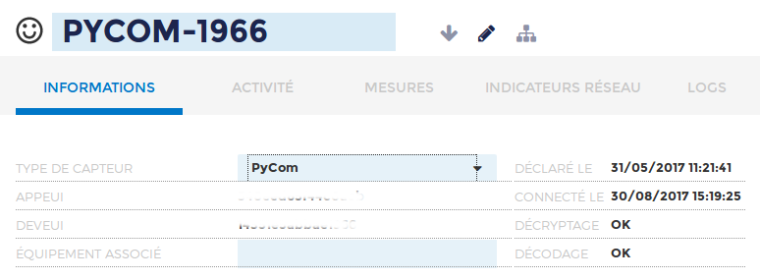
What sensor type did you use for the LoPy ? ( as pycom not in the sensor list )Thank's in advance.
Stephane A.
-
@stef , sensor type Pycon should be avail:


Hello! It looks like you're interested in this conversation, but you don't have an account yet.
Getting fed up of having to scroll through the same posts each visit? When you register for an account, you'll always come back to exactly where you were before, and choose to be notified of new replies (either via email, or push notification). You'll also be able to save bookmarks and upvote posts to show your appreciation to other community members.
With your input, this post could be even better 💗
Register Login