"Unable to find folder" using sync with Atom.
-
Sync folder is set in pymakr.conf for the project but the file won't sync. I'm trying to use a folder off my home folder in Linux.
-
Hi @alidaf, make sure the sync_folder is inside the project that is opened, and you put the relative path in it (without a / in front of it).
So, if the opened project is in~/projects/wipyand you want to sync the~/projects/wipy/src/filesfolder to the board, putsrc/filesin the sync_folder config.Let me know if that helps. If not, it would be helpful to have a screenshot of the error you're getting.
-
Hi @ralph, I still can't get it to sync. I have listed under Project in Atom a folder called git. Below that are some project subfolders. I've tried src/files and also adding a higher level up to git, i.e.
src/files
chargepoint/src/files
git/chargepoint/src/files
but all of them fail...Unable to find folder 'src/files'. Please add the correct folder in your settings
Unable to find folder 'chargepoint/src/files'. Please add the correct folder in your settings
Unable to find folder 'git/chargepoint/src/files'. Please add the correct folder in your settingsI'll probably kick myself when the error is pointed out but I really can't see it.
-
The
src/filescontent was just an example, to be clear :). The sync_folder just has to be the folder name relative to your project folder. If you want to sync the files in thegitdirectory in your project, put"sync_folder": "git"in your config file. Just tested it (on mac) and seems to work fine. Will test it on ubuntu in a moment just to be sure. -
Hi @ralph,
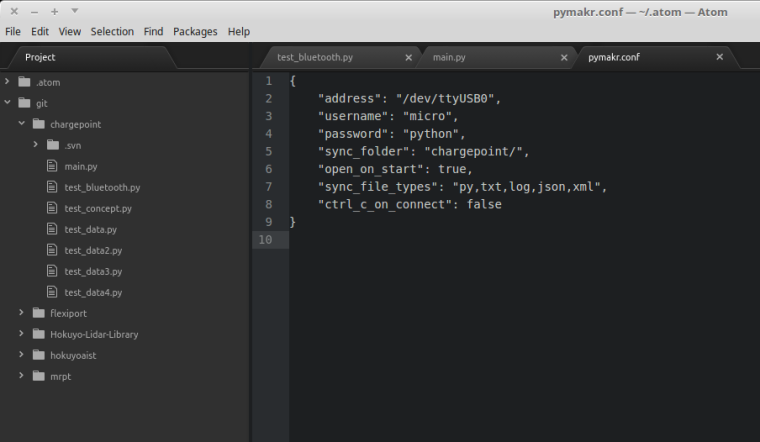
Thanks for sticking with this. I still can't sync so I've attached a screenshot.I've tried git/chargepoint as well.
-
@alidaf Thanks, I see the problem now. You have 2 folders open in atom as 'projects': one is '.atom' and one is 'git'. Pymakr doesn't detect which project is currently open, so it alsways uses the first in the list, whenever you use actions like "Project Settings". If you look at the file paths you'll see that pymakr.conf has actually been placed inside '.atom'.
Solution for now is to remove the .atom folder from your projects list on the left. After that click 'project settings' and it'll create a pymakr.conf file in the 'git' folder. Or you can move the current one from .atom to git.
In the meantime I'm trying to find a way to build in multi-project support for Pymakr. That will solve this issue.
-
Hi @ralph ,
I couldn't delete .atom from the menu so I deleted it from the filesystem. I had to reinstall pymakr but i now have just a single project folder.
Syncing now gives:
Synchronizing failed: timeout. Please reboot your device manually.I tried moving just main.py into a subfolder and changing the sync_folder setting but I get the same error.
-
@alidaf Ok good, that's one step further!
The last release caused this sync error to happen with some users. Try updating to the just released 1.1.4 version of Pymakr and try again.
-
@ralph, that's awesome. I'll have to do that next week but I'm pretty sure that'll fix it. Many thanks.
-
Yup, problem is sorted. Thanks.
Hello! It looks like you're interested in this conversation, but you don't have an account yet.
Getting fed up of having to scroll through the same posts each visit? When you register for an account, you'll always come back to exactly where you were before, and choose to be notified of new replies (either via email, or push notification). You'll also be able to save bookmarks and upvote posts to show your appreciation to other community members.
With your input, this post could be even better 💗
Register Login