Welcome to the Pycom forum Forum
    • \[\[global:header.categories\]\]
    • \[\[global:header.recent\]\]
    • \[\[global:header.tags\]\]
    • \[\[global:header.popular\]\]
    • Login

    Explore Pybytes | Official Documentation | Report a Firmware Bug/Issue | GitHub

    I need working code for LoRaWAN

    Scheduled Pinned Locked Moved LoPy
    lorawanotaalopy
    14 Posts 4 Posters 3.5k Views 4 Watching
    Loading More Posts
    • Oldest to Newest
    • Newest to Oldest
    • Most Votes
    Reply
    • Reply as topic
    Log in to reply
    This topic has been deleted. Only users with topic management privileges can see it.
    • M Offline
      miroslav.petrov
      last edited by

      Hello,

      I have been reading the forum for over 6 months, however I am still unable to write a working code. Could someone share a working core for OTAA LoRAWAN connection with some sensor data being collected and send(the sensor doesnt't matter, I have almost every type of sensor).

      J 1 Reply Last reply Reply Quote 0
      • J Offline
        jcaron @miroslav.petrov
        last edited by

        @miroslav-petrov with or without deep sleep, and if so, using what hardware?

        What’s your actual issue? Getting the data from the sensor? Joining? Sending data? What network are you connected to? What kind of gateway are you using, how far is it?

        You’ll need to provide quite a bit more information for someone to be able to help.

        1 Reply Last reply Reply Quote 0
        • M Offline
          miroslav.petrov
          last edited by

          @jcaron said in I need working code for LoRaWAN:

          hat’s your actual issue? Getting the data from the sensor? Joining? Sending data? What netwo

          I am trying with both ttn and a local company using everynet servers with cayenne. I am able to get OTAA auth using the example code, but I am not able to write a code in which to send a payload. I just need a good example code that works.

          1 Reply Last reply Reply Quote 0
          • J Offline
            jcaron
            last edited by

            Once you have successfully joined, sending data is simple:

            s = socket.socket(socket.AF_LORA, socket.SOCK_RAW)
            # Can be used to force a specific data rate / spread factor
            #s.setsockopt(socket.SOL_LORA, socket.SO_DR, 0)
            s.setsockopt(socket.SOL_LORA, socket.SO_CONFIRMED, 0)
            s.send(bytes([your,data,here]));
            
            M 1 Reply Last reply Reply Quote 0
            • M Offline
              miroslav.petrov @jcaron
              last edited by

              @jcaron I want to send the following bytes: Payload (Hex) 03 67 01 10 05 67 00 FF
              Can you show me the correct formating I should use in the brackets?

              J 1 Reply Last reply Reply Quote 0
              • J Offline
                jcaron @miroslav.petrov
                last edited by

                @miroslav-petrov There are many ways to do it, but you can do it this way:

                s.send(bytes([0x03, 0x67, 0x01, 0x10, 0x05, 0x67, 0x00, 0xff]))
                

                An alternative would be:

                s.send(binascii.unhexlify("03 67 01 10 05 67 00 FF".replace(" ","")))
                

                The latter requires an import binascii if you don't already have it, but you probably have it already for the OTAA credentials.

                M 1 Reply Last reply Reply Quote 0
                • M Offline
                  miroslav.petrov @jcaron
                  last edited by

                  @jcaron
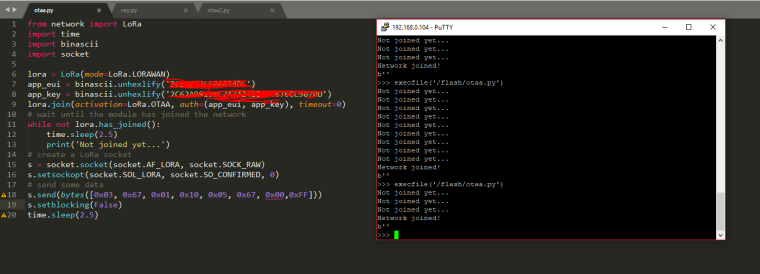
                  This is a screenshot showing my code and a telnet window to my LoPy after opening the script. I got this "B'" " after executing the script and I get nothing in the application.
                  0_1510082288842_lopy.PNG

                  J 2 Replies Last reply Reply Quote 0
                  • J Offline
                    jcaron @miroslav.petrov
                    last edited by

                    @miroslav-petrov try setting the data rate explicitly to 0. How far away is the gateway? Is in indoors or outdoors? What kind of antenna are you using?

                    It takes quite a while to join, which probably indicates pretty bad communication...

                    M 1 Reply Last reply Reply Quote 0
                    • M Offline
                      miroslav.petrov @jcaron
                      last edited by

                      @jcaron said in I need working code for LoRaWAN:

                      t takes quite a while to join, which probably indicates

                      I am using a local LoRa operator and I don't know where the gateway is. But I don't think the bad connection is the problem since I get a "Network joined!" Do you happen to know where this b" comes from?

                      IplookyI 1 Reply Last reply Reply Quote 0
                      • IplookyI Offline
                        Iplooky @miroslav.petrov
                        last edited by

                        @miroslav-petrov that b' ' means that you recieved and empty package, otherwise you should have b'your_message_here'. I think you should swipe line 19 and 18, setblocking it before the data transmision.

                        1 Reply Last reply Reply Quote 0
                        • J Offline
                          jcaron @miroslav.petrov
                          last edited by

                          @miroslav-petrov There's something weird in your screenshot... The console output shows "Network joined!", but that does not appear in your code? Are you sure you are running the right script?

                          M 1 Reply Last reply Reply Quote 0
                          • M Offline
                            miroslav.petrov @jcaron
                            last edited by

                            @jcaron I am also curious where this "Network joined!' comes from. I guess its something build in the lopy firmware. I am 100% sure that I am running this code.

                            @Iplooky I will try to swap the lines and see if it works

                            R 1 Reply Last reply Reply Quote 0
                            • R Offline
                              Rachelsimida @miroslav.petrov
                              last edited by

                              @miroslav-petrov Hi I am new as you too. The same problem of you, may I ask if you finish the connection now, if worked can you share your code. Many thanks!

                              M 1 Reply Last reply Reply Quote 0
                              • M Offline
                                miroslav.petrov @Rachelsimida
                                last edited by

                                @rachelsimida I gave up. I have my LoPy for 1 year and I cannot find a single working code that reads a sensor (dht22 for example) and sends it to the things network.

                                1 Reply Last reply Reply Quote 0

                                Hello! It looks like you're interested in this conversation, but you don't have an account yet.

                                Getting fed up of having to scroll through the same posts each visit? When you register for an account, you'll always come back to exactly where you were before, and choose to be notified of new replies (either via email, or push notification). You'll also be able to save bookmarks and upvote posts to show your appreciation to other community members.

                                With your input, this post could be even better 💗

                                Register Login
                                • 1 / 1
                                • First post
                                  Last post

                                Pycom on Twitter

                                Pycom