[Solved] TTN Gateway status not connected for LoRaWAN

-
Hello,
I have been trying to follow the instructions for LoraWAN Gateway as here:
https://github.com/franckalbinet/iot-smr3128-ictp/blob/master/labs/lorawan-nano-gateway.mdI am not having much luck and not sure why. I am in Australia and I am using the meshed network, labelling it in my config.py as router.thethings.meshed.com.au. I am connecting via mobile hotspot (If anyone knows how to connect to eduroam that would also be very helpful) and it connects and even shows a connection on my phone. The REPL seems to indicate that I have connected to the LoraWAN nano gateway however nothing is happening on the things network gateway overview.
I have googled through other people having the same problem at some stages but yet to decipher how they fixed their problem.
This is what shows in REPL
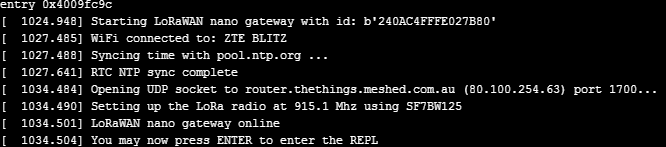
I also had this come up at one stage:

When I went out for lunch my hotspot disconnected and I returned to a lot of messages saying Failed to pull/push uplink/downlink packets to/from server 118.
Cheers,
Dylan
-
@dylan
Why are you using the Meshed router? I’m not familiar with that option.The official TTN router for Australia is
router.au.thethings.networkhave you tried it? -
@jmarcelino I did see that around but it doesn't come up in the list of routers on The Thing Network Gateway setup, I saw somewhere that someone used the meshed network, made sense as the address ends in a .au. I'll try router.au.thethings.network and see what happens.
Cheers
-
Hello! It looks like you're interested in this conversation, but you don't have an account yet.
Getting fed up of having to scroll through the same posts each visit? When you register for an account, you'll always come back to exactly where you were before, and choose to be notified of new replies (either via email, or push notification). You'll also be able to save bookmarks and upvote posts to show your appreciation to other community members.
With your input, this post could be even better 💗
Register Login