Building my own firmware?
-
When i try
$ cd esp32
$ make clean
$ make TARGET=boot
$ make TARGET=app
$ make flashi get bash: python: commandnot found ...any idea..running on windows
-
You will need to install python from: https://www.python.org/
-
@seb Already have python, do i have to do something with the path?
-
@misterlisty
editmsys2_shell.cmd
and uncomment line (removerem)rem set MSYS2_PATH_TYPE=inherit -
@livius still no luck..what should the path be anyway? When installing python should the path have been addded?
-
@misterlisty In windows you have to add the path to python to the PATH environment variable, which is normally done by the installation process. So if you open a cmd window and type the command "python"(enter), python should start. If not, PATH is not set. You can do that in System Control->system>enhanced setting>environment variables.
I'm guessing the names because I have no english system here. -
@misterlisty
what if you right click and "Run as administrator"? -
@misterlisty Besides everything else, the best method of creating your own firmware on a windows machine is to install Linux in a virtual machine and do it there. Then the only problem left is getting the compiled firmware onto your board, because the USB support of virtual machines is poor. That can be done with ftp too.
If you have an older computer at hand, install linux there. Unless it's older than 10 years, it should still be fast enough for the task. -
@robert-hh Just curios, why is running this on linux advantageous?
-
@misterlisty because it matches the development environment for both micropython and esp-idf. All teh toosl used are generic Linux/Unix tools.
-
Hi guys.
I am trying to build the firmware for mi FIPY but I am having trouble when executing
make BOARD=FIPY TARGET=appI have followed the steps indicated in this thread, more precisely:
@jmarcelino said in Building my own firmware?:
You don't need any IDE. Just setup your compiler and pycom-esp-idf first using the instructions provided in its README: https://github.com/pycom/pycom-esp-idf
Once that's done clone the main repository: https://github.com/pycom/pycom-micropython-sigfox
and follow build the instructions from esp32/README.md there
However the compilation throws the following error (for brevity, I show only the first part when the error messages begin):
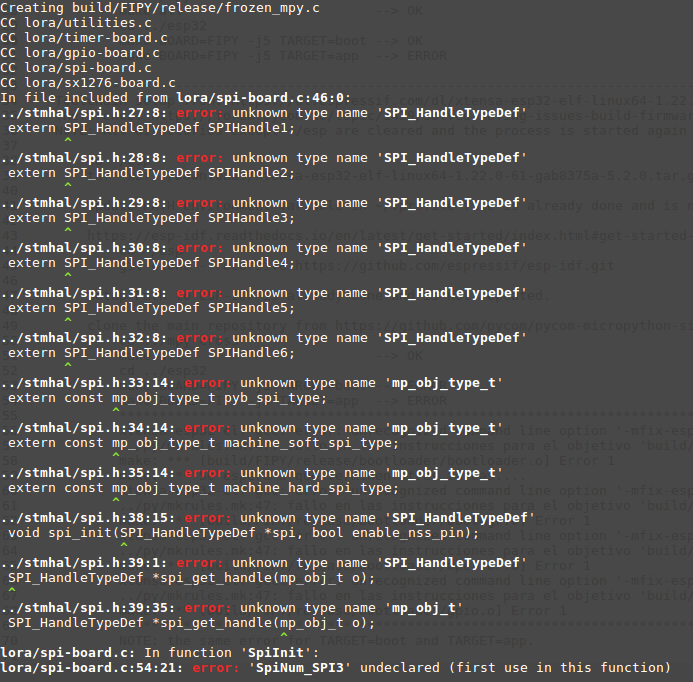
For the compilation of mpy-cross and for TARGET=boot I have no problem. I have the problem with TARGET=app.
I am using the Toolchain from: https://dl.espressif.com/dl/xtensa-esp32-elf-linux64-1.22.0-80-g6c4433a-5.2.0.tar.gz
I have also tryed with the toolchain sugested here by @jmarcelino 9 months ago, which is https://dl.espressif.com/dl/xtensa-esp32-elf-linux64-1.22.0-61-gab8375a-5.2.0.tar.gz, but in that case the compilation fails even for TARGET=boot with the following error (I obtain the same error with TARGET=app):
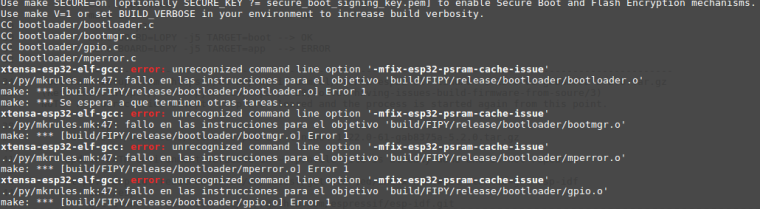
Can you please help me to build and flash my own firmware? I need to then make some changes/corrections to the official firmware...but I can't even build the official one in https://github.com/pycom/pycom-micropython-sigfox
-
@gnm I suggest you check out this page as well: https://esp-idf.readthedocs.io/en/latest/get-started/linux-setup.html
-
@gnm Have you correctly updated the ESP-IDF as well, and cleaned previous output?
-
Yes @jcaron , I cleaned up everything and made the process all over again a couple of times. Same result every time.
I haven't checked out the suggestion of @Xykon yet.
For the moment I have given up with pycom (my final objective is to implement a nanogateway able to operate with downlink messages), and I am using a multitech gateway and microchip nodes for my project because I need to move on, and the process with pycom as gateway is way too complicated and time consuming. However, I will return to this subject as soon as possible.


Hello! It looks like you're interested in this conversation, but you don't have an account yet.
Getting fed up of having to scroll through the same posts each visit? When you register for an account, you'll always come back to exactly where you were before, and choose to be notified of new replies (either via email, or push notification). You'll also be able to save bookmarks and upvote posts to show your appreciation to other community members.
With your input, this post could be even better 💗
Register Login