Connect FiPy with Lora OTAA to TTN?
-
Did anyone succeed connecting a FiPy using OTAA to The Things Network?
Connecting by ABP works fine. Though when I use the OTAA example from chapter 5.3.2 https://docs.pycom.io/chapter/tutorials/lopy/lorawan-otaa.html it keeps saying 'Not yet joined...'.
I do see it trying to connect in the network logging of my Gateway and in the TTN Console. Though it looks like the 'txpk' that the Gateway returns is not received by the FyPi.
I have seen this before on an Arduino with a RFM95 chip using the LMIC library. With that setup I had to make a correction to the clock (in order to extend the receive window) to get it working (LMIC_setClockError).
Therefor my question, did anyone succeed connecting the FiPy to TTN using OTAA yet and if so, what code did you use? Or.. does anyone know a similar trick that I can try to extend the negotiation window?
Firmware:
(sysname='FiPy', nodename='FiPy', release='1.14.0.b1', version='v1.8.6-849-86da809 on 2018-01-17', machine='FiPy with ESP32', lorawan='1.0.0', sigfox='1.0.1') -
@harm said in Connect FiPy with Lora OTAA to TTN?:
connecting a FiPy using OTAA to The Things Network
Unfortunately no answers yet. Retry: Was anyone able to connect a FiPy using OTAA to The Things Network?
-
@harm
I'm having the same problem, joins ok with ABP, but not with OTAA, I can see LoRa packets on the spectrum analyser waterfall display, but they aren't correct for the Australian LoRaWAN Alliance Channel Allocation, maybe it's defaulting to US channels?By setting channel frequencies using lora.add_channel
lora.add_channel( 8, frequency=916800000, dr_min=0, dr_max=3)I can see the join requests on the gateway, but that's about it.
I'm thinking it's a wrong channel allocation in the firmware, but I have no easy way of checking what was downloaded, once it's in the pycom database, I can't change it. :(
-
@harm yes...what kind of gateway do u use ? ...and what distance is from node to gateway?
-
I'm not sure if you were asking me or Harm, but my TTN gateway is a Raspberry Pi with Rising HF RHF0M301 8 channel.
Distance to gateway is about 40 ft vertically.
-
This post is deleted! -
I found the problem, there was a mismatch with the Device EUI
from network import LoRa
import binascii
lora = LoRa(mode=LoRa.LORAWAN)
print(binascii.hexlify(lora.mac()).upper().decode('utf-8'))
Put that serial number into the device settings on the TTN console.
Also I deleted all channels and added only the AU915 uplink channels
for i in range(0, 72):
    lora.remove_channel(i)


lora.add_channel( 8, frequency=916800000, dr_min=0, dr_max=3)
lora.add_channel( 9, frequency=917000000, dr_min=0, dr_max=3)
lora.add_channel(10, frequency=917200000, dr_min=0, dr_max=3)
lora.add_channel(11, frequency=917400000, dr_min=0, dr_max=3)
lora.add_channel(12, frequency=917600000, dr_min=0, dr_max=3)
lora.add_channel(13, frequency=917800000, dr_min=0, dr_max=3)
lora.add_channel(14, frequency=918000000, dr_min=0, dr_max=3)
lora.add_channel(15, frequency=918200000, dr_min=0, dr_max=3)
Excuse the double posting, I couldn't get the code markers working.
-
@ray It is a RaspberryPi 3 with IMST iC880A. About 10 meters vertically above me. Other nodes have no problems communicating with it. The Fipy's connect request is received and visible in TTN's console. Though the application keeps saying 'Not yet joined'.
-
Thank you for your responses. There is hope;-)
(@chumelnicu: sorry, the previous was my answer to you ;-))
@ray : Thank you for your answer though I already did (print out and) put the serial number into the Device EUI in the TTN's console. That is were you put it as well I assume? After that the TTN console's data panel did display the connect request though the Fipy never gets past the message 'Not yet joined...'. That's why I suspect the Fipy never receiving the answer from the Gateway (although that is being send according to the Gateway's logging).
I did not yet remove and add any channels and will try that as soon as I've got time. First I have to figure out the European settings though.
@chumelnicu : did you use any European settings and get it running 'out of the box'?
-
Hi Harm,
Here is the source I'm running (file attached), you will need to change to uplink frequencies that suit your local gateway.
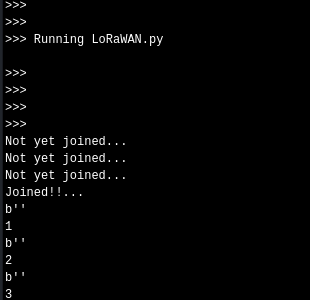
And here is the TTN device data screen

-
@ray Thanks Ray, I compared your code to mine and .. found the problem in my code. When getting that Device EUI two weeks ago, I must have put and left one initialization too many in my code. Taking it out... makes it work immediately.
So, I did not have to take out the frequency settings too let it work. Just making sure that the right Device EUI is in TTN should make the standard code work.
Thanks all for your answers! Solved;-)
-
@harm hi, how did you do ABP connection ? I tried but it is not working. And i want to know just one device enough for send data to TTN?
-
@smnc As prerequisite for a ABP join you have to register an applications and in the application your device at the TTN server. See https://docs.pycom.io/gettingstarted/registration/lora/ttn.html
If during device registration you select ABP, the device address and communication keys are generate by the server. This data, device address, network session key and application software key, have to be used in your script. You just copy the from you web site and put them into your script. This data will not change, unless you ask at the server to do so.
TTN has a message playback protection. That might be a problem during testing. You can disable that in the device setting at the TTN server.
To be able to exchange data with the TTN server, you need a node (you Fipy) and a gateway. If there is a gateway close enough you can use that one. Gateways typically accept messages from any node.
LoRa uses vertical polarity, so put your antenna upright. Not doing will not harm your device, but lower the chance of successful communication.

Hello! It looks like you're interested in this conversation, but you don't have an account yet.
Getting fed up of having to scroll through the same posts each visit? When you register for an account, you'll always come back to exactly where you were before, and choose to be notified of new replies (either via email, or push notification). You'll also be able to save bookmarks and upvote posts to show your appreciation to other community members.
With your input, this post could be even better 💗
Register Login