Welcome to the Pycom forum Forum
    • \[\[global:header.categories\]\]
    • \[\[global:header.recent\]\]
    • \[\[global:header.tags\]\]
    • \[\[global:header.popular\]\]
    • Login

    Explore Pybytes | Official Documentation | Report a Firmware Bug/Issue | GitHub

    LoPy 4 - Current consumption and Deep Sleep

    Scheduled Pinned Locked Moved LoPy
    lopylopy4deepsleepconsumptioncurrent
    23 Posts 7 Posters 10.5k Views 7 Watching
    Loading More Posts
    • Oldest to Newest
    • Newest to Oldest
    • Most Votes
    Reply
    • Reply as topic
    Log in to reply
    This topic has been deleted. Only users with topic management privileges can see it.
    • J Offline
      jmarcelino @cduplouy
      last edited by

      @cduplouy
      Also how are you going to deepsleep and wake up on a button press? Can you show that part of your code and describe your setup?

      Thanks

      1 Reply Last reply Reply Quote 0
      • C Offline
        cduplouy
        last edited by

        Thank you for your reply !

        Here's what I get with the os.uname() command :

        (sysname='LoPy4', nodename='LoPy4', release='1.15.0.b1', version='v1.8.6-849-baa8c33 on 2018-01-29', machine='LoPy4 with ESP32', lorawan='1.0.0', sigfox='1.0.1')
        

        About my setup, I use an external 10kOhm pull down resistor and the pin P13. Here's how I configure the pin :

        from machine import Pin
        import machine
        
        pinAlert = Pin('P13', mode=Pin.IN, pull= Pin.PULL_DOWN)
        machine.pin_deepsleep_wakeup(['P13'], machine.WAKEUP_ANY_HIGH, True)
        

        The other part of the main :

        import myClass
        import time
        
        remote = myClass.Remote()
        
        if machine.reset_cause() == machine.DEEPSLEEP_RESET:
        	print('woke from a deep sleep')
        	print(machine.wake_reason())
        	remote.send_msg()
        	time.sleep(1)
        	machine.deepsleep()
        	
        else:
        	print('power on or hard reset')
        	remote.connect()
        	print("going to deepsleep")
        	machine.deepsleep()


        If needed here are my connect and send_msg functions from the class Remote :

        def connect(self):
        	self.lora.join(activation=LoRa.OTAA, auth=(self.deveui, self.appeui, self.appkey), timeout=0, dr=0)
        	while not self.lora.has_joined():
        		time.sleep(parameters.DELAY_BETWEEN_ATTEMPTS)
        	print('CONNECTED')
        	self.lora.nvram_save()
        
        def send_msg(self):
        	print("SENDING LORA MESSAGE")
        	self.lora.nvram_restore()
        	try:
        		self.socket.setblocking(True)
        		self.socket.send(bytes([0x01]))
        	except Exception as ex:
        		print("Error: {0}".format(ex))
        	finally:
        		self.socket.setblocking(False)
        		self.socket.settimeout(parameters.SOCKET_TIMEOUT)
        		self.lora.nvram_save()
        

        Thanks for your help !

        R 1 Reply Last reply Reply Quote 0
        • R Offline
          River @cduplouy
          last edited by

          @cduplouy Do you disable wifi on boot? Maybe WiFi is activated and it's the reason of high power consumption.
          PyCom device API

          just my two cents...

          C 1 Reply Last reply Reply Quote 0
          • C Offline
            cduplouy @River
            last edited by

            @river

            Thanks ! I was actually not disabling the wifi at boot ..
            I added that in the boot.py file :

            pycom.wifi_on_boot(False)
            

            It helped for the consumption at the Join process and during wake up , which is around 50mA now instead of 120 mA.
            I still get 14mA in deepsleep though.

            Since I use an external 10k pull down resistor I changed the pin configuration with that, but it didn't change much ...

            pinAlert =  Pin('P13',mode=Pin.IN, pull=None)
            machine.pin_deepsleep_wakeup(['P13'], machine.WAKEUP_ANY_HIGH, False)
            

            I also updated the firmware to 1.16

            R 1 Reply Last reply Reply Quote 0
            • R Offline
              River @cduplouy
              last edited by

              @cduplouy
              Do you have lopy4 connected to an expasion board or something? Test it with the module alone (no serial converter, no leds) and measure the consumption.

              I don't know if you must deactivate something more, I didn't programmed any pycom module yet (I'm doing tests with lopy4 but only small snippets of code) so excuse me in advance if I'm in error.

              C 1 Reply Last reply Reply Quote 0
              • J Offline
                jcaron
                last edited by

                Just to be sure, you are powering the LoPy from a battery, not USB, right?

                1 Reply Last reply Reply Quote 0
                • C Offline
                  cduplouy @River
                  last edited by cduplouy

                  @river
                  I tried with and without the Expansion Board.
                  I'm going to try without serial converter as you suggested.

                  @jcaron
                  Yes, from a LiPo battery at first and a stabilized power supply as well.

                  J 2 Replies Last reply Reply Quote 0
                  • J Offline
                    jmarcelino @cduplouy
                    last edited by

                    @cduplouy
                    The expansion board adds a few hundred μA due to the battery voltage divider but nowhere near 10mA.

                    I’ll going to test your code today, will let you know.

                    1 Reply Last reply Reply Quote 0
                    • J Offline
                      jmarcelino @cduplouy
                      last edited by

                      @cduplouy
                      I tried your code and you setup and even with an UART adapter connected I get 50 μA when the board enters machine.deepsleep()

                      Can you give some more details please , how are you measuring the current consumption? Are you powering through the Vin pin (top right)?

                      1 Reply Last reply Reply Quote 0
                      • C Offline
                        cduplouy
                        last edited by

                        Well ...
                        I got a second LoPy 4 to run the exact same tests and codes ... And it worked ! With a consumption of 25uA in Deepsleep.
                        I was indeed powering the LoPy through the Vin Pin with a pico ammeter in serial between the power supply and Vin Pin.

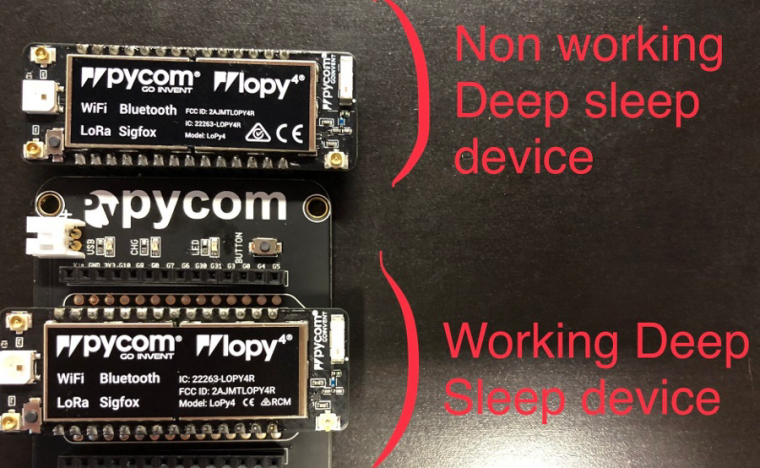
                        It seems there are different batches of LoPy 4... And one of them includes non working devices with Deepsleep. I noticed a slight difference on the label. I can post pictures of the two devices tomorrow.
                        But we should definitely notice pycom about that.

                        Anyway, thank you all for helping me :) !

                        L 1 Reply Last reply Reply Quote 0
                        • L Offline
                          livius @cduplouy
                          last edited by

                          @cduplouy

                          yes, show pictures - i am also interested it there is some difference between devices

                          think about people first, then computers

                          C 1 Reply Last reply Reply Quote 0
                          • C Offline
                            cduplouy @livius
                            last edited by

                            @livius

                            Here's a picture of the two different devices

                            0_1518769185177_LoPy4.jpeg

                            J 1 Reply Last reply Reply Quote 2
                            • J Offline
                              jmarcelino @cduplouy
                              last edited by

                              Hi @cduplouy

                              Can you post photos of the back of the device please. Since it may have serial numbers please email it to me at jmarcelino@pycom.io

                              Also please let me know where you purchased them.

                              Thank you.

                              J 1 Reply Last reply Reply Quote 0
                              • J Offline
                                jmarcelino @jmarcelino
                                last edited by

                                Just an update, we do have both devices internally (I'm still checking why there are two stickers). We've tested and both should give good deepsleep results.

                                Can you confirm you are doing exactly the same deepsleep test on both devices? If so it's possible there is some physical problem with the higher current one.

                                However the problem is not related to which sticker your device has.

                                C 2 Replies Last reply Reply Quote 0
                                • G Offline
                                  Gomez
                                  last edited by

                                  Hi,
                                  same for me with FiPy and expansion board. Tested with a battery pack made of 2 x 18650, during deepsleep power consumption is around 18-30 ma. Also tried to remove the RTS,CTS and LED jumper as suggested in other post ( RTS e CTS to avoid the TTL to USB converter maybe stay in high power "consumption mode" ) ans 180 ma during main.py processing and Sigfox transmission.
                                  Regards, Andrea

                                  J 1 Reply Last reply Reply Quote 0
                                  • J Offline
                                    jmarcelino @Gomez
                                    last edited by jmarcelino

                                    Hi @gomez,

                                    The FiPy issue is completely unrelated, that's due to in some cases the LTE modem not being properly put into deepsleep (airplane mode). We're working on it. Please see this post: https://forum.pycom.io/post/15268

                                    1 Reply Last reply Reply Quote 0
                                    • C Offline
                                      cduplouy @jmarcelino
                                      last edited by

                                      @jmarcelino
                                      Thanks for the update.

                                      I confirm I use the same files to make my tests.

                                      I got 3 other LoPy 4. I'm going to run some tests on them as well and I'll keep you updated.

                                      1 Reply Last reply Reply Quote 0
                                      • C Offline
                                        cduplouy @jmarcelino
                                        last edited by

                                        @jmarcelino

                                        Seems like I was really unlucky ...
                                        There's only one LoPy 4 that doesn't work in Deep Sleep mode !

                                        I am around 40 to 50 uA with all of the other LoPy 4.
                                        Do you know if that is the lowest we can get ?

                                        J 1 Reply Last reply Reply Quote 0
                                        • J Offline
                                          jmarcelino @cduplouy
                                          last edited by jmarcelino

                                          @cduplouy
                                          That's expected, are you using machine.pin_deepsleep_wakeup()? I found that increases consumption a bit more compared to timer deepsleep.

                                          There's also around 16 μA loss due to going through the voltage regulator. For even lower power consumption we recommend the OEM module which can be powered directly at 3.3V. (don't power the LoPy4 without going through the regulator on Vin, unless you physically remove it)

                                          If you get our OEM reference board and the OEM module you can also remove a resistor to disconnect the voltage regulator.

                                          C 1 Reply Last reply Reply Quote 1
                                          • C Offline
                                            cduplouy @jmarcelino
                                            last edited by

                                            @jmarcelino

                                            I tried with my power supply through the Vin Pin at 3.7V. I get 40 to 50 uA in Deepsleep
                                            Then I tried with my power suply at 3.3V and indeed i had like 24 uA !

                                            Thank you again for your help

                                            C 1 Reply Last reply Reply Quote 0

                                            Hello! It looks like you're interested in this conversation, but you don't have an account yet.

                                            Getting fed up of having to scroll through the same posts each visit? When you register for an account, you'll always come back to exactly where you were before, and choose to be notified of new replies (either via email, or push notification). You'll also be able to save bookmarks and upvote posts to show your appreciation to other community members.

                                            With your input, this post could be even better 💗

                                            Register Login
                                            • 1
                                            • 2
                                            • 2 / 2
                                            • First post
                                              Last post

                                            Pycom on Twitter

                                            Pycom