Welcome to the Pycom forum Forum
    • \[\[global:header.categories\]\]
    • \[\[global:header.recent\]\]
    • \[\[global:header.tags\]\]
    • \[\[global:header.popular\]\]
    • Login

    Explore Pybytes | Official Documentation | Report a Firmware Bug/Issue | GitHub

    Fipy Firmware Upgrade Error
    Scheduled Pinned Locked Moved FiPy
    fipy firmwarefirmwarefipy
    18 Posts 7 Posters 2.9k Views 7 Watching
    Loading More Posts
    • Oldest to Newest
    • Newest to Oldest
    • Most Votes
    Reply
    • Reply as topic
    Log in to reply
    This topic has been deleted. Only users with topic management privileges can see it.
    • rubencg195R Offline
      rubencg195
      last edited by rubencg195

      We are making test using the Pycom devices and we've managed to create a gateway and node using two Lopy's and sending the raw data to TheThingsNetwork.

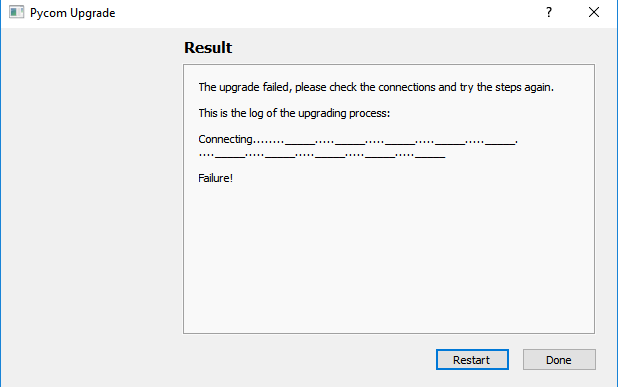
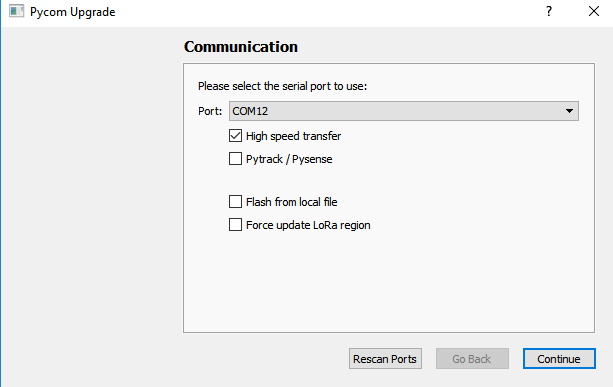
      To do it in our region using 915 Mhz we update the firmware to both devices. Now we want to make it more portable since the Lopy's only have WIFI connection but at the moment we try to upgrade the firmware of our Fipy device using the Pycom firmware tool it doesn't recognize it, it says connection failed.

      I followed every step in the process, connecting the wires from G23 to GND and so on, proof of it is the Lopy's working but I am not able to upgrade the Fipy's firmware to 915Mhz.

      OS: Windows 10
      Device: Fipy
      Software: Pycom firmware tool
      0_1519929663660_pycom_error.png
      0_1519929758078_pycom_error_2.png
      0_1519929846709_WhatsApp Image 2018-03-01 at 12.43.33.jpeg

      L J 2 Replies Last reply Reply Quote 0
      • L Offline
        livius @rubencg195
        last edited by

        @rubencg195
        Did you press reset button?

        think about people first, then computers

        1 Reply Last reply Reply Quote 0
        • J Offline
          jmarcelino @rubencg195
          last edited by

          Hi Ruben,

          For the FiPy please remove the jumpers on the expansion board marked CTS and RTS.

          It should work then.

          ps: Also be avoid placing the Expansion Board on top conductive metal cases like the photo above :-)

          P 1 Reply Last reply Reply Quote 0
          • rubencg195R Offline
            rubencg195
            last edited by

            Thank you very much @livius @jmarcelino, I tried both solutions, what worked for me was to press the reset button for 3 seconds before scanning the board.

            1 Reply Last reply Reply Quote 0
            • P Offline
              prasadsnayak
              last edited by

              This post is deleted!
              1 Reply Last reply Reply Quote 0
              • P Offline
                prasadsnayak @jmarcelino
                last edited by

                @jmarcelino: I removed both CTS and RTS jumpers but failed to upgrade. screenshot of error attached0_1522733691205_firmware_error.JPG

                robert-hhR 1 Reply Last reply Reply Quote 0
                • robert-hhR Offline
                  robert-hh @prasadsnayak
                  last edited by

                  @prasadsnayak Did you try already with low speed transfer?

                  P 1 Reply Last reply Reply Quote 0
                  • P Offline
                    prasadsnayak @robert-hh
                    last edited by

                    @robert-hh : Yes, i unchecked High Speed transfer

                    P 1 Reply Last reply Reply Quote 0
                    • P Offline
                      prasadsnayak @prasadsnayak
                      last edited by

                      @prasadsnayak :Worked!!, I did the local firmware upgrade

                      1 Reply Last reply Reply Quote 0
                      • P Offline
                        prasadsnayak
                        last edited by

                        I again tried to upgrade the firmware with latest one(FiPy-1.18.0.r1.tar) with latest pycom firmware update tool but failed the flashing and throws an error "Invalid head of packet(\x00)0_1538395192477_Pycom_upgrade_issue.JPG

                        robert-hhR 1 Reply Last reply Reply Quote 0
                        • robert-hhR Offline
                          robert-hh @prasadsnayak
                          last edited by

                          @prasadsnayak This liek the ones before is a transmission error, especially since some of the sections were updated properly. Did you use low speed? You could also try to use a different USB cable.

                          1 Reply Last reply Reply Quote 0
                          • P Offline
                            prasadsnayak
                            last edited by

                            Also get invalid segment length message on the console while pressing reset button

                            robert-hhR 1 Reply Last reply Reply Quote 0
                            • robert-hhR Offline
                              robert-hh @prasadsnayak
                              last edited by

                              @prasadsnayak That's most likely because you the upgrade was interrupted. Please try again, with a good short USB cable, at low speed.

                              P 1 Reply Last reply Reply Quote 0
                              • P Offline
                                prasadsnayak @robert-hh
                                last edited by

                                @robert-hh I tried with baudrate of 59600 and i am able to do the upgrade. Many Thanks

                                robert-hhR 1 Reply Last reply Reply Quote 0
                                • robert-hhR Offline
                                  robert-hh @prasadsnayak
                                  last edited by

                                  @prasadsnayak Very good. This is still strange. The Fipy itself accepts a baud rate of 921600 Baud. The Expansion boards also work at that baud rate. Other USB/Serial bridges may only work with lower baud rates, like the ones with a ch340g chip. USB cables may also limit the speed. So there is something special in your set-up.

                                  P 1 Reply Last reply Reply Quote 0
                                  • P Offline
                                    prasadsnayak @robert-hh
                                    last edited by

                                    @robert-hh I forgot to mention that i also changed the USB cable, earlier i was using 30V vw-1 low voltage computer cable later changed samsung USB cable(which worked for me)

                                    1 Reply Last reply Reply Quote 0
                                    • E Offline
                                      emmecilab
                                      last edited by

                                      Hi all
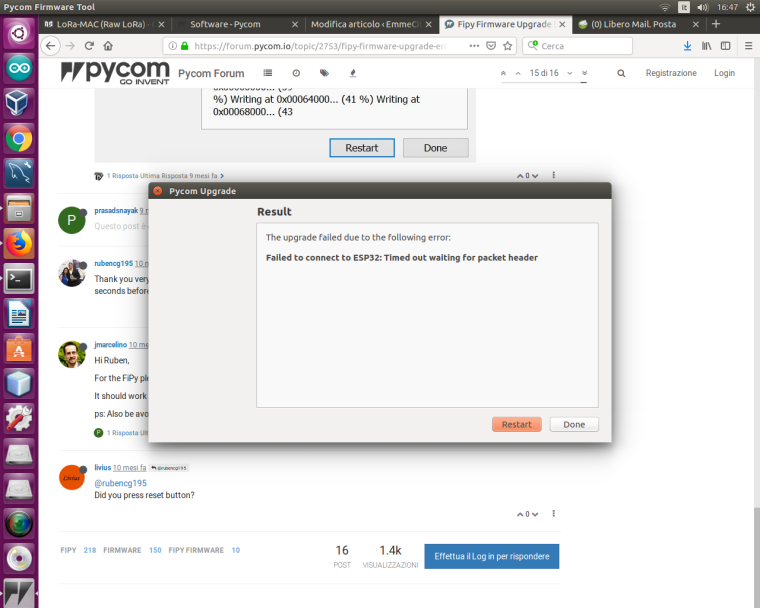
                                      I'm trying to update the firmware of my FiPy. I connected G23 and GND pins, removed jumpers for CTS and RTS and pressed reset button but the tool can't connect to the board.
                                      Any help?
                                      Thanks
                                      0_1545148227242_Schermata del 2018-12-18 16-47-31.png

                                      LoRa-LoRaWAN Awesome Resources
                                      https://github.com/mcicolella/awesome-lora-lorawan

                                      P 1 Reply Last reply Reply Quote 0
                                      • P Offline
                                        Paul Thornton @emmecilab
                                        last edited by

                                        @emmecilab I have only managed to see this when I've done something like put the module in the wrong way round or I'm using a usb cable that makes a bad physical connection. Im sure you already have but could you try removing/reseating the module in the expansion board and trying again.

                                        Same with the USB. If its still failing. drop a ticket to support@pycom.io or pm me on here and I'll help get this sorted.


                                        1 Reply Last reply Reply Quote 0

                                        Hello! It looks like you're interested in this conversation, but you don't have an account yet.

                                        Getting fed up of having to scroll through the same posts each visit? When you register for an account, you'll always come back to exactly where you were before, and choose to be notified of new replies (either via email, or push notification). You'll also be able to save bookmarks and upvote posts to show your appreciation to other community members.

                                        With your input, this post could be even better 💗

                                        Register Login
                                        • 1 / 1
                                        • First post
                                          Last post

                                        Pycom on Twitter

                                        Pycom