Firmware update cannot connect well
-
Hi everyone
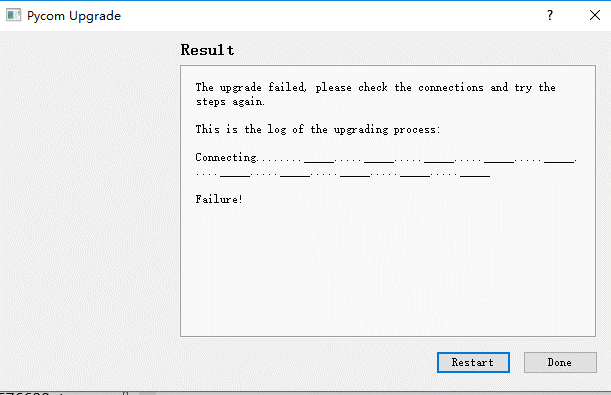
My expansion board always works like this when updating firmware. I have used the board for 3 months. The two plug slots I often used to update firmware are loosen now. I don't know if problem from the slots. Anyone can give me more ideas to solve this issue. Thank you!
-
@rachelsimida You see that picture when P2 (alias G23) is not connected to GND for update. The weared slots could be a problem. Try to insert a pin into that P2 position of the slot and connect that pin to GND.
Side note:
PyCom promised since long to create a new basic expansion board with automatic switch for firmware update, like all the cheap Chinese boards have. Or at least have a jumper/switch for that. -
@robert-hh Thanks. I just connect the P2 and GND. I am very familiar with the process.I tried 2 hours using mang different wires but always failure finally yesterday, I think I need buy a new one. Such a impractical product. I am so sad.
-
@rachelsimida You can try join connect P2 to GND directly at the module, like with the tip of a jumper cable, and while doing that, push the reset button. P2 has to be at GND only at the very moment while you release the reset button. The RGB LED may flicker, but you can ignore that. The protective cover behind the P2 is at GND level.
You can also solder a wire at the P2 position of the expansion board.
Besides that, while waiting for a better board, I use a simple tiny breadboard and a standard USB/UART interface. The only thing to care is to get 5V supply out of it while having the UARt lines at 3.3 V level. -
Until there is a new version of the expansion board doing the same, I recommend using a Pysense or PyTrack for USB firmware updates, the recent versions of the Pycom tools will switch the module automatically when using those.
Or you can do OTA updates if the firmware versions that is already on the module is recent enough.
-
I just struggled through getting the Expansion Board V3.0r to support updating a fipy and had similar issues. In the end it required a manual jumper between P2 and GND (even though the board is supposed handle this automatically) and turning off the high-speed and Pysense options.
Having said that, the first one I upgraded I used an external USB to serial interface and it worked first time.


Hello! It looks like you're interested in this conversation, but you don't have an account yet.
Getting fed up of having to scroll through the same posts each visit? When you register for an account, you'll always come back to exactly where you were before, and choose to be notified of new replies (either via email, or push notification). You'll also be able to save bookmarks and upvote posts to show your appreciation to other community members.
With your input, this post could be even better 💗
Register Login