Send a file from one Lopy to another Lopy
-
Hi, nice to see you again.
I'm trying to send a .txt file from one lopy to another via WIFI and I do not know how to do it.
I have been testing with 'socket.socket' but it gives me an error and I am not so sure that it is the correct method. It is also that the Lopy where the file will be received can not be left listening while waiting because it is executing another code.
issuer code:
from network import WLAN

import socket
import sys


def buscarWifi(ssid):
    #Ponemos el wifi en modo estacion:
    wlan = WLAN(mode=WLAN.STA)

    #Buscamos wifi:
    redes = wlan.scan()
    print('Redes disponibles: ',len(redes))
    #for c in range(len(redes)):
        #print(c,'->',redes[c])

        #if ssid in redes[c]: //Otra opción de encontrar el ssid
        #print("Encontrado en:",redes[c])
        #return True
    for red in redes:
        if red.ssid == ssid:
            wlan.connect(red.ssid, auth=(red.sec,'witeklab@2018'), timeout=5000)
            while not wlan.isconnected():
                machine.idle() # save power while waiting
            print('WLAN connection succeeded!')
            return True,wlan
            break
        else:
            return False,wlan
ok,w = buscarWifi('Gateway1')
if ok:
    print('ok')
    ip = w.ifconfig()
    print('ip destino = ',ip[0])
    print(w.ifconfig())

    #Creamos el fichero:
    #f = open ('prueba.txt', 'w')#MOdo 'a' Para añadir no sobre escribir
    #texto = ip[0]+"\nPrueba1"
    #f.write(texto)
    #f.close()

    import socket

    HOST = 'localhost'
    PORT = 9876
    ADDR = (ip[0],PORT)
    BUFSIZE = 4096
    videofile = "prueba.txt"

    bytes = open(videofile).read()

    print (len(bytes))

    client = socket.socket(socket.AF_INET, socket.SOCK_STREAM)
    client.connect(ADDR) ## <-- Failure
    client.send(bytes)
    client.close()
    #s = socket.socket(socket.AF_INET, socket.SOCK_STREAM)
    #s.connect((ip[0],9999))
    #l = f.read()
    #s.send(l)
    #s.close()
    #Intentamos el envío del fichero:
    #s = socket.socket()

else:
    print('no')

#Pag de interes:
# + info : https://docs.pycom.io/chapter/firmwareapi/micropython/usocket.html
# http://help.ubidots.com/connect-your-devices/connect-your-pycom-devices-over-wi-fi
The code what it does is look for a wifi network in particular that is what generates the Lopy server and connects correctly and I want to send a .txt file generated in the Lopy and send via Wi-Fi to the connected Lopy.
Is there a better way to do it?
By the way I have already looked at the following documents documents:
https://docs.pycom.io/chapter/tutorials/all/wlan.html
https://docs.pycom.io/chapter/firmwareapi/pycom/network/wlan.html
https://docs.pycom.io/chapter/firmwareapi/pycom/network/server.htmlAnd I have not managed to figure out how to make it sorry.
-
Just look up any standard python example of sending files and this will most likely port directly over to micropython. The basic idea is that you open the file you want to send, read it line by line and then send it line by line. On the other end you just need to read and write to a file.
Looking at the code you have posted above I have two comments:
- Make the socket blocking before sending data because you might be closing the socket before the data has actually been sent if you do it non-blocking.
- I would recommend sending the file line by line instead of reading the whole file into the
bytesvariabile. You might find with large files you will run out of RAM because of this.
-
@seb said in Send a file from one Lopy to another Lopy:
Just look up any standard python example of sending files and this will most likely port directly over to micropython. The basic idea is that you open the file you want to send, read it line by line and then send it line by line. On the other end you just need to read and write to a file.
Looking at the code you have posted above I have two comments:Make the socket blocking before sending data because you might be closing the socket before the data has actually been sent if you do it non-blocking.
I would recommend sending the file line by line instead of reading the whole file into the bytes variabile. You might find with large files you will run out of RAM because of this.But ... if the destination Lopy is executing an infinite loop carrying out some processes, is it possible to send it over wifi without having to listen, or anything like FTP?
-
Look into the "select" library or using threads if you want to do things concurrently
-
@seb
I have searched a lot and I have not come across any example that will finally help me to know how to send a file by socket.I know it's a lot to ask but ...Please, do you think it would be possible for you to write me two examples of how to send it and how to receive it from lopy to lopy with micro python using socket?
I have searched a lot and I have not come across any example that will finally help me to know how to send a file by socket.
I know it's a lot to ask but ... Do you think it would be possible for you to write me two examples of how to send it and how to receive it from lopy to lopy with micro python using socket?
thank you very much!
-
Up, some good Samaritan who gives me a hand with the code ...
Is that there is no sure way that if it surpasses what I am doing in each moment I would get to get it out, better or worse but I would take it out. But there is no way ...
If I do this on the server:
def iniciarFTP():
    try:
        import network
        from network import WLAN
        wlan = network.WLAN(mode=network.WLAN.STA)
        wlan.init(mode=WLAN.AP, ssid='Gateway1', auth=(WLAN.WPA2,'witeklab@2018'), channel=7, antenna=WLAN.INT_ANT)
        from network import Server
        server = Server(login=('micro', 'python'), timeout=600)
        server.timeout(300)
        server.timeout()
        print(server.isrunning())
        return True
    except:
        return False

iniciarFTP()
and in the client I connect like this:
from network import WLAN
wlan = WLAN(mode=WLAN.STA)

nets = wlan.scan()
for net in nets:
    print (net.ssid)
    if net.ssid == 'Gateway1':
        print('Network found!')
        wlan.connect(net.ssid, auth=(net.sec, 'witeklab@2018'), timeout=5000)
        while not wlan.isconnected():
            machine.idle() # save power while waiting
        print('WLAN connection succeeded!')
        wlan.ifconfig()
        break
I just need the socket type code to send a file.txt but for more than try it gives me error with the name of the server or a thousand other things ...
I can not get it out, if someone is bored a moment and can write the code of the client and server to send and receive via wifi would be very grateful because now I just want to send them to that space. XD
please please :(
-
Well nothing for more that I try things I can not send anything. I keep writing to see if anyone can help me.
This is the code that runs the server Lopy. About this code I do not know if there will be problems because as I can not connect, I do not know if something fails. But create the wifi network in which the client connects correctly as you can see in the client capture:
def iniciarFTP():
    try:
        import network
        from network import WLAN
        wlan = network.WLAN(mode=network.WLAN.STA)
        wlan.init(mode=WLAN.AP, ssid='Gateway1', auth=(WLAN.WPA2,'witeklab@2018'), channel=7, antenna=WLAN.INT_ANT)
        from network import Server
        server = Server(login=('micro', 'python'), timeout=600)
        server.timeout(300)
        server.timeout()
        print(server.isrunning())
        return True
    except:
        return False

#Iniciamos servidor:
iniciarFTP()

#Ponemos a la escucha:
import socket

f = open('recieved.txt', 'w')
eggs = socket.socket(socket.AF_INET, socket.SOCK_STREAM)
eggs.bind(('', 8206))
eggs.listen(5)
while True:
    channel, details = eggs.accept()
    print ('connected')
    got = channel.recv(4096)
    f.write(got)
    channel.send("recieved!")
    channel.close()
This is the code of the Lopy client in which I get an error on line 47.
What I do is look for the Wi-Fi network that the Lopy server generates and connect me as a client. So far so good. The next thing I try is with the ip obtained from the connection I assign to the variable 'HOST' the ip of the Lopy server and the PORT because it is listening. But when doing 's.connect (ADDR)' gives error:
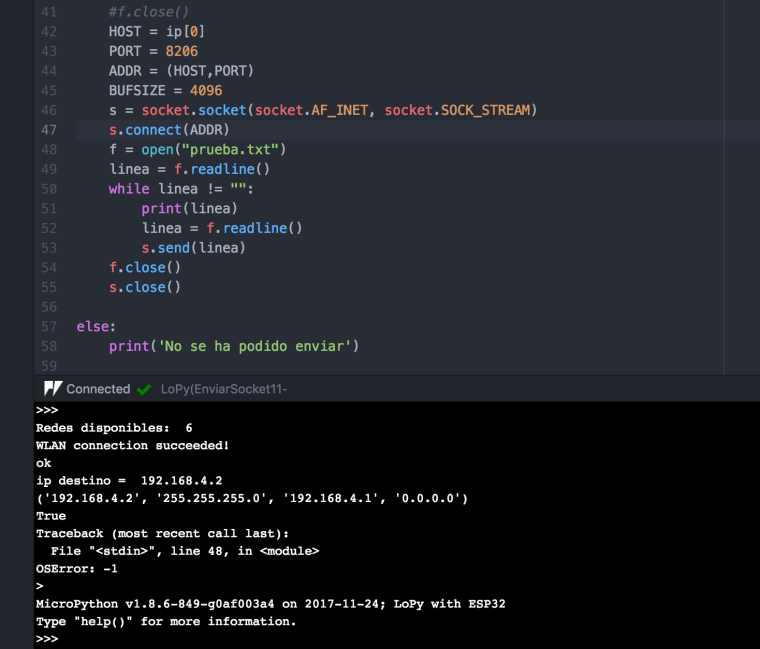
complete code of the client Lopy:
from network import WLAN

import socket
import sys


def buscarWifi(ssid):
    #Ponemos el wifi en modo estacion:
    wlan = WLAN(mode=WLAN.STA)

    #Buscamos wifi:
    redes = wlan.scan()
    print('Redes disponibles: ',len(redes))

    for red in redes:
        if red.ssid == ssid:
            wlan.connect(red.ssid, auth=(red.sec,'witeklab@2018'), timeout=5000)
            while not wlan.isconnected():
                machine.idle() # save power while waiting
            print('WLAN connection succeeded!')
            return True,wlan
            break
        else:
            return False,wlan
ok,w = buscarWifi('Gateway1')
if ok:
    print('ok')
    ip = w.ifconfig()
    print('ip destino = ',ip[0])
    print(w.ifconfig())
    print(w.isconnected())

    HOST = ip[0]
    PORT = 8206
    ADDR = (HOST,PORT)
    BUFSIZE = 4096
    s = socket.socket(socket.AF_INET, socket.SOCK_STREAM)
    s.connect(ADDR)
    f = open("prueba.txt")
    linea = f.readline()
    while linea != "":
        print(linea)
        linea = f.readline()
        s.send(linea)
    f.close()
    s.close()

else:
    print('Connection failed!')
I have tried many more ways to do it but almost all of them gave me another type of errors. For example I also found an adaptation of the python FTP library for micro Python but it did not work either ... At last and the caba I just want to do the same thing that Filezilla does when you connect to the Wi-Fi of a Lopy that is sending you a file .. .
If someone can help me? thanks in advance, regards.
-
It seems that finally they are between lopys and connect because the server prints this:
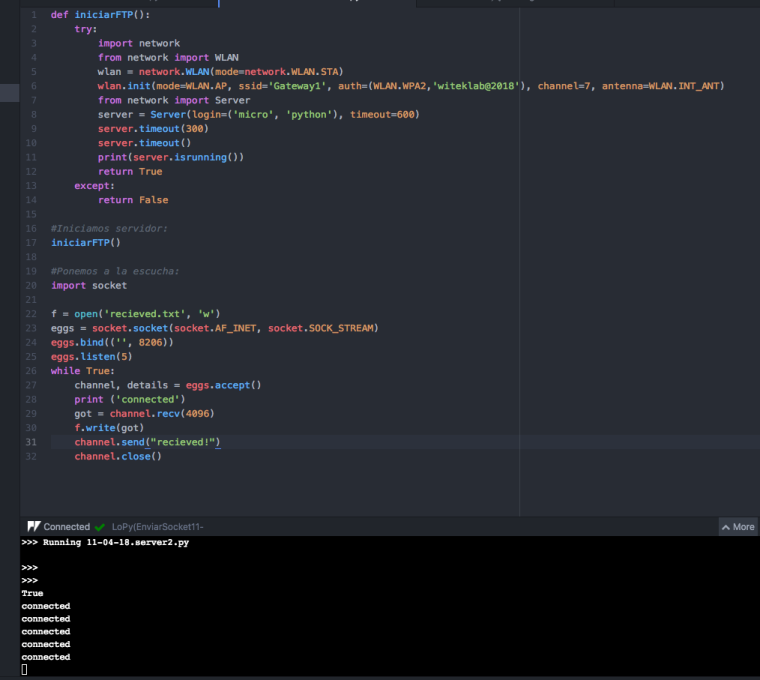
Now the client seems to give me another error but this one I do not know what it means:
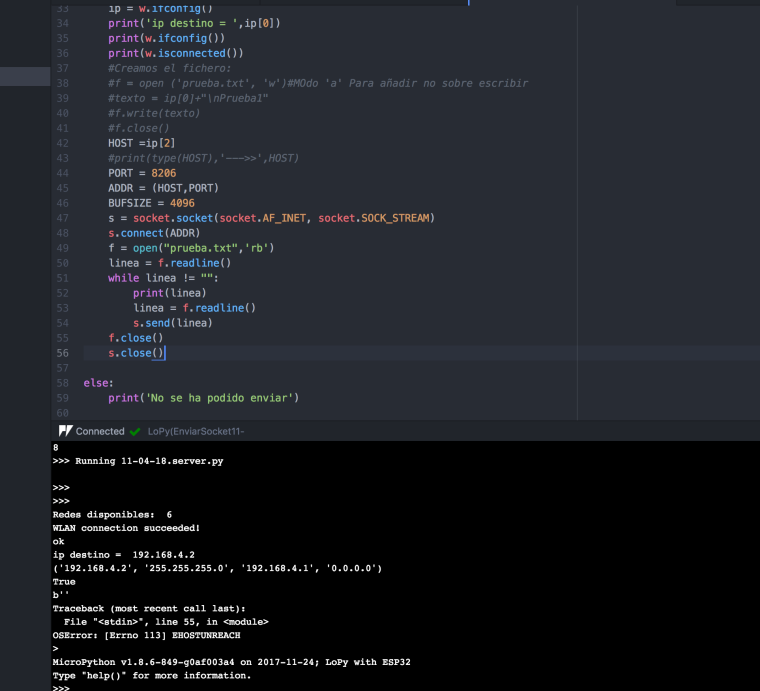
OSError: (Errno 113) EHOSTUNREACH
¿?
-
error host unreachable - this means the lopy could not find a route to the destination
-
@seb said in Send a file from one Lopy to another Lopy:
error host unreachable - this means the lopy could not find a route to the destination
If you do not find it as it is on the print server ('connected') when I run the client code? What am I missing?
-
can you post your complete code and I will have a look
-
@seb said in Send a file from one Lopy to another Lopy:
can you post your complete code and I will have a look
Thank you very much for looking at it. This is the full code of the Lopy Server:
import socket                   # Import socket module

def iniciarFTP():
    try:
        import network
        from network import WLAN
        wlan = network.WLAN(mode=network.WLAN.STA)
        wlan.init(mode=WLAN.AP, ssid='Gateway1', auth=(WLAN.WPA2,'witeklab@2018'), channel=7, antenna=WLAN.INT_ANT)
        from network import Server
        server = Server(login=('micro', 'python'), timeout=600)
        server.timeout(300)
        server.timeout()
        print(server.isrunning())
        return True
    except:
        return False

#Iniciamos servidor:
iniciarFTP()
host = ''
port = 8206                     # Reserve a port for your service.
s = socket.socket()             # Create a socket object

s.bind((host, port))            # Bind to the port
s.listen(5)                     # Now wait for client connection.

print ('Server listening....')

while True:
    conn, addr = s.accept()     # Establish connection with client.
    print ('Got connection from', addr)
    data = conn.recv(1024)
    print('Server received', repr(data))

    with open('received_file.txt', 'wb') as f:
        print ('file opened')
        while True:
            print('receiving data...')
            data = s.recv(1024)
            print('data=%s', (data))
            if not data:
                break
            # write data to a file
            f.write(data)

        f.close()
        print('Successfully get the file')
        s.close()
        print('connection closed')

        conn.send('Thank you for connecting')
    conn.close()
No more, now I give you a screenshot of what you do when you run it, but I already told you that it stops when you print ('Server listening ....')
As the programming indicates waiting for some connection. But the one that receives a connection from the client fails with the error 'OSError: 128':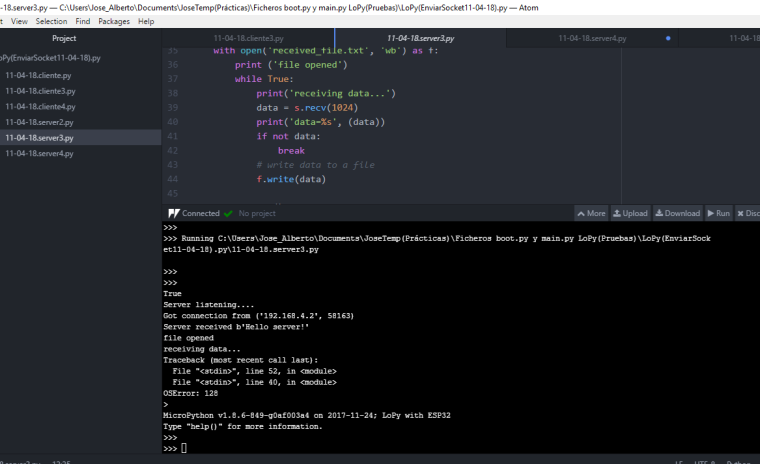
Now we go to the client Lopy code:
 from network import WLAN
import socket
import sys

def buscarWifi(ssid):
    wlan = WLAN(mode=WLAN.STA)
    redes = wlan.scan()
    print('Redes disponibles: ',len(redes))
    for red in redes:
        if red.ssid == ssid:
            wlan.connect(red.ssid, auth=(red.sec,'witeklab@2018'), timeout=5000)
            while not wlan.isconnected():
                machine.idle() # save power while waiting
            print('WLAN connection succeeded!')
            return True,wlan
            break
        else:
            return False,wlan

ok,w = buscarWifi('Gateway1')
if ok:
    print('ok')
    s = socket.socket()
    ip = w.ifconfig()
    print('ip destino = ',ip[0])
    print('Configuracion de red:',w.ifconfig())
    print('Estoy conectado=',w.isconnected())
    ip = w.ifconfig()
    host = ip[2]
    #print(type(HOST),'--->>',HOST)
    port = 8206
    s.connect((host, port))
    s.send("Hello server!")
    filename='prueba.txt'
    f = open(filename,'rb')
    l = f.read(1024)
    while (l):
       conn.send(l)
       print('Sent ',repr(l))
       l = f.read(1024)
    f.close()
    s.close()
and the error that appears to me in this case is:
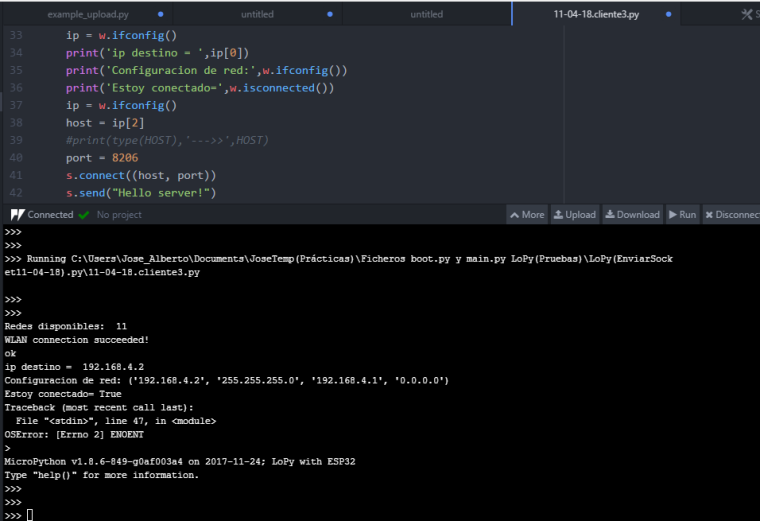
I do not know what that error means, nor do I know if I'm doing things right. The only thing I know is that at least now they connect to Lopy client and Lopy server, which is already a lot, having to study how the socket system works.
That's why in some comment I said, I was requesting some exemplary code of how the system should connect between a client and server and transfer a file.
I have taken the code example from here:
http://www.bogotobogo.com/python/python_network_programming_server_client_file_transfer.phpAlthough I would like to be able to use the last one with Thread but I have not known how to adapt it to mircro python:
http://www.bogotobogo.com/python/python_network_programming_server_client_file_transfer.php#ec2 -
@zceld said in Send a file from one Lopy to another Lopy:
from network import WLAN
import socket
import sysdef buscarWifi(ssid):
wlan = WLAN(mode=WLAN.STA)
redes = wlan.scan()
print('Redes disponibles: ',len(redes))
for red in redes:
if red.ssid == ssid:
wlan.connect(red.ssid, auth=(red.sec,'witeklab@2018'), timeout=5000)
while not wlan.isconnected():
machine.idle() # save power while waiting
print('WLAN connection succeeded!')
return True,wlan
break
else:
return False,wlanok,w = buscarWifi('Gateway1')
if ok:
print('ok')
s = socket.socket()
ip = w.ifconfig()
print('ip destino = ',ip[0])
print('Configuracion de red:',w.ifconfig())
print('Estoy conectado=',w.isconnected())
ip = w.ifconfig()
host = ip[2]
#print(type(HOST),'--->>',HOST)
port = 8206
s.connect((host, port))
s.send("Hello server!")
filename='prueba.txt'
f = open(filename,'rb')
l = f.read(1024)
while (l):
conn.send(l)
print('Sent ',repr(l))
l = f.read(1024)
f.close()
s.close()Looking at your second block of code it looks like you are trying to connect the device to itself? You are getting
hostfromifconfig()but then trying to connect to that address -
@seb said in Send a file from one Lopy to another Lopy:
host = ip[2]
Hi, thanks again for checking it out!
In theory the server returns these values of WLAN.ifconfig ():
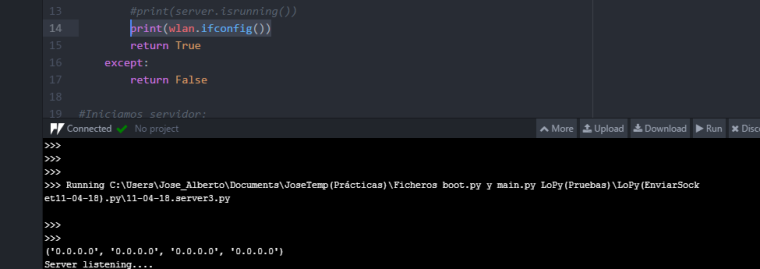
Of the data that ifconfig returns are:?
('ip assigned', 'subnet mask', 'ip server'?, 'and this last one I do not know' /0.0.0.0).
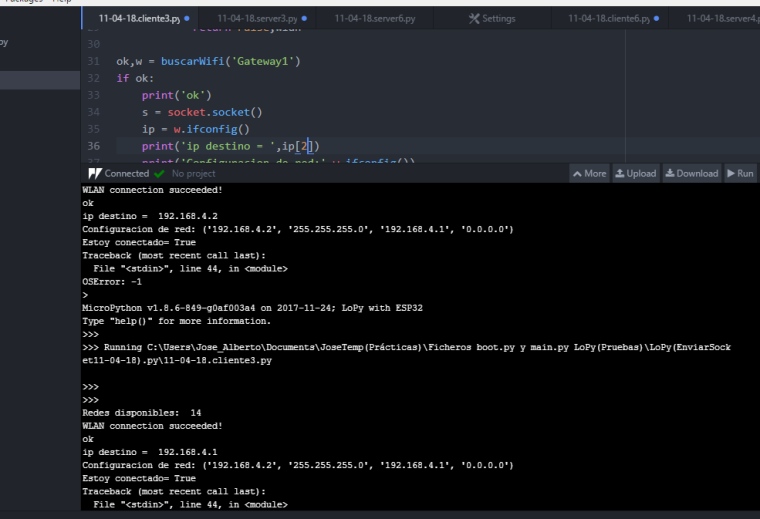
Capture of the client, this time trying to connect to the ip '192.168.4.1' that is supposed to be the server's Wi-Fi therefore the Lopy server does not?
-
@zceld
The return of ifconfig is in the following format.
(ip, subnet, gateway, dns)I see now from your code that you are using one of the modules as a wifi AP, can you first try connecting them to an existing network to see if this works, then we can narrow down if the issue lies with the networking or your logic
-
@seb said in Send a file from one Lopy to another Lopy:
@zceld
The return of ifconfig is in the following format.
(ip, subnet, gateway, dns)
I see now from your code that you are using one of the modules as a wifi AP, can you first try connecting them to an existing network to see if this works, then we can narrow down if the issue lies with the networking or your logicNow I will try to reduce where the problem may be, but the need to connect and send data is to be used without a router, if you do not communicate with each other.
Regardless of the Wi-Fi, do you think that you could send two messages simultaneously with LoRa using thread?
-
@seb
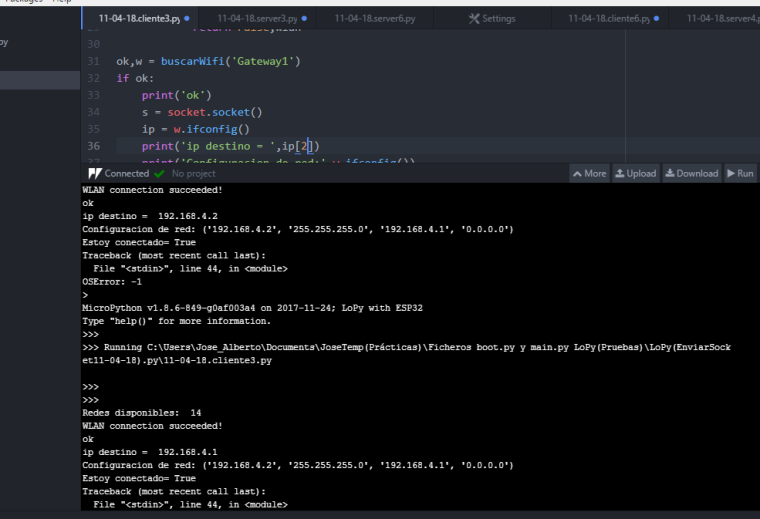
This is the result that the server connected to Wi-Fi has given me, and to which it has begun to receive data from the client, it has failed:
code used in the superior test:
def buscarWifi(ssid):
    #Ponemos el wifi en modo estacion:
    wlan = WLAN(mode=WLAN.STA)

    #Buscamos wifi:
    redes = wlan.scan()
    print('Redes disponibles: ',len(redes))
    for red in redes:
        if red.ssid == ssid:
            wlan.connect(red.ssid, auth=(red.sec,'hszh6539'), timeout=5000)
            while not wlan.isconnected():
                machine.idle() # save power while waiting
            print('WLAN connection succeeded!')
            return True,wlan
            break
        else:
            return False,wlan

iniciarFTP()
ok,w = buscarWifi('S9+ Wifi')
if ok:
    print('ok')
    ip = w.ifconfig()
    host = ip[0]
    print('my ip = ',ip[0])
    port = 60000                     # Reserve a port for your service.
    s = socket.socket()             # Create a socket object
    gc.collect()
    s.bind((host, port))            # Bind to the port
    s.listen(5)                     # Now wait for client connection.

    print ('Server listening....')

    while True:
        conn, addr = s.accept()     # Establish connection with client.
        print ('Got connection from', addr)
        data = conn.recv(256)
        print('Server received', repr(data))

        with open('received_file.txt', 'wb') as f:
            print ('file opened')
            while True:
                print('receiving data...')
                s.setblocking(True)
                print('Memoria->',str(gc.mem_free()))
                data = s.recv(256)
                print('M despues->',str(gc.mem_free()))
                print('data=%s', (data))
                if not data:
                    break
                # write data to a file
                f.write(data)

            f.close()
            print('Successfully get the file')
            s.close()
            print('connection closed')

            conn.send('Thank you for connecting')
        conn.close()
        gc.collect()
Result of the Lopy that sends the file:
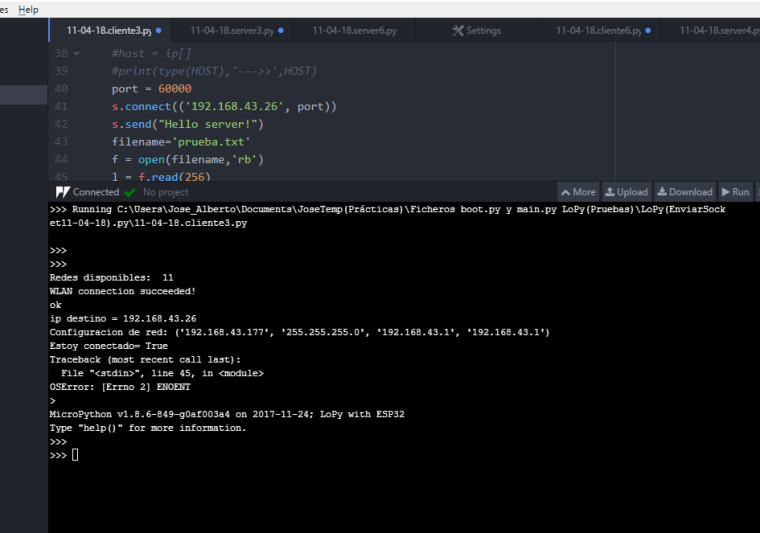
code used in the superior test:
from network import WLAN import socket import sys def buscarWifi(ssid): #Ponemos el wifi en modo estacion: wlan = WLAN(mode=WLAN.STA) #Buscamos wifi: redes = wlan.scan() print('Redes disponibles: ',len(redes)) #for c in range(len(redes)): #print(c,'->',redes[c]) #if ssid in redes[c]: //Otra opción de encontrar el ssid #print("Encontrado en:",redes[c]) #return True for red in redes: if red.ssid == ssid: wlan.connect(red.ssid, auth=(red.sec,'hszh6539'), timeout=5000) while not wlan.isconnected(): machine.idle() # save power while waiting print('WLAN connection succeeded!') return True,wlan break else: return False,wlan ok,w = buscarWifi('S9+ Wifi') if ok: print('ok') s = socket.socket() print('ip destino = 192.168.43.26') print('Configuracion de red:',w.ifconfig()) print('Estoy conectado=',w.isconnected()) #host = ip[] #print(type(HOST),'--->>',HOST) port = 60000 s.connect(('192.168.43.26', port)) s.send("Hello server!") filename='prueba.txt' f = open(filename,'rb') l = f.read(256) while (l): conn.send(l) print('Sent ',repr(l)) l = f.read(256) f.close() s.close() -
Hi,
Please excuse the delay. I have gone ahead and written some code for you to demonstrate sending a file between devices. Be aware that this does no error checking/retries etc. but the basic functionality is there.
Client
from network import WLAN
import socket
import select
import machine
import time

# Connect to server AP
wlan = WLAN(mode=WLAN.STA)
nets = wlan.scan()
for net in nets:
    if net.ssid == 'Gateway1':
        print('Network found!')
        wlan.connect(net.ssid, auth=(net.sec, 'password'), timeout=5000)
        while not wlan.isconnected():
            machine.idle() # save power while waiting
        print('WLAN connection succeeded!')
        break
else:
    raise Exception("WiFi network not found")

# sleep just to make sure the wifi is connected
time.sleep(1)

ip, subnet, gateway, dns = wlan.ifconfig()

# Connect to server
port = 12345
s = socket.socket()
print("Connecting to: ", gateway, port)
s.connect((gateway, port))
s.setblocking(True)
s.settimeout(2)

file = "/flash/test.txt"
with open(file, 'wb') as f:
    while True:
        try:
            data = s.recv(1024)
            print(data)
            f.write(data)
        except TimeoutError:
            break
Server
from network import WLAN import socket import select import time #Setup WiFi AP wlan = WLAN(mode=WLAN.AP, ssid='Gateway1', auth=(WLAN.WPA2,'password'), antenna=WLAN.INT_ANT) # Bind to the port port = 12345 s = socket.socket() s.bind(socket.getaddrinfo("0.0.0.0", port)[0][4]) s.listen(1) print("Running server") while True: readable, writable, errored = select.select([s], [], []) for s in readable: cl, remote_addr = s.accept() cl.setblocking(True) print("Client connection from:", remote_addr) file = "/flash/test.txt" print("Sending: ", file) with open(file, 'rb') as f: data = f.read(1024) while(data): print("sending", data) cl.sendall(data) data = f.read(1024) print("Done Sending") cl.close() -
@seb said in Send a file from one Lopy to another Lopy:
from network import WLAN
import socket
import select
import time

#Setup WiFi AP
wlan = WLAN(mode=WLAN.AP,
            ssid='Gateway1',
            auth=(WLAN.WPA2,'password'),
            antenna=WLAN.INT_ANT)


# Bind to the port
port = 12345
s = socket.socket()
s.bind(socket.getaddrinfo("0.0.0.0", port)[0][4])
s.listen(1)

print("Running server")
while True:
    readable, writable, errored = select.select([s], [], [])

    for s in readable:
        cl, remote_addr = s.accept()
        cl.setblocking(True)
        print("Client connection from:", remote_addr)

        file = "/flash/test.txt"
        print("Sending: ", file)

        with open(file, 'rb') as f:
            data = f.read(1024)
            while(data):
                print("sending", data)
                cl.sendall(data)
                data = f.read(1024)
        print("Done Sending")
        cl.close()
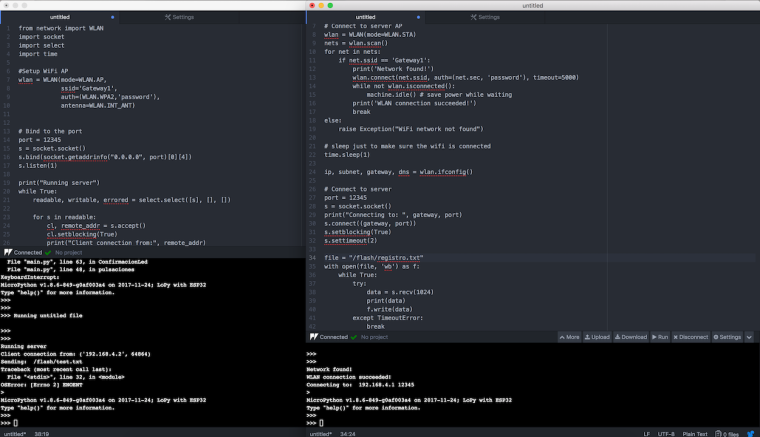
hi, forgive me for the delay, yesterday I could not look at it, today was the first thing I've done and has given a failure on the server.
-
Did you create a test.txt file on your device too? the server reads the file test.txt and client writes to a file called test.txt

Hello! It looks like you're interested in this conversation, but you don't have an account yet.
Getting fed up of having to scroll through the same posts each visit? When you register for an account, you'll always come back to exactly where you were before, and choose to be notified of new replies (either via email, or push notification). You'll also be able to save bookmarks and upvote posts to show your appreciation to other community members.
With your input, this post could be even better 💗
Register Login