Send a file from one Lopy to another Lopy
-
@seb said in Send a file from one Lopy to another Lopy:
Did you create a test.txt file on your device too? the server reads the file test.txt and client writes to a file called test.txt
I had not realized that it was the other way around, that is, as my idea was to send the client to the server, I had not noticed sorry. Anyway now I have changed it to a file that is in the Lopy but now it tells me this error:
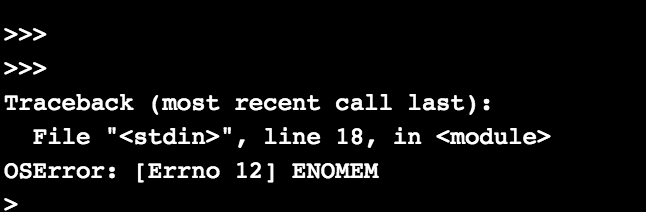 Captura de pantalla 2018-04-19 16.30.23
 -
How big of a file are you trying to copy?
-
I still do not know what that error means but it must be related to the socket and the listener method.
But I have reset the plates and it has worked :) I still do not believe it ...
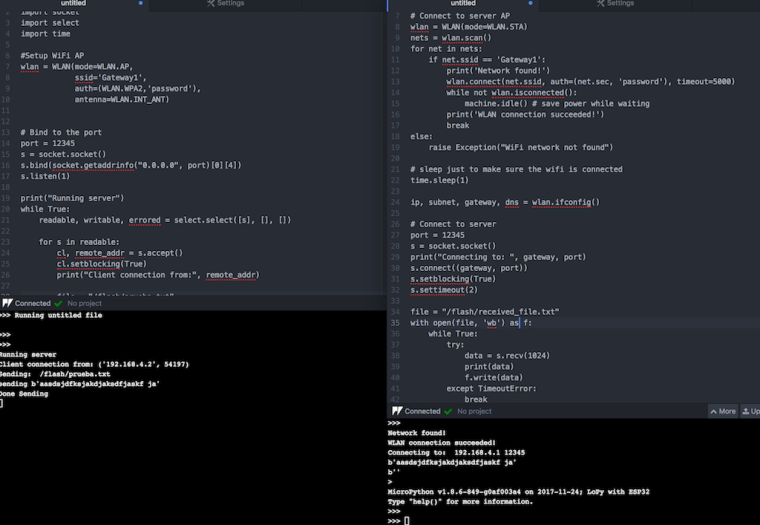
hehe thank you very much at least I know that something works now I need many things to know but already with the base is much.By the way when you put the socket = cl.setblocking (True)
Is there a way to cancel or interrupt this?
another question. this 's.listen (1)' which means you will be listening once?I have more questions ... If I use for example Wi-Fi or Lora with _threads, can I send and listen to the same chip at the same time?
-
-
You can cancel it by using
setblocking(False) -
you can find out what
s.listen(1)means here: https://docs.pycom.io/chapter/firmwareapi/micropython/usocket.html#socketlistenbacklog its basically how many unaccepted connections you can queue up -
Yeah that should be fine, the underlying drivers for wifi/lora will handle multiplexing access to them
-
-
@seb said in Send a file from one Lopy to another Lopy:
You can cancel it by using setblocking(False)
you can find out what s.listen(1) means here: https://docs.pycom.io/chapter/firmwareapi/micropython/usocket.html#socketlistenbacklog its basically how many unaccepted connections you can queue up
Yeah that should be fine, the underlying drivers for wifi/lora will handle multiplexing access to them
Would you know to tell me that I failed in all the previous examples??
On the other hand I already ask you in your day for the same thing of s.setblocking (True / False) you know where I could find an exhaustive explanation about that?
Finally on the _treads, to confirm. It would be possible to put in a Lopy a _tread that established the wifi in WLAN.AP mode and in turn in the same Lopy through another _tread the wifi was put in WLAN.STA mode at the same time?
-
The docs are the best place to look at what these functions do: https://docs.pycom.io/chapter/firmwareapi/micropython/usocket.html
Here is a basic run down,
s.setblocking(True)will make any sending or recieving functions block, this means the lopy will get stuck at that line of code until it receives the amount of bytes asked for (or it timesout, if a timeout is set) or until all data is send. When it isFalsecalls to any sending or receiving functions will return immediately. In the case of a send, it will place the data in a queue and it will be send in the background in a different thread. In the case of a recieve, if there is less data than expected available it simply returns that and doesnt wait for the full expected amount.You can change the WLAN modes but this will become messy because you will need to make sure the threads have proper locks and that they are aware of what state the WLAN is in before trying to use it. You might be better off just using the WLAN.STA_AP mode which is both modes at once.
-
Good again.
I return to post, because I would need the LoPy that receives the txt file is the one that starts the wifi as
wlan = WLAN (mode = WLAN.AP,
ssid = 'Gateway1',
auth = (WLAN.WPA2, 'password'),
antenna = WLAN.INT_ANT)I have tried to modify the code as I have the partner that works so that it is but I get error everywhere.
Once trying once more, if I do not restart the board and try to execute the code, I always get the error:
Traceback (most recent call last):
File "<stdin>", line 17, in <module>
OSError: [Errno 12] ENOMEMBecause it is ? If someone can give me a hand code please!
Capture Errors:
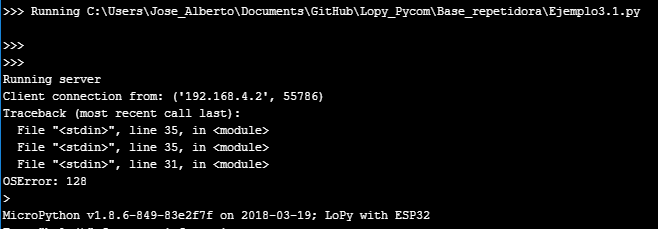
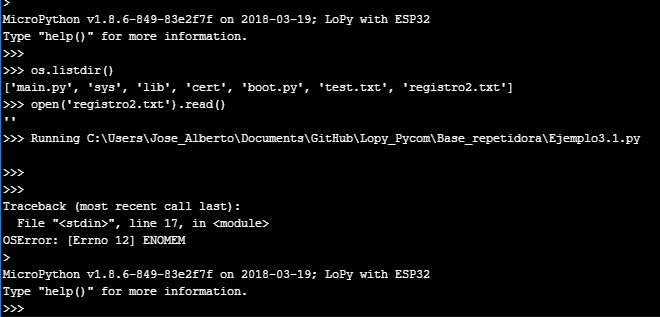
used code:
Server And Wifi AP:from network import WLAN import socket import select import time #Setup WiFi AP wlan = WLAN(mode=WLAN.AP, ssid='Gateway1', auth=(WLAN.WPA2,'password'), antenna=WLAN.INT_ANT) port = 12345 s = socket.socket() s.bind(socket.getaddrinfo("0.0.0.0", port)[0][4]) s.listen(1) print("Running server") while True: cl, remote_addr = s.accept() cl.setblocking(True) print("Client connection from:", remote_addr) file = "/flash/registro2.txt" with open(file, 'wb') as f: try: data = s.recv(1024) print(data) f.write(data) except TimeoutError: breakClient and Lopy and in charge to send file:
from network import WLAN
import socket
import select
import machine
import time

# Abrimos wifi
wlan = WLAN(mode=WLAN.STA)
nets = wlan.scan()
for net in nets:
    if net.ssid == 'Gateway1':
        print('Network found!')
        wlan.connect(net.ssid, auth=(net.sec, 'password'), timeout=5000)
        while not wlan.isconnected():
            machine.idle() # save power while waiting
        print('WLAN connection succeeded!')
        break
else:
    raise Exception("WiFi network not found")

# sleep just to make sure the wifi is connected
time.sleep(1)

ip, subnet, gateway, dns = wlan.ifconfig()

# Connect to server
# Bind to the port
port = 12345
s = socket.socket()
s.connect((gateway, port))
s.setblocking(True)
s.settimeout(2)

while True:
    readable, writable, errored = select.select([s], [], [])

    for s in readable:
        cl, remote_addr = s.accept()
        cl.setblocking(True)
        print("Client connection from:", remote_addr)

        file = "/flash/registro.txt"
        print("Sending: ", file)

        with open(file, 'rb') as f:
            data = f.read(1024)
            while(data):
                print("sending", data)
                cl.sendall(data)
                data = f.read(1024)
        print("Done Sending")
        cl.close()

Hello! It looks like you're interested in this conversation, but you don't have an account yet.
Getting fed up of having to scroll through the same posts each visit? When you register for an account, you'll always come back to exactly where you were before, and choose to be notified of new replies (either via email, or push notification). You'll also be able to save bookmarks and upvote posts to show your appreciation to other community members.
With your input, this post could be even better 💗
Register Login