Welcome to the Pycom forum Forum
    • \[\[global:header.categories\]\]
    • \[\[global:header.recent\]\]
    • \[\[global:header.tags\]\]
    • \[\[global:header.popular\]\]
    • Login

    Explore Pybytes | Official Documentation | Report a Firmware Bug/Issue | GitHub

    DS18B20 temperature sensor

    Scheduled Pinned Locked Moved LoPy
    36 Posts 16 Posters 24.0k Views 15 Watching
    Loading More Posts
    • Oldest to Newest
    • Newest to Oldest
    • Most Votes
    Reply
    • Reply as topic
    Log in to reply
    This topic has been deleted. Only users with topic management privileges can see it.
    • M Offline
      madsdk @michal
      last edited by

      @michal Ah, ok. Thanks. I've just tested it on my LoPy and sadly it doesn't seem to work.

      1 Reply Last reply Reply Quote 0
      • B Offline
        Brunus
        last edited by

        Hi all,
        I'm connecting this probe on my WiPy 1.0, it's working with the official firmware, with multithreading support activated.
        First I was also loading the not multhreaded firmware, but this morning I wanted to test the 1.8.6 firmware and with the onewire lib and this probe, it just works.
        I was suprised, but it's cool :)
        My connexions :
        probe + on 3V3 pin
        probe ground on ground pin
        probe data on pin 10

        M 1 Reply Last reply Reply Quote 0
        • M Offline
          michal @Brunus
          last edited by

          @madsdk
          I have tested the library on Wipy 2.0 and it works with stock firmware too. So it has to work on Lopy.

          My setup:

          Wipy Sensor
          3V3 -> red (VCC)
          P23 -> yellow (DATA)
          GND -> black (GND)
          Pull-up resistor 4k7 is connected between VCC and DATA.
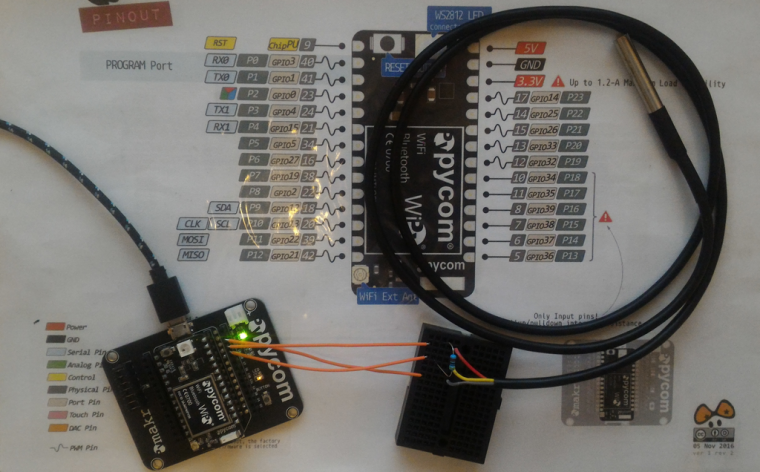
          0_1479836230063_wipy2_ds18b20.png
          Sample code:

          >>> import onewire
          >>> from machine import Pin
          >>> ds = onewire.DS18X20(onewire.OneWire(Pin('P23')))
          >>> print('devices:', ds.roms)
          devices: [bytearray(b'(\xff\xae8\x90\x15\x03T')]
          >>> print('temperatures:', ds.read_temps())
          temperatures: [2525]
          

          Michal

          A M C 3 Replies Last reply Reply Quote 2
          • A Offline
            acheesehead @michal
            last edited by

            @michal I have WiPy 2.0 and just upgraded firmware to release 0.9.5.b1. 'import onewire' does not work.

            A 1 Reply Last reply Reply Quote 0
            • A Offline
              acheesehead @acheesehead
              last edited by

              Never mind. Uploaded onewire.py to the WiPy 2.0. First got error about the last line that runs test. Commented that out and hooked two sensors up on P23. ds.roms call showed both. ds.read_temps also showed reasonable temps.

              Nice!

              1 Reply Last reply Reply Quote 0
              • M Offline
                madsdk @michal
                last edited by

                @michal Thanks a lot for your answer. I just tried it once more. I have the same setup, except that I had connected the data line to pin 19, which didn't work. When I connect it to pin 23, like you've done, I suddenly get some data from the sensor. I don't think the data I get is correct, but at least I get some data :)

                >>> test('P23')
                devices: [bytearray(b'(\xc5?6\x07\x00\x00\xba')]
                temperatures: [8500]
                

                Why does it work on pin 23 but not on pin 19? I'm fairly new to messing around with hardware on this level :-)

                Best regards,
                Mads

                C 1 Reply Last reply Reply Quote 0
                • P Offline
                  Pieter
                  last edited by

                  Did anyone get it to work and where can i find the related modules? It seems that i need "onewire", "ds18x20" and "pyb". As pyb seem to be more common i can not find a version compatible to LoPy anywhere?

                  1 Reply Last reply Reply Quote 0
                  • A Offline
                    acheesehead
                    last edited by

                    I have 3 DS18B20 sensors working with the WiPy 2.0 using the onewire.py module. I'm not sure of the differences between WiPy and LoPy, but it comes down to precision timing, on the order of 6 usec. The WiPy 2.0 (and 1.0) correctly detects the 3 sensors on a single GPIO port.

                    1 Reply Last reply Reply Quote 0
                    • P Offline
                      Pieter
                      last edited by

                      @acheesehead can you provide a link to the onewire, ds18x20 and pyb.py files?

                      1 Reply Last reply Reply Quote 0
                      • L Offline
                        LoneTech
                        last edited by LoneTech

                        While I've had success porting the prior micropython bitbanging onewire code (it was mostly changing the IO mode to open drain, and replacing pyb with machine), I just managed to wake up the RMT peripheral. It could conceivably run onewire with extremely precise timing without requiring much CPU. It should only require two RMT channels (one input, one output) mapped on the same GPIO, set to open drain. 6µs should be no problem at all considering I did 0.05µs for the WS2812 :)

                        The micropython onewire example code is at https://github.com/micropython/micropython/tree/master/drivers/onewire and my initial RMT access code is at https://github.com/lonetech/LoPy

                        By the way, I suspect the issue with P19 was the bug when accessing GPIO>=31. P19 is GPIO 32.

                        J 1 Reply Last reply Reply Quote 0
                        • J Offline
                          JF002 @LoneTech
                          last edited by

                          @LoneTech Would you mind sharing your port of the MicroPython library on the Lopy?It's too bad that this library is not portable across different MicroPython board...
                          Once I've confirmed that my DS18B20 works fine on the Lopy, I'll try to use the RMT instead of this bitbanging library :)

                          L 1 Reply Last reply Reply Quote 0
                          • L Offline
                            LoneTech @JF002
                            last edited by

                            @JF002 Sure. The patch and modules are in http://donkey.vernier.se/~yann/onewire.zip - sorry for taking so long.

                            J 1 Reply Last reply Reply Quote 0
                            • I Offline
                              iber
                              last edited by

                              @LoneTech have you got a working example with the Lopy/Wipy?
                              When I try to get it working on a Lopy I get a 'OneWire pin didn't go high' error when I run this piece of code d=DS18X20(Pin('G5'))

                              1 Reply Last reply Reply Quote 0
                              • I Offline
                                iber
                                last edited by

                                I got it working now.

                                from machine import Pin
                                from ds18x20 import DS18X20
                                d=DS18X20(Pin('G17', mode=Pin.OUT))
                                result=d.read_temps()
                                print(result)
                                
                                S 1 Reply Last reply Reply Quote 0
                                • J Offline
                                  JF002 @LoneTech
                                  last edited by

                                  @LoneTech Thank you! I'll give it a try as soon as I have time :)

                                  1 Reply Last reply Reply Quote 0
                                  • C Offline
                                    Colateral @michal
                                    last edited by

                                    @michal The temperature output(2525 = 25.25 degrees celsius) is as 4 digits output. The strange fact is that If I read the same sensor with raspberry pi or on Arduino I got the value as 5 digits. (eq 25437)

                                    C 1 Reply Last reply Reply Quote 0
                                    • C Offline
                                      Colateral @Colateral
                                      last edited by Colateral

                                      @Colateral I checked the code an conv_temp function shall be changed as following

                                      def convert_temp(self, rom0, data):
                                          """
                                          Convert the raw temperature data into degrees celsius and return as a fixed point with 2 decimal places.
                                          """
                                          temp_lsb = data[0]
                                          temp_msb = data[1]
                                          if rom0 == 0x10:
                                              if temp_msb != 0:
                                                  # convert negative number
                                                  temp_read = temp_lsb >> 1 | 0x80  # truncate bit 0 by shifting, fill high bit with 1.
                                                  temp_read = -((~temp_read + 1) & 0xff) # now convert from two's complement
                                              else:
                                                  temp_read = temp_lsb >> 1  # truncate bit 0 by shifting
                                              count_remain = data[6]
                                              count_per_c = data[7]
                                              temp = 100 * temp_read - 25 + (count_per_c - count_remain) // count_per_c
                                              return temp
                                          elif rom0 == 0x28:
                                              temp = (temp_msb << 8 | temp_lsb) / 16
                                              if (temp_msb & 0xf8) == 0xf8 :  # for negative temperature
                                                 temp -= 0x1000
                                      
                                              return temp * 1000
                                          else:
                                              assert False
                                      
                                      1 Reply Last reply Reply Quote 0
                                      • C Offline
                                        Colateral @madsdk
                                        last edited by

                                        @madsdk P23/G10 has SD_CLK (pulse clock) required for bit banging.

                                        1 Reply Last reply Reply Quote 0
                                        • S Offline
                                          sk @iber
                                          last edited by

                                          @iber how did you import the ds18x20 module? I am getting the error:

                                          Traceback (most recent call last):
                                          File "<stdin>", line 2, in <module>
                                          ImportError: no module named 'ds18x20'
                                          

                                          I have pasted the ds18x20.py into the folder my other py files and project is in. Is that not where it goes?

                                          D 1 Reply Last reply Reply Quote 0
                                          • D Offline
                                            dchappel @sk
                                            last edited by

                                            @sk

                                            onewire.py and ds18x20.py are in my lib directory (available here per @LoneTech: http://donkey.vernier.se/~yann/onewire.zip)

                                            This works for me:

                                            import time
                                            from machine import Pin
                                            from ds18x20 import DS18X20
                                            
                                            while True:
                                                
                                                d=DS18X20(Pin('P23', mode=Pin.OUT))
                                                
                                                result=(d.read_temps())
                                                
                                                if result:
                                                    val=str(result[0]*1.8+32)
                                                else:
                                                    val="-1"
                                                    
                                                print(val)
                                                
                                                time.sleep(5)
                                            
                                            D G J 3 Replies Last reply Reply Quote 1

                                            Hello! It looks like you're interested in this conversation, but you don't have an account yet.

                                            Getting fed up of having to scroll through the same posts each visit? When you register for an account, you'll always come back to exactly where you were before, and choose to be notified of new replies (either via email, or push notification). You'll also be able to save bookmarks and upvote posts to show your appreciation to other community members.

                                            With your input, this post could be even better 💗

                                            Register Login
                                            • 1
                                            • 2
                                            • 1 / 2
                                            • First post
                                              Last post

                                            Pycom on Twitter

                                            Pycom