Welcome to the Pycom forum Forum
    • \[\[global:header.categories\]\]
    • \[\[global:header.recent\]\]
    • \[\[global:header.tags\]\]
    • \[\[global:header.popular\]\]
    • Login

    Explore Pybytes | Official Documentation | Report a Firmware Bug/Issue | GitHub

    fipy connecting to BME680 sensor

    Scheduled Pinned Locked Moved FiPy
    i2cbme680fipy
    8 Posts 3 Posters 1.7k Views 3 Watching
    Loading More Posts
    • Oldest to Newest
    • Newest to Oldest
    • Most Votes
    Reply
    • Reply as topic
    Log in to reply
    This topic has been deleted. Only users with topic management privileges can see it.
    • P Offline
      pas
      last edited by

      Hello, I'm connecting a fipy to a Bosch BME680 sensor through I2C. Is there any library in python available for this communication? Could you please, point me in the right direction?
      Thank you very much for your help,
      Paulo

      J 1 Reply Last reply Reply Quote 0
      • J Offline
        jmarcelino @pas
        last edited by

        @pas
        I believe this library from @robmarkcole works:

        https://github.com/robmarkcole/bme680-mqtt-micropython

        P 1 Reply Last reply Reply Quote 0
        • P Offline
          pas @jmarcelino
          last edited by

          @jmarcelino Thank you very much. I'm having a problem with Atom though. I use Open Folder and the pycom plugin doesn't recognize the project. And of course if I try to run main.py in the simple-readout folder it doesn't recognize the bme680 class.
          Am I forgetting something?

          J 1 Reply Last reply Reply Quote 0
          • J Offline
            jmarcelino @pas
            last edited by

            @pas
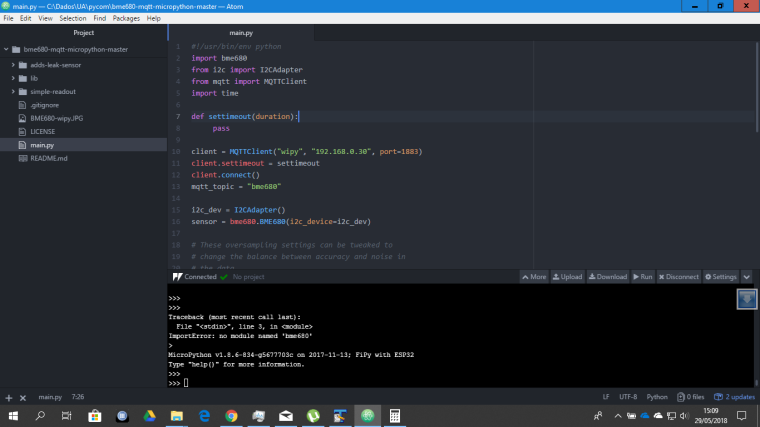
            Can you post your project structure (or a screenshot of Atom) please?

            Usually the problem is if you open the parent folder by mistake

            1 Reply Last reply Reply Quote 0
            • P Offline
              pas
              last edited by

              0_1527603040738_60c1c59d-ddc5-4a00-9228-b86fe4eee36f-image.png

              This is the problem. It seems the folder is not recognized as a project.

              1 Reply Last reply Reply Quote 0
              • P Offline
                pas
                last edited by

                When I used another PC the sync function worked and I could upload the code with the libraries. The code worked printing temperature, humidity, pressure after I removed the mqtt library though. It seems the fipy firmware does not recognizes the mosquito code. Also, Atom, still, does not show the name of the project in the plugin.
                Thank you,
                Paulo

                M 1 Reply Last reply Reply Quote 0
                • M Offline
                  Marike @pas
                  last edited by

                  @pas Have you tried following the pymakr project setup exactly: https://docs.pycom.io/chapter/gettingstarted/programming/first_project.html

                  It seems you have more files/folders in your "project" than specified in the documentation.

                  1 Reply Last reply Reply Quote 0
                  • P Offline
                    pas
                    last edited by

                    Later I realized I needed to download the pycom libraries in https://github.com/pycom/pycom-libraries. There was the mqtt lib and now it works. Isn't this supposed to be in the online documentation?
                    Thank you.

                    1 Reply Last reply Reply Quote 0

                    Hello! It looks like you're interested in this conversation, but you don't have an account yet.

                    Getting fed up of having to scroll through the same posts each visit? When you register for an account, you'll always come back to exactly where you were before, and choose to be notified of new replies (either via email, or push notification). You'll also be able to save bookmarks and upvote posts to show your appreciation to other community members.

                    With your input, this post could be even better 💗

                    Register Login
                    • 1 / 1
                    • First post
                      Last post

                    Pycom on Twitter

                    Pycom