Welcome to the Pycom forum Forum
    • \[\[global:header.categories\]\]
    • \[\[global:header.recent\]\]
    • \[\[global:header.tags\]\]
    • \[\[global:header.popular\]\]
    • Login

    Explore Pybytes | Official Documentation | Report a Firmware Bug/Issue | GitHub

    5V Relay on pycom

    Scheduled Pinned Locked Moved MicroPython
    pycomrelaylopy
    22 Posts 4 Posters 4.8k Views 4 Watching
    Loading More Posts
    • Oldest to Newest
    • Newest to Oldest
    • Most Votes
    Reply
    • Reply as topic
    Log in to reply
    This topic has been deleted. Only users with topic management privileges can see it.
    • K Offline
      Kebson @robert-hh
      last edited by

      @robert-hh I try what you said but, nothing special

      p_relay = Pin('P11', mode=Pin.OUT)
      p_relay.value(1)
      p_relay.value(0)
      while True:
         if result_dht.is_valid():
              p_relay(1)
         else:
              p_relay(0)
      

      Is there something wrong in the code?

      robert-hhR 1 Reply Last reply Reply Quote 0
      • robert-hhR Offline
        robert-hh @Kebson
        last edited by

        @kebson I do not understand why you have that:

        p_relay.value(1)
        p_relay.value(0)
        

        at the beginning, because that gives just a 3µs pulse at the output. Besides that I assume, that you want to switch the relay on, when result_dht.is_valid() returns True.
        If you have a voltmeter, you should see output P11 change it's level. If it does, the program logic is OK, but the relay board does not switch with 3.3 V.

        K 1 Reply Last reply Reply Quote 0
        • K Offline
          Kebson @robert-hh
          last edited by

          @robert-hh YEah I commentend the second line, but yes, I would like to put the relay on when result_dht returns True. and turn it off otherwise.
          Yesterday, I joined the relay with a transistor, a resistance, but nothing happened. That's why, i disconnect the transistor, and now, it's directly connected on the 3V3 pycom.

          robert-hhR 1 Reply Last reply Reply Quote 0
          • robert-hhR Offline
            robert-hh @Kebson
            last edited by

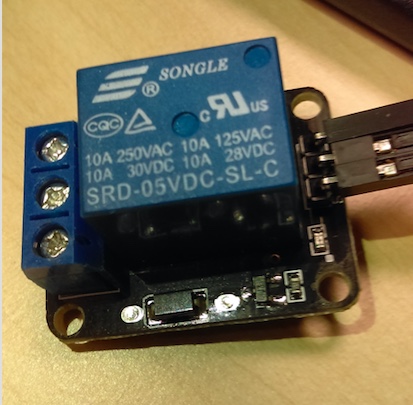
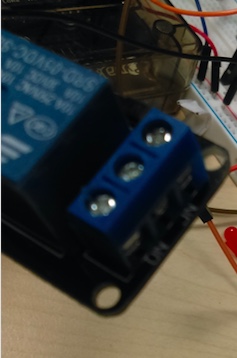
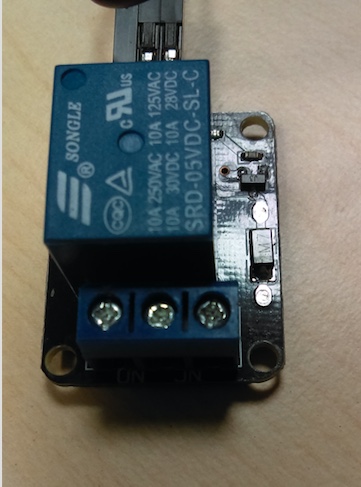
            @kebson Can you post an as-good-as-possible picture of the upper and lower side of the relay board. The upper side should show the transistor and the LED. Then I can derive the schematics.

            K 1 Reply Last reply Reply Quote 0
            • K Offline
              Kebson @robert-hh
              last edited by

              @robert-hh
              2_1529414258021_3.jpeg 1_1529414258020_2.jpeg 0_1529414258018_1.jpeg

              robert-hhR 1 Reply Last reply Reply Quote 0
              • robert-hhR Offline
                robert-hh @Kebson
                last edited by

                @kebson Thanks. Did you ever see the LED turning on. And if yes, what's the color?

                K 1 Reply Last reply Reply Quote 0
                • K Offline
                  Kebson @robert-hh
                  last edited by Kebson

                  @robert-hh Yeah, when I connect the pycom on the machine, the LED turns on in RED color and I heard a little sound. But he does it once in two.

                  robert-hhR 1 Reply Last reply Reply Quote 0
                  • robert-hhR Offline
                    robert-hh @Kebson
                    last edited by

                    @kebson Is the relay Vcc connected to 5V or 3.3V? And again, what is the color of the LED? Red or green or yellow or blue? It is important, because from the color I can tell the voltage dop of the LED.

                    K 1 Reply Last reply Reply Quote 0
                    • K Offline
                      Kebson @robert-hh
                      last edited by

                      @robert-hh I edited my last answer and put RED color. The relay VCC is connected to my first pin (Vin (3.5-5.5V)).

                      robert-hhR 1 Reply Last reply Reply Quote 0
                      • robert-hhR Offline
                        robert-hh @Kebson
                        last edited by

                        @kebson Red is ok. That has a drop voltage of about 1.4 V, and should work with 3.3 V input voltage. The Vcc input at the board should be 5V, if the device is connected to USB. You could try to bypass the LED and connect the P11 output to the point indicated by the arrow in the picture below.
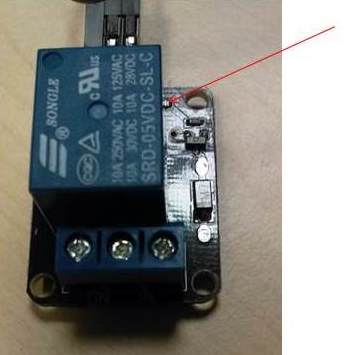
                        0_1529416790230_relais.jpg

                        K 1 Reply Last reply Reply Quote 0
                        • K Offline
                          Kebson @robert-hh
                          last edited by

                          @robert-hh It's what i did, but like i said, I just heard a sound, and see the LED turns on, but nothing else.

                          My relay if it will work, I would like to connect it to a water pump. So, if I can't have the steps on turns on and off the relay, I couldn't continue.

                          robert-hhR 1 Reply Last reply Reply Quote 0
                          • robert-hhR Offline
                            robert-hh @Kebson
                            last edited by

                            @kebson What do you expect from a relay? It is just a solenoid operated switch. When it turns on, you hear a sharp click, it if turns off, you'll hear a soft click. In order to tell if it is working, you have to switch something with it.

                            K 1 Reply Last reply Reply Quote 0
                            • K Offline
                              Kebson @robert-hh
                              last edited by

                              @robert-hh yes, and it's my water pomp I will switch with. But for now, I just would like to see its turns on and off. Because it doesn't. I'm using a transistor P2N2222 to try with it now.

                              K 1 Reply Last reply Reply Quote 0
                              • K Offline
                                Kebson @Kebson
                                last edited by

                                @robert-hh It works, I just remove the transistor, and let the 3V3 to control the relay.

                                I saw in a website if You directly connect a 5v relay in a 3V3, without transistor, you'll fry the pycom.

                                But I tried it yesterday, and it works well.

                                Thank you

                                robert-hhR 1 Reply Last reply Reply Quote 0
                                • robert-hhR Offline
                                  robert-hh @Kebson
                                  last edited by robert-hh

                                  @kebson Thinking about your message, I assume that you connected the collector of the transistor to GND and control the relay though through the Vcc & GND pins of that relay board. Two topics are to be discussed:

                                  1. Current draw. According to the data sheet, the coil resistance is 70 Ohm, resulting in an current of 47 mA at 3.3V. At that load, the output voltage should be lower than 3.3 V, so it might "just" fit. At about 3V, the force at the relay contacts may be lower than at 5V, causing higher relay contact wear.
                                  2. Flyback voltage peaks. If you did not remove the flyback diode from the board, that might work, at least for a while.

                                  But still I would not consider to connect an inductive load directly to the ESP32 output pins. It may work for a while, but then break.
                                  B.T.W.: What is the mains voltage/power of the Pump?

                                  1 Reply Last reply Reply Quote 0

                                  Hello! It looks like you're interested in this conversation, but you don't have an account yet.

                                  Getting fed up of having to scroll through the same posts each visit? When you register for an account, you'll always come back to exactly where you were before, and choose to be notified of new replies (either via email, or push notification). You'll also be able to save bookmarks and upvote posts to show your appreciation to other community members.

                                  With your input, this post could be even better 💗

                                  Register Login
                                  • 1
                                  • 2
                                  • 2 / 2
                                  • First post
                                    Last post

                                  Pycom on Twitter

                                  Pycom