Welcome to the Pycom forum Forum
    • \[\[global:header.categories\]\]
    • \[\[global:header.recent\]\]
    • \[\[global:header.tags\]\]
    • \[\[global:header.popular\]\]
    • Login

    Explore Pybytes | Official Documentation | Report a Firmware Bug/Issue | GitHub

    LoPy Using machine.main(filename)

    Scheduled Pinned Locked Moved LoPy
    11 Posts 3 Posters 2.9k Views 3 Watching
    Loading More Posts
    • Oldest to Newest
    • Newest to Oldest
    • Most Votes
    Reply
    • Reply as topic
    Log in to reply
    This topic has been deleted. Only users with topic management privileges can see it.
    • R Offline
      Rens
      last edited by

      Hi,

      anyone succesfull in using machine.main(filename) from boot.py.
      No matter what it always seems boot main.py.

      Runnig LoPy version 0.97.b1

      1 Reply Last reply Reply Quote 0
      • R Offline
        rskoniec
        last edited by

        Default boot.py file looks like below:

        from machine import UART
        import os
        uart = UART(0, 115200)
        os.dupterm(uart)
        

        Try:

        import machine
        import os
        uart = machine.UART(0, 115200)
        os.dupterm(uart)
        machine.main(filename)
        

        The machine is working as good as it's code.

        1 Reply Last reply Reply Quote 0
        • R Offline
          Rens
          last edited by

          Thanks,

          tried this already in various syntax options,

          import machine
          import os
          uart = machine.UART(0, 115200)
          os.dupterm(uart)
          machine.main(test.py)
          or
          machine.main('test.py')
          or
          machine.main('./test.py')

          etc.

          Even removed main.py from the file system
          but no succes.

          The basic idea that want to implement is running various
          version of software depending in grounding pins.
          This is the first step i need to solve.

          R 1 Reply Last reply Reply Quote 0
          • L Offline
            livius
            last edited by

            You do not need to override it to acomplish task
            use
            execfile('your file.py')
            in your boot.py

            think about people first, then computers

            1 Reply Last reply Reply Quote 0
            • R Offline
              rskoniec @Rens
              last edited by rskoniec

              @Rens Like @livius said, for your scenario execfile('your_file.py') is more appropriate - try it. Anyway machine.main('test.py') should do it's job too. Because my LoPys are at work, I'll try to check that tomorrow.

              The machine is working as good as it's code.

              R 1 Reply Last reply Reply Quote 0
              • R Offline
                Rens
                last edited by

                Thanks,

                just tested this and works like a charm.

                1 Reply Last reply Reply Quote 0
                • R Offline
                  Rens @rskoniec
                  last edited by

                  @rskoniec

                  Still curious why this is not working, i assume when execfile('test.py')
                  would return still will go on with main.py.

                  Thanks for all suggestions !

                  R 1 Reply Last reply Reply Quote 0
                  • R Offline
                    rskoniec @Rens
                    last edited by

                    @Rens said in LoPy Using machine.main(filename):

                    @rskoniec

                    Still curious why this is not working, i assume when execfile('test.py')
                    would return still will go on with main.py.

                    Thanks for all suggestions !

                    OK, as I promised I've tried my LoPy with boot.py as below:

                    import machine
                    import os
                    
                    uart = machine.UART(0, 115200)
                    os.dupterm(uart)
                    
                    machine.main('test.py')
                    

                    with test.py file:

                    print('Test')
                    

                    and everything is working as it should.
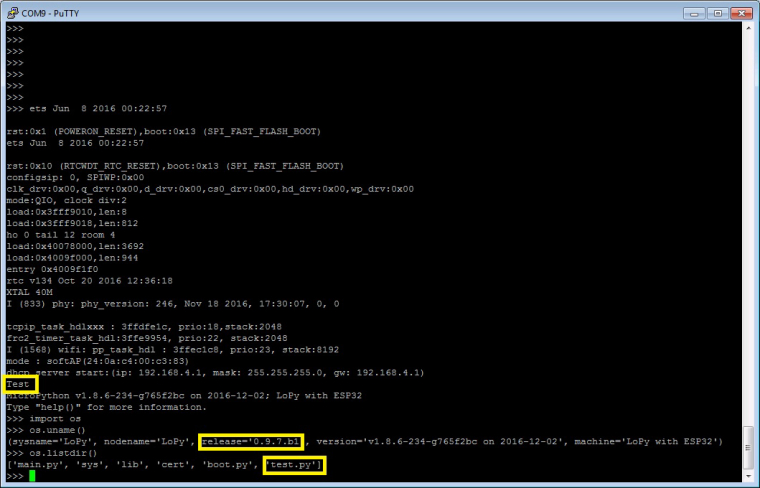
                    0_1481018401638_main.jpg

                    The machine is working as good as it's code.

                    1 Reply Last reply Reply Quote 0
                    • R Offline
                      Rens
                      last edited by

                      Thanks for trying, no idea were I did go wrong.

                      Will test and have another close look, as far is i can see
                      both setup's are identical.

                      When do find the answer I will post it here.

                      Regards Rens

                      1 Reply Last reply Reply Quote 0
                      • R Offline
                        Rens
                        last edited by

                        Well just tested again with machine.main('test.py') and now its
                        working as i would expect. Thanks again for the support.

                        Rens

                        R 1 Reply Last reply Reply Quote 0
                        • R Offline
                          rskoniec @Rens
                          last edited by

                          @Rens said in LoPy Using machine.main(filename):

                          Well just tested again with machine.main('test.py') and now its
                          working as i would expect. Thanks again for the support.

                          Rens

                          Super! I'm glad that you finally did it! :o)

                          The machine is working as good as it's code.

                          1 Reply Last reply Reply Quote 0

                          Hello! It looks like you're interested in this conversation, but you don't have an account yet.

                          Getting fed up of having to scroll through the same posts each visit? When you register for an account, you'll always come back to exactly where you were before, and choose to be notified of new replies (either via email, or push notification). You'll also be able to save bookmarks and upvote posts to show your appreciation to other community members.

                          With your input, this post could be even better 💗

                          Register Login
                          • 1 / 1
                          • First post
                            Last post

                          Pycom on Twitter

                          Pycom