Welcome to the Pycom forum Forum
    • \[\[global:header.categories\]\]
    • \[\[global:header.recent\]\]
    • \[\[global:header.tags\]\]
    • \[\[global:header.popular\]\]
    • Login

    Explore Pybytes | Official Documentation | Report a Firmware Bug/Issue | GitHub

    Lopy4 deep sleep problem

    Scheduled Pinned Locked Moved Comments & Feedback
    lopy4loradeepsleep
    23 Posts 7 Posters 4.9k Views 6 Watching
    Loading More Posts
    • Oldest to Newest
    • Newest to Oldest
    • Most Votes
    Reply
    • Reply as topic
    Log in to reply
    This topic has been deleted. Only users with topic management privileges can see it.
    • I Offline
      iwahdan
      last edited by iwahdan

      Hello @pierremarsot , No This should not be the normal power consumption during deep sleep.
      Which Firmware are you using on the board (stable or Development)?

      Also are you connecting the LoPy4 to any external Circuit?

      Wahdan

      P 1 Reply Last reply Reply Quote 0
      • P Offline
        pierremarsot @iwahdan
        last edited by

        @iwahdan Thanks for your reply.

        I using the last stable firmware (checked this morning).

        What do you mean about "external circuit" ?
        I power the Lopy4 with an power supply which is power with two options : USB or 5V. So yes, with my point of view, it's an external circuit.
        But i have the same problem when I power the Lopy directly with the board 3.0

        1 Reply Last reply Reply Quote 0
        • tobzT Offline
          tobz
          last edited by

          Is Bluetooth turned on by default? Does it need to be desalinized/turned off to save power?

          P 1 Reply Last reply Reply Quote 0
          • P Offline
            pierremarsot @tobz
            last edited by

            @tobz I call Bluetooth deinit function in boot.py
            So Bluetooth should be turned off ...

            tobzT 1 Reply Last reply Reply Quote 0
            • tobzT Offline
              tobz @pierremarsot
              last edited by

              @pierremarsot Yeah I saw that, I just assume d it was already off... is that not the case?

              P 1 Reply Last reply Reply Quote 0
              • P Offline
                pierremarsot @tobz
                last edited by

                @tobz No. It's not disable by default. You need to called deinit function

                tobzT 1 Reply Last reply Reply Quote 0
                • tobzT Offline
                  tobz @pierremarsot
                  last edited by

                  @pierremarsot Very good to know, thanks for confirming :)

                  1 Reply Last reply Reply Quote 0
                  • P Offline
                    pierremarsot
                    last edited by

                    So, do you have any idea why the LoPy4 consume 80mA in sleep mode ?

                    1 Reply Last reply Reply Quote 0
                    • M Offline
                      MarcoBenini @pierremarsot
                      last edited by

                      @pierremarsot said in Lopy4 deep sleep problem:

                      000

                      Try to close the socket ( s.close ) after your "s.setblocking(False)" and check if the radio module goes to sleep.

                      1 Reply Last reply Reply Quote 0
                      • I Offline
                        iwahdan
                        last edited by iwahdan

                        Hi @pierremarsot , Actually there is no need to disable bt/wifi or Heartbeat before deepsleep, they are disabled automatically when calling machine.deepsleep also the LoRa modem is turned off in deepsleep.

                        I've actually ran you code on a LoPy4 and I get an Avg current consumption in deepsleep = 27uA.

                        Wahdan

                        P 2 Replies Last reply Reply Quote 0
                        • P Offline
                          pierremarsot @iwahdan
                          last edited by

                          @iwahdan Strange ...
                          I'll check again the consumption tonight but i was pretty sure

                          I 1 Reply Last reply Reply Quote 0
                          • P Offline
                            pierremarsot @iwahdan
                            last edited by

                            @iwahdan Sorry but i have an consumption higher (see picture)
                            Maybe i didn't do the right thing ...
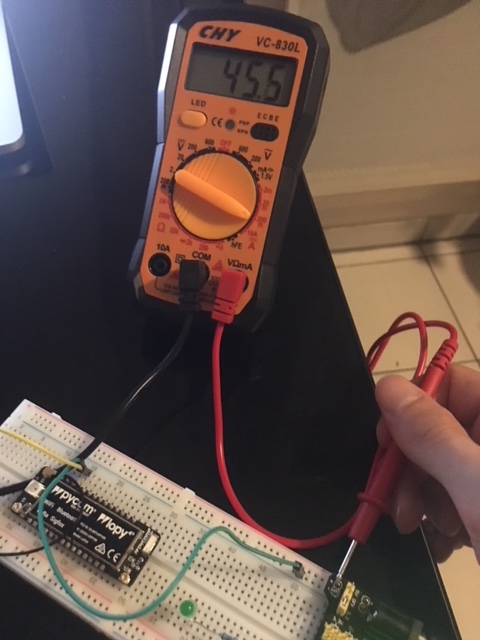
                            0_1532539060576_IMG_1429-1.JPG

                            1 Reply Last reply Reply Quote 0
                            • I Offline
                              iwahdan @pierremarsot
                              last edited by

                              Hi @pierremarsot, I cannot totally get from the picture how you setup the circuit , if you could share the circuit diagram along with pin connections I could try to test with your setup.

                              Wahdan

                              P 1 Reply Last reply Reply Quote 0
                              • P Offline
                                pierremarsot @iwahdan
                                last edited by

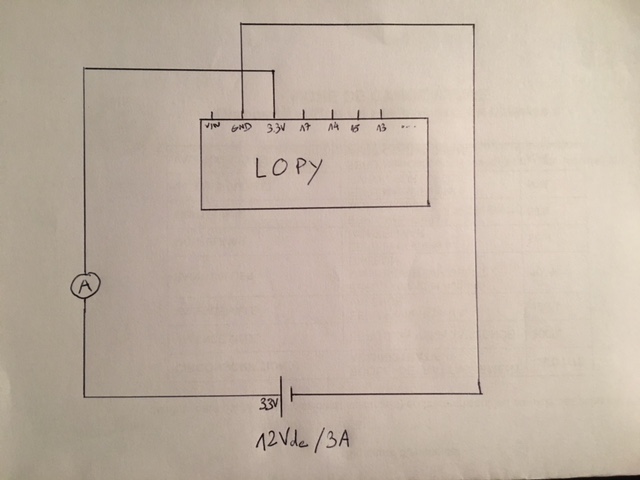
                                Tanks @iwahdan 0_1532541974275_IMG_1430.JPG
                                Can you see clearly on this picture ?

                                Basic circuit. Powered by a power supply (12Vdc / 3A) on 3.3V PIN
                                I tried on 5V PIN, i got a consumption around 65mA

                                I S 2 Replies Last reply Reply Quote 0
                                • I Offline
                                  iwahdan @pierremarsot
                                  last edited by iwahdan

                                  @pierremarsot , This is NOT how you power on any of pycom Devices.

                                  Maximum voltage you can use is 5.5v and you Connect to Vin not 3.3v pin! , the 3.3v pin is actually used for supplying 3.3v output.

                                  please use this pinout diagram as a guideline

                                  Wahdan

                                  P 1 Reply Last reply Reply Quote 0
                                  • P Offline
                                    pierremarsot @iwahdan
                                    last edited by pierremarsot

                                    @iwahdan
                                    Ok, thanks for this issue, sorry ...

                                    I just tried with an 5.5V power supply (checked with multimeter) and i got a consumption around 63mA in deep sleep.
                                    Same circuit, just changed power supply input and connected with 5.5v PIN.

                                    I 1 Reply Last reply Reply Quote 0
                                    • I Offline
                                      iwahdan @pierremarsot
                                      last edited by

                                      @pierremarsot, well it might very well be that your Lopy was damaged in some way or something got shortened , do you have another device that you can try?

                                      Wahdan

                                      1 Reply Last reply Reply Quote 0
                                      • S Offline
                                        Sympatron @pierremarsot
                                        last edited by

                                        @pierremarsot said in Lopy4 deep sleep problem:

                                        Basic circuit. Powered by a power supply (12Vdc / 3A) on 3.3V PIN

                                        What do you mean by that? Did you connect 12V to the 3.3V Pin? This would certainly damage the device...

                                        P 1 Reply Last reply Reply Quote 0
                                        • P Offline
                                          pierremarsot @Sympatron
                                          last edited by

                                          Hi @sympatron
                                          Yes, I connected the 12V to the 3.3V and 5V PINs ...
                                          I thought my power supply transformed the 12V input in 5V output but after some tests, it didn't ...

                                          I used this one : https://www.amazon.fr/SODIAL-Planche-Compatible-puissance-bricolage/dp/B015NUN4QI/ref=asc_df_B015NUN4QI/?tag=googshopfr-21&linkCode=df0&hvadid=106796343001&hvpos=1o3&hvnetw=g&hvrand=2025127917332645665&hvpone=&hvptwo=&hvqmt=&hvdev=c&hvdvcmdl=&hvlocint=&hvlocphy=9055144&hvtargid=pla-208287294001&psc=1

                                          robert-hhR 1 Reply Last reply Reply Quote 0
                                          • robert-hhR Offline
                                            robert-hh @pierremarsot
                                            last edited by

                                            @pierremarsot that module should step down 12V to 5V or 3.3V. If your LoPy4 still works, then you probably used it fine. Only the 3.3V pin of the xxPy devies is an Input. Always power them throuh Vin.


                                            J 1 Reply Last reply Reply Quote 0

                                            Hello! It looks like you're interested in this conversation, but you don't have an account yet.

                                            Getting fed up of having to scroll through the same posts each visit? When you register for an account, you'll always come back to exactly where you were before, and choose to be notified of new replies (either via email, or push notification). You'll also be able to save bookmarks and upvote posts to show your appreciation to other community members.

                                            With your input, this post could be even better đź’—

                                            Register Login
                                            • 1
                                            • 2
                                            • 1 / 2
                                            • First post
                                              Last post

                                            Pycom on Twitter

                                            Pycom