Fresh install on VS Code: broken
-
Hi pycom,
I was just following the install process on Mac (10.13.5) and a freshly downloaded version of VS Code (1.25.1). Nothing else is installed in vs code (no other extensions)
After I install the pymakr package as described here: https://docs.pycom.io/chapter/pymakr/installation/vscode.html it starts constantly flashing the following messages:
The terminal process command 'node /Users/tycho/.vscode/extensions/pycom.pymakr-1.0.0/terminalExec.js 1784' failed to launch (exit code: 1)At about a rate of 2 per second..
Could you please have a look at it? If you need any info or logs just let me know.
By the way it works fine in Atom but I kinda prefer VS Code now :)
-
Hi @Tycho
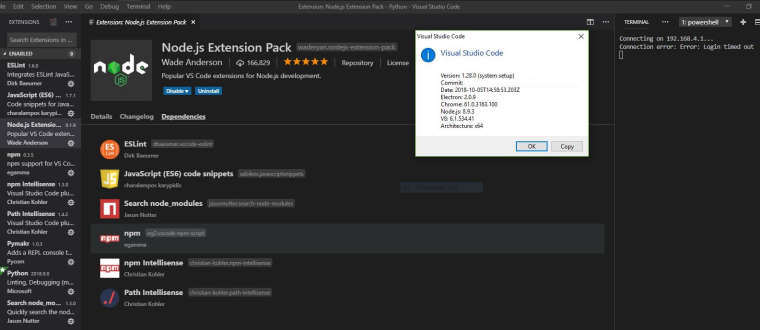
it happened to me in Windows while upgrading VS Code to 1.28.0 and it is caused by missing NodeJS installed on your system (MacOS)in addition to the NodeJS extension (VS Code).So in short try this:
- Uninstall Pymakr package in VS Code
- download and install NodeJS for your MacOS here https://nodejs.org/en/download/
- Install Pymakr package in VS Code
and solved.
As reference VS Code versions and extensions in my system.
Enjoy!
-
I have the same issue. VS Code in now totally broken!
Node.js is installed, and it worked good just a week ago.
Reinstalled node.js and pymakr plugin, but same result.
-
@ulwur could you post your version numbers? (VSCode, Operating System, Pymakr)

Hello! It looks like you're interested in this conversation, but you don't have an account yet.
Getting fed up of having to scroll through the same posts each visit? When you register for an account, you'll always come back to exactly where you were before, and choose to be notified of new replies (either via email, or push notification). You'll also be able to save bookmarks and upvote posts to show your appreciation to other community members.
With your input, this post could be even better 💗
Register Login