Wipy 2.0 and save data on my pc, not in flash memory
-
@vflorio94 Taking the measurement and writing takes time too. Now you know, it's about 0.015s.
-
@robert-hh Thank you very much for your help. I've never scheduled with Python, so for me is very difficult and I have to do this for my master thesis. For me you were very valuable.
thank you. -
@robert-hh Hi, sorry for my insistence. I have a new problem
╝Traceback (most recent call last):
  File "<stdin>", line 24, in <module>
OSError: 28
╝>
but i don't know why, because Yesterday this code run and now it give me this message.
the code is this oneimport machine import pycom from machine import Timer import time import lib_imu from machine import I2C from machine import PWM import gc chrono = Timer.Chrono() lib_imu.set_configmode() time.sleep(0.05) lib_imu.set_units() time.sleep(0.05) lib_imu.set_mode('ndof') # List =[] file_dati = open("datiprova_tempo20.txt", "a") chrono = Timer.Chrono() chrono.start() lap = chrono.read() while lap <= 1200: #eul = lib_imu.get_euler() file_dati.write(repr(lap) + "\t ") file_dati.write(repr(lib_imu.get_euler()[0]) + "\t ") time.sleep(0.02) lap = chrono.read() file_dati.close() print("fine") chrono.stop()Can you help me please?
-
@vflorio94 Error 28 means: "No space left on device"
So your file system is full. You have to delete some files, or better change your code to save on an SD card. The internal flash file system is pretty small. I do not know why, because most of the FiPy's flash is not used. -
@robert-hh I delete each file.txt that I write before on the device with Filezilla.
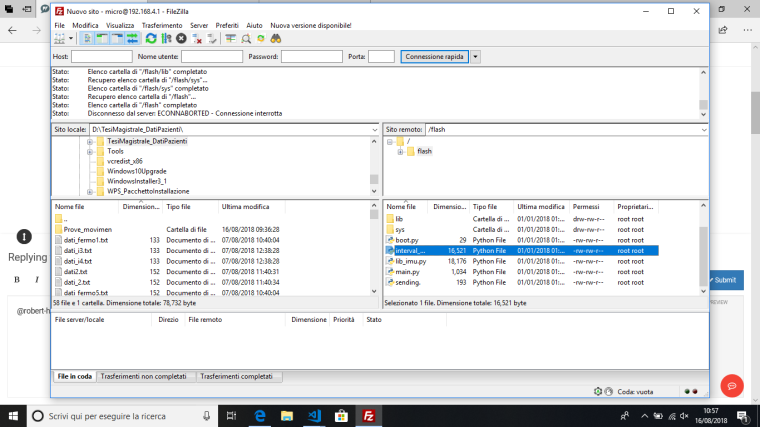
Yesterday and the day before in this condition I can wrote file.txt on the device, but now I can't and it give me this error.
but on the memory there are only those file.py. -
@vflorio94 Are there any other files in the subdirectories, like in lib?
-
@robert-hh No, there aren't any file in the subdirectory. But Yesterday it run program and saved them on memory.
after I collected data I deleted immediately file.txt. But now I have this error.
Probably do not filezilla really delete file? -
@vflorio94 At the REPL prompt, you can also get the file list and free space with:
import uos
uos.listdir()
uos.getfree("/flash") -
@vflorio94 Filezilla just sends commands to the ftp server of the FiPy.
-
@robert-hh I use the command that you wrote and it gives me the message:
import uos
print(uos.listdir())
print(uos.getfree("/flash"))


>>>
['main.py', 'sending.py', 'sys', 'lib', 'cert', 'boot.py', 'datiprova_tempo20.txt', 'lib_imu.py', 'interval_position.py']
0
╝╝>```
but it's incredible, just Yesterday it run. and I don't know what can I do now?!
-
@vflorio94 You can tell the size ofdatiprova_tempo20.txt with:
import uos
uos.stat('datiprova_tempo20.txt')Every time you call your script this file will get larger, since you open that in append mode "a". I am just wondering why this file is not shown in the FileZilla screen dump.
-
@robert-hh said in Wipy 2.0 and save data on my pc, not in flash memory:
You can tell the size ofdatiprova_tempo20.txt with:
import uos
uos.stat('datiprova_tempo20.txt')
Every time you call your script this file will get larger, since you open that in append mode "a". I am just wondering why this file is not shown in the FileZilla screen dump.now I delete also the function 'interval.py' and 'sending.py' but it continue to give me the same error.
-
@vflorio94 But how large is 'datiprova_tempo20.txt'? That is the file which grows by about 50kBytes on every execution of your script.
-
(32768, 0, 0, 0, 0, 0, 0, 315535722, 315535722, 315535722)
╝Traceback (most recent call last):
 File "<stdin>", line 27, in <module>
OSError: 28
╝>
MicroPython v1.8.6-849-56d00234 on 2018-05-18; WiPy with ESP32
Type "help()" for more information.
But Yesterday i did a test of 1200 s and it worked. now i delete everything from flash except the necessary function
-
@vflorio94 OK. So the file size is 0. Did you change anything else? like the file name (even if that seems strange)?
-
@robert-hh said in Wipy 2.0 and save data on my pc, not in flash memory:
OK. So the file size is 0. Did you change anything else? like the file name (even if that seems strange)?
Yes, I change the name of my file.txt each time that I collect data, but Yesterday I run this script about 20 times , also the day before, And it worked
-
@vflorio94 So where are these files? if the local file system of your wipy is corrupted, you can always reflash the device with the option to clear the file system, at which point it will be recreated.
-
@robert-hh said in Wipy 2.0 and save data on my pc, not in flash memory:
So where are these files? if the local file system of your wipy is corrupted, you can always reflash the device with the option to clear the file system, at which point it will be recreated.
I deleted those files Yesterday. I think that it's bettere if I'll try to reflash the device.
Which is the command that i have to use?
thank you -
@vflorio94 you did that already with the pycom updater tool.
-
@robert-hh I reflash wipy with the command:
import os

os.mkfs('/flash')
after this I upload on the device a simple main and the library that i have to use, but when I run the simple code that has to write data on file it immediately give me the same error, but now the memory used is short.

Hello! It looks like you're interested in this conversation, but you don't have an account yet.
Getting fed up of having to scroll through the same posts each visit? When you register for an account, you'll always come back to exactly where you were before, and choose to be notified of new replies (either via email, or push notification). You'll also be able to save bookmarks and upvote posts to show your appreciation to other community members.
With your input, this post could be even better 💗
Register Login