New LTE Firmware releases v1.18.1.r4 (stable) & 1.19.0.b5 (development) & NB-IoT firmware 40343
-
@iwahdan
I am testing 1.18.1.r5 on FiPy with NB1-40343 running following code in main.py:import network import time import urequests class httpPostTest(): def __init__(self): self.apn = None self.band = None self.LTEisAttached = False self.LTEisAttachedLast = False self.LTEisConnected = False self.LTEisConnectedLast = False self.start = True def initLTE(self, band, apn): self.apn = apn self.band = band print("INFO", "Starting initialization of LTE") try: self.lte = network.LTE() print("INFO", "LTE initialized") except: print("WARNING", "LTE init command failed") print("LTE is attached after init:", self.lte.isattached()) print("LTE is connected after init:", self.lte.isconnected()) def run(self, url): n = 0 while True: self.LTEisAttached = self.lte.isattached() if not self.LTEisAttached and (self.LTEisAttachedLast or self.start): if not self.start: print("WARNING", "Dettached from LTE network") try: self.lte.attach(band = self.band, apn = self.apn) print("INFO", "LTE attach command sent") self.start = False except: print("WARNING", "LTE attach command failed") if self.LTEisAttached and not self.LTEisAttachedLast: print("INFO", "Attached to LTE network") try: self.lte.connect() print("INFO", "LTE connect command sent") except: print("WARNING", "LTE connect command failed") self.LTEisAttachedLast = self.LTEisAttached self.LTEisConnected = self.lte.isconnected() if self.LTEisConnected and not self.LTEisConnectedLast: print("INFO", "Connected to LTE network") elif not self.LTEisConnected and self.LTEisConnectedLast: print("WARNING", "Disconnected from LTE network") self.LTEisConnectedLast = self.LTEisConnected if self.LTEisConnected: n+=1 try: response = urequests.post(url, headers={"Content-Type": "application/json", "Accept": "application/json"}, data='{"time": "%s"}' % (time.time())) print("INFO", "%s. HTTP POST successful: %s" % (n, response.text)) except Exception as e: print("WARNING", "%s. HTTP POST failed: %s" % (n, e)) time.sleep(0.25) test = httpPostTest() test.initLTE(20, "nbiot.telekom.sk") test.run(url = "https://54.167.116.227/post")It is also available here for download including slightly modified urequests library:
https://drive.google.com/open?id=19hA2KGq4iwkkv36d2cuW1M4j0Tab9_YPIssues:
- The code often hangs during LTE initialization (self.lte = network.LTE())
- If it makes it through init only first request is sent successfully and then the modem seems to dettach from the network:
INFO Starting initialization of LTE
INFO LTE initialized
LTE is attached after init: False
LTE is connected after init: False
INFO LTE attached command sent
INFO Attached to LTE network
INFO LTE connect command sent
INFO Connected to LTE network
INFO 1. HTTP POST successful: {"args":{},"data":{"time":"13"},"files":{},"form":{},"headers":{"x-forwarded-proto":"https","host":"54.167.116.227","content-length":"14","accept":"application/json","content-type":"application/json","x-forwarded-port":"443"},"json":{"time":"13"},"url":"https://54.167.116.227/post"}
WARNING 2. HTTP POST failed: Avialable Interfaces are down
WARNING Dettached from LTE network
Application code written for our product behaves in a similar way since 1.18.1.r3.
-
In the meantime I left the test code running on 1.18.1.r2 with NB1-40343 modem firmware.
It was necessary to replace lineself.lte.attach(band = self.band, apn = self.apn)with:
self.lte.send_at_cmd('AT+CGDCONT=1,"IP","%s"' % (self.apn))
self.lte.attach(band = self.band)
because lte.attach() does not support "apn" parameter in 1.18.1.r2.
After almost 5000 requests the test failed with error codes as follows:
INFO 4866. HTTP POST successful: {"args":{},"data":{"time":"41384"},"files":{},"form":{},"headers":{"x-forwarded-proto":"https","host":"54.167.116.227","content-length":"17","accept":"application/json","content-type":"application/json","x-forwarded-port":"443"},"json":{"time":"41384"},"url":"https://54.167.116.227/post"}
INFO 4867. HTTP POST successful: {"args":{},"data":{"time":"41392"},"files":{},"form":{},"headers":{"x-forwarded-proto":"https","host":"54.167.116.227","content-length":"17","accept":"application/json","content-type":"application/json","x-forwarded-port":"443"},"json":{"time":"41392"},"url":"https://54.167.116.227/post"}
INFO 4868. HTTP POST successful: {"args":{},"data":{"time":"41399"},"files":{},"form":{},"headers":{"x-forwarded-proto":"https","host":"54.167.116.227","content-length":"17","accept":"application/json","content-type":"application/json","x-forwarded-port":"443"},"json":{"time":"41399"},"url":"https://54.167.116.227/post"}
WARNING 4869. HTTP POST failed: -76
WARNING 4870. HTTP POST failed: -1
WARNING 4871. HTTP POST failed: -1
WARNING 4872. HTTP POST failed: -1
WARNING 4873. HTTP POST failed: -1
WARNING 4874. HTTP POST failed: -1
WARNING 4875. HTTP POST failed: -1
WARNING 4876. HTTP POST failed: -1
WARNING 4877. HTTP POST failed: -1
WARNING 4878. HTTP POST failed: -1
WARNING 4879. HTTP POST failed: 23
WARNING 4880. HTTP POST failed: 23
WARNING 4881. HTTP POST failed: 23
WARNING 4882. HTTP POST failed: 23
WARNING 4883. HTTP POST failed: 23
WARNING 4884. HTTP POST failed: 23
WARNING 10843. HTTP POST failed: 23 WARNING 10844. HTTP POST failed: 23 WARNING 10845. HTTP POST failed: 23 WARNING 10846. HTTP POST failed: [Errno 105] ENOBUFS WARNING 10847. HTTP POST failed: [Errno 105] ENOBUFS WARNING 10848. HTTP POST failed: [Errno 105] ENOBUFSMethods lte.isattached() and lte.isconnected() returned True during entire test period.
After Ctrl-F reset (without power supply disconnection) it was not possible to init LTE (from REPL). I upgraded Pycom FW to 1.18.1.r5 via FTP OTA an LTE init failed as well.
-
-
Hi All,
Due to moving office's and limited internet access the development team are unable to investigate the LTE issues at the moment. Thanks for being patient whilst we work on this.
@danielm Ill make sure they see your response and take a look just as soon as they can.
Paul T,
-
@paul-thornton Hello Paul. Welcome to the community.
-
Thanks :D Ill make a proper introduction post soon. I just snuck on to post this and get you all updated. Look forward to getting stuck in the forums some cool projects being worked on in here. :)
-
@paul-thornton
Hi Paul, thanks for the information regarding moving of the office. -
@Xykon ... the new firmware doesn't work with Telia NB-IOT in sweden :-( ... cannot attach anymore ...
I tried to just use the "update" dup ... but I'm trying now to use the total reset method and see if that helps ... elsewise I'll be downgrading back to the previous version that worked ...
-
I was having major problems, with trying to do the update using v1.18.1.r4 and using the FW package 39529. After following multiple recommendations from other FiPy Users, as well as trying to do the method as described in the Docs, it was to no avail. Then I viewed @rskoniec post at https://forum.pycom.io/topic/3995/fipy-firmware-upgrade-failed-cat-m1/26 showed me a potential way of getting my FW at least to 38638. But after attempting downgrading my FiPy Firmware to v1.18.1.r1 and trying to upgrade to 38638 it just was not happening. It kept getting stuck on Attempting AT Auto-Negotiation, then it would eventually fail.
ERROR sending AT command... no response? b'' AT auto-negotiation failed! Exiting. Unable to load updater from /sd/updater.elf@rskoniec was kind enough to remotely connect to my computer and we spent roughly 3 hours trying to do the firmware upgrade to the SQNS Modem. @rskoniec knows exactly what he did, and will be replying to this post with how he was able to get my firmware on my modem upgraded. As it stands I have a FiPY + Pytrack and my sqnsupgrade.version() is as bellow.
SYSTEM VERSION
==============
  FIRMWARE VERSION
    Bootloader0  : 5.1.1.0 [33080]
    Bootloader1  : 5.1.1.0 [38638]
    Bootloader2* : 5.1.1.0 [38638]
    NV Info      : 1.1,0,0
    Software     : 5.1.1.0 [38638] by robot-soft at 2018-08-20 09:51:46
    UE           : 5.0.0.0d
  COMPONENTS
    ZSP0         : 1.0.99-13604
    ZSP1         : 1.0.99-12341
I will be attempting to upgrade to the newest SQNS Firmware after updating the FiPy to r4. I will attempt upgrading to 39529 using the method as described in the forum, and will post my results.
I cannot thank @rskoniec enough for the time he dedicated to help another developer! I hope that my post will save others valuable time, especially during this holiday season.
-
@danielm said in New LTE Firmware releases v1.18.1.r4 (stable) & 1.19.0.b5 (development) & NB-IoT firmware 40343:
Hello @danielm , I could reproduce the issue you had with getting disconnected after the first HTTP post request I submitted a fix now for it as pre-release v1.18.1.r6.
Thanks for your feedback
-
After upgrading the FiPy Firware to v1.18.1.r4 I attempted to follow the instructions on the forum to ugprade to 39529. Using the following method.
- Use Filezilla to transfer upgdiff_38638-to-39529.dup and updater.elf to flash memory.
- Executed the following in the REPL
import sqnsupgrade
sqnsupgrade.run('upgdiff_38638-to-39529.dup','updater.elf')
which ultimately resulted in the successful upgrade of my SQNS Modem Firmware to the version info below.
SYSTEM VERSION ============== FIRMWARE VERSION Bootloader0 : 5.1.1.0 [39529] Bootloader1* : 5.1.1.0 [39529] Bootloader2 : 5.1.1.0 [39529] NV Info : 1.1,0,0 Software : 5.1.1.0 [39529] by robot-soft at 2018-09-28 16:07:40 UE : 5.0.0.0d COMPONENTS ZSP0 : 1.0.99-13616 ZSP1 : 1.0.99-12355 -
@iwahdan
Thanks a lot, I will start testing in the evening or tomorrow.Could you please let my test code running on 1.18.1.r6 over the weekend just to be sure that there will not be any unexpected hang?
-
@iwahdan
I did some testing and it seems that LTE init/disconnect issues are solved.When I left the test running for some time socket errors/exceptions started to be raised at some point.
INFO 1140. HTTP POST successful: {"args":{},"data":{"time":"10843"},"files":{},"form":{},"headers":{"x-forwarded-proto":"https","host":"34.202.13.18","content-length":"17","accept":"application/json","content-type":"application/json","x-forwarded-port":"443"},"json":{"time":"10843"},"url":"https://34.202.13.18/post"}
INFO 1141. HTTP POST successful: {"args":{},"data":{"time":"10858"},"files":{},"form":{},"headers":{"x-forwarded-proto":"https","host":"34.202.13.18","content-length":"17","accept":"application/json","content-type":"application/json","x-forwarded-port":"443"},"json":{"time":"10858"},"url":"https://34.202.13.18/post"}
INFO 1142. HTTP POST successful: {"args":{},"data":{"time":"10873"},"files":{},"form":{},"headers":{"x-forwarded-proto":"https","host":"34.202.13.18","content-length":"17","accept":"application/json","content-type":"application/json","x-forwarded-port":"443"},"json":{"time":"10873"},"url":"https://34.202.13.18/post"}
INFO 1143. HTTP POST successful: {"args":{},"data":{"time":"10894"},"files":{},"form":{},"headers":{"x-forwarded-proto":"https","host":"34.202.13.18","content-length":"17","accept":"application/json","content-type":"application/json","x-forwarded-port":"443"},"json":{"time":"10894"},"url":"https://34.202.13.18/post"}
INFO 1144. HTTP POST successful: {"args":{},"data":{"time":"10936"},"files":{},"form":{},"headers":{"x-forwarded-proto":"https","host":"34.202.13.18","content-length":"17","accept":"application/json","content-type":"application/json","x-forwarded-port":"443"},"json":{"time":"10936"},"url":"https://34.202.13.18/post"}
WARNING 1145. HTTP POST failed: -76
WARNING 1146. HTTP POST failed: -1
WARNING 1147. HTTP POST failed: -1
WARNING 1148. HTTP POST failed: -1
WARNING 1149. HTTP POST failed: -1
WARNING 1150. HTTP POST failed: -1
WARNING 1151. HTTP POST failed: -1
WARNING 1152. HTTP POST failed: -1
WARNING 1153. HTTP POST failed: -1
WARNING 1154. HTTP POST failed: -1
WARNING 1155. HTTP POST failed: 23
WARNING 1156. HTTP POST failed: 23
WARNING 1157. HTTP POST failed: 23
WARNING 1158. HTTP POST failed: 23
WARNING 1159. HTTP POST failed: 23
WARNING 1160. HTTP POST failed: 23
WARNING 1161. HTTP POST failed: 23
WARNING 1162. HTTP POST failed: 23
WARNING 7130. HTTP POST failed: 23 WARNING 7131. HTTP POST failed: 23 WARNING 7132. HTTP POST failed: 23 WARNING 7133. HTTP POST failed: 23 WARNING 7134. HTTP POST failed: 23 WARNING 7135. HTTP POST failed: [Errno 105] ENOBUFS WARNING 7136. HTTP POST failed: [Errno 105] ENOBUFS WARNING 7137. HTTP POST failed: [Errno 105] ENOBUFS WARNING 7138. HTTP POST failed: [Errno 105] ENOBUFS WARNING 7139. HTTP POST failed: [Errno 105] ENOBUFS WARNING 7140. HTTP POST failed: [Errno 105] ENOBUFSWARNING 10758. HTTP POST failed: [Errno 105] ENOBUFS WARNING 10759. HTTP POST failed: [Errno 105] ENOBUFS WARNING 10760. HTTP POST failed: [Errno 105] ENOBUFS WARNING 10761. HTTP POST failed: [Errno 105] ENOBUFS WARNING 10762. HTTP POST failed: [Errno 105] ENOBUFS WARNING 10763. HTTP POST failed: [Errno 105] ENOBUFS WARNING 10764. HTTP POST failed: [Errno 105] ENOBUFSThe code was hanged at 10764. POST attempt. It was not possible to break the loop using Ctrl + C, but it was possible to reset the machine using Ctrl+F.
After soft-reset POST attempts were unsuccessful as well. LTE dettach attempt resulted in OSError, however the modem did dettach. After consequent machine.reset() POST requests worked. It seems that after several hundreds socket creations the modem starts to act weirdly.
rst:0x7 (TG0WDT_SYS_RESET),boot:0x13 (SPI_FAST_FLASH_BOOT)
configsip: 0, SPIWP:0xee
clk_drv:0x00,q_drv:0x00,d_drv:0x00,cs0_drv:0x00,hd_drv:0x00,wp_drv:0x00
mode:DIO, clock div:1
load:0x3fff8028,len:8
load:0x3fff8030,len:1728
load:0x4009fa00,len:0
load:0x4009fa00,len:14584
entry 0x400a059c
INFO Starting initialization of LTE
INFO LTE initialized
LTE is attached after init: True
LTE is connected after init: False
INFO Attached to LTE network
INFO LTE connect command sent
INFO Connected to LTE network
WARNING 1. HTTP POST failed: -1
WARNING 2. HTTP POST failed: -1
WARNING 3. HTTP POST failed: -1
WARNING 4. HTTP POST failed: -1
WARNING 5. HTTP POST failed: -1
WARNING 6. HTTP POST failed: -1
Traceback (most recent call last):
  File "main.py", line 78, in <module>
  File "main.py", line 70, in run
KeyboardInterrupt:
Pycom MicroPython 1.18.1.r6 [v1.8.6-849-a8966d1] on 2018-11-23; FiPy with ESP32
Type "help()" for more information.
>>>
>>>
>>>
>>>
>>>
>>> test.lte
<LTE>
>>> test.lte.dettach()
Traceback (most recent call last):
  File "<stdin>", line 1, in <module>
OSError: the requested operation failed
>>> test.lte.isattached()
False
>>> import machine
>>> machine.reset()
ets Jun  8 2016 00:22:57

rst:0x7 (TG0WDT_SYS_RESET),boot:0x13 (SPI_FAST_FLASH_BOOT)
configsip: 0, SPIWP:0xee
clk_drv:0x00,q_drv:0x00,d_drv:0x00,cs0_drv:0x00,hd_drv:0x00,wp_drv:0x00
mode:DIO, clock div:1
load:0x3fff8028,len:8
load:0x3fff8030,len:1728
load:0x4009fa00,len:0
load:0x4009fa00,len:14584
entry 0x400a059c
INFO Starting initialization of LTE
INFO LTE initialized
LTE is attached after init: False
LTE is connected after init: False
INFO LTE attach command sent
INFO Attached to LTE network
INFO LTE connect command sent
INFO Connected to LTE network
INFO 1. HTTP POST successful: {"args":{},"data":{"time":"69"},"files":{},"form":{},"headers":{"x-forwarded-proto":"https","host":"34.202.13.18","content-length":"14","accept":"application/json","content-type":"application/json","x-forwarded-port":"443"},"json":{"time":"69"},"url":"https://34.202.13.18/post"}
INFO 2. HTTP POST successful: {"args":{},"data":{"time":"77"},"files":{},"form":{},"headers":{"x-forwarded-proto":"https","host":"34.202.13.18","content-length":"14","accept":"application/json","content-type":"application/json","x-forwarded-port":"443"},"json":{"time":"77"},"url":"https://34.202.13.18/post"}
INFO 3. HTTP POST successful: {"args":{},"data":{"time":"87"},"files":{},"form":{},"headers":{"x-forwarded-proto":"https","host":"34.202.13.18","content-length":"14","accept":"application/json","content-type":"application/json","x-forwarded-port":"443"},"json":{"time":"87"},"url":"https://34.202.13.18/post"}
INFO 4. HTTP POST successful: {"args":{},"data":{"time":"95"},"files":{},"form":{},"headers":{"x-forwarded-proto":"https","host":"34.202.13.18","content-length":"14","accept":"application/json","content-type":"application/json","x-forwarded-port":"443"},"json":{"time":"95"},"url":"https://34.202.13.18/post"}
INFO 5. HTTP POST successful: {"args":{},"data":{"time":"103"},"files":{},"form":{},"headers":{"x-forwarded-proto":"https","host":"34.202.13.18","content-length":"15","accept":"application/json","content-type":"application/json","x-forwarded-port":"443"},"json":{"time":"103"},"url":"https://34.202.13.18/post"}
INFO 6. HTTP POST successful: {"args":{},"data":{"time":"111"},"files":{},"form":{},"headers":{"x-forwarded-proto":"https","host":"34.202.13.18","content-length":"15","accept":"application/json","content-type":"application/json","x-forwarded-port":"443"},"json":{"time":"111"},"url":"https://34.202.13.18/post"}
During tests with 1.18.1.r2 long-term test did behave in a similar way:
https://forum.pycom.io/topic/3985/new-lte-firmware-releases-v1-18-1-r4-stable-1-19-0-b5-development-nb-iot-firmware-40343/22Exception value of first failed POST request was -76 in both tests. What does it mean?
-
@danielm this error code is :
#define MBEDTLS_ERR_NET_RECV_FAILED -0x004C /**< Reading information from the socket failed. */So these socket errors you get I think occurs when using ssl, did you have same problem with posting to non-secure site?
Anyway I am also running your code over the weekend via our NB-IoT network emulator , I will see if I get same errors as yours.
-
@iwahdan
I just started the same test without SSL and will leave it running during the night.
Thank you for conducting tests in your environment.
Where can I find list of socket exceptions? -
@iwahdan
The test failed also without SSL:INFO 6619. HTTP POST successful: {"args":{},"data":{"time":"15432"},"files":{},"form":{},"headers":{"x-forwarded-proto":"https","host":"34.202.13.18","content-length":"17","accept":"application/json","content-type":"application/json","x-forwarded-port":"80"},"json":{"time":"15432"},"url":"https://34.202.13.18/post"} INFO 6620. HTTP POST successful: {"args":{},"data":{"time":"15435"},"files":{},"form":{},"headers":{"x-forwarded-proto":"https","host":"34.202.13.18","content-length":"17","accept":"application/json","content-type":"application/json","x-forwarded-port":"80"},"json":{"time":"15435"},"url":"https://34.202.13.18/post"} INFO 6621. HTTP POST successful: {"args":{},"data":{"time":"15437"},"files":{},"form":{},"headers":{"x-forwarded-proto":"https","host":"34.202.13.18","content-length":"17","accept":"application/json","content-type":"application/json","x-forwarded-port":"80"},"json":{"time":"15437"},"url":"https://34.202.13.18/post"} INFO 6622. HTTP POST successful: {"args":{},"data":{"time":"15439"},"files":{},"form":{},"headers":{"x-forwarded-proto":"https","host":"34.202.13.18","content-length":"17","accept":"application/json","content-type":"application/json","x-forwarded-port":"80"},"json":{"time":"15439"},"url":"https://34.202.13.18/post"} INFO 6623. HTTP POST successful: {"args":{},"data":{"time":"15441"},"files":{},"form":{},"headers":{"x-forwarded-proto":"https","host":"34.202.13.18","content-length":"17","accept":"application/json","content-type":"application/json","x-forwarded-port":"80"},"json":{"time":"15441"},"url":"https://34.202.13.18/post"} WARNING 6624. HTTP POST failed: -1 WARNING 6625. HTTP POST failed: -1 WARNING 6626. HTTP POST failed: -1 WARNING 6627. HTTP POST failed: -1 WARNING 6628. HTTP POST failed: -1 WARNING 6629. HTTP POST failed: -1 WARNING 6630. HTTP POST failed: -1 WARNING 6631. HTTP POST failed: -1 WARNING 6632. HTTP POST failed: -1 WARNING 6633. HTTP POST failed: -1 WARNING 6634. HTTP POST failed: 23 WARNING 6635. HTTP POST failed: 23 WARNING 6636. HTTP POST failed: 23 WARNING 6637. HTTP POST failed: 23 WARNING 6638. HTTP POST failed: 23 WARNING 6639. HTTP POST failed: 23 -
Second test without SSL failed as well, this time with "weird" exception:
INFO 9937. HTTP POST successful: {"args":{},"data":{"time":"22492"},"files":{},"form":{},"headers":{"x-forwarded-proto":"https","host":"34.202.13.18","content-length":"17","accept":"application/json","content-type":"application/json","x-forwarded-port":"80"},"json":{"time":"22492"},"url":"https://34.202.13.18/post"} INFO 9938. HTTP POST successful: {"args":{},"data":{"time":"22494"},"files":{},"form":{},"headers":{"x-forwarded-proto":"https","host":"34.202.13.18","content-length":"17","accept":"application/json","content-type":"application/json","x-forwarded-port":"80"},"json":{"time":"22494"},"url":"https://34.202.13.18/post"} INFO 9939. HTTP POST successful: {"args":{},"data":{"time":"22497"},"files":{},"form":{},"headers":{"x-forwarded-proto":"https","host":"34.202.13.18","content-length":"17","accept":"application/json","content-type":"application/json","x-forwarded-port":"80"},"json":{"time":"22497"},"url":"https://34.202.13.18/post"} WARNING 9940. HTTP POST failed: 'NoneType' object has no attribute 'split' WARNING 9941. HTTP POST failed: -1 WARNING 9942. HTTP POST failed: -1 WARNING 9943. HTTP POST failed: -1 WARNING 9944. HTTP POST failed: -1 WARNING 9945. HTTP POST failed: -1 WARNING 9946. HTTP POST failed: -1 WARNING 9947. HTTP POST failed: -1 WARNING 9948. HTTP POST failed: -1 WARNING 9949. HTTP POST failed: -1 WARNING 9950. HTTP POST failed: 23 WARNING 9951. HTTP POST failed: 23 WARNING 9952. HTTP POST failed: 23 WARNING 9953. HTTP POST failed: 23 WARNING 9954. HTTP POST failed: 23 WARNING 9955. HTTP POST failed: 23 -
I'm now trying just to get reliable network communication working using WIFI with v1.18.1.r4.
Sometimes it works and sometimes it doesn't.
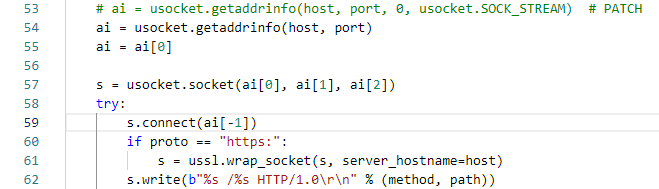
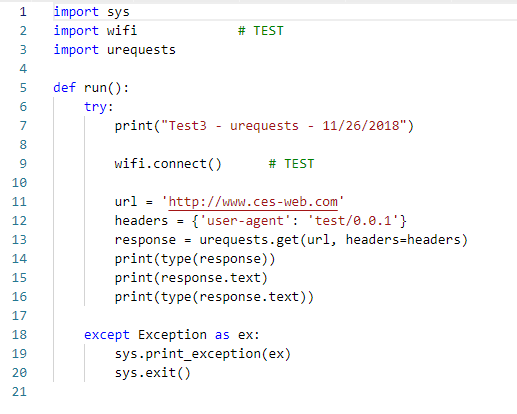
Below is a simple program to try to download a web page using a WIFI connection with the urequests.py module.
The socket connection command fails at least 50% of the time returning a OSError: -1 exception.
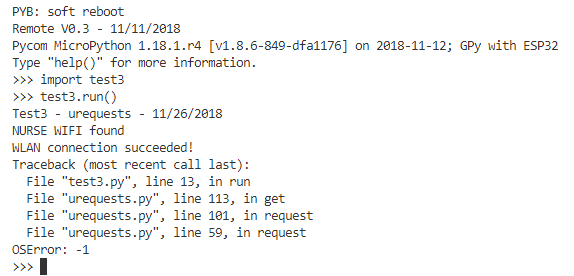
Part of urequests.py where crash occurs:
Simple test program:
-
Hi @danielm, when running your code I don't get the errors you have but however I do get another issue where the test is stuck at some point waiting for the POST response message - since blocking sockets is used - (it gets stuck after couple of hundred Posts, so I was not able to reach the point you had in your test (i.e in range of Thousands)), which i am currently investigating and might actually be a problem with our NB-IoT emulator.
Will keep you updated.
-
Hi @iwahdan, do you have possbility to connect to production NB-IoT network of MNO to find out if this problem disappears?
I think I have encountered this behavior in the past as well. The module was not completely hanged as it was possible to soft reset using Ctrl+F. I am suspecting that some operation with blocking socket will not timeout despite the fact that the timeout has been set.

Hello! It looks like you're interested in this conversation, but you don't have an account yet.
Getting fed up of having to scroll through the same posts each visit? When you register for an account, you'll always come back to exactly where you were before, and choose to be notified of new replies (either via email, or push notification). You'll also be able to save bookmarks and upvote posts to show your appreciation to other community members.
With your input, this post could be even better 💗
Register Login