Welcome to the Pycom forum Forum
    • \[\[global:header.categories\]\]
    • \[\[global:header.recent\]\]
    • \[\[global:header.tags\]\]
    • \[\[global:header.popular\]\]
    • Login

    Explore Pybytes | Official Documentation | Report a Firmware Bug/Issue | GitHub

    New LTE Firmware releases v1.18.1.r4 (stable) & 1.19.0.b5 (development) & NB-IoT firmware 40343

    Scheduled Pinned Locked Moved Announcements & News
    firmwarelte
    51 Posts 12 Posters 10.8k Views 14 Watching
    Loading More Posts
    • Oldest to Newest
    • Newest to Oldest
    • Most Votes
    Reply
    • Reply as topic
    Log in to reply
    This topic has been deleted. Only users with topic management privileges can see it.
    • X Offline
      Xykon administrators
      last edited by

      Hello everyone,

      A new stable firmware v1.18.1.r4 is now available for the LTE modules (GPy, G01, FiPy). This update fixes an issue where the modem becomes unresponsive during LTE.init(), improves the reliability of LTE.pppsuspend() and improves LTE.isattached() detection. A development version with the same LTE improvements is also now available (1.19.0.b5).

      A new NB-IoT firmware 40343 is also now available for download at http://software.pycom.io/downloads/sequans2.html

      This new firmware most importantly fixes the DNS issue that was introduced in recent versions. It should also have full support for PSM and eDRX though I haven't tested these features yet.

      Unfortunately I am not able to provide differential upgrade packages from every previous NB-IoT firmware as the older firmwares don't always upgrade correctly. You can either upgrade from the factory firmware 33080 or the previous NB-IoT firmware 38729, otherwise please use the full firmware package for now.

      If you haven't already, please make sure to also read the previous update before updating your modem.

      With this new NB-IoT firmware you can use the same commands as used for a CAT-M1 firmware. The following code has been successfully tested with Vodafone NL:

      from network import LTE
      lte = LTE()
      lte.attach(band=20, apn="nb.inetd.gdsp")
      while not lte.isattached():
          time.sleep(0.25)
      lte.connect()       # start a data session and obtain an IP address
      while not lte.isconnected():
          time.sleep(0.25)
      

      If you require any additional AT commands to make a successful NB-IoT connection please post them here so I can add them to the API.

      Christian Ehlers

      robert-hhR T 2 Replies Last reply Reply Quote 2
      • robert-hhR Offline
        robert-hh @Xykon
        last edited by

        @xykon Hi @Xykon Did you push that to master or is it the same code as in branch lte-xykon?

        X 1 Reply Last reply Reply Quote 0
        • X Offline
          Xykon administrators @robert-hh
          last edited by

          @robert-hh said in New LTE Firmware releases v1.18.1.r4 (stable) & 1.19.0.b5 (development) & NB-IoT firmware 40343:

          @xykon Hi @Xykon Did you push that to master or is it the same code as in branch lte-xykon?

          The stable firmware is only in the lte-xykon branch for now.

          Christian Ehlers

          1 Reply Last reply Reply Quote 0
          • T Offline
            tlanier @Xykon
            last edited by

            @xykon
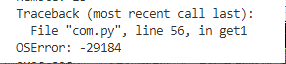
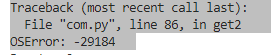
            With v1.18.1.r4 installed I now get an error when I try to do a socket connect.

            0_1542121764353_eebaeac2-283e-4fd9-83e1-07c184e9b84a-image.png

            0_1542121780357_69f77806-0293-4fab-bb54-080c86cefac9-image.png

            S 1 Reply Last reply Reply Quote 0
            • S Offline
              serafimsaudade @tlanier
              last edited by serafimsaudade

              @tlanier

              I'm getting the same error, but don't happens all the time. It seems a DNS problem.
              If a use the IP address the error disappears.

              Tested with MEO/Altice Portugal

              T danD 2 Replies Last reply Reply Quote 0
              • R Offline
                reidfo
                last edited by

                Will you be adding an option to the updater to use LittleFS?

                danD 1 Reply Last reply Reply Quote 0
                • danD Offline
                  dan @reidfo
                  last edited by

                  @reidfo If you use the development version of the firmware and updater, you have an option to choose file systems (check Show Advanced Settings).

                  R 1 Reply Last reply Reply Quote 0
                  • T Offline
                    tlanier @serafimsaudade
                    last edited by

                    @serafimsaudade

                    I get the same error even if I use an IP address. I don't think it's a DNS problem.

                    1 Reply Last reply Reply Quote 0
                    • R Offline
                      reidfo @dan
                      last edited by

                      @dan Thanks, not sure how I missed that. I updated to 1.19.0.b5 using the updater and it broke LTE on my FiPy. The board would initially attach, then after several seconds the connection seemed to hang. AT commands took several seconds to complete. I downgraded back to my previous firmware (1.19.0.b4 built myself from the development branch) and it started working again.

                      1 Reply Last reply Reply Quote 0
                      • danD Offline
                        dan @serafimsaudade
                        last edited by

                        @serafimsaudade @tlanier we are looking into the issue with sockets

                        D T 2 Replies Last reply Reply Quote 0
                        • D Offline
                          danielm @dan
                          last edited by

                          @dan
                          Is there any time estimation for fix of socket issue?

                          1 Reply Last reply Reply Quote 0
                          • T Offline
                            tlanier @dan
                            last edited by tlanier

                            @dan
                            If it helps, note that the socket error occurs even if I'm using WIFI and connecting to a static IP. I don't think the problem has anything to do with the LTE module.
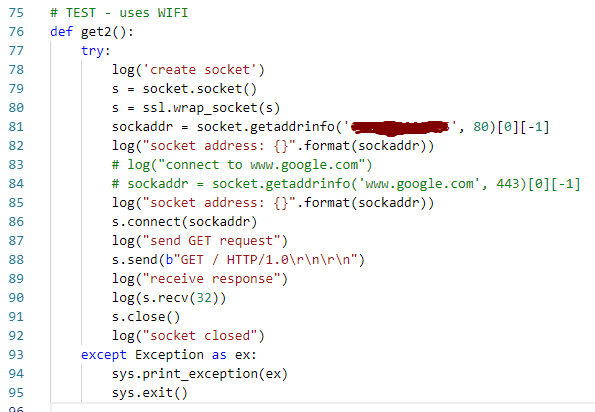
                            0_1542208352061_100317bf-8efa-4062-b195-642e6f6b9a6c-image.png

                            0_1542209190430_2dbf7e91-a61d-4b8c-9c62-7bdf9a667b3f-image.png

                            D S T 3 Replies Last reply Reply Quote 0
                            • D Offline
                              danielm @tlanier
                              last edited by danielm

                              @tlanier
                              Is the behaviour identical on 1.19.0.b5 and 1.18.1.r4?

                              1 Reply Last reply Reply Quote 0
                              • S Offline
                                serafimsaudade @tlanier
                                last edited by

                                @tlanier
                                I'm using mqtt that use sockets over wifi connection with no problem.

                                1 Reply Last reply Reply Quote 0
                                • T Offline
                                  tlanier @tlanier
                                  last edited by

                                  @tlanier

                                  The problem with the previous code was my own fault. The "ssl.wrap_socket(s)" line should not be used when connecting to a non-secure site.

                                  I now believe that the problem only occurs when connecting to a secure site. I can successfully connect using WIFI to a non-secure site. If I try to connect to a secure site (www.google.com), I get a stack overflow error.

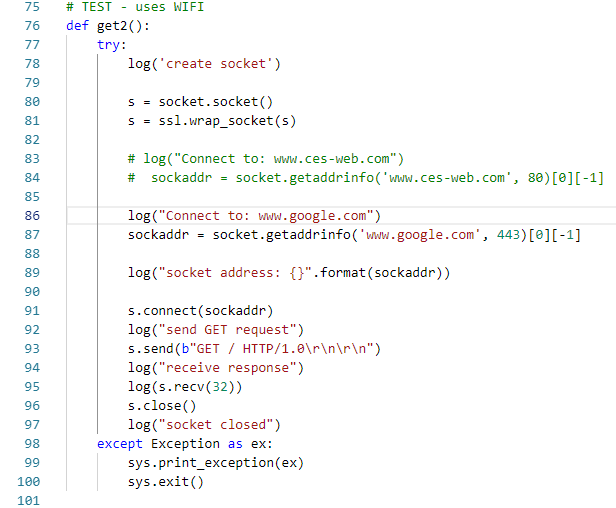
                                  0_1542216827652_4be6eab0-f53d-4f05-986b-2ebb61622bd1-image.png

                                  0_1542216859717_1a9abf8d-8942-4acd-a348-4c9ee42eda8d-image.png

                                  T I 2 Replies Last reply Reply Quote 0
                                  • T Offline
                                    tlanier @tlanier
                                    last edited by

                                    @tlanier
                                    I'm now successfully connecting and downloading from a non-secure site using either LTE or WIFI. The errors occur if I try to connect to a secure site (www.google.com) using either LTE or WIFI.

                                    # TEST - uses cell modem
                                    def get1():
                                        try:
                                            log('creating LTE object - carrier verizon')
                                            # lte = LTE()
                                            lte = LTE(carrier="verizon")
                                            # lte = LTE(carrier="at&t")         # instantiate the LTE object
                                            log('resetting modem, may take up to 5 secs...')
                                            lte.reset()
                                            log('attaching...')
                                            lte.attach(apn='apn.hologram.io')        # attach the cellular modem to a base station
                                            # lte.attach(band=13)        # attach the cellular modem to a base station
                                            
                                            i = 0
                                            while not lte.isattached():
                                                log('waiting for isattached...')
                                                utime.sleep_ms(1000)
                                    
                                            log('connecting...')
                                            # lte.connect()       # start a data session and obtain an IP address
                                            lte.connect(cid=3)    # cid=3 for verizon - start a data session and obtain an IP address
                                            while not lte.isconnected():
                                                log('waiting for isconnected...')
                                                utime.sleep_ms(500)
                                    
                                            log('create socket')
                                            s = socket.socket()
                                    
                                            log("Connect to: www.ces-web.com")
                                            sockaddr = socket.getaddrinfo('www.ces-web.com', 80)[0][-1]
                                    
                                            #log("Connect to: www.google.com")
                                            #s = ssl.wrap_socket(s)
                                            #sockaddr = socket.getaddrinfo('www.google.com', 443)[0][-1]
                                    
                                            log("socket address: {}".format(sockaddr))
                                    
                                            s.connect(sockaddr)
                                            log("send GET request")
                                            s.send(b"GET / HTTP/1.0\r\n\r\n")
                                            log("receive response")
                                            log(s.recv(16))
                                            s.close()
                                            log("socket closed")
                                            lte.disconnect()
                                            log("disconnected")
                                            lte.dettach()
                                            log("dettached")
                                            lte.deinit()
                                            log("deinit")
                                        except Exception as ex:
                                            sys.print_exception(ex)
                                            sys.exit()
                                    
                                    1 Reply Last reply Reply Quote 0
                                    • P Offline
                                      panda
                                      last edited by panda

                                      With this latest version on a GPy and latest CAT M1 modem firmware I can no longer connect with hologram SIM.

                                      lte.connect() will dettach the modem and the REPL input hangs.

                                      Previously I could successfully do:

                                      lte = LTE('verizon')
                                      lte.attach(apn='apn.hologram.io')
                                      ...
                                      lte.connect(cid=3)
                                      

                                      Going back to 1.18.1.r1 and 38638 modem fw works fine. Why would this change? How do I connect to Hologram with the latest updates?

                                      The creg info is:

                                      ['+CEREG: 2,5,"3D03","00F0F703",7', 'OK']

                                      1 Reply Last reply Reply Quote 0
                                      • X Offline
                                        Xykon administrators
                                        last edited by

                                        Thanks everyone for the reports.

                                        @iwahdan is looking into the SSL issue as this doesn't seem to be directly related to the LTE changes I made.

                                        @panda Unfortunately we don't have hologram.io in The Netherlands so all I can do is emulate Verizon on our Amarisoft eNB.

                                        Could you please try the following 3 commands between attach and connect?

                                        print(lte.send_at_cmd('AT+CGATT?'))
                                        print(lte.send_at_cmd('AT+CFUN?'))
                                        print(lte.send_at_cmd('AT!="showphy"'))
                                        

                                        You mention that the REPL input hangs after connect()... if you do a hard reset does it keep hanging?

                                        If you are able to reset the module and enter code, can you please run the 3 commands again without calling attach first?

                                        Christian Ehlers

                                        P 1 Reply Last reply Reply Quote 0
                                        • P Offline
                                          panda @Xykon
                                          last edited by panda

                                          @xykon said in New LTE Firmware releases v1.18.1.r4 (stable) & 1.19.0.b5 (development) & NB-IoT firmware 40343:

                                          Could you please try the following 3 commands between attach and connect?

                                          text
                                          print(lte.send_at_cmd('AT+CGATT?'))
                                          print(lte.send_at_cmd('AT+CFUN?'))
                                          print(lte.send_at_cmd('AT!="showphy"'))

                                          ['+CGATT: 1', 'OK']

                                          ['+CFUN: 1', 'OK']

                                          ['DL SYNCHRO STATISTICS', '=====================', ' Synchro state : DRX_SLEEP', ' PPU SIB1 ACQ watchdog : 0', ' Frequency Hypothesis RF (Hz) : 0', ' RSRP (dBm) : -94.06', ' RSRQ (dB) : -10.79', ' Channel estimation state (Cell-spec.) : HIGH CINR', ' Channel estimation state (UE-spec.) : LOW CINR', ' Channel estimation state (MBSFN) : LOW CINR', ' Channel estimation CINR : 10.10', ' Channel length : SHORT', ' AGC', ' AGC RX gain (dB) : 53.71', ' RX PSD BO (dBFs) : -20.63', ' RX PSD (dBm) : -99.33', ' Noise level RS (dBm) : -104.16', ' Digital gain (dB) : 9.03', ' CINR RS (dB) : 10.10', ' NARROWBANDS', ' Last DL NB : Central', ' Last UL NB : N/A', ' AFC', ' Frequency offset RF (Hz) : -316', ' Frequency offset BB (Hz) : 0', ' PBCH', ' MIB received quantity : 1239', ' MIB timeout quantity : 0', 'OK']

                                          You mention that the REPL input hangs after connect()... if you do a hard reset does it keep hanging?

                                          No, reset solves it.

                                          If you are able to reset the module and enter code, can you please run the 3 commands again without calling attach first?

                                          ['+CGATT: 0', 'OK']

                                          ['+CFUN: 4', 'OK']

                                          ['DL SYNCHRO STATISTICS', '=====================', ' Synchro state : OFF', ' PPU SIB1 ACQwatchdog : 0', ' Frequency Hypothesis RF (Hz) : 0', ' RSRP (dBm) : 0.00', ' RSRQ (dB) : 0.00', ' Channel estimation state (Cell-spec.) : LOW CINR',' Channel estimation state (UE-spec.) : LOW CINR', ' Channel estimation state (MBSFN) : LOW CINR', ' Channel estimation CINR : 0.00', ' Channel length : SHORT', ' AGC', ' AGC RX gain (dB) : 0.00', ' RX PSD BO (dBFs) : 0.00', ' RX PSD (dBm) : 0.00', ' Noise level RS (dBm) : 0.00', ' Digital gain (dB) : 0.00', ' CINR RS (dB) : 0.00', ' NARROWBANDS', ' Last DL NB :0', ' Last UL NB : 0', ' AFC', ' Frequency offset RF (Hz) : 0', ' Frequency offset BB (Hz) : 0', ' PBCH', ' MIB received quantity : 0', ' MIB timeout quantity : 0', 'OK']

                                          1 Reply Last reply Reply Quote 0
                                          • I Offline
                                            iwahdan @tlanier
                                            last edited by

                                            Hi @tlanier ,I am not able to reproduce the stack overflow issue you got yet, however I've made some improvements to LTE and sockets in a pre-release v1.18.1.r5 :
                                            https://github.com/pycom/pycom-micropython-sigfox/releases/tag/v1.18.1.r5
                                            maybe you can see if that solves the problem.

                                            Wahdan

                                            D 1 Reply Last reply Reply Quote 0

                                            Hello! It looks like you're interested in this conversation, but you don't have an account yet.

                                            Getting fed up of having to scroll through the same posts each visit? When you register for an account, you'll always come back to exactly where you were before, and choose to be notified of new replies (either via email, or push notification). You'll also be able to save bookmarks and upvote posts to show your appreciation to other community members.

                                            With your input, this post could be even better 💗

                                            Register Login
                                            • 1
                                            • 2
                                            • 3
                                            • 1 / 3
                                            • First post
                                              Last post

                                            Pycom on Twitter

                                            Pycom