WiPy and DHT22 issue
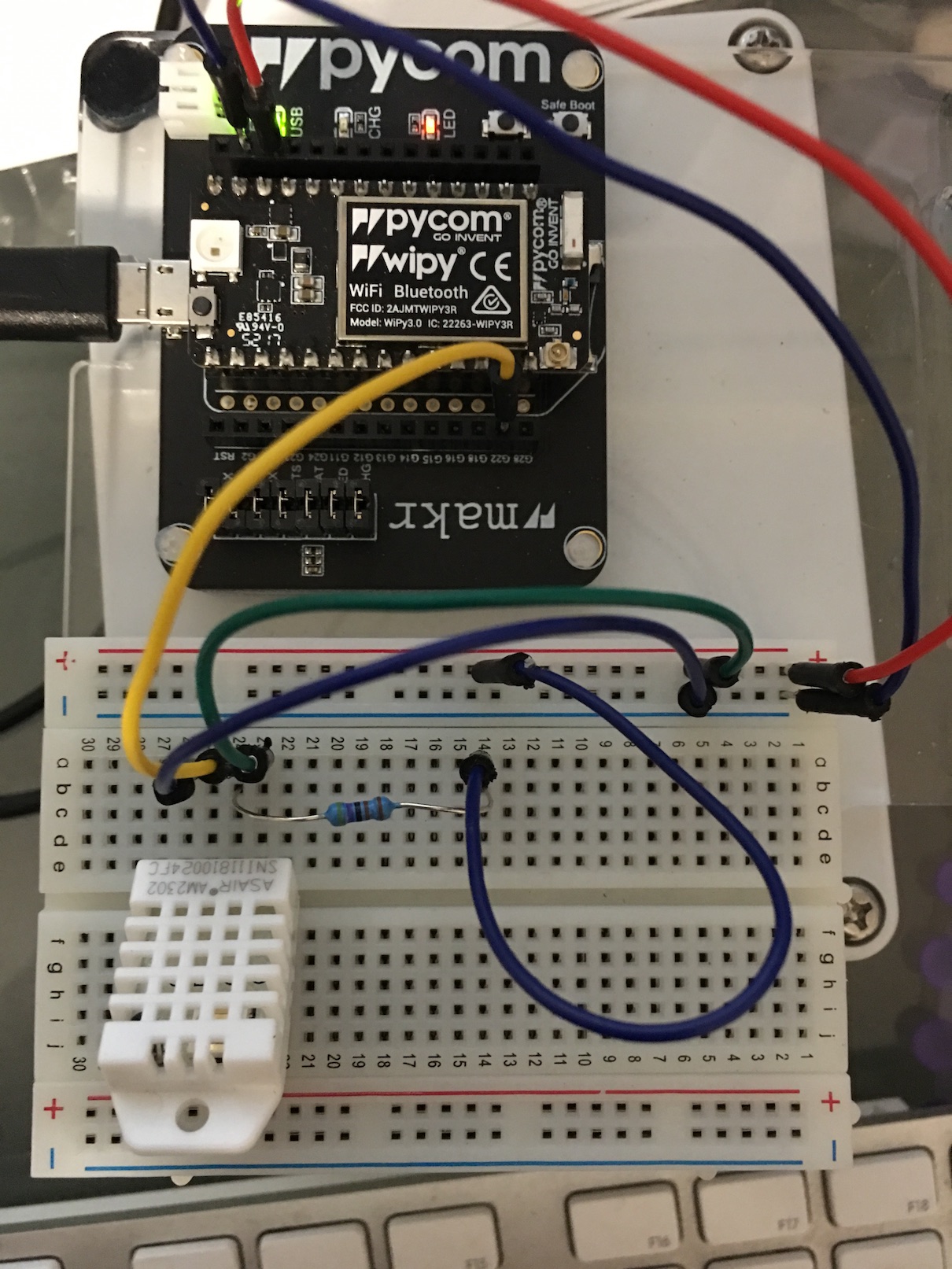
-
@brewnut Try this code. It works well for me. It should be in micrpython-lib, but I did not find it. Do not ask me why the class is DTH instead of DHT
import time import pycom from machine import Pin class DTHResult: 'DHT sensor result returned by DHT.read() method' ERR_NO_ERROR = 0 ERR_MISSING_DATA = 1 ERR_CRC = 2 error_code = ERR_NO_ERROR temperature = -1 humidity = -1 def __init__(self, error_code, temperature, humidity): self.error_code = error_code self.temperature = temperature self.humidity = humidity def is_valid(self): return self.error_code == DTHResult.ERR_NO_ERROR class DTH: 'DHT sensor (dht11, dht21,dht22) reader class for Pycom' __dhttype = 0 def __init__(self, pin, sensor=0): self.__pin = Pin(pin, mode=Pin.OPEN_DRAIN) self.__dhttype = sensor self.__pin(1) time.sleep(1.0) def read(self): # pull down to low self.__send_and_sleep(0, 0.019) data = pycom.pulses_get(self.__pin,100) self.__pin.init(Pin.OPEN_DRAIN) self.__pin(1) bits = [] for a,b in data: if a ==1 and 18 <= b <= 28: bits.append(0) if a ==1 and 65 <= b <= 75: bits.append(1) if len(bits) != 40: return DTHResult(DTHResult.ERR_MISSING_DATA, 0, 0) # we have the bits, calculate bytes the_bytes = self.__bits_to_bytes(bits) # calculate checksum and check checksum = self.__calculate_checksum(the_bytes) if the_bytes[4] != checksum: return DTHResult(DTHResult.ERR_CRC, 0, 0) # ok, we have valid data, return it [int_rh, dec_rh, int_t, dec_t, csum] = the_bytes if self.__dhttype==0: #dht11 rh = int_rh #dht11 20% ~ 90% t = int_t #dht11 0..50°C else: #dht21,dht22 rh = ((int_rh * 256) + dec_rh)/10 t = (((int_t & 0x7F) * 256) + dec_t)/10 if (int_t & 0x80) != 0: t = -t return DTHResult(DTHResult.ERR_NO_ERROR, t, rh) def __send_and_sleep(self, output, mysleep): self.__pin(output) time.sleep(mysleep) def __bits_to_bytes(self, bits): the_bytes = [] byte = 0 for i in range(0, len(bits)): byte <<= 1 if (bits[i]): byte |= 1 if ((i % 8) == 7): the_bytes.append(byte) byte = 0 return the_bytes def __calculate_checksum(self, the_bytes): return the_bytes[0] + the_bytes[1] + the_bytes[2] + the_bytes[3] & 255 th = DTH(Pin('P8', mode=Pin.OPEN_DRAIN),1) def run(): pycom.heartbeat(False) pycom.rgbled(0x000008) # blue time.sleep(0.5) result = th.read() if result.is_valid(): pycom.rgbled(0x001000) # green print("Temperature: %.1f C" % result.temperature) print("Humidity: %.1f %%" % result.humidity) run() -
@robert-hh thanks for this. I have also tried running this code from Jurassic Pork and i get nothing at all when i run it.
I have changed the pin to G22 so it matches my wiring for both sets of code.I will give the code from Daniel a go as well.
This is the code from Jurassic Pork
this is the DTH.py file
import time
import pycom
from machine import enable_irq, disable_irq,  Pin

class DTHResult:
    'DHT sensor result returned by DHT.read() method'

    ERR_NO_ERROR = 0
    ERR_MISSING_DATA = 1
    ERR_CRC = 2

    error_code = ERR_NO_ERROR
    temperature = -1
    humidity = -1

    def __init__(self, error_code, temperature, humidity):
        self.error_code = error_code
        self.temperature = temperature
        self.humidity = humidity

    def is_valid(self):
        return self.error_code == DTHResult.ERR_NO_ERROR


class DTH:
    'DHT sensor (dht11, dht21,dht22) reader class for Pycom'

    __pin = Pin(Pin.exp_board.G22, mode=Pin.OPEN_DRAIN)
    print(__pin)
    __dhttype = 1

    def __init__(self, pin, sensor=1):
        self.__pin = Pin(pin, mode=Pin.OPEN_DRAIN)
        self.__dhttype = sensor
        self.__pin(1)
        time.sleep(1.0)

    def read(self):
        # pull down to low
        self.__send_and_sleep(0, 0.019)
        data = pycom.pulses_get(self.__pin,100)
        self.__pin.init(Pin.OPEN_DRAIN)
        self.__pin(1)
        #print(data)
        bits = []
        for a,b in data:
        	if a ==1 and 18 <= b <= 28:
        		bits.append(0)
        	if a ==1 and 65 <= b <= 75:
        		bits.append(1)
                #print("longueur bits : %d " % len(bits))
        if len(bits) != 40:
            return DTHResult(DTHResult.ERR_MISSING_DATA, 0, 0)
        #print(bits)
        # we have the bits, calculate bytes
        the_bytes = self.__bits_to_bytes(bits)
        # calculate checksum and check
        checksum = self.__calculate_checksum(the_bytes)
        if the_bytes[4] != checksum:
            return DTHResult(DTHResult.ERR_CRC, 0, 0)
        # ok, we have valid data, return it
        [int_rh, dec_rh, int_t, dec_t, csum] = the_bytes
        if self.__dhttype==0:		#dht11
            rh = int_rh 		#dht11 20% ~ 90%
            t = int_t 	#dht11 0..50°C
        else:			#dht21,dht22
            rh = ((int_rh * 256) + dec_rh)/10
            t = (((int_t & 0x7F) * 256) + dec_t)/10
            if (int_t & 0x80) > 0:
                t *= -1
        return DTHResult(DTHResult.ERR_NO_ERROR, t, rh)


    def __send_and_sleep(self, output, mysleep):
        self.__pin(output)
        time.sleep(mysleep)

    def __bits_to_bytes(self, bits):
        the_bytes = []
        byte = 0

        for i in range(0, len(bits)):
            byte = byte << 1
            if (bits[i]):
                byte = byte | 1
            else:
                byte = byte | 0
            if ((i + 1) % 8 == 0):
                the_bytes.append(byte)
                byte = 0
        #print(the_bytes)
        return the_bytes

    def __calculate_checksum(self, the_bytes):
        return the_bytes[0] + the_bytes[1] + the_bytes[2] + the_bytes[3] & 255
this is the DHT22_example.py code
import pycom
import time
from machine import Pin
from dth import DTH

pycom.heartbeat(False)
pycom.rgbled(0x000008) # blue
th = DTH(Pin.exp_board.G22,1)
print(th)
time.sleep(2)
result = th.read()
print(result)
if result.is_valid():
    pycom.rgbled(0x001000) # green
    print('Temperature: {:3.2f}'.format(result.temperature/1.0))
    print('Humidity: {:3.2f}'.format(result.humidity/1.0))
Running the DHT22_example code seems to stall somewhere after the LED changes to blue as it does not change to green. I presume this is because the result is not valid.
:-(
-
Ok I have since added a one wire temp sensor to the board and got that working so have now come back to the dht22.
I am still getting the zero pulses received error so will look to see how I go debugging. Any tips would be appreciated.
-
@brewnut When you take the voltage at the data pin, it should be about 3.3V. Do you have to visualize the data signal, like with a logic analyzer or Oscilloscope?
-
@robert-hh no sorry I don’t have an Oscilloscope. Anything else I can do with the code to troubleshoot eg print out results at certain steps to see where it is failing?
-
This post is deleted! -
@brewnut did you try to take my code example below and replace 'P8' by 'P12', which is your wiring?
-
@robert-hh Hi Robert i have just tried your code replacing 'P8' with 'P11' (thats actually what the yellow jumper wire is plugged into).
Noting happens when running this.
I also tried replacing the __dhttype = 0 with = 1 as reading over the DTH code notes it mentions the DHT 11 sensor is type 0 and DHT 22 sensor is type 1.
Changing these settings also results in noting happening when running.
:-( -
If you want to use 'P11' (G22), try removing the 'RTS' jumper as it is connected to 'program port'.
See: https://docs.pycom.io/.gitbook/assets/wipy3-pinout.png -
@frida thanks for this suggestion, I will give a go and report back. Any particular reason the RTS jumper is linked to P11. Should I try a different pin instead and leave the RTS jumper in place?
-
@brewnut The RTS pin is not used by the firmware, but driven by the UAB/UART bridge. But you can also use another pin, like P6.


Hello! It looks like you're interested in this conversation, but you don't have an account yet.
Getting fed up of having to scroll through the same posts each visit? When you register for an account, you'll always come back to exactly where you were before, and choose to be notified of new replies (either via email, or push notification). You'll also be able to save bookmarks and upvote posts to show your appreciation to other community members.
With your input, this post could be even better 💗
Register Login